ScriptSpot

Forum topic · Scripts Wanted

Radial Sort In Line

By JokerMartini · 2011-01-22

Description

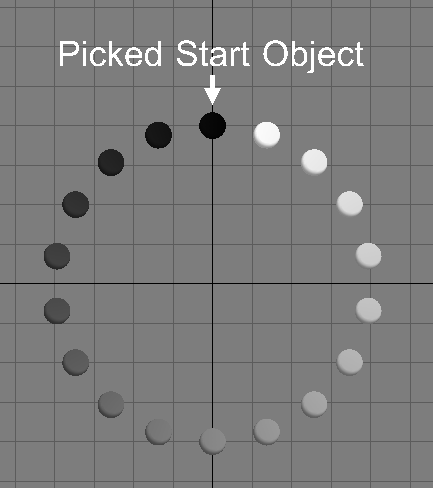
I'd like to do a radial sort that apply an change on the first object and then increaingly all the way around till i reach the last object.

Check out the attached image to make more sense.

For example: I have an array of sphere and I'd like to change there diffuse color from white to black based on the radial array. Check out the image to make more sense. For the sake of the image i just did it by hand.

Thanks

JokerMartini

Attachments
Comments (24)

JokerMartini · 2012-05-19

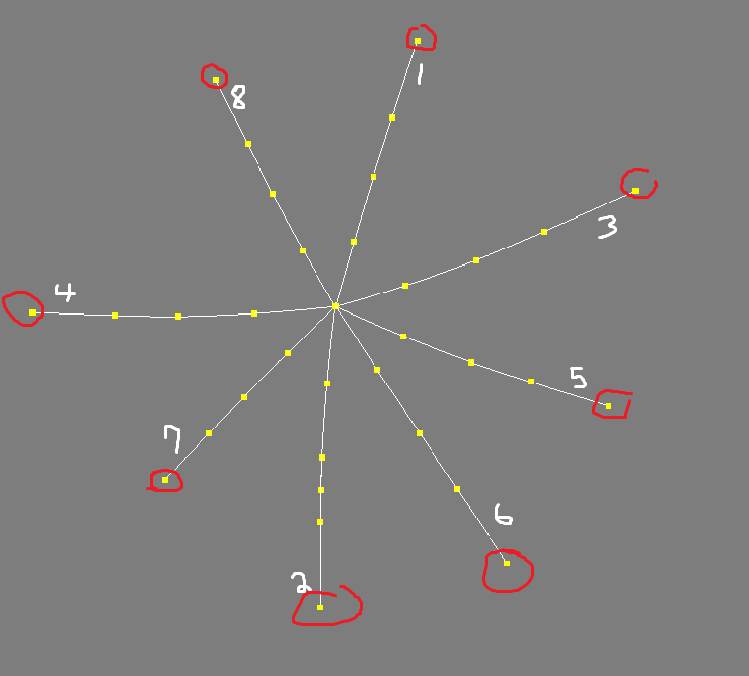
I need to figure out how to return an array which is the order of splines in a shape, but in an order based on the radial sorting of the first knot in each spline.

I've hit this wall and I've been at it for the past few days and I'm now seeking some help from anyone. I hope that makes sense. I've attached an image to help explain incase your up for the challenge.
You may be wondering why I don't just create the splines in a radial order but that is because they are randomly created based off ob particle positions.

Anyways, the knot circled in red is just to show which knot is the first knot in the spline. The number by each spline shows which spline in the splineshape it is.
So ideally the returned array if radial sorted properly wold return this
#(1,3,5,6,2,7,4,8)

Attachments

The Solution

barigazy · 2012-05-19

Try this code on attachment file. Select any point helper and run code

fn RemoveItemFromArray arr itm =
(
local idx = findItem arr itm
if idx == 0 then false else deleteItem arr idx
)
pointArr = $Point* as array
if selection.count == 1 do
(
posArr = #(selection[1].center)
itm = selection[1]
while pointArr.count != 1 do
(
minDist = amin (for p in pointArr where p != itm collect distance itm.center p.center)
format "minDist = %\n" minDist
nextnode = (for p in pointArr where p != itm and (distance itm.center p.center) == minDist collect p)[1]
pointArr = RemoveItemFromArray pointArr itm
itm = nextnode ; append posArr itm.center
)
format "posArr = %\n" posArr
)

Attachments

JokerMartini · 2012-05-19

Great. Just what I needed. Let me play around with this code and see what I can do.

Any?

JokerMartini · 2012-05-19

Has anyone been able to find the best way to radial sort. These seem to only work if the objects are on the x and y.

hey

JokerMartini · 2011-01-28

Nice test result.

Attachments

Idea

JokerMartini · 2011-01-28

It would be cool to make a pickbutton allowing a user to choose the first object in the radial array to start from.

Results from Anubis's latest version

JokerMartini · 2011-01-28


(
clearListener()

local theObjects = getCurrentSelection()
local count = theObjects.count
local center = [0, 0, 0]
for obj in theObjects do center += obj.pos
center /= count

fn angularSort obj1 obj2 = (
in coordSys (transMatrix center)
obj1[3][2][3].value - obj2[3][2][3].value
)

-- create points (in case the objects has not Z_Rotation controller)
tmpPoints = for obj in theObjects collect
Point pos:obj.pos name:(obj.name+"_")

qsort tmpPoints angularSort

sortedArray = #(); sortedArray.count = theObjects.count
for i = 1 to tmpPoints.count do (
sortedArray[i] = getNodeByName (trimRight tmpPoints[i].name "_")

for i = 1 to theObjects.count do
(
obj = selection[i]
obj.wirecolor = [i*10,i*10,i*10]
moveKeys Obj (i*.1)
)
)

delete tmpPoints
print sortedArray
)

Attachments

haha, fun...

Anubis · 2011-01-28

I end with very fun anim result using attached scene :) I see you loop through in input/unsorted array theObjects insted of sortedArray, but nm, forgot this version and read Garp notes.

Attachments

Garp

JokerMartini · 2011-01-27

Quick Testing result to see the ordering based on wirecolor


(
local theObjects = getCurrentSelection()
local count = theObjects.count
local center = [0, 0, 0]
for obj in theObjects do center += obj.pos
center /= count

point pos:center

fn angularSort obj1 obj2 =
in coordSys (transMatrix center)
(
local ang1 = atan2 obj1.pos.y obj1.pos.x
local ang2 = atan2 obj2.pos.y obj2.pos.x
ang1 - ang2
)

qsort theObjects angularSort

for i = 1 to count do format "%\n" theObjects[i].name
for i = 1 to theObjects.count do
(
obj = selection[i]
obj.wirecolor = [i*30,i*30,i*30]
)
)

And another one.

Garp · 2011-01-27

(
    local theObjects = getCurrentSelection()
    local count = theObjects.count
    local center = [0, 0, 0]
    for obj in theObjects do center += obj.pos
    center /= count

    point pos:center

    fn angularSort obj1 obj2 =
    in coordSys (transMatrix center)
    (
        local ang1 = atan2 obj1.pos.y obj1.pos.x
        local ang2 = atan2 obj2.pos.y obj2.pos.x
        ang1 - ang2
    )

    qsort theObjects angularSort

    for i = 1 to count do format "%\n" theObjects[i].name
)

The cross product didn't diffentiate vectors aligned in the same direction or in opposite directions.

this is better, thanks

Anubis · 2011-01-28

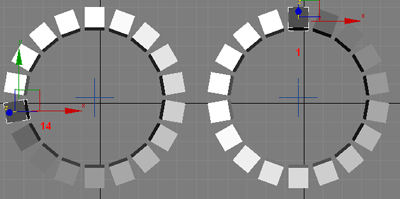
it sort CCW and start from 14 (in my example .max). I modify the code and I'v got sorted CW result from 1 to 18 like this:

(
	local theObjects = getCurrentSelection()
    local count = theObjects.count
    local center = [0, 0, 0]
    for obj in theObjects do center += obj.pos
    center /= count
	
	fn angularSort obj1 obj2 = (
		in coordSys (transMatrix center)
			obj1[3][2][3].value - obj2[3][2][3].value
	)
	
	-- create points (in case the objects has not Z_Rotation controller)
	tmpPoints = for obj in theObjects collect
		Point pos:obj.pos name:(obj.name+"_")
	
	qsort tmpPoints angularSort
	
	sortedArray = #(); sortedArray.count = theObjects.count
	for i = 1 to tmpPoints.count do (
		sortedArray[i] = getNodeByName (trimRight tmpPoints[i].name "_")
	)
	
	delete tmpPoints
	print sortedArray
)

example

Attachments

Well...

Garp · 2011-01-28

... once the objects are sorted, it's fairly trivial to shift the array and/or reverse it.

Also, this method doesn't care if the objects are in a circular pattern or not, not even if they are planar. It just sorts them by their angle as seen in the XY plane from their averaged position.

yes, nice catch

Anubis · 2011-01-28

just looking for better way, nm :)

And another thing.

Garp · 2011-01-28

With your modification, it looks like you're now sorting the objects based on their own rotation instead of their angle from the center.

Different approach.

Garp · 2011-01-27

(
    local theObjects = getCurrentSelection()
    local count = theObjects.count
    local center = [0, 0, 0]
    for obj in theObjects do center += obj.pos
    center /= count

    fn radialSort obj1 obj2 =
        in coordSys (transMatrix center) (cross obj2.pos obj1.pos).z

    qsort theObjects radialSort

    --check resulting array
    for i = 1 to theObjects.count do format "%\n" theObjects[i].name
)

First a center is determined by averaging all the positions. Then the objects are sorted depending on the sense of rotation as seen from the center.
This is done in the XY plane (rotation around the Z axis).

JokerMartini · 2011-01-27

alright, ill do that. Quickly testing it is having a problem.

It's mainly just bugging out on this particular line of code.

is there an example scene that i could try testing it on that works for you?


obj1Pos = Point2 sortedArray[1].pos[1] sortedArray[1].pos[2]

Ok

Anubis · 2011-01-27

Attaching a scene file to test it. Note that now I see so my function return correct result only if the objects center match the origin (ie 0,0,0). I like Garp approach (at the first look) but it not return the objects in circular order. In my test scene (with 18 boxes) if they are in CW, s'd been sorted - Box01, Box02 ... Box18, and if CCW - Box01, Box18, Box17 ... Box02. Garp function looks cool but return them in order - 8, 7, 6, 5, 4, 3, 2, 1, 9, 18, 17, 16, 15, 14, 13, 12, 11, 10. Ah, and very strange but if run Garp code line by line - the result is different - start with 17, next 16, 15, ... next to the last 1 and last 18, which is correct order, just start from 17.

Attachments

I've discovered why the error

JokerMartini · 2011-01-27

It's erroring out because the array is empty.

I wrote this in (print sortedArray[1] and it is printing undefined.


for o in objs where o.pos[1] == c[1] and o.pos[2] > c[2] do append sortedArray o
print sortedArray[1]

Hi John

Anubis · 2011-01-27

I have only one hypothesis about. Because the script get itself 1st object ("at 12 o'clock"), and if it X pos is not equal to the center X pos, then the script will fail. To test if this is the issue, enter in the Listener:

objs = $Sphere* as array;dir = 1

and then execute the code in the function line by line.

This errors as well for some reason?

JokerMartini · 2011-01-26

this is the error i get
-- Unknown property: "pos" in undefined
-- Error occurred in getCircleObjArrayInOrder(); position: 500; line: 12


objs =$Sphere* as array

-- function limitation:
-- the objects must be at zero plane on Z axis
fn getCircleObjArrayInOrder objs dir:1 = (
sortedArray = #()
oldSel = getCurrentSelection(); select objs
c = Point2 $.center[1] $.center[2] -- get center XY coords
select oldSel -- restore previus selection
-- add 1st object ("at 12 o'clock") to the array
for o in objs where o.pos[1] == c[1] and o.pos[2] > c[2] do append sortedArray o
obj1Pos = Point2 sortedArray[1].pos[1] sortedArray[1].pos[2]
r = distance c obj1Pos -- get the radius
a = (360.0 / objs.count) * dir -- get the angle
for i = 1 to objs.count-1 do ( -- find the rest...
ps = formattedPrint [r*sin(a*i),r*cos(a*i),0] format:".2f"
for o in objs where formattedPrint o.pos format:".2f" == ps do append sortedArray o
)
sortedArray -- return result
)

-- if dir:1 (default) the order is CW, if is -1 then CCW
a1 = getCircleObjArrayInOrder objs -- sorted CW
a2 = getCircleObjArrayInOrder objs dir:-1 -- sorted CCW

try this

Anubis · 2011-01-25

[code]-- function limitation:
-- the objects must be at zero plane on Z axis
fn getCircleObjArrayInOrder objs dir:1 = (
sortedArray = #()
oldSel = getCurrentSelection(); select objs
c = Point2 $.center[1] $.center[2] -- get center XY coords
select oldSel -- restore previus selection
-- add 1st object ("at 12 o'clock") to the array
for o in objs where o.pos[1] == c[1] and o.pos[2] > c[2] do append sortedArray o
obj1Pos = Point2 sortedArray[1].pos[1] sortedArray[1].pos[2]
r = distance c obj1Pos -- get the radius
a = (360.0 / objs.count) * dir -- get the angle
for i = 1 to objs.count-1 do ( -- find the rest...
ps = formattedPrint [r*sin(a*i),r*cos(a*i),0] format:".2f"
for o in objs where formattedPrint o.pos format:".2f" == ps do append sortedArray o
)
sortedArray -- return result
)

-- if dir:1 (default) the order is CW, if is -1 then CCW
a1 = getCircleObjArrayInOrder boxes -- sorted CW
a2 = getCircleObjArrayInOrder boxes dir:-1 -- sorted CCW

Its Erroring out

JokerMartini · 2011-01-25

It errors out and says this in the listener:

In the max scene i just have 12 spheres in circular array like in the image attached.

getCircleObjArrayInOrder()
-- Error occurred in getCircleObjArrayInOrder(); filename: ; position: 187; line: 6
-- Frame:
-- sortedArray: #()
-- r: undefined
-- objs: undefined
-- dir: 1
-- a: undefined
-- c: undefined
-- obj1Pos: undefined
-- oldSel: #($Sphere001, $Sphere006, $Sphere009, $Sphere012, $Sphere015, $Sphere018, $Sphere021, $Sphere024, $Sphere027, $Sphere030, $Sphere033, $Sphere036)
-- No ""select"" function for undefined
-- Error occurred in getCircleObjArrayInOrder(); filename: ; position: 187; line: 6
-- Frame:
-- sortedArray: #()
-- r: undefined
-- objs: undefined
-- dir: -1
-- a: undefined
-- c: undefined
-- obj1Pos: undefined
-- oldSel: #($Sphere001, $Sphere006, $Sphere009, $Sphere012, $Sphere015, $Sphere018, $Sphere021, $Sphere024, $Sphere027, $Sphere030, $Sphere033, $Sphere036)
-- No ""select"" function for undefined

Anubis · 2011-01-26

You execute the function without argument!
The 2nd (dir) is optinal but the 1st required.

Put your objects to array (for eg):

objs = $Sphere* as array

and use this array as argument:

a1 = getCircleObjArrayInOrder objs