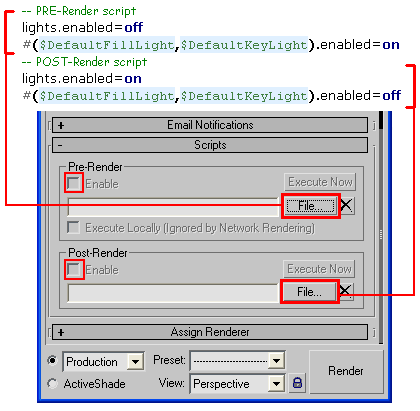
Hi there,
I am searching for a script that renders with default lights, even if there are lights in the scene.
So, the problem is:
Sometimes I am working on a scene where lighting is set up already but I just wanna preview some materials or anything. The Problem in MAX is that as soon as there is a single light created in the scene, the default lights won't render any more even if I turn off all created lights in the scene. So if I wanna render the scene just with defaut lights I have to turn off all lights in the scene, go and create the default lights and render... and turn back everything after rendering.
So it would save a lot of time if there where a script where I can render the scene just with default lights by pressing a button, or having a "on-off-default-lighting"-switch anywhere. So when the switch is turned on, all lights in the scene should be turned off before rendering and the default light are temporarily created for rendering. And then, of course, after rendering, everything should be set back as before.
Is that possible? Maybe there already exists a similar script anywhere??
Would be nice to get some response :)
Greetz Ben
EDIT: Here is link to where the same problem is done "by hand". If this process could be accomplish with a script that would be really helpful. Also if there was an option to render with the "one-default-light-setup" that would be great, since you can only create default lights when the default-lighting-setup is set to two lights... hope you get Iwhat I mean... :)
http://3dsmaxrendering.blogspot.com/2008/10/testing-materials-with-default.html
 Anubis · 2009-09-16