ScriptSpot

Script

Bitmap Tracking / Resizing

By pixamoon · Credited author: Pixamoon · 2014-12-03

Version
v2.06.00
Date updated
2026-05-25
Votes
70
Download
Download
Description

++ Works with All Assets ++

New: column and filter "In Scene" - to show if bitmap is used in scene or only in material editor
New: columns Channels and Memory - to show bitmap channels and estimated memory load for each bitmap

.
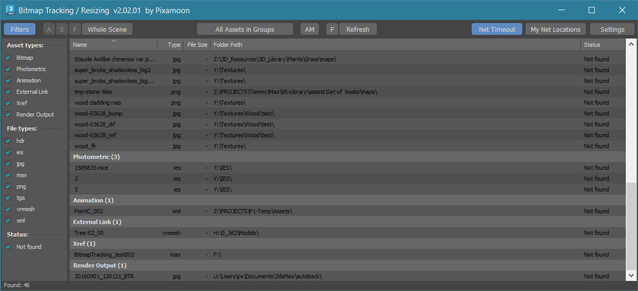


Bitmap Tracking / Resizing... is tool similar to Asset Tracking. But it gives more possibility to work with bitmaps:

- Support for All Assets
- Sort files by name, image width, height, file size, path, gamma, texture name, status (Found - network, Found -  local, Not found)
- Resize to JPG selected bitmaps to specified size or to Nearest Power of 2
    - can be used to resize and repath selected bitmaps (by size) before sending to external renderfarm,
    - resize bitmaps in large animation sceens to reduce memory ussage,
- Convert... see below
- Change / Rename paths (with paths history and rename path prefix eg. change only server/drive letter)
      * Choose path from history or scene paths
      * Pick new path
      * Rename paths beginng ( drive letter or paths C:\sample\abc\ and rename them to Z:\3d\sample\abc\ )
      * Find and Replace part of paths - supports Regular Extension
- Multi-threaded Auto-Relink with progress dialog
- And More...

- Select objects by selected bitmaps
- Select / show materials by selected bitmaps
- Select duplicated filenames (coming in next version)
- Copy local files to network with auto path replacing (for distributed / network render)
- Copy Selected / All to one path with path replacing or just copy files - collect selected to project forlder or quickly copy+change selected paths to not show your paths structure
- Shows local and network files -> Status -> OK - network,  Found -  local,  Not found ( eg.: easy sort and select all local -> copy selected to network)
- "In Scene" column and filter - shows if bitmap is used in scene or only in material editor
- Bitamp Info mode shows image size, bits per channel, channels and estimated memory usage
- Supports .ifl - sequence image files - resize / convert / copy / path replace
- Supports Mari Tiles and the <UDIM> Tag
- Supports Mudbox Tiles and the <UVTILE> Tag
- Script works with Bitmap Texture, VrayBmpFilter and VrayHDRI, CoronaBitmap, FStormBitmap and all other assets
- Change ColorSpace / Gamma in selected - works only with jpeg, bmp, gif, tga, tiff in Max 2014 and up. (not in demo)
- Check / Change ColoerSpace in VRayHDRI / VrayBitmap
- Converts to Tiled EXR - it sends comments to img2vrayexr and translate BitmapTexture to VRayHDRI. (not in demo)
- Converts to Tiled TX - it sends comments to maketx and translate BitmapTexture to VRayHDRI. (not in demo)
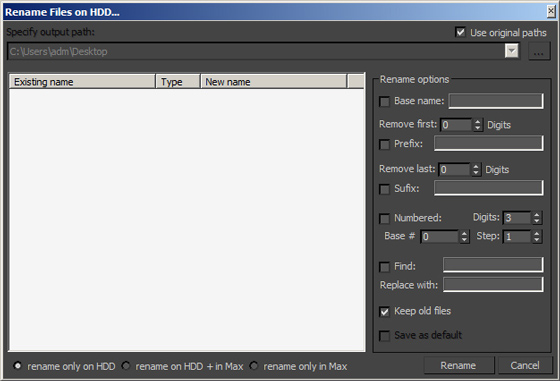
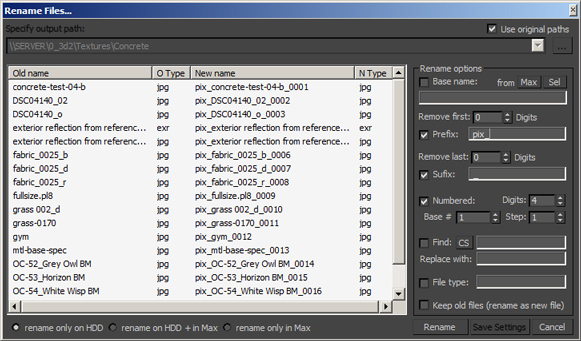
- Rename Files on HDD - 5 methods:
   - Copy with new name on HDD only
   - Copy with new name on HDD and rename in project paths
   - Rename on HDD only
   - Rename on HDD and in project paths
   - Rename in project paths only
- Convert to JPG
- with settigns dialog (Quailty, Smooth, Linear EXR/HDRI to sRGB JPG)
- Save Cropped as JPG - with settigns dialog (Quailty, Smooth, Linear EXR/HDRI to sRGB JPG)

- External Bitmaps options:
    - possible options: Resize / Convert to Tx / Exr / Jpg (Tx files can be only converted in ths version)
    - how to do:
      1. click top middle button and choose External Bitmaps
      2. drag and drop folder or image files supported by Max (including Tx files)
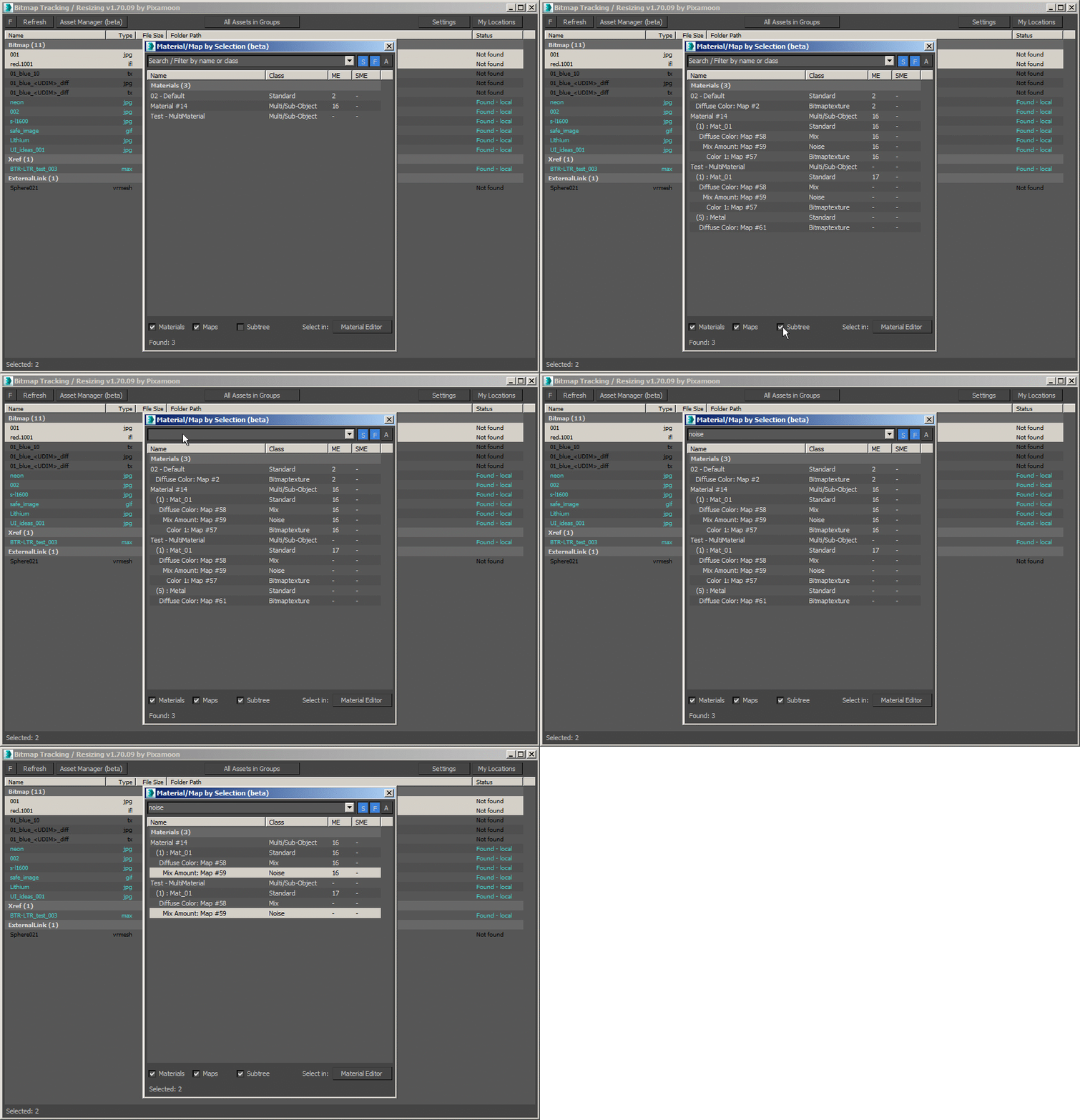
SubTree bowser to Show Materials by selected bitmap assets - and drag and drop to Material Editor:
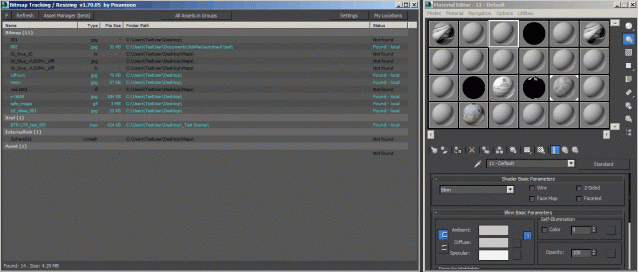
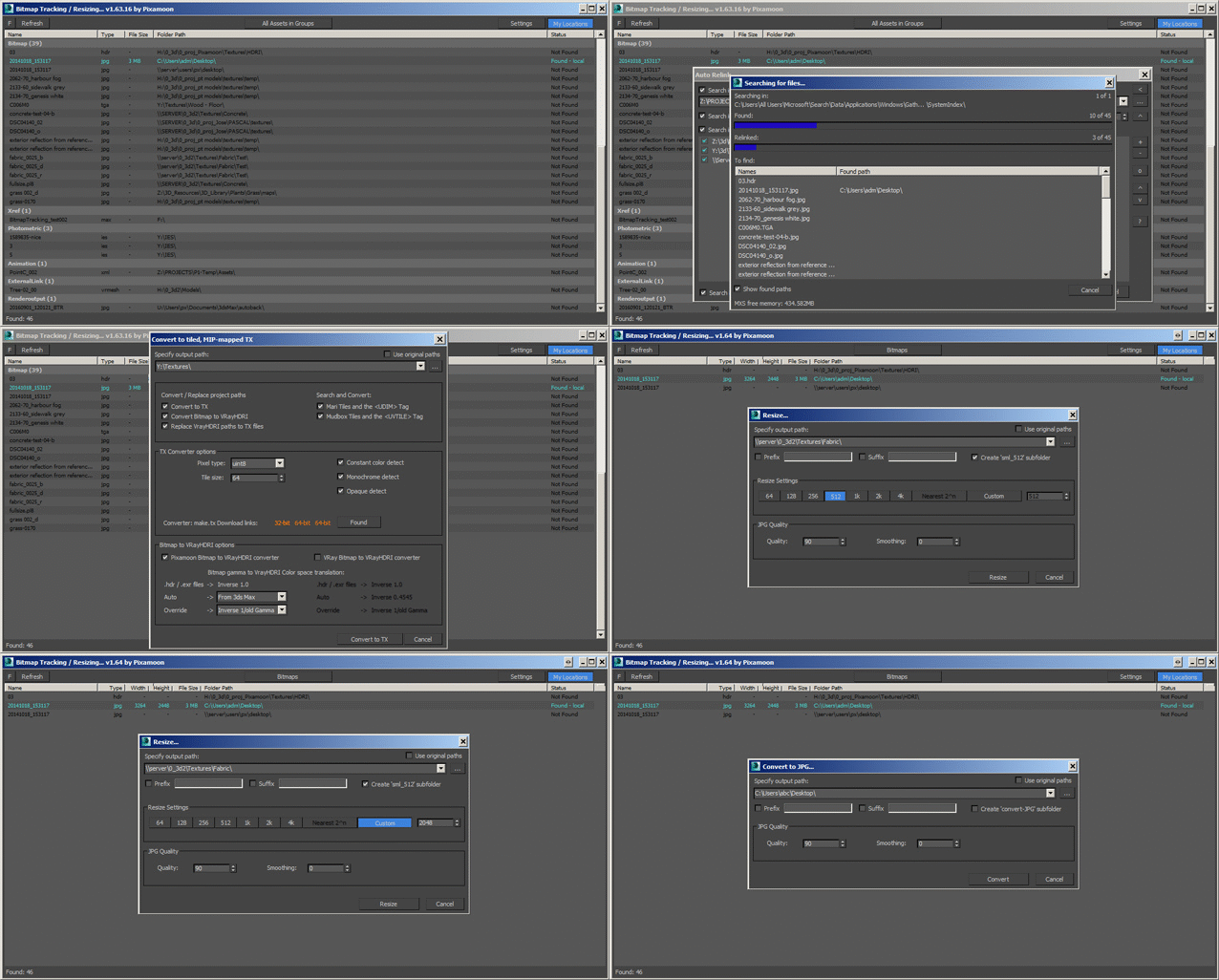


_______________________________________________________________________________________________


_______________________________________________________________________________________________

Changelogs:
To download the newest update please visit www.pixamoon.com/chanelogs

v2.06.00 (2026-05-19)
- new Search box to filter items by filename
- fixed drag-and-drop selected material into SME
- fixed Full Refresh on/off in right-click menu
- fixed list in External Bitmaps mode
- fixed error while switching from Whole scene to Selected objects
- fixed issues in Auto-Relink function

v2.05.00 (2026-04-28)
- added support for 3ds max 2027
- added "Make unique" button in overwrite options
- generates a unique file name
- hidden for multi-file sequences (.ifl, tyCache: .tyc, PointCache: .xml, tagged)
- fixed Resize (with same file format) for multi-files
- fixed error with 'substring' function in some cases

v2.04.00 (2026-04-21)
- added new column "In Scene" to show if asset is used in scene (Used / Not used)
(to show this column: right-click on columns header and pick "In Scene")
- added new filter "In Scene" to filter Used/Not used assets
- added estimated bitmap memory usage to the status bar (all/selected) in 'Bitmap Info" mode
- fixed drag-and-drop selected material into SME
- fixed error in Select duplicate names
- fixed error in Remove selected assets
- fixed error while right-clicking on missing assets
- fixed startup errors

v2.03.02-test (2026-04-16)
- fixed drag-and-drop selected material into SME
- fixed error in Select diplicated names
- fixed error in Remove selected assets

v2.03.01-test (2026-04-15)
- fixed error while right-clicking on missing assets
- fixed startup errors

v2.03.00 (2026-04-14)
- new method to Resize images while preserving original file formats and channels
- renamed the legacy 'Resize' feature to 'Resize to Jpg'
- fixed incorrect color output when resizing to JPG (3ds Max 2026)
- fixed issues with 'Convert to TX' and 'Convert to EXR' methods
- fixed an issue on launching Select by ('S' button)
- fixed an issue where the tool failed to collect assets
- renamed 'Bitmaps with Gamma' to 'Bitmap Color Space' mode
- fixed an issue where the tool failed to launch in 'Bitmaps with Gamma' mode
- fixed startup error

v2.02.01-test (2026-04-09)
- renamed 'Bitmaps with Gamma' to 'Bitmap Color Space' mode
- fixed an issue where the tool failed to launch in 'Bitmaps with Gamma' mode
- fixed startup error

v2.02.00 (2026-04-08)
- added new columns in modes: 'Bitmap Infos' and 'External Bitmaps'
  - Channels - show number of channels in image (1: Monochrome, Grayscale, 3: RGB, 4: RGBA, RGBE)
  - Memory - show memory usage to estimate RAM usage when texture is loaded memory

- renamed mode 'Bitmaps with Sizes' to 'Bitmap Infos'
- new method to speed up reading image info - especially for large EXR, JPG, TGA (reads in milliseconds)

- major performance increment to work smoothly with 10.000+ items
  - all list are virtual lists now
  - load into the list 10k+ takes less than 1s (before was 20s)
  - immediate sort by column
  - fast rename/set path previews
- increased speed in Set Path
  - immediate creating dialog window - collecting paths starts after opening window now
  - new listView with cached VirtualItems ready for large asset lists (10k+ loads in seconds)
  - updating paths textbox 10x faster
  - creating listview preview 20x faster (less than 1s | 13k items)
  - updating preview 10x faster (less then 1s | 13k items)
  - sorted preview by old directory name
- increased speed in Auto-Relink preview window
  - immediate creating dialog window - collecting paths starts after opening window now
  - updating paths textbox 10x faster
  - creating paths preview window
- increased speed in Copy/Collect assets
  - immediate creating dialog window - collecting paths starts after opening window nowe
  - updating paths textbox 10x faster
  - increased speed in Rename/Copy files
  - new listView with cached VirtualItems ready for large asset lists (10k+ loads in seconds)
  - immediate window start
  - fast new name preview even for large asset collections (preview of 10k+ items milliseconds)

v2.01.00 (2025-05-22)
- added support for 3ds max 2026
- Auto-Relink:
 - fixed refreshing issue after relinking
 - added "Close after all relinked" in Autorelink progress window
- faster repath processes in Auto-Relink / Set path / Rename / Resize by:
 - turn off Material Editor
 - switch Common Panel to Create mode
- fixed "Remove selected assets" - to clean also Render Output path
- fixed error in collecting RenderElement and Displace.Bitmap assets
- fixed activation problem with Act# BStandard... exception
- fixed External files method

v2.00.00 (2024-12-12)
- added new option to Filter or Select assets based on selected Objects or Materials (Filter / Select by)
  - 'F' checkbutton - means Filter assets by selected objects or materials
  - 'S' checkbutton - means Select assets by selected objects or materials
  - 'A' checkbutton - means Automatic - to automatically catch refresh selection changes in scene or material editor)
  - to change method press button (Whole Scene, Objects, Materials) and select from menu
- fixed collecting assets info from OSL shaders
- fixed function to Select materials/objects by assets from OSL shaders
- changed style of the group headers in asset list view (added line and space under last group item)

v1.81.00 (2024-03-26)
- added support for tyCache .tyc files - to Copy/Collect all sequenced files
- added new columns:
   - Multi files - shows count of multi-files (sequenced .ifl, PointCache, tyCache or tagged files)
   - Multi size - shows total file size of multi-files
- fixed status bar info for selected items
- increased speed of listview multiselection
- fixed installation message in 3ds max 2024+ (selects Toolbar tab and Pixamoon category for easy button creation)

v1.80.00 (2024-02-13)
- fixed problem in Convert to TX - error message: files not supported
- fixed problem in Resize - error message: files not supported
- fixed support for sequenced ifl files
- fixed UI issue - disabling controls below when custom message box popup
- fixed Rename / Copy files dialog to be a child window of main BTR window
- fixed error on start in 'Bitmaps with Gamma' mode

v1.79.00 (2024-01-23)
- Copy / Collect assets:
- collects only filtered / displayed assets
- fixed creating subfolders from UNC paths
- Rename/Copy files:
- added possibility to store 'Rename/Copy mode' in current 3ds max session:
- to set it: Hold Ctrl while choosing option or pressing 'S' button
- added checkbox "Don't ask again" in query box: "Warning - Rename / Move files"
(it will stop asking in current 3ds max session only)
- added check on script start if main window position is saved outside of desktop
- possible if resolution/scaling changed or 2nd screen disconnected
- if outside - it will start in default (center) position
- UI fixes:
- set focus on last focused control when activating window again
- disable main BTR window when any popup window is open (to prevent changing selection on the list behind)
- hide child/popup windows when minimizing 3ds max
- updated deactivation process - added Automatic (online) deactivation
- fixed error on loading BTR - (error occurred in some scenes with OSL maps)
- fixes crashing issue when BTR starts (in 3ds max 2024 + Corona 11)
- fixed installation message window in newer max versions
- fixed error on loading ini settings: Unable to convert undefined to type: String
- fixed error in Resize images option
- fixed values in 'Bit depth' column

v1.78.00
- added support for 3ds max 2023
- fixed bug with editing path in Auto-Relink window

v1.77.00
- added support for VRayBitmap's Color space transfer function in VRay 5.2.0 (additional type 'Auto')
- shows gamma values for VRayHDRI and VRayBitmap (None:1.0, Inverse:Inverse gamma value, sRGB:2.2, From 3ds max:current Auto in Gamma)
- added network files search timeout - checkbutton "Net Timeout"
   - to speed up checking network files status
- modified My Network locations option
   - works only with network paths now (no need to add local drives to My locations)
   - possible to add server names (eg \\DATA) or network location (eg \\DATA\Textures)
   - with this option enabled all other network paths will be skipped during search and shown as "Not found"
- modified Setting window
   - added network timeout option
   - changed "My locations" to "My Network locations"
   - changed to resizable window - to show longer network paths
- added support for RGB Primaries in VRay Bitmap
   - new column RGB Primaries
   - possible to change RGB Primaries
- removed 'Asset type' filter in Bitmaps modes (Bitmaps, Bitmaps with Sizes, Bitmaps with gamma, External bitmaps)
- fixed refreshing list after changing gamma / color space (to refresh other instances too)
- fixed problem with reading date/Time for 'Not found' files
- fixed problem with reading date/time for UDIM files
- fixed duplicated VRayBitmap assets in Bitmaps with Gamma mode
- fixed ProgressBars for 3ds max newer than 2019
- fixes in Auto Relink window:
   - fixed issue with keeping additional search paths from previous search
   - fixed wrong window size on start
   - fixed right buttons location (when on/off right panel)
   - fixed window resize issue in Win7 with standard theme - (resizing with button '>')
- fixed saving window size and position - to not save when minimized or maximized

v1.76.00
- new Overwrite window with map previews and info
- 'Open destination folder' message box has new checkbox "Do not show this again"
  (to change Open destination folder settings - go to Settings > Notification tab)
- keep / restore Color space in VRayBitmap after Rename / Copy filename- new options in asset list:
  - added column header right-click menu - to choose columns
  - added saving columns widths and order
  - added new columns Bit Depth (in Bitmap with Sizes), Date Modified, Date Created 
    (if you don't see them - right-click on header and pick them from menu)
- Auto-Relink window is sizable now (to display long paths)
- fixed bug reading some OSL maps

v1.75.00
- added new method to speed up reading image size and color depth - especially for large EXR, HDR, TIFF, TX etc
- fixed bug showing wrong image sizes in some jpgs
- fixed drag and drop material from "Material by" (it was not working in max 2021)

v1.74.00
- fixed Specify Path fields - events: copy paste text or drag and drop text / folder
- fix to Autorelink (to prevent crashes in large scenes)
- fixed license activation issues
- fixed issue with slow copy / resize / repath assets

v1.73.00
- added Filters by:
   - Asset type
   - File type
   - Bit depth
   - Status
- added support for:
   - RedShift RS_Bitmap
   - Octane RGB_Image
   - Arnold Image
   - OSL Texture
   - VRayOSLTex
   - GlareTextureMap
   - DirectX_9_Shader
 - added Select by duplicated file names
 - added Convert to Tiff (Tx or other images)
 - added Convert to 1-bit Tiff (black and white bitmap for opacity maps
 - to speed up render with lots of vegetations)
 - added Convert to TX in Redshift loaders
 - faster search for Image Size 
 - UI changes:
   - new custom controls (EditText, Spinner, ComboBox)
   - added arrow to show sorted column and sort order
   - changed columns style for darker theme
   - settings: added row height option (in addition to font height)
 - Rename / Copy Files changes: 
   - added exception to not Rename to empty filename or empty extension
   - added check and highlights in red if new files names are the same
 - Show gamma mode
   - changed how gamma is shown and changing for VRayHDRI/VRayBitmap and CoronaBitmap
   - new columns to show bitmap loader location: Slot, Name and Class of parent node
   - added possibility to convert to TX / EXR
 - Select Objects works with most know objects now: VRayProxy, CoronaProxy etc...
 - fixed bug in multithreaded AutoRelink - it was still crashing during long searches
 - fixed checkbox "SubDirs" in Autorelink
 - fixed reading image size and color depth for 32bit TX bitmaps (half and float)
 - fixed auto-search for img2tiledexr.exe - when 'Convert to EXR' starts
 - added auto-search for maketx.exe in inside Arnold tools (max 2018 and up)
 - fixed drag and drop in Select Material by (for max 2021 and up)
 - fixed support for <UDIM> tags in max 2018

Full changelog list can be found at www.pixamoon.com/changelogs

____________________________________________________________________________________________

Known bugs:
Drag and drop material from "Select material by.." dialog does not work in max 2021 

____________________________________________________________________________________________

How to use:
To change Image size - click on middle top mode button and choose "Bimaps with size"
To change gamma - click on middle top mode button and choose  "Bitmaps with gamma" 

____________________________________________________________________________________________

Requirements:
- change gamma works in max 2014 and up
- maketx.exe 32bit: https://code.google.com/p/osspack32/downloads/detail?name=maketx.exe
 or 64bit for images bigger than 8k
- maketx 64bit: http://forums.chaosgroup.com/showthread.php?86656-maketx
- maketx 64bit: http://www.nico-rehberg.de/tools.html
- img2vrayexr is part of VRay - It is not part of this script
____________________________________________________________________________________________


Demo version available here:
www.turbosquid.com/FullPreview/Index.cfm/ID/873911?referral=pixamoon

Full version available on my web:
www.pixamoon.com/product-page/bitmap-tracking-resizing

Full version available also on gumroad:
www.gumroad.com/l/bitmap-tracking-resizing

All purchases will be send automatically in few minutes.
All updates till v2.00 will be send automaticaly to your email.

New option:
The newest download links can be requested at www.pixamoon.com/changelogs
Download links will be sent via email in a few seconds after request (only to users who bought license already)


Let me know what you think.
Pixamoon


Videos
Comments (82)

Bug when updated to v1.75.06

3dwannab · 2021-09-23

After updating and opening this message appears in the listener.

Pixamoon - Bitmap Tracking / Resizing - v1.75.06   OK
-- Error occurred in anonymous codeblock; filename: C:\Users\ste\AppData\Local\Autodesk\3dsMax\2020 - 64bit\ENU\scripts\Pixamoon\pxm-BitmapTracking-Resizing.mse; position: 1069942; line: 79
-- MAXScript Rollout Handler Exception:
-- No ""findItem"" function for

Re: Bug when updated to v1.75.06 - test version

pixamoon · 2021-09-23

Which version of max do you use with ?

.

3dwannab · 2021-09-23

2020.1 Update

Re: Bugs

pixamoon · 2021-10-12

All recent bugs should be fixed in the newest version v1.76.00

Best,

Thanks !

flavio3d2009 · 2021-06-01

Very good software, always speeds up the terrible map search, thanks pixamon!

flavio3d2009 · 2021-04-13

THANKS ! SHOW !

flavio3d2009 · 2021-03-15

Excellent script helped me a lot, wonderful before I suffered a lot with 3d studio max map paths, after that my productivity increased a lot.

THANKS ! PIXAMOON

Best Script Ever

flash_michel · 2021-02-20

Highly recommended !

Highly recommended !

dobromir · 2020-09-15

Super useful and well done script. One of the few really good one.
Well spent money and Pixamoon support is on the same level - just great.
Rest scripts are also amazing!
Don't waist more time and just buy it - it is the best.

Very useful.

vizzarto · 2020-08-10

Great plugin, use it a lot at my works.

Cool script

D0br0 · 2020-06-08

Very well helps to optimize the scene and computer resources. Thank you for the script!

re: moving license to new machine

pixamoon · 2020-05-05

Hi,

Please contact me via email pixamoon@gmail.com
Will send you instruction how to deactivate and move the license.

Best,
Pixamoon

Information for moving license to other pc

FabioFragiacomo · 2020-05-05

Hi,

I would like to know how to moving my licene to other workstation.

Thank you in advance

spectra · 2019-06-21

Amazing script, huge huge time saver and assist when working with large scenes and maps.

Very Useful, hugh time saver

thecreativecontrol · 2019-05-21

I use it all the time to resize my bitmaps to optimize my scene.
Great timesaver!
And fast and friendly reply from the support too.

cblyth · 2019-03-27

One of the best scripts I've used, saves me hours in render time and setting up files. Fantastic customer support as well

StormBrig · 2019-03-14

Useful tool. Thank you.

Bitmap Filtering and Vray Normal Map gamma

MichelNo · 2019-03-13

Does it have options for changing all the scene bitmaps filtering to none and change the vray normal maps gamma setting?

`

pixamoon · 2019-03-14

Hi MichelNo,

BTR doesn't have option to change bitmap filtering to none but you can simply do with one line of code:

for o in getClassInstances BitmapTex do o.filtering = 2

BTR can show and change gamma of any bitmaps - but to sort by class above where bitmap is located you need newest test version 1.72.15 or you can use also Gamma Organizer:
http://www.scriptspot.com/3ds-max/scripts/gamma-organizer

Best,
Pixamoon

fctirado · 2019-02-05

This script has save me tones of time, it works like a charm, highly recommended :)

`

pixamoon · 2019-03-14

Hi and thank you for good words,

Testing and finishing new full update 1.73 now. Should be ready before mid of April.

- new Filter by Asset Type or File Type
- new in Auto-Relink: find and relink tagged and files

Best,
Pixamoon

Excellent work

flash_michel · 2019-01-27

Definitely the best script to reassign maps to 3ds Max !

Regis 2000

Essential tool for heavy/messy scenes

monkeybrother · 2018-11-07

This is one my main tools for dealing with heavy scenes/files. It's saved me hours of time. 5 stars

re: web search

pixamoon · 2018-08-01

Hi,

Can you explain bit more. Which websites it should look on or just on google ?

What about other users: what do you think about it ? How many of you needs webs search integration ?

Best,
Pixamoon

Ps. Can you explain previous comment ? Please see may questions below.

Web search

aranmor · 2018-07-27

Just had an idea of having an option to websearch a map by name, might be cool at least to me, I do it a lot for free assets I get.

Merge and relink integration

aranmor · 2018-06-20

the subject pretty much explains it, will it ever be? is it there now and I don't see it? because when I use the free merge and relink script my max freezes

re Merge and Relink

pixamoon · 2018-06-20

Hi,

Merge and Relink is my other tool, I don't plan to integrate it here,

But can you explain me bit more about freezing, I didn't get any info about it so far.
1. which version of max do you use?
2. which version of windows ?
3. is there a lot of subfolders in the location where you merging from or in subfolders in one step lower location (eg max file D:\projects\ - one step lower: D:\ )? this can slow down a lot the process

Let me know.

Best,
Pixamoon

demo not working

Strob · 2017-06-27

max 2017
when trying to run the demo I get
Known system exception
--desc: EXCEPTION_ACCESS_VIOLATION etc

`

pixamoon · 2017-06-27

Hi,

Demo was not updated for long time. Full version is tested with 2017 and should work fine.

I'll take a look on demo next days - will try to match it to the newest full vesion.

Best,
Pixamoon

Taking too long to load bitmap

kiemtong · 2017-03-28

Hi Pixamoon,
Thanks for very nice script.

I need your help. I'm having trouble when start open the script. It takes 3-5 mins just to open the UI and when i use autorelink, it takes like forever, not responding and i have to exit max file.

I already put all the bitmap in the same folder on my local drive C ( using SSD )

Please reply to me back soon
Thank you

`

pixamoon · 2017-03-28

Hi,

If missing assets are network paths - please try to use My Locations option (press button on top + go to Settings and add your system drives and network locations - sample on main screenshot of BitmapTracking)
Second thing is - try to turn off full refresh (F button on left top of UI)

if this won't help please send me more info:
1. how many missing assets has that scene ?
2. are they network paths ?
3. which version of script and max do you use ?
4. what kind of assets has that scene ?

Please send me a screen shot or that file if you can. My email: pixamoon@gmail.com

Best,
Pixamoon

Taking too long to load bitmap

kiemtong · 2017-03-28

Hi Pixamoon,
Thanks for very nice script.

I need your help. I'm having trouble when start open the script. It takes 3-5 mins just to open the UI and when i use autorelink, it takes like forever, not responding and i have to exit max file.

I already put all the bitmap in the same folder on my local drive C ( using SSD )

Please reply to me back soon
Thank you

Corona Bitmap Support Update?

3dwannab · 2016-06-20

Hi, was wondering if you're looking into this? Cheers

Re: Corona support

pixamoon · 2016-11-08

Hi,
Corona support is ready.

FStorm Bitmaps

pixamoon · 2016-11-08

Hi,
Added support for FStorm Bitmaps, still just test version 1.61.07
Let me know who wants to test it.

Few more tests and will publish it as 1.62

Cheers,
Pixamoon

IES

bronius · 2016-03-29

Thank You for excellent script. Any chance to include IES maps tracking in future release?

re: IES

pixamoon · 2016-04-03

Hey, thanks for support.

And yes, this will come with all types of assets support. Just need to find some free time :p
But first I started adding Corona Bitmap support (resize/convert/gamma etc)

Which function of Bitmap Tracking\Rizising do you need first for IES ?

Cheers,
Pixamoon

IES

bronius · 2016-04-06

Which function of Bitmap Tracking\Rizising do you need first for IES ?

- Set Assets Path.. (to network share IES maps between computers for Backburner rendering).

re: IES

pixamoon · 2016-04-08

Oki, I'll try to add this and render outputs too

For now you can use Library Track / Relink. It has support to all assets. It works for multiple max files and not currently opened, so you need to save max open in (or drag and drop to) Library Track / Relink -> make changes to paths and reopen.

Library Track / Relink is very similar to Bitmap Tracking / Resizing but for multiple max/mat files

If you want to I can send you test version before you buy.

Best,
Pixamoon

re: IES

bronius · 2016-04-12

Ok, let me test.

re: IES

pixamoon · 2016-04-12

Sure, Please send me your e-mail here or to pixamoon@gmail.com

"renderoutput" Asset type

nitrolee · 2015-07-29

Hi pixamoon,
"Bitmap Tracking / Resizing ...." doesn't find the "renderoutput" Asset type.
can you add this option?

A bit like the "Library Track / Relink ..."

Best.

re: renderoutput

pixamoon · 2015-07-29

Thanks for your purchase and suggestion.

I'm planning to add all assets support but bit later.
Core of the script has to be changed for that.

Thanks,
Pixamoon

conversion of bitmaps

ltchest · 2015-07-21

can this script convert the bitmaps in a scene from tga to jpg ?

re: convert TGA to JPG

pixamoon · 2015-07-21

hi,

Yes, I just finished this in new version v1.49

You can buy it on my web:
http://www.pixamoon.com/shop/4587562584/bitmap-tracking-resizing-.../933…
or my turbosquid:
http://www.turbosquid.com/Search/Artists/pixamoon??referral=pixamoon

how to batch convert to JPG:
1. choose "Show image size" from right click menu
3. select files to convert
3. choose Convert -> JPG
4. select destination folder (script will create "convert-JPG" folder in there and place converted Jpegs inside.
5. paths will be relinked to new Jpegs

Best,
Pixamoon

Not working

jpjapers · 2015-01-28

Im getting the error "Unable to convert: undefined to type Name"
I was genuinely considering purchasing the script to make it easier migrating my model library to a new server. could you fix this issue?
Thanks

Error on loading : Unable to convert: undefined to type: Name

theedge · 2015-01-28

Hello,
I downloaded the demo version.
When I run the script a window "Collecting Info" appears and it starts collecting. When it reaches 261 of 311 I get an error :

MAXScript Rollout Handler Exception
! -- Unable to convert: undefined to type: Name

jpjapers · 2015-01-28

I also got this error

v1.31

pixamoon · 2015-01-28

Hi, thanks for info.
I've changed a lot in code to add gamma support, so there can be still some bugs.

The error you wrote about should be fix now.
Please try new version 1.31 and let me know.

Thanks,

Brilliant!

jpjapers · 2015-01-28

It works great now thanks! One thing id really love is to be able to actually rename the maps from within this script and then remap the paths. So by possibly placing the new name into a variable and the old into another, then renaming the source bitmap and then mapping all instances of the old path to the new path? Im no maxscript expert! the universal renamer tool that used to do this doesnt work anymore unfortunately.

jpjapers · 2015-01-28

fn renameBmpFile source target =
(
local sioFile = dotNetClass "System.IO.File"
local sysStr = dotNetClass "System.String"

if not (sioFile.Exists source) then messageBox "Bitmap File not exist!" title:"Warning" beep:off else
(
if sioFile.Exists target then messageBox "You already used this name!" title:"Warning" beep:off else
(
local bitmaps = getClassInstances Bitmaptex
if bitmaps.count == 0 then messageBox "No Bitmaps In The Scene" title:"Warning" beep:off else
(
local bmpArr = for b in bitmaps where isKindOf b.filename String and (sysStr.Compare source b.filename true) == 0 collect b
if bmpArr.count == 0 then messageBox "This Bitmap Is Not Assigned!" title:"Warning" beep:off else
(
sioFile.Move source target
for b in bmpArr do setProperty b #filename target
free bmpArr
)
free bitmaps
)
)
)
)
-- example
sceneMapString = @"c:\Users\Maps\Bark map.jpg"
newFileName = @"c:\Users\Maps\Wood_Bark.tiff"
renameBmpFile sceneMapString newFileName

I Found this on another forum if that helps :)

jpjapers · 2015-01-28

Also the ability to specify resize dimensions for textures that arent required in power of 2 values. id like to be able to resize banners and stuff to 256x512 to retain their editability in photoshop etc once they have been resized. Just a thought :)

Rename

pixamoon · 2015-01-28

Hey, Thanks for comments.

I didn't understand everything.
Did you mean to rename image file on the HDD (to the same or new folder), or convert to jpg with new names ?

But also if you want to repath whole models library it will be better to do it without opening max, just by changing paths in max file. There should be other script for that I think.

And by your second question to resize with 2 values. Did you mean to change aspect ratio ? Or just to resize if height bigger then 256 or and width than 512 ?
For now script resize if finds that height or width of selected is bigger then specified value.

Let me know.
P

jpjapers · 2015-01-28

Sorry it is confusing now i read it back haha.

Yes renaming the jpeg on the HDD from within Max and having max replace the references to the old name with the new name, so that you can rename your maps without having to reload them all individually.

As for the resizing, ive found that if you resize a map that isnt square (for example a banner) if you need to edit the texture its very hard because all the details become squashed if it isnt a square texture. So essentially the aspect ratio of the image yes.

Its a great script by the way, you seem very proactive in keeping it updated!
Thanks
Jack

Re: rename/resize

pixamoon · 2015-01-28

ha, good ideas, will try to implement them soon.

Should it copy image file with new name (to keep original file) or just rename old one and replace scene/maxfiles paths ?

For resizing, I just need to add dialog window with more options (so there can be new aspect ratio too)

Thanks for good directions :)

jpjapers · 2015-01-28

Thats awesome thanks. Maybe copy the original map to the new directory and rename it there. This script will be a very powerful tool for people working on servers!
I cant wait to see what you come up with!
Thanks
Jack

Re: rename

pixamoon · 2015-01-30

Hey
Let me know what kind of auto renaming structure you want to use when you select multiple files?
Or just base name + suffix eg: name_001.jpg, name_002.jpg etc or more advanced ?

And check my new Library Track/Relink script. I'm just posting it now. It will wait for approval now.
It will be similar to Bitmap Tracking/Resizing but for multiple Max files at once, to Re-path,Rename, Relink assets for whole library Max files, without opening it in max.

Thanks for comments :)

jpjapers · 2015-01-31

Hi, maybe similar to other renaming scripts it would be good to have the options for custom prefix/suffixes as well as the option to have an incremental number added? Your new script sounds great! ill definitely take a look!
Thanks

re: Renaming

pixamoon · 2015-02-10

Hi,
Ok, cool. Renaming files on HDD is next thing I'll add. Coming soon :)

Just finishing work on converting to tiled .tx and .exr with Bitmap to VRayHDRI translation.

cheers,

Rename files on HDD

pixamoon · 2015-02-13

Oki,
Take a look on UI of Rename files on HDD. It's coming with preview to compare old with new filename.
What you think about options? Is it clear? Any more suggestions ?

Thats just UI, I'll try to find a time and finish it till end of next week.
Cheers,

re: rename

pixamoon · 2015-03-03

hey man, sorry for delay,
I'll finish renaming by the end of this week.
Pixamoon

rename in progress

pixamoon · 2015-03-05

Hi,
Rename files almost ready....

Preview list is ready now,  Please test and let me know if all works fine.

pixamoon · 2015-04-10

Rename Files on HDD is ready now.

Please use it carefully - There is no undo to changes made on HDD.

Great script

finalmethod · 2015-01-16

This is another one of those excellent scripts that saves you alot of time!
Thanks!!

ty

bronius · 2015-01-01

Thank You - now working.

new v1.02

pixamoon · 2014-12-31

Thanks for reporting this issue. Previews versions worked only with bitmaps in Bitmap Texture.

I've just added support for bitmaps in VRayHDRI and VRayBmpFilter. For everybody who bought it - please download new update v1.02 from your turbosquid accounts.

Demo version doesn't support VRayHDRI and VRayBmpFilter. Only in testing all asset mode.

Cheers :)

obbboo · 2014-12-15

Maybe you can test with point cache (.pc2) or Alembic(.abc) instead of xmesh.

Re: sequence image files

pixamoon · 2014-12-16

New version support .ifl - sequence image files - resize / copy / path replace.
Available only in full version: http://www.turbosquid.com/FullPreview/Index.cfm/ID/876634

Other sequence assets, will be add in "All Assets Tracking" mode in future.

obbboo · 2014-12-15

I ้'ve tested with sequence file. It will show all images when using with image sequence file.
And copy selected and change path only first frame when using with other sequence assets (tested with Xmesh ) ^_^

re: image seqence

pixamoon · 2014-12-15

Thanks, very good point!
I'll fix sequenced images shortly.

But all assets are still in test mode. Xmesh files will fix it later.
Please let me know what kind of other types of asset do you use.

Thanks.

fajar · 2014-12-11

as your word says..its only rough design...using fileoutgamma will do it...but I had another way using dotnet. Kept your work hard friend. :)

Thanks

pixamoon · 2014-12-12

Many thanks :)
I realy like your MiscBox Toolset! great collection in one!

And very nice way to use dotnet :) specialy dotnet windows without frame. Its dotnet, right ?
Is there some .ini file ? to remember my last settings (for eg. Symetry Weld, Trs.H etc) ?

fajar · 2014-12-11

Theres some resize methodes I found on other forum, something like this...


fn resizeImg theImg toFolder: sizeTo: = ---dadi single 
(	
      if sizeTo==unsupplied do sizeTo=256
	DestFolder=if toFolder!=unsupplied then toFolder else (getsavePath caption:"Select destination folder..." initialDir:maxFilePath)
	
	new_file_name = DestFolder +"\\"+ (getfilenameFile theImg) + ".jpg" 
		
	t_bmp = try (openbitmap theImg) catch()
	bmp_w = t_bmp.width
	bmp_h = t_bmp.height

		if bmp_w > sizeTo or bmp_h > sizeTo then
			(
			aspect_bmp = bmp_w / bmp_h as float
			if aspect_bmp > 1 then 
				(
				bmp_w = sizeTo
				bmp_h = sizeTo/aspect_bmp
				bmp_h = bmp_h as integer
				)
				else
				(
				bmp_h = sizeTo
				bmp_w = sizeTo*aspect_bmp
				bmp_w = bmp_w as integer
				)
		--txt = "Bitmap " + (filenamefrompath (theImg)) + " resized from " + t_bmp.width as string +"x"+t_bmp.height as string + " to " + bmp_w as string +"x"+bmp_h as string +"."
		--format "%\n" txt
			)
		
	n_bmp = bitmap bmp_w bmp_h filename:new_file_name
	n_bmp.gamma =2.2	
	copy t_bmp n_bmp
	save n_bmp
	close n_bmp
	close t_bmp
	new_file_name		
)
theFile="H:\\Try\\DSC_3168.JPG"
Dest="H:\\Try\\irms"

resizeImg theFile toFolder:Dest sizeTo:1024

you could also change .jpg to whetever image format you like.

Re: resize

pixamoon · 2014-12-11

Hey,

Batch resize function is done, but it will be available in final version.

Function you post is totaly correct. Its a basic idea of resizing. But has issue with one gamma 2.2 only and no control of jpeg compresion - (Gamma issue: there will be a problem if some images are loaded with gamma 1.0 (reflection, bump, normal)
- I fixed those issues and are ready in final. I hope :) Me and few friends are using this script since few years, no problems so far.

And yes, If you guys want to, I can add option to save in the same file format as original, no prob. For us was enough to have everything in jpgs.

Cheers,

Resize bitmaps

jpjapers · 2014-12-11

Hi, is there a full version of this with the bitmap resizer? its the only feature i actually need.

Re: Resize bitmaps

pixamoon · 2014-12-12

Hi, I'm still working on my web/store. But if u need it now I can post it on my turbosquid later today or tomorrow:
http://www.turbosquid.com/Search/Artists/pixamoon

Script resize all bitmap types to JPEG now with quality 90. Is it ok for you ?.
And there is no override files check for now.
I'll work on those things later if more people are interested.
Best,

Re: Final v1.0 with resize bitmaps

pixamoon · 2014-12-12

Hi, I post final v1.0 on turbosquid. If anybody interested:
http://www.turbosquid.com/FullPreview/Index.cfm/ID/876634

This version is only for bitmaps, I have to test it more in all assets mode and add few things.

But resizing definitely works.

Vray Proxies/IES/Xmesh

obbboo · 2014-12-09

Is it possibility to work with Vray Proxies/IES/Xmesh ?

Re:

pixamoon · 2014-12-09

Hi,
This one works with bitmaps only. But I work on new version for all assets.

What you think about Bitmap Tracking/Resizing idea ?

And what will be useful for other assets: just paths sorting/renaming or find scene objects by assets file name too ?

Best,

Re: Vray Proxies/IES/Xmesh

pixamoon · 2014-12-09

Actually I just added "all assets mode" for testing only. (right click menu > Show all assets...)

Let me know how it works.

Cheers,