ScriptSpot

Script

Copy Paste Image

By pixamoon · Credited author: Pixamoon · 2015-05-18

Version
beta v0.54
Date updated
2015-09-07
Votes
15
Download
Download
Description

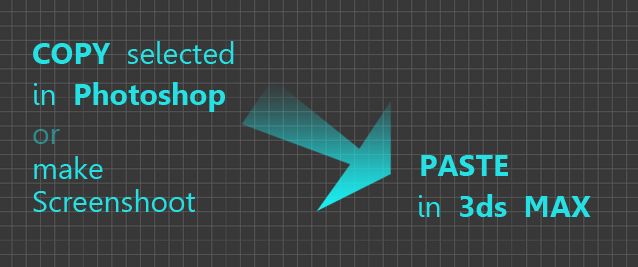
Just simple script to paste image form windows clipboard to 3ds MAX (as reference plate)

It can be used to copy paste selected from Photoshop, screenshot or web page

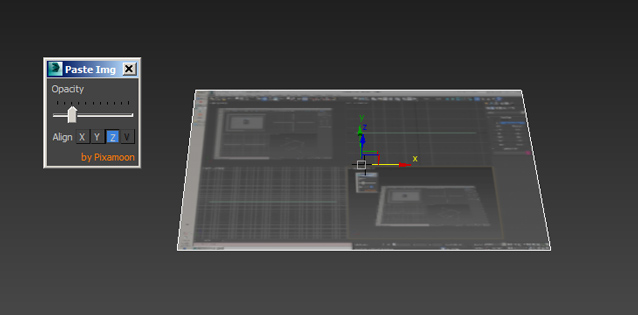
It reads proportion of image and creates plate with correct aspect ratio.
To try:
Drag and drop to 3ds max window

How to install :
use my other script - > Favorite Scripts:
1. Install Favorite Scripts (drag and drop to max)
2. place on toolbar (customize -> category Pixamoon)
3. run Favorite Scripts
4. settings
5. choose your favorite scripts root folder
6. create "IO" or "Edit" folder
7. copy "CopyPasteImage" script there

Versions:
v0.54
 - fix - mirrored UV in X or Y
v0.52
 - creates Plate and BitmapTexture without Real-World Map Size
v0.49
 - few more fixes - save / load settings
v0.47
 - fixed error when press OK
v0.45
 - save settings:
     - change Image temp folder ( small "s" button )
     - opacity
     - dialog position
 - OK and Cancel buttons
v0.40:
 - opacity slider
 - align to X, Y,, Z

Coming soon:
 - paste image files (Ctrl-C on selected jpg in explorer)
 - auto align plate to active vieport
 - scale plate
 - crop
 - collect to project textures folder
 - save / load paste settings from ini file

Let me know what you think and if you have any suggestions,

Enjoy!
Pixamoon
.
.
Tags: copy paste image screenshot

Comments (44)

image IO error

jaddaou · 2019-07-17

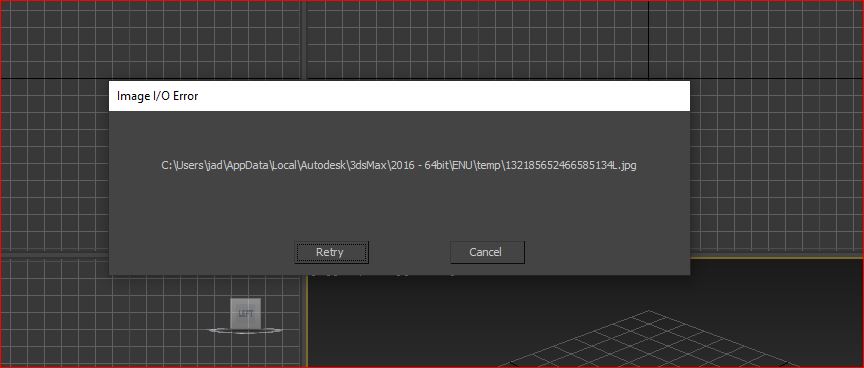
I get this error when i try to paste image from photoshop to max.

Re: image IO error

pixamoon · 2019-11-13

Hi,

Please let me know which version of 3ds max and windows update/version do you use.

Best,
Pixmaoon

jaddaou · 2019-11-13

Hi
windows 10 1903 and 3dsmax 2016

image IO error

jaddaou · 2019-11-13

Hi
windows 10 1903 and 3dsmax 2016

re: image IO error

pixamoon · 2019-11-14

1. Can you post screenshot of that IO error massage ?

2. Which temp folder did you choose to save images (right top "s" button) ?

3. Can you also try to set the path to other location ( eg. C:\Temp\ ) ?

Best,
Pixamoon

jaddaou · 2019-11-18

I've never choose any temp folder to save images. all i did is downloaded the script from turbosquid. drop and drag the script to 3dsmax after copy an image from Photoshop. so i got the error. I attached the image below.
Is there anything i should have done ?

Attachments

re: image IO error

pixamoon · 2019-11-18

oki, I see. Please try new version v0.56

image IO error

jaddaou · 2019-07-17

I get this error when i try to paste image from photoshop to max.

Feature request

NiK684 · 2015-12-11

Hi. Can you please add two little spinners for height and width with respect to aspect ratio of image?

`

pixamoon · 2015-12-11

thanks, yes, resizing is coming in full version - not with spinners but bit easier way.

I'm bit busy now but hopefully soon will find some time soon to finish and post it

macro for toolbar install

evanesac · 2015-08-06

Installing the script in a toolbar without the need to install another script first is my number one request. Can you do that?
THX

`

pixamoon · 2015-08-10

Yes of course, it will be part of installation package in full version, I will upload it soon.
(but I wanted to finish first crop and auto-align to view)

Thanks,
Pixamoon

RealWorld coords

NiK684 · 2015-09-01

Hi again. I noticed that I'm almost always using realworld texture coords so I enabled "Use realworld texture coordinates" in Max Preferences. Now when I create any object Max automatically enables realworld coords on it. This also happens when I paste images with your script. So I always need to uncheck RW coords to see the image. Can you please add ".realWorldMapSize = off" for your image planes?

re: RealWorld coords

pixamoon · 2015-09-02

sure, that's easy to add

pixamoon · 2015-09-04

Real-World Map Size is off now. Check new version v0.52

one more thing

NiK684 · 2015-09-04

I'm sorry I forgot to mention one more thing. Look at this screenshot. Here I created image plane with X and Y options. Both of them are inverted for default Left-Front viewport.

`

pixamoon · 2015-09-07

oki, It should be fixed in new version v0.54

Cheers,
Pixamoon

NiK684 · 2015-09-07

Thanks ;) Your tools makes my work more and more comfortable :)

`

pixamoon · 2015-09-08

thanks, more scripts coming soon :)

harumscarum · 2015-07-22

same error with 0.47 version - only first run in session though

`

pixamoon · 2015-07-23

oki, thanks for info, I'll try to fix it today.

Is it the same error - while pressing OK ? :

"Error Type - GetDialogPos requires RolloutClass - got undefined" ?

copy paste Image v0.49

pixamoon · 2015-07-25

oki, hope all work good now. Try and let me know.

`

pixamoon · 2015-07-09

oki, I think it is reading rollout position on close. I'll fix it today.
Thanks

fix

pixamoon · 2015-07-09

oki, should be fixed now - v0.47

change folder for screenshots

harumscarum · 2015-07-06

Hello
some max tools erase Temp folder regularly so screenshots got lost
could you please make ProjectFolder\sceneassets\images\ for that purpose?
thanks!

save dir

pixamoon · 2015-07-07

Hey, good idea, I'll do small save settings button + save opacity and window location.
I should have time later today or tomorrow.
Cheers,

re: change folder for screenshots

pixamoon · 2015-07-08

oki,
It should be ready now. Please check v0.45

It saves also dialog position and opacity value.
Enjoy :)

May be sketchup is next?

mustafa mamdouh · 2015-05-24

Okay I'm following you and I can see you are making a great job in collaboration between two different application .. So please let me suggest you to do something really great between 3ds Max & SketchUp ..
Everyone know sketchup and how powerful with measurements and drawing precisely so too many people consider to do modeling there then complete the job at 3ds Max and I found that is very annoying when sometime you need to do everything in 3ds max and few things in sketchup so I dream with something like that:
- Right Click on your selected 3d Model at 3ds Max > Edit with Sketchup > Magically Sketchup will open and You do your fun work there then you just save the file > 3ds Max will update the model there automatically

`

pixamoon · 2015-05-26

sure, I'll try to do that.
It looks bit complicated but will look at it closer soon...
Thanks !

Michele71 · 2015-05-21

Good job man! ;) +1!!

`

pixamoon · 2015-05-22

Thank you :)

`

pixamoon · 2015-05-21

Thanks,
Good idea! I'll add it as slider to upcoming paste menu, so u can change it after paste (with ini file, so it will remember your defaults)

Next version is coming with few more options - crop, automatic save/collect to project textures folder , etc

Cheers,

great long awaited tool

harumscarum · 2015-05-21

very handy! thanks
one request - make image's opacity 30 if possible

Fav script menu

NiK684 · 2015-05-21

I'll test it before I tell you what I think ;)

Feature request

NiK684 · 2015-05-20

I think it will be nice if script will create image plane in orientation that depends of active viewport.
If active is persp or top then plane must lie on the ground. If active is left then plane must be rotated (90,0,-90), if right (90,0,90). Front is 90,0,0 and back is 90,0,180.
I mean that image planes must automatically facing to active viewport.
Just to be even more cooler than now :)

I downloaded 0.20 and waiting for Changelog :)

And one more thing, don't you want to create a macro for toolbar and quad? I created it for myself, but not all must be able to do that.

`

pixamoon · 2015-05-21

cool, thanks

I'll add this in next versions plus few other ideas I want to add :)

on paste it will open small dialog with few more options, so it can automatically recognize and suggest orientation (but u can still change it before and after creating plate)

to install... Plewase use my Favorite Scripts Menu script... it automatically search for installed and other sorted scripts. I think this is faster and more organize way than creating icons / buttons then installing, adding to toolbar etc.
http://www.scriptspot.com/3ds-max/scripts/favorite-scripts

what you think ?

re: gamma

pixamoon · 2015-05-20

oki, gamma for paste image should be fixed now... v0.20

Let me know if all works fine with it.

Image file in buffer

NiK684 · 2015-05-19

Is it possible to handle not only copied picture but also a *.jpg file itself?
I mean, what if I just Ctrl+C on jpg in Explorer and then paste in 3dsmax. Is it possible?

re: Image file in buffer

pixamoon · 2015-05-20

Just finishing it now and this will come in next version...
you will be able to select few jpgs and press Ctrl-C -> they will be paste as plates in 3ds max :)

And few more cool features. Coming soon :)

re: gamma

pixamoon · 2015-05-19

Thanks,

I'll double check it and fix in next version

New version coming with crop too (for screenshots)

Gamma

NiK684 · 2015-05-19

I got some problems with gamma http://SSMaker.ru/9ba0d60d/
It is a bug or a feature?

If I disable gamma correction in 3dsMax Preferences then texture loads in proper gamma. But this is not a solution! Please fix this, because script is very handy!

super!

finalmethod · 2015-05-19

Super time saver!

lnio · 2015-05-19

Excellent!!
It`s a big time saver :)