ScriptSpot

Script

Delete Modifier Utility

By LittleLordPotala · 2011-12-06

Version
1.0
Version requirement
2010, 2011, 2012
Votes
6
Description

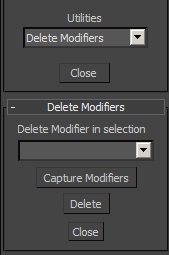
This small utility allows to delete any modifier in a selection. First, it captures the modifiers in the selection. The group of selected objects can be of different types (geometry, shape...). Then select which modifier you want to delete and click on "delete".
Additional Info

Execute the script then go to the "Utilities" panel, "MAXScript", "Utilities", "Delete Modifiers".
Attachments

Tags: modifier, utility, delete

Comments (14)

RobH2 · 2022-06-17

Duplicate

This is great...thanks.

RobH2 · 2022-06-17

What's nice about these maxscripts is that don't have to be recompiled each release. Works in Max 2022 and I'm sure in Max 2023 as well.

Thanks!

e.ov · 2020-04-11

Very useful script! Thanks!

cgdarby · 2019-03-27

Ahh so good

max 2019

dub73 · 2018-11-26

this is exactly what i was looking for, thnx!!

Brilliant

garretthoyos · 2017-04-27

I'm not sure why this doesn't come default in Max, but this script does exactly what is intended, make sure to follow the directions & only have geo selected. :) Thank you

Waseem3D · 2016-08-27

Thank you so much for making this.. It saved my time

Thanks a million

dashlight · 2015-01-26

Great stuff man, you saved me a lot of time!
Thumbs up!

awesome script

jeemjee · 2013-08-18

Awsome. you saved my day!!!
thanks for the script.

eventhough the "utility" menu usage...

crystal3d · 2012-12-18

it is a superb working script.

mark pigott · 2012-11-21

any way to get this script to work with older versions?

Awesome

Fraine7 · 2012-04-16

Was looking at writing a script to do just this task and found your version, one of the most useful scripts I have ever had the pleasure of using!

Mrjacks2o · 2012-01-11

Excellent script!! Very Handy.