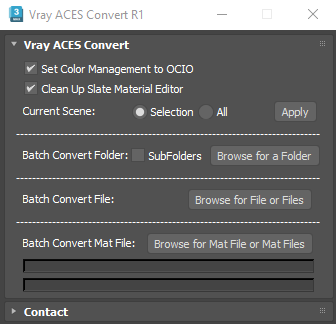
This Script is intended to convert Gamma Workflow scene to ACES OCIO. It will convert any kind of Vray materials, and also VrayLight, Vraydiplacement Modifiers, VrayFur, Chaos Scatter, and Forestpack bitmaps.
it does everything automatically,first it will convert any 3dsmax bitmap to vraybitmap, then it will set diffuse, reflect, translucent, self illum, fog color, environement bitmaps to "srgb-srgb", or to "none-raw" if bitmaps are .exr or .hdr, while other bitmaps are set to "none-raw"
It will split (uninstance) maps that needs to be split even on complex case scenario (ColorCorrection, Multitex, Composite,etc...), if it can it will create only two version of the same bitmap and apply it were it needs to be replaced.
You have multiple choice, apply to current selection or all objects, but you can also batch process max files by selecting a folder (including or not sub folders) or browse and select a file or multiple files, you can also batch convert .mat files.
When using .mat files convertion, if the script finds a corresponding .vrmesh in the same folder, it copies the .mat in a backup folder and override the existing .mat file to avoid creating a mismatch between the proxy name and its corresponding .mat. This way if you use my other script http://www.scriptspot.com/3ds-max/scripts/vray-toolbox or http://www.scriptspot.com/3ds-max/scripts/vrayproxy-thumbnail-generator to import you vray proxies it will load the right material . if it doesn't find any .vrmesh it adds a suffix (*_ACES.mat)
For Installation, just Drag and drop the .mzp file in 3dsmax Viewport and follow instructions. The first time you launch the script it will ask you to generate a request code and you'll need to send this code to me via email, once your payment validated, you will receive your license. The license is based on your computer name and CPU ID, the script will work only on your current computer , but don't worry if you change your computer or reinstall with an other computer name, i'll give you a new license for free. https://payhip.com/b/VdU3J
update 2.2 : Support for 3dsmax 2026
update 2.3 : User settings are stored when script is closed and are reloaded when it is opened