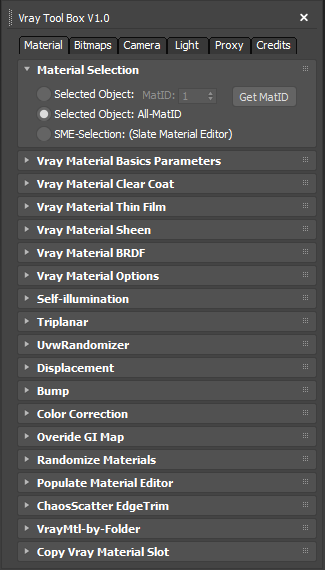
It is a Vray version of my script "Corona Automator" It has a lot of features for materials, bitmaps ,cameras, lights and proxies.
Its main goal is to automate property tweaking, and save time on repetitive tasks.
for now the material part is focused on Vray Materials , it won't work on other kind of materials like fastSSS or other materials.
You have different options to access the desired materials or bitmaps, either from selected objects or from the slate material editor selection nodes, you can also target a specific Material ID or apply to all Material IDs.
update 1.0.1: Some Camera properties where missing, and remove round edges wasn't working on single VrayEdgeText, though it was working when used in conjunction of a VraycompText that use an additional bump texture.
update 1.0.2: A preset system has been added, you can create a preset file that will set new default values for all settings.
update 1.0.3: Some Settings were not well stored in the saved preset, if you have already create some preset files with 1.0.2 version you should recreate them because some UI elements needed to have their name changed to make it work properly, if you experience problems just delete the preset files before launching the script. I also fixed the Self-illumination spinner where it wasn't possible to go above a value of 1.
update 1.0.4: BugFix, crashed when selection filter was set to SME (Slate Material Editor), and Color Correction was set to Maps. Also the random values buttons in Color Correction settings were applying a single random value to multiple nodes instead of random values for each nodes when multiple color correct nodes where found in a single slot, for example multiple color correct in a multitexture node. Another update has been made to the function that converts standard or physical camera to Vray camera, now it is also transfering animation (position ,rotation, roll_angle, field of view).
update 1.0.5: A few bug fixed...
update 1.0.6: Last saved preset is now loaded as default,Updated "Multiple Cameras To Single animated camera" and "Animated camera to multiple cameras" now keeps every property of each cameras, it used to keep only position, orientation and field of view, I Also fixed a few bugs here and there...
update 1.0.7: A few improvements here and there...
update 1.0.8: Updated colorcorrection functions, you can now target any material slot, a few bug fix, and a few improvements here and there...
update 1.0.9: In preset tab there is now a Dock option, you need to save a preset so that next time you open it, it will be docked or not, the default is docked. It will also save the dialog position, so when you save your preset first undock the script and put it where you want it to be next time you launch it.(update requested by locb)
update 1.1.0 : BugFix, there was a bug in latest version when trying to modify any material properties.
update 1.1.1: The new undocked version didn't work well for the camera tab where the end of the first rollout wasn't reachable by scrolling down, an other bug was that if you saved a preset with the dock checkbox disable but with the current Ui docked it wasn't working when loading this preset.
update 1.1.2: ColorCorrection Dropdown menu (introduced in version 1.0.8) wasn't updated properly when unchecking any checkbox.