ScriptSpot

Script

ZOA - Spline 2 Poly

By andrasmiklos · Credited author: András Miklós Balogh · 2011-11-28

Version
1.00
Version requirement
tested on maxR2011
Date updated
2011-11-07
Votes
5
Download
Download
Description

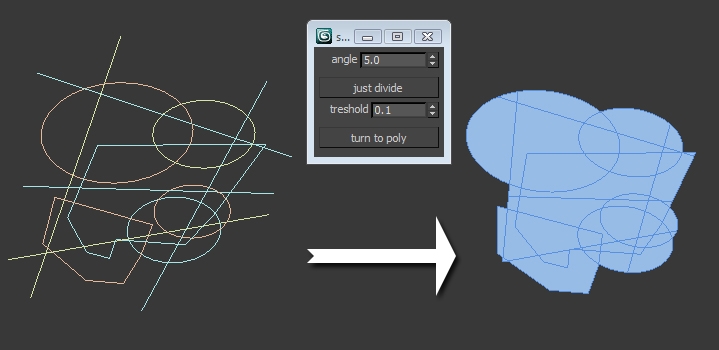
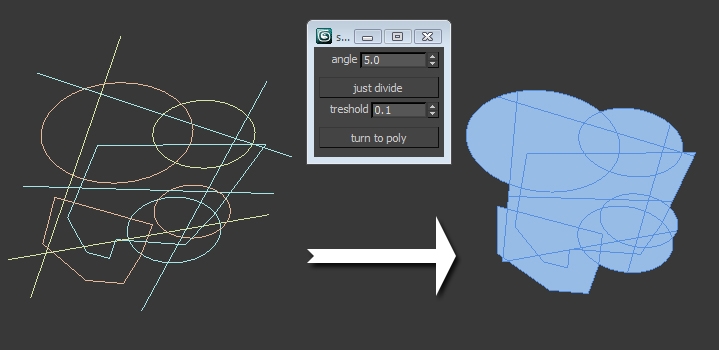
While building up architectural models we often come across the task to create a plain editable polygon object with all the neccessarry lines imprinted into it. This script is an alternative to the shapemerge compound object or the “imprint” option of the ProBoolean object in 3ds max – but this one works. Rather then cheating with an original mesh where we would like to put previously selected splines on, this script goes the other way and creates the polygon object directly from the original splines.

Additional Info

No matter if we have one spline object or more, just select them and push the lower button: turn to poly. The “just divide” button creates a copy of the original object and makes the vertices visible, so you get to know how the curves get divided. Delete these splines after creation! The script is rather slow, so be patient if working with big areas. Also save your work before applying the spline2poly script. After installation you should find the script in the category: “zoa scripts”. Check out a small video on our page if you are in doubt how this thing works: http://zoa3d.com/spline-2-poly-maxscript-a-video-tutorial/
Attachments

Tags: zoa, create polygon, spline poly conversion, spline merge, insert shape, shapemerge

Comments (13)

Hey Waxmodeler,

andrasmiklos · 2011-12-22

I have checked the latest link, and it works here. Did you download the latest? http://www.zoa.hu/maxscripts/spline2ploy_07.ms
Can you send the scene to me you were working on? I would love to have a look at it. Unfortunately I think I can only make a change to my script in a week or so.... my email is: balogh.andras (*"at"*) zoa.hu
Merry Christmas to all of you!

Script Works Fantastic

Waxmodeler · 2011-12-22

I installed the latest version per your instructions and the Script is working fantastic. Thanks for the follow up.

Script does not work

Waxmodeler · 2011-12-21

when I use this script it does not work.
it creates a couple of small messy pieces of polygons but nothing like what the video depicts.

Thanks for the bug

andrasmiklos · 2011-12-14

su37, I will try to find out what's going on in max2009.
Nick, to prevent a direct confusion I have changed the script name to "zoa - spline 2 poly".
The spline2ploy_06.ms file contains a minor bug fix that occured with zero-sized beziers.

su37 · 2011-12-14

>> MAXScript Rollout Handler Exception: -- Unknown property: "EditablePoly" in undefined <<

R2009 bug fixed

andrasmiklos · 2011-12-14

Hello,
I have fixed the bug that made max R2009 crash. I'm really surprised r2011 didn't crash on that one. :)

su37 · 2011-12-14

A bug !
3dsmax2009 run it

Name Change

Nick · 2011-12-13

Yeah, it's a tricky one. I had to change the name of mine because the original name I chose was taken.

Sadly, the name "Spline-2-Poly" seems to fit your script a lot better than mine, so maybe mine is in need of another name change :/

Sure!

andrasmiklos · 2011-12-05

Hello nick! Sure, no problem. At least I know why the url of my script got this weird "0" on the end. Any idea what the new name could be? :)

thank you!

harumscarum · 2011-11-28

awesome tool! i wonder if it could be modifier?

titane357 · 2011-11-28

Very Good ! Thanks a lot. :-)
very usefull for archviz... and yes it is slooow.