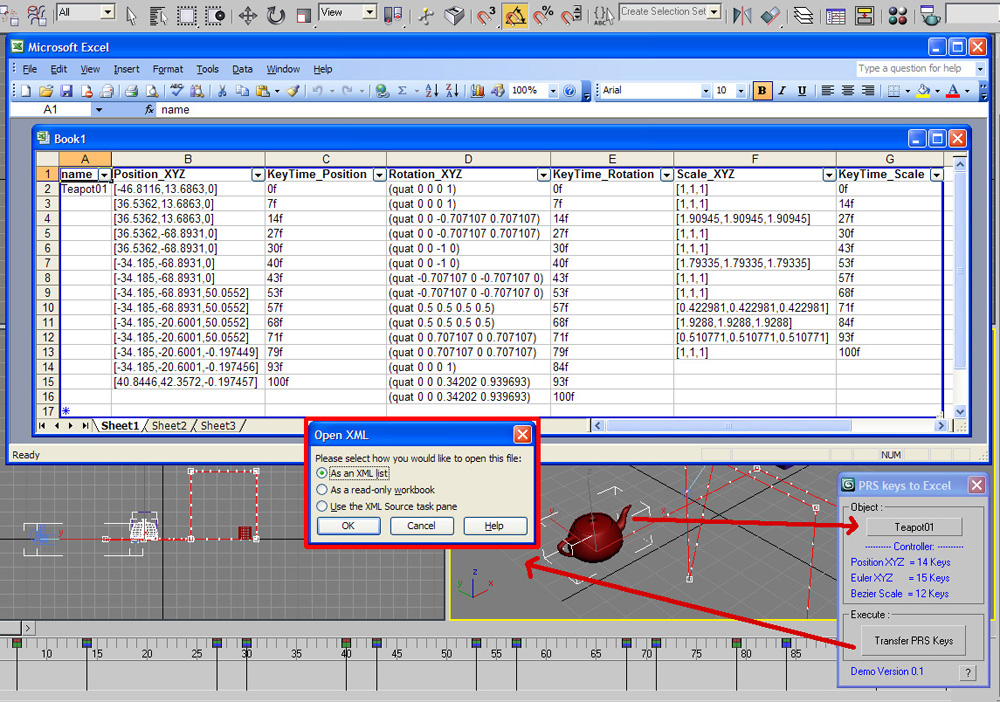
I want someone to make a script to link keyframe info to a database cell like excel, so if you can the cell it updates the keyframe in max. I will pay if needed.
Forum topic · General Scripting
How to link a keyframe to an excel spreadsheet
By burdurky · 2010-12-11
Description
Comments (7)
 br0t · 2010-12-13
Hello Budi,
I am quite interested in how you have connected MAXScript with any external program like Excel. Is this possible with pure MAXScript or did you use another programming language like Python maybe?
Regards
 Budi G · 2010-12-14
hi brot
in this case I just combine MAXScript, dotnet and excel language.
for connecting to excel that's we just need a lot of excel library methods that can be read by max.
see ref post
 Anubis · 2010-12-12
Hi Budi,
a week ago in other post Andy describe better what he need.
Budi G · 2010-12-14
thanks anubis
Nice link. mm but I just need feedback from budursky first about my example scripts.
Budi G · 2010-12-12
Hi burdurky
I have tried something on your request.
a script on the attachment below. you can run it first in the max.
usage:
select an object that has the PRS keys, then run the scripts / .mse files ... then later will appear the excel dialog with keyframes information from previously selected object. for now you can only save the excel manually.
did you mean like what I make ?
Attachments
- copy_keyframe_to_excel_test01.mse.zip — copy_keyframe_to_excel_test01.mse.zip1.8 KB
error on 1st line
Anubis · 2010-12-15
Hi Budi,
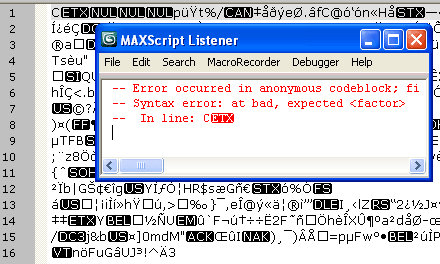
I trying your script but the .mse return an error at the beginning and nothing happens. Also I had to kill Max after that with the task manager. I'm on Max 2009 if this can help.
Woops... skip above comment, i think i see whats up.
I get this error:
-- Runtime error: createOLEObject: can't find server Excel.SheetYou said using dotNet but this come from OLE Automation (ActiveX):
xl = createOLEObject "Excel.Sheet"Attachments
- mse-error.png — mse-error.png8.5 KB
- ole-error.png — ole-error.png2.9 KB

Thanks already tried
Budi G · 2010-12-22
hi Anubis... sorry for late reply, I'm busy out there and has been trying to find info about the Excel method in MAXScript.
yes, the script I use OLE Automation (ActiveX) and work correctly on a 32-bit.
The script above it is a part of my script which I store in here.
and what I meant by using dotnet, earlier if I have tested the combine for the purpose of UI at the max.
Script below I use a dotnet without ActiveX methods , almost the same way as the script that works on top but I made the UI display when in use.
I hope this will work correctly. :)
cheers
Attachments
- prskeys_to_excel_demo.zip — prskeys_to_excel_demo.zip349 KB
- exampleui-prs_keystoexcel.jpg — exampleui-prs_keystoexcel.jpg385 KB