Batch Export (Like a Collect Asset Script)
Forum topic · Scripts Wanted
Crop TextureMap?
By ostia · 2015-02-23
Description
Attachments
- nc.jpg — nc.jpg346 KB
Comments (10)
ok.thank Mr.
ostia · 2015-03-01
Hi pixamoon.
This time, extraction of still images only
Get the path to the Extract file, it is useful if can replace
but It doesn't matter. even without
>>- if image is used in more than one texture with different crop. (than has to save with different names to not override)>>
[prefix & Number SUFFIX auto Rename?]
example:
texture.jpg→ Pixa texture 001.jpg
texture.jpg→ Pixa texture 002.jpg
>>- if bitmap has output, UV settings..>>
sorry ..I dont know that .
At least I think that's unnecessary..?
:)
pixamoon · 2015-03-01
Oki, cool, now I know more what you need.
I'll try to add to this basic things only for tomorrow.
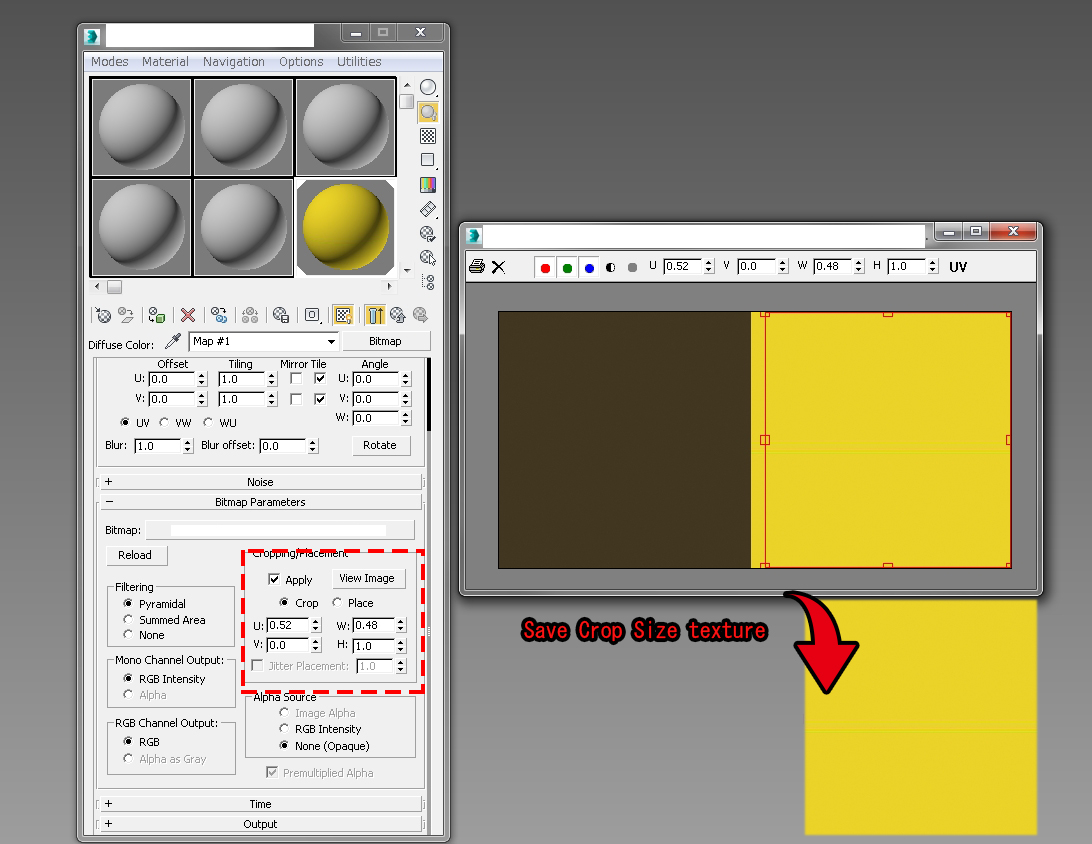
but it will just find all crop texture and save them with one prefix name + number if this is ok. (all as jpgs - to save to original formats is more complicated)
Let you know when is ready :)
Rep
ostia · 2015-03-02
I am looking forward to the completion
Thank technician.
I have to hand the gratitude and wallet, will wait;b
crop
pixamoon · 2015-03-03
oki,
I didin't have time to add it to Bitmap Tracking/Resizing... but u can have it now as simple test. Just open it in Script Editor, change destination folder and file Name prefix and run it. It will find all bitmaps with crop and save them as new cropped jpgs.
Please see attached.
Cheers,
pixamoon
Attachments
- crop_bitmaps.ms — crop_bitmaps.ms598 B
Woooo Cool it!
ostia · 2015-03-04
Unprecedented behavior work
In honor of Mr.
:)
pixamoon · 2015-03-05
no prob :)
ok.nice product. but
ostia · 2015-02-28
hi, pixamoon.
The script [Crop is not work on DEMO] it says as follows.
I need function is [extract texture region] = Crop?
Description [ 64...128...256...] Crop a x2 just size?
crop
pixamoon · 2015-02-28
Hi ostia,
Crop function is not finished yet, because I found there can be at least 2 ways to do it + exceptions etc. So was just waiting for your answer.
If you need to save crop from existing settings, there are few exceptions to do:
- if image is used in more than one texture with different crop. (than has to save with different names to not override)
- if crop is animatable ? save all as IFL or just current frame ?
- if bitmap has output, UV settings, than has to be reloaded to new and than cropped and saved
etc...
as I understand you're looking for function to get crop from existing textures, right ?
Do you want to just save it or also replace bitmap paths to new cropped files ? (in max project)
Let me know.
Batch Save Cropped
pixamoon · 2015-02-24
Hi,
I'm just adding this function to Bitmap Tracking/Resizing...
http://www.scriptspot.com/3ds-max/scripts/bitmap-tracking-resizing
It will be ready later today.
Cheers,
Pixamoon
what kind of crop ?
pixamoon · 2015-02-26
Do you want to use existing crop from each texture or new overall crop for all ?