Tagged 'light'

Vray HDRI Light

1 vote

A new tool useful for those who often use VrayDome Light with a VrayHDRI texmap pluged-in. You simply locate the HDR map on your computer, and the script generate a VrayDome light with your HDR file. The HDR is also display in the viewport and you can rotate it by rotating the VrayDome light. There is an additional parameter on the VrayDome light that allows you to enabled or disabled the HDR in the viewport.


Vray HDRI Viewer

2 votes

Vray HDRI Viewer is a simple and quick way of getting your HDRI's into your scene. Please note that for every HDRI the viewer requires an equivalent jpg file sized at 1000x500. I will be releasing a photoshop action to make this a little easier.

To intstal, use the maxscript menu > run script. You will then find it in "Catagory > shawvfx"

Vray Real Light

0 votes

This script allows you to create Vray lights of different type based on watt and calculates the luminous power and temperature of the light to be as close to reality.
This is extremely useful when lighting a scene where real light data need to be used.

The lights available are:
- Incandescent
- CFL
- Halogen
- LED Bulb
- HID Metal Halide
- HID Sodium Vapor
- HID Mercury Vapor
- Fluorescent tube
- LED Tube (warm white)
- Candlelight

Vray ToolBox

6 votes

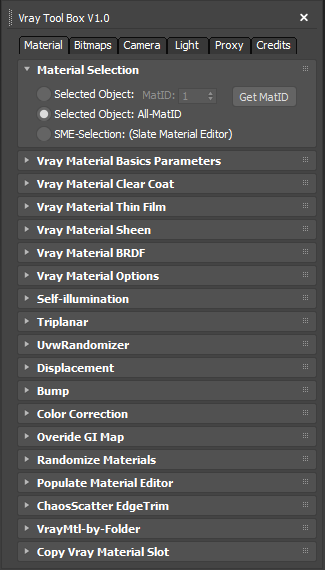
It is a Vray version of my script "Corona Automator" It has a lot of features for materials, bitmaps ,cameras, lights and proxies.

Its main goal is to automate property tweaking, and save time on repetitive tasks.

for now the material part is focused on Vray Materials , it won't work on other kind of materials like fastSSS or other materials.

VrayLight Target

9 votes

Adds a target to picked vraylight

Z Manager

2 votes

SORRY, BUT THIS SCRIPT IS CURRENTLY NOT AVAILABLE.

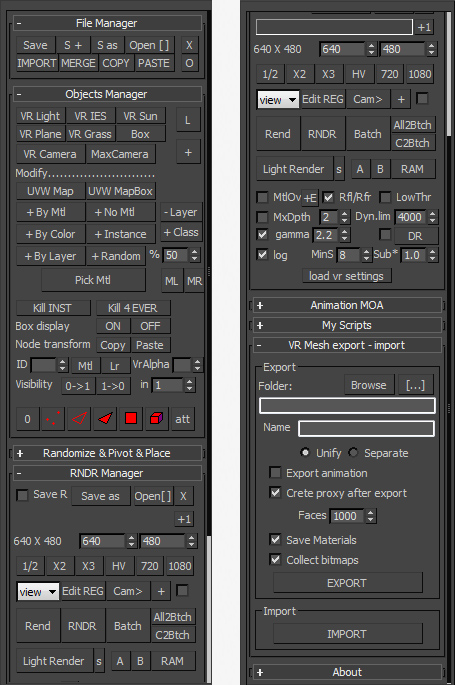
This is a 3dsMax manager tool, preferably for Vray users, very useful for editing architectural models created with other software (eg. ArchiCAD) and fast scene setup. Very useful tools for Selection, Rendering, Incremental Rendering, Copy/Paste objects from other scenes, Material Replacer, Animation with Moving Objects, Exporting/Importing Vray Proxy with material and so on...

zsLightingTools

3 votes

A little lighting-helper...

- rollout "On/Off"

  • MULTIPLIER: set the global multiplier to apply with the buttons below
  • ISOLATE: turn selected lights on, all others off
  • ON / OFF: turn selected/all lights on/off
  • SET MULTIPLIER: apply the global multiplier to the current values of selected/all lights

- rollout "Properties"

Syndicate content