Tagged 'Editable Poly'

Override -Selection Mode- & -Convert Selection- in EditablePoly/UnwrapUVW

19 votes

This script override selection mode in EditablePoly/UnwrapUVW AND allow to Convert subobject selection to an another in EditablePoly and Unwrap

Hit 1 or 2/3/4/5 ==> go in vertex/edge/..() mode
Re-hit 1 or 2/3/4/5 ==> go in object mode and you can select another object!
I have added a line, with "Max modify mode", like this, if your are not in "modify panel" when you select an object and hit 1 to set vertex mode, the script go automatically in the panel "modify"

Install:
Go in Customize User Interface, Group "Main UI", Category "zOffTy Tools" and set
1 for epoly_vertex

Create Editable Box on Target

4 votes

This script will create an editable box that will match volume size of target(group, object, light, camera, spline, helper, basically anything that has a bounding box). In addition it will match name, position, and create UVW Mapping modifier(box), and setting mat id's uniques to all sides.

Quad Primitives

4 votes

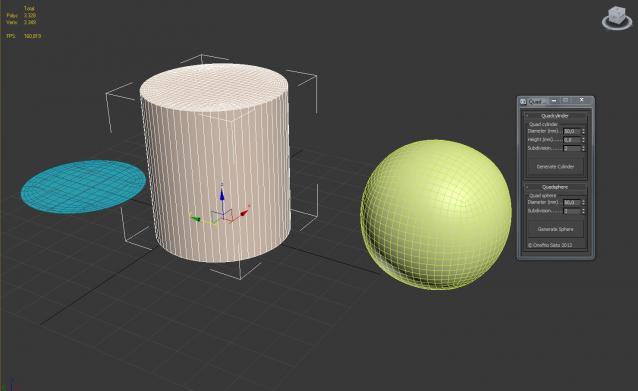
A small script to generate a quad cylinder and quad sphere...


Hard Edges Selection (maxscript pack)

2 votes


Hard Edges Selection maxscript pack is couple of maxscript which allows select Hard Edges in Editable Poly object or in Edit Poly modifier in 3ds Max. This allows us to significantly speed up the work of modeling objects. 

Script pack contains scripts:

Urgaffels script pack 01

11 votes

Small pack of scripts created by me to speed up tasks while creating environments for games. Contains the following scripts...

FallOff Up Down

3 votes

Respectively makes FallOff bigger or smaller by 20% (20% because every four times the size roughly doubles/halves). Only for editable poly. I have assigned these to my up and down arrows. This is really use full when I do terrain work.
Update 1.1 added Undo

PaintDefValUpDown

6 votes

Respectively makes Paint Deform Push Pull Values bigger or smaller by
20% (20% because every four times the size roughly doubles/halves).
Only for editable poly objects. I have assigned these to my shift and
ctrl up and down arrows.This is really use full when I do terrain work.
Update 1.1: Added undo

Select Faces By 2 Edges

2 votes

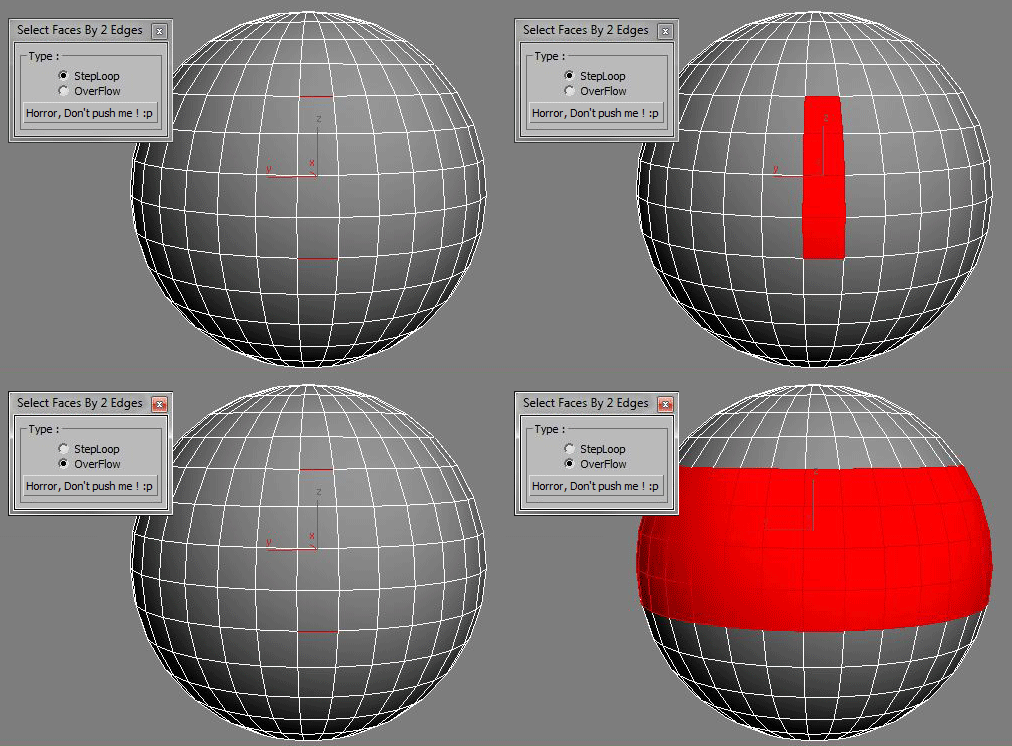
Select a Loop Faces between two selected Edges.

Editable Poly vertex selection to Skin modifier

14 votes

This script allows you to transfer current Editable Poly vertex selection to your Skin modifier.

Bevel Switcher

0 votes

This is a quick and simple script that lets you set the bevel type with a hotkey so you no longer need to open up the bevel settings dialog. Works with any Editable Poly object or with any Edit Poly modifier.

Install the macroscript and you'll find it listed under the Burke Studios category. Assign this macroscript to a hot key so that you can access it quickly. The script uses a timer to determine which bevel mode to enable:

1. Hit the hot key ONCE and the bevel type will be set to -Local Normal
2. Hit the hot key TWICE quickly and the bevel type will be set to -By Polygon