ScriptSpot

Script

Architecture to Standard Material Converter

By Smallpoly · 2016-10-31

Version
v1.0
Version requirement
Max 2012-2018 Or Higher
Date updated
2018-01-26
Votes
4
Description

This macroscript converts Architectural materials to Standard materials for use with VR exporters that require this setup.

To install:
- Run the script using MaxScript -> Run Script or drag the attached .MCR macroscript into Max
- Customize -> Customize user interface -> Toolbar
- From the "# SmallpolyScripts" category, add Architecture Standard Converter

One of my next steps is to add in the now-fixed functionality of my Autodesk_Bitmap to Bitmap converter script, found as a general use stand-alone script here.

Category: "# SmallpolyScripts" ButtonText: "ArchStd" ToolTip: "Architecture Standard Converter"

Additional Info

----- Change Log ----- 2018-02-02 - v1.00 - Now a macroscript. Minor UI Tweaks. 2018-01-26 - v0.9 - Used felixherder's input to fix the material instancing problem. - Replacing alertbox based UI with actual rollout based UI - Adding greater map support and filtering based on material type - Fixed "acitecture" typo 2016-12-19 - v0.8 - Bugfix: Keeping the name should now work for multi-materials as well.
Attachments

Tags: Material, architecture, vr, gamedev, virtual reality, standard material, smallpoly

Comments (18)

Architecture to Standard Material Converter

Oscar2012 · 2022-10-10

When converting from Autodesk to standard, the texture gets unlinked, when I bring it into Lumion I would have to re-link all the textures again. Is there an update where after converting to standard= the Textures stay linked to the standard shaders, this way when importing into Lumion 12 All Textures Show.

Please Help

Architecture to Standard Material Converter

Oscar2012 · 2022-10-10

When I use this, the materials become unattached from the standard shader,
I'm trying to import into lumion 12 with all the standard textures.

PLEASE HELP.

Architecture to Standard Material Converter

Oscar2012 · 2022-10-10

When I use this, the materials become unattached from the standard shader,
I'm trying to import into lumion 12 with all the standard textures.

PLEASE HELP.

New Updates Coming!

Smallpoly · 2018-02-03

To go along with the updates to this script, I've also updated AutodeskMap to BitmapTexture to now work regardless of whether it's run before or after the material conversions script. The new approach should be able to handle any kind of material that is thrown at it - including VRayMtl and other 3rd party renderers.

The next time I do an update to this script I'll also be rolling in the map conversion feature.

felixherder · 2017-08-31

Great Script
One weird thing though, if you have 5000 obj in your scene you get 5000 materials, although you started with about 20.
I've modified your script abit to keep mat instances, Just add this with a roullout checkbox maybe.


-- Go through materials
		for m in sceneMaterials do (
			 matMod = changeToStd m 
			 objarr = for o in objects where o.material == m collect o
			 for obj in objarr do obj.mat = matMod
		)-- convert the material and assign it

Smallpoly · 2017-12-05

Thanks! I got stuck on that part a while back. I'll add this in the next time I do an update.

Change added in

Smallpoly · 2018-01-27

Hey, this is to let you know that your fix is in the new version. Thank you!

1rv · 2017-06-27

Thank you for sharing! It's almost perfect, but there's one minor issue: it doesn't convert Autodesk bitmap to vanilla bitmap. Could it be fixed?
I found there is your additional script to cure this issue but it does nothing.

Smallpoly · 2017-07-05

Hey, that's weird. The script you're referring to should work correctly when run after this one. I'll have to verify if it still works in recent versions of Max.

Smallpoly · 2017-07-05

Hey, that's weird. The script you're referring to should work correctly when run after this one. I'll have to verify if it still works in recent versions of Max.

Autodesk_Map to Bitmap is now Fixed

Smallpoly · 2018-02-03

Hey, good news. I've updated AutodeskMap to BitmapTexture to now work regardless of whether it's run before or after the material conversions script. The new approach should be able to handle any kind of material that is thrown at it - including VRayMtl and other 3rd party renderers.

The next time I do an update to this script I'll also be rolling in the map conversion feature.

Thank you very much!!!

enrico_sanchez · 2017-06-21

This script is the best! I searched for hours looking for a way to convert Autodesk Materials to V-ray materials. It looked like the only way was spending €99 on Universal Material Converter, but instead I used your script and then v-ray scene converter!
Thanks again!

Game Export

Smallpoly · 2018-02-03

Yep. This one is for people that need Standard for game engine exporters. Other conversion tools are better options if you just need to go straight to VRay. This prevent maps and settings from getting lost that are supported by VRayMTl but not by Standard.

Also, please avoid posting spam in the future.

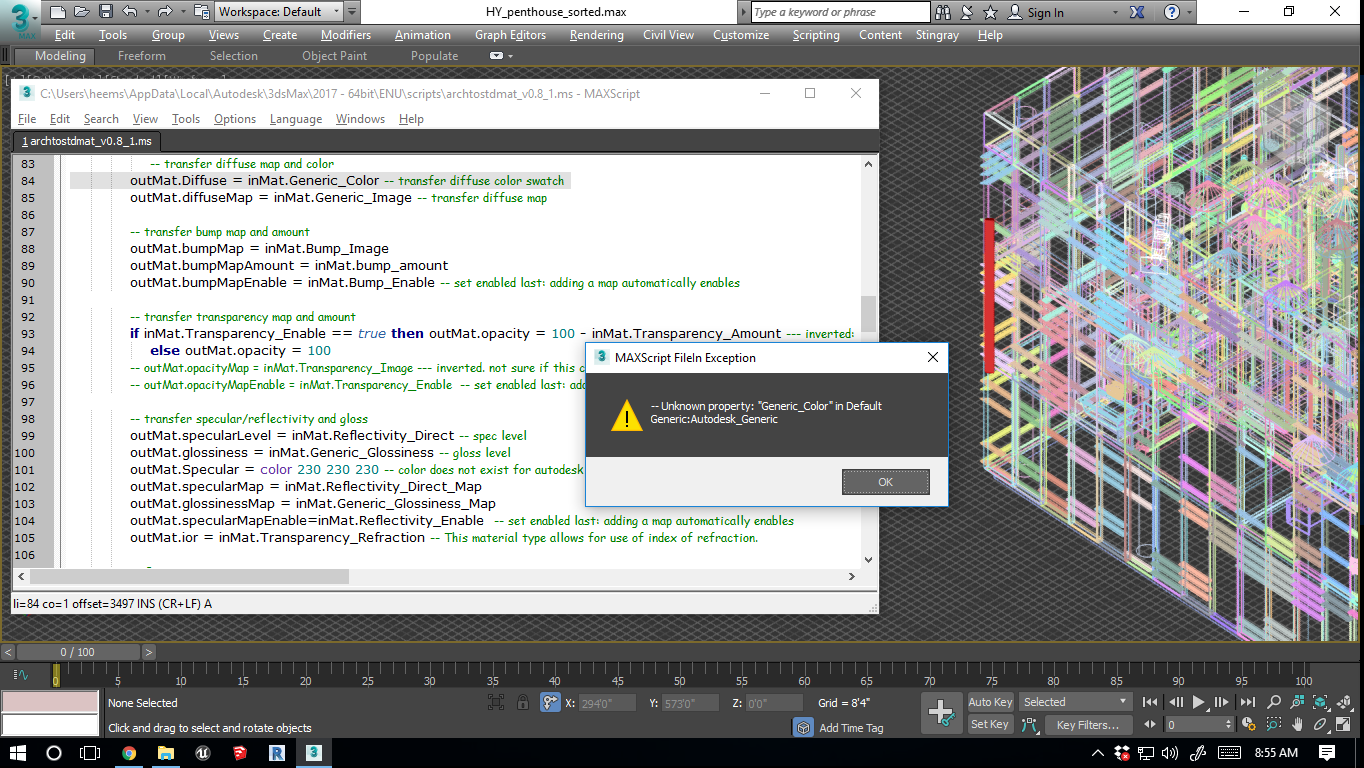
error

jointy · 2017-05-09

thank you your script. i am getting an error message "--unknown property: "generic color in default generic:Autodesk_generic"

i am using revit 2017 and 3ds max 2017 (64 bit)

see attached image.

Attachments

Looking into it

Smallpoly · 2017-05-10

Thanks for letting me know about this issue!

If you know which material is causing the script to get stuck, do you think you could you assign it to a box, save that to a new Max file and upload it here as an attachment? If you're up for it, this would help me verify that any changes I make will fix the issue.

Smallpoly · 2018-01-27

Still haven't been able to reproduce this.

Update v0.8

Smallpoly · 2016-12-19

Bugfix: Original names should stick around on all materials now.