ScriptSpot

Script

Copy Replace

By Hani Tiby · 2006-10-21

Version
2
Version requirement
2011 and prior versions
Date updated
2011-11-30
Votes
35
Download
Download
Description

Turns a selection of objects into instances or references of another object.
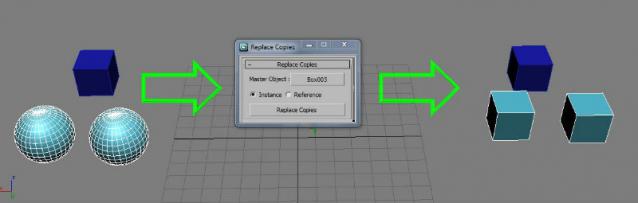
Fixed in v 2.0:

  • Instances outside the selection are not replaced anymore. (Thanks to Anubis)
  • Added the option to choose between instance or reference
  • Changed the "Button name" to "Copy replace"

Tags: instance, replace, Reference, copies

Comments (36)

Miyamoto · 2017-08-06

Great script, thanks for your work!

And here is an idea for further expansion of functionality, if i may - an ability to make a set of objects with which selected ones being replaced randomly (or according to some rules, maybe with options?), not just single one - it would be awesome.

Anyway, still very useful as is.

Tested it in 2014

vyle · 2014-03-20

Works great in 2014, hugely useful script!

2014

Hani Tiby · 2014-04-19

Thanks, for testing and for using :D

does this script work for max 2012?

egeer · 2012-12-03

how do I get this script to run in max 2012?

Didn't test it yet

Hani Tiby · 2012-12-15

Hi Egeer,

I didn't test it in Max 2012 yet, but it should be working fine as it's too simple and basic. it's also working in 2011.
--
Christopher Grant commented on compatibility issues saying:

"Due to the way scripts work they are almost always forward compatible. I just verified this script work in 2009 and I'm sure it'll work in 2008...

The only time there are issues with scripts are ones that are *really* old (max 2, 3 era) or ones that used ActiveX controls which were no longer available in 64 bit versions of Windows / 3ds Max... Other than that you can confidently use scripts for max 5, 6, 7, 8, 9, 2008, 2009 with any newer version of 3ds Max...

Christopher Grant
ScriptSpot.com"

--

concerning how to run it in 2012:
- like all macroscripts, put the file in C:\Program Files\Autodesk\3ds Max 2012\UI\MacroScripts
- restart Max if it's open
- customize your UI to add the tool.
- you'll find it in a category named "Hani"

--

Soon I'll make some fixes with the script, and I'll post the new one with the Max version update.
Sorry for being late, but I'm Egyptian, and politicians in my country are so busy these days making life so hard.
wish me luck :D

barigazy · 2012-12-15

I tested in max2012x64 and max2013x64 and script works as expected.

Hani Tiby · 2012-12-23

Thanks barigazy for testing

Thanks!

Artie · 2012-02-04

Awesome script! Very much helping me out. Just wanted to point out your statement "Instances outside the selection are not replaced anymore". This is not applicable to reference object.
Please, fix this.

Hani Tiby · 2012-12-15

Sorry for being late, I'll check this issue soon.
Thanks for your feedback :D

Thanks for the feedback

Hani Tiby · 2012-01-31

I'll check the groups and targeted nodes too.

very goodthe groups could

kino_unico · 2011-12-20

very good
the groups could work?

lights not working in target, just copy the light and not the target.

an idea

Anubis · 2011-01-08

Quote:
"I've noticed that instances outside the selection are replaced too"

Hi, if you still not fix this, you can make selected objects individual before

instanceReplace

using

InstanceMgr.MakeObjectsUnique

function, i.e. something like:

InstanceMgr.MakeObjectsUnique $ #individual

Cheers

Hani Tiby · 2011-01-20

Thanks Anubis,
I'll check this function as soon as I have some free time.
I hope it would fix that problem.
Thanks again for the help, and keep writing nice tools :)

Thanks !

harnelbe · 2011-01-06

I used your script with Max 2011 64, it works perfectly !
It helped me a lot.
Before your script i was using the "replace" function of Max, Instance Replace is better for what i was doing !
Thanks again !

oh

kurt_hectic · 2010-11-15

hi, manny thx for this tool

i m working with a lot of instanced objects in 3ds max. after i done some job i realise i didnt use reset x form on my master object that i was copy as instance! i was just fucked up. but after all i used your script ( 1st i used collapse max tool, than use your sctipt for reset x form without changing a pivot!!!) and after this i use instance replace script! after all i just use option hierarchy>pivot>move object to pivot pisition (becouse after i used instance replace script all object just flip or so, but they still have a good pivot position! so i just click hierarchy>pivot >move object to pivot pisition and HAPPY END!

i get instanced objects after resetx form on the same position where i just set up at start!!!!!!!!!!!!

THAT TAKES ME 2 DAYS AND 2 NIGHT ARGH !!!!!!!!!!!!
sorry for my english but my mind looks like potato after all :o

:*

http://www.scriptspot.com/3ds-max/scripts/reset-xform (reset x form + save position of pivot!)
http://www.scriptspot.com/3ds-max/scripts/instance-replace

kurt_hectic · 2010-11-12

many thx!

crystal3d · 2010-09-25

i was dreaming of this today! great job! and thank you to your good angels

mujeebmy · 2010-05-12

hey, this is very usefull my work. I am looking this long time. Cheers.
Thank you very much this script.

xamsrewop · 2009-12-28

Hey, thanks for the extra info, I'll give it a go...

Cheers!

Anubis · 2009-12-27

If you use the current script then you can save your time just finding and replacing "instanceReplace" with "referenceReplace" inside the code ; or just select your source object and collect it to some variable by entering to say: "source = $", after then select objects which want to replace and enter: "referenceReplace selection source". The function is mapped, i.e. not need loop like "for i in selection do ...". And the best source for learning maxscript is MaxScript Reference.

Best regards, Anubis

Anubis · 2009-12-27

No and not yet built function in Max to make unique copies replace, for now is available this 2:

instanceReplace <dest_node> <src_node>
referenceReplace <dest_node> <src_node>

xamsrewop · 2009-12-27

Hi Anubis, thanks for the reply, I really appreciate it...

Changing them to a reference would be fine - I'm assumming that's what this does... Any chance you could give me an idiots guide of how to do this? Or point me in a direction where I can learn a little more about how to execute it?? I've been reading but without any progress so far... :/

xamsrewop · 2009-12-27

Hi there, I have to admit being a bit of a newbie to script! But can this be used for making multiple objects unique??

I have a problem where I cloned around 200 Grouped objects, all with 4 objects in each group. The problem being that in Max 2010, the default clone type is 'Instance', meaning that the Grouped objects are all instances and I don't want them to be. I cannot find a way to make each Grouped object unique again without opening and selecting each individual object within the Group.

Can this script be used for this?

Thanks in advance...! :)

Hani Tiby · 2009-05-16

Thanks atom, momentum, soljarag.

free agent · 2009-05-14

is it supposed to move all the newly converted instances on top of the master instance??? any way around this?

...a little research: with geometry imported into max, when i use this script it moves the instances into the masters possition :( then if i move all the instances back into possition, then make all unique and then run the script on them again, it works fine??? what would i have to do to get it to work correctly the first time?

Hani Tiby · 2009-05-16

No it's not supposed to move instances to the masters' position.
One of my colleagues had this problem while working on some building windows, in his case I found out that all the windows shared the same pivot point position, cause they were originally one mesh then detached to multiple objects.
and the solution was :
- selecting all the windows including the master.
- centering the pivot points.
- applying reset Xform.
- then using the script.

soljarag · 2009-05-06

This saved me soooo much time... Thank you!!!!!!!

Although I wish you could undo the instance :)

atom560 · 2009-03-18

Very usefull, thanks.

daniel.phillis · 2008-09-09

if you have compatibility issues, you could always do it the old way...

select your object you want propogated as an instance

in Track View copy its object track,

select all the object's object tracks that you want to change to become this instance,

paste (as instance) !

Use the 'filtering by name' feature in trackview to make this easier

coupled with show only selected objects

ie i type in obj and it just lists all the object tracks

free agent · 2009-05-14

trying daniel.phillis' "old way"

in track view (drop sheet) or track view (curve editor)??? the copy and paste options are always greyed out when i try this.

Admin · 2008-09-08

Due to the way scripts work they are almost always forward compatible. I just verified this script work in 2009 and I'm sure it'll work in 2008...

The only time there are issues with scripts are ones that are *really* old (max 2, 3 era) or ones that used ActiveX controls which were no longer available in 64 bit versions of Windows / 3ds Max... Other than that you can confidently use scripts for max 5, 6, 7, 8, 9, 2008, 2009 with any newer version of 3ds Max...

Christopher Grant
ScriptSpot.com

kilad · 2008-09-08

Is it possible to get it for 2008?

imageimaging · 2008-06-08

Thank you very much! It help me.

Hani Tiby · 2007-10-28

thanks for using it and many thanks for your comment :)