ScriptSpot

Script

Show Active Constraint

By miauu · 2014-03-03

Version
1.3
Version requirement
Max 2009 and up.
Date updated
2014-03-30
Votes
8
Description

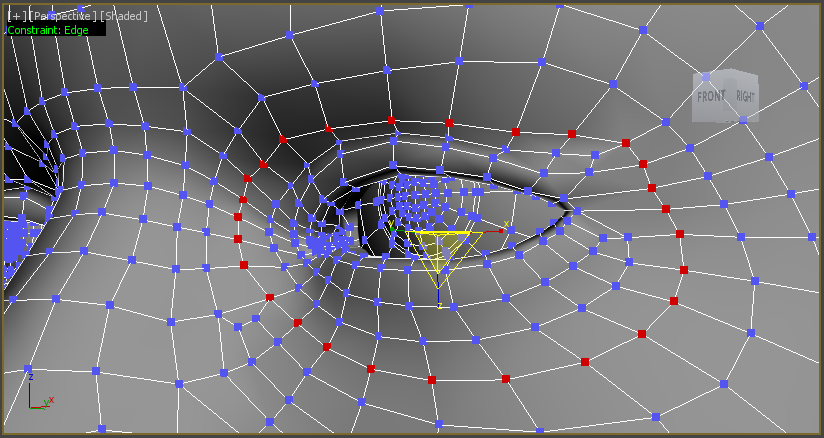
This script will show in the left corner of the active viewport the currently used(active) Cosntraint type. It supports Editable Poly object and Edit Poly modifier.

The script works as a toggle.

Put miauushowactivecosntraintinviewportStartUp.ms in maxroot/scripts/Startup folder so the constraint always shows.


You can install only the miauushowactivecosntraintinviewportStartUp.ms. This way the script will be always active during the current max session.

If the miauushowactivecosntraintinviewport.mcr is installed, you can control the startUp script with it.

Requested by Haider of Sweden in this thread.


Videos
Attachments
Comments (23)

as always

3dwannab · 2015-02-18

Great script Miauu. Mucho gracias. +1 ;)

.

miauu · 2015-02-21

Thank you. :)

.

miauu · 2014-03-29

The script is updated.
Now the active constraint will be shown if the object is an Editable Poly and it have modifiers applied to it and those modifiers are not Edit Poly.
If the obejct have Edit Poly modifiers, the active cosntraint for the top-most Edit Poly modifier will be shown.

.

Haider of Sweden · 2014-03-09

@barigazy. Sorry if it seemed like I missed your point, I never meant so. I cannot speak for others, but I know that I am very grateful for all the help I got, both directly for me, or requested by others.

.

Haider of Sweden · 2014-03-08

@barigazy: no one wants to vote. :)

Maybe people dont know about it. I +1:ed just now and will do on all the great scripts downloaded before and coming in the future.

If there was a function that showed the amount of downloaded scripts, then one would know how popular it is. :)

.

miauu · 2014-03-08

There is a way to see the most popular scripts by votes(user points) and/or by hits. On top of the http://www.scriptspot.com/3ds-max/scripts you can see "tabs" Date Updated, Date Submited, Comments, Title(A=Z), Hits, Votes. The last two tab is waht you lokking for. :)

barigazy · 2014-03-08

We're not talking about any kind of popularity here.
All requested scripts are free and many other users besides requester will find this tool useful. Here's more about respect for the author who "grants wishes"

+1

barigazy · 2014-03-05

Next thing that I do not understand. Someone looking script, we create a script and it's a sad because no one wants to vote. :)

Come on people! It's easy just press the

"+"

sign.

O_o

.

miauu · 2014-03-05

I also wondering why this happens, not only with this script. There are a lot of examples on scriptspot. :)
But, most important is that the someone use the scripts and find them useful.

Royal Ghost · 2014-03-04

Hello! Interesting approach. A couple years ago I wrote script for visualize active constraint. My script has different approach, it adds callback to the active modifier and changes selection color.
Maybe my approach will interested to you...

Attachments

.

Haider of Sweden · 2014-03-04

This is definitively a welcome addition to the script, don't you think miauu?
There would be a HUD, but also an additional colour on the selection itself. After a time of usage, the user will get used to the colours and indirectly know that the constrained is turned on and even what constraint is currently been used.

Great feature addition in my opinion.

[:.:]

barigazy · 2014-03-04

It's really good idea. I think that Kostadin will expand his "script pack" with this :)

.

miauu · 2014-03-04

Royal Ghost, cool script.
My first though was to use callback, but then I decided to go with the timer.
But with your script, on max2013 and max2014, I can change only the color of the vertices. The color of the faces stays unchanged.
Why you made your script to not works when you reset Max, reload new scene, etc?
By the way I can't change the color for subselection even using Customize-Customzie User Interface-Colors. Strange.

Haider of Sweden, there is no problem the both scripts to be combined in one. I can do it. Royal Ghost also can do it. The problem is that in max2014 and 2013 the color of the faces did not changed. At least on my PC.

Branko, this will stay away from my script pack. :)

:)

barigazy · 2014-03-04

Just kidding. Of course. This one is not the right choise. Anyway back to topic
When you set UI color you need to "repaintUI" and redraw view every time when you do that. That is very annoying.

clr = (color 15 120 255)
SetUIColor 1 [clr.r/255, clr.g/255, clr.b/255]
colorMan.repaintUI #repaintAll
max views redraw

.

miauu · 2014-03-04

Repaint the UI not solves my problem. I tried it before, but the selected faces still remains red. :)
Maybe something is wrong with my Max.

barigazy · 2014-03-05

That option is broken long-long time.
Like gw.triangle or gw.polygon

>>But with your script, on

Royal Ghost · 2014-03-05

>>But with your script, on max2013 and max2014, I can change only the color of the vertices. The color of the faces stays unchanged.

Seems in Nitrous selection color is totally broken :( So its makes useless my script for 2013-2014 max with Nitrous. Maybe selection color will be fixed in upcoming 2015 max...


>>Why you made your script to not works when you reset Max, reload new scene, etc?

I have no time to do this, that's why script not released for public.

.

miauu · 2014-03-05

In upcoming Max 2015 we can expect and receive more new bugs. I doubt that they will fix old bugs. But, as you know, this is tne MAX.

.

Haider of Sweden · 2014-03-03

Great work! This helps the user get notified that the constraint might be still turned on.
I'll keep you busy with more suggestions ;)

.

miauu · 2014-03-03

The script is updated.
I still waiting a video or something else for the Maya-UV - Max-UV suggestion.

.

Haider of Sweden · 2014-03-04

Great improvement.
Let me continue with my suggestions here so everyone can read it.

About the third suggestion I mentioned before, I thought that the HUD - what I previously called "text box" - could appear only once it is needed. And it is needed once you have a editable poly or a mesh with an edit poly modifier on it.

You can skip this particular feature from the MCR, because you can disable the HUD with a press on the button. But for the MS file that can be used in the startup folder, it is preferable that the HUD disappears when no poly is selected.

What do you think?

.

miauu · 2014-03-04

The HUD will dissapear when the selected object is not an Editable Poly or with Edit Poly modifier for the MCR and startup scripts.

titane357 · 2014-03-03

Thanks :-)