Tagged 'Proxy'

Harry's Proxy Creator

1 vote

This script is very similar to a script Jason Schleifer wrote from Maya, it allows you to split a predefined object into several segments based on the transforms of special cutter objects, these segments can then be linked back into a skeleton hierarchy. The advantage of displaying segmented geometry in the viewport rather than the skinned mesh is that you get faster playback speeds.

When you evaluate this script it create a new "Category" in the "Customize User Interface" window called "Harry's Proxy Creator" where you'll find the tool

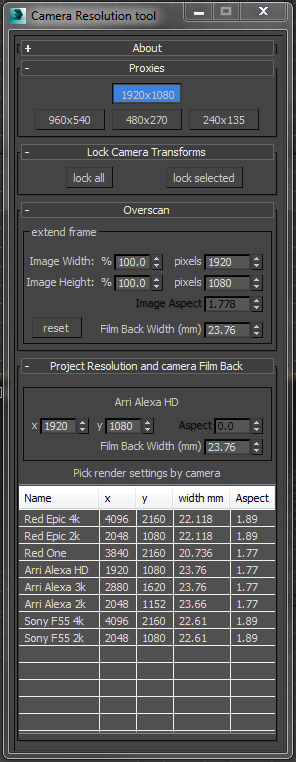
Camera resolution tool

6 votes

Frankly the default 3dsMax render settings bug me. They don't deal with modern cameras. The proxy settings are hard coded and can't be changed. There's no easy way to create over-scanned frame without a calculator. So I've written my own tool to fix these problems.

Tweak Camera Dialog

There several rollouts in this tool, each dealing with a separate task.

GTVFX-SCA_VRproxiesReplaceWithMesh

2 votes

Brings in the geometry mesh of the VRay Proxy at the same position and with the same hierarchy as the proxy container.

GTVFX-MSH_proOptimizeSelection

1 vote


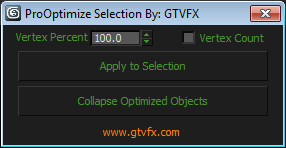
For each object in your selection a proOptimzer modifier will be applied and calculated to the percentage you specify.


Once applied and you can update the spinner in the UI and see your objects update in real-time.


Batch Library Helper v1.0.1

0 votes


mental ray Proxy Manipulator

3 votes


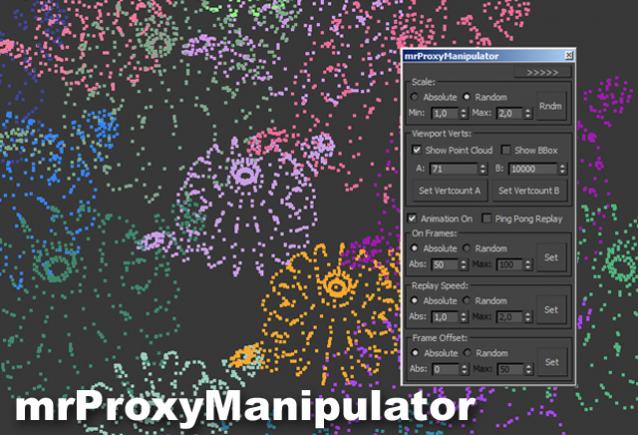
Working with mental ray proxies can be very tedious. As they are used for vegetation alot, the need for variation is there, to make it look believable. This script gives you options to vary scale and all animations aspects of all selected mr proxies. It also has a minimized version where you can quickly change the viewport resolution of your proxies, helping to speed up the viewport alot.

Tutorial video:

Project Manager

595 votes

After a long stretch of development, Project Manager 4 is officially out — the biggest release in the product's history, and now with full 3ds Max 2027 support.
The headline is AI Asset Classification.
Your library gets sorted automatically — by object type, material, and style — no manual tagging.

Project Manager 4 — What's New Since v3

Changelog · 3ds Max 2016–2027

AI-Powered Asset Classification

  • Automatic categorisation of 3D models by object type, material, form, and style — no manual tagging required
  • Runs entirely on your machine — no cloud, no subscription, your assets never leave your computer
  • GPU-accelerated background processing at low priority — won't interfere with rendering or active work
  • Reclassify specific folders or categories on demand — no need to reprocess the entire library
  • Scale across a team: multiple workstations share the same database and classify in parallel

Colour Tools

  • Find assets by colour — pick from a palette and instantly see matching models or textures
  • Perceptual colour similarity search — finds visually related assets, not just exact hex matches
  • Find Similar by Colour in the right-click menu for models and textures

Find Similar

  • Find similar by content — AI matches 3D models by style, shape, and visual look
  • Find similar by colour palette — matches assets to a reference image or mood board by dominant colour proportions

Smarter Search & Filtering

  • Multi-keyword search: "Chair, Glass" finds a file named Chair.max described as "glass"
  • Category filter correctly includes all subcategories — filtering Furniture also returns Furniture → Chairs → Dining
  • Combine category and material filters: find glass-and-metal tables, or wooden ones, in one click
  • Categorised / Uncategorised quick filters — see which assets still need attention

Gallery & 3D File Browsing

  • Three gallery tabs for .max files: Models, Materials, and External Links
  • Drag materials directly from the gallery into your open 3ds Max scene
  • 3D viewport preview for FBX, 3DS, OBJ, and other formats — inspect geometry before importing
  • Edit external links inline — fix or replace missing textures without opening the .max file
  • Zoom & Pan for images — inspect textures at full resolution inside Project Manager

Migration & Compatibility

  • v3 and v4 share the same database format — point v4 at your existing library and go; no rebuild required
  • Run v3 and v4 side by side on the same team; supported from 3ds Max 2016 through 2027

Performance & Other Fixes

  • Significantly improved overall performance — faster navigation, filtering, search, and file/folder operations
  • Live sync in shared database mode — changes by colleagues appear automatically without reloading
More about new features   Project Manager version 4
 

VrayProxy Switcher

35 votes

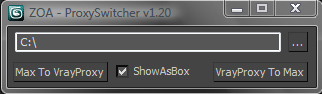
Select a bunch of objects and put unique nodes to a specified directory as separate max files with the related vrayproxy data saved next to it.
Istance copies will be replaced with the new vrayproxy object.
Get previously saved objects back to max whenever you wish.

User Interface

MR_Proxy_BakeAll

27 votes

This scripts enable you to change selected objects(with animation) to mr_Proxy objects.
And you can change some parameters of selected objects all at once.
Caution: If you wanna use property "AnimOffset", you have to apply Skin modifier or
other deformation modifier to an object, whose animation is just drived by linked hierarchy.

How to use: Just put this script to \3ds max root\ui\macroscripts\. Then, start up 3ds max,
and go to "Customize"->"Customize User Interface". You can find this script in a category "DSTRUEVISION".

mrProxy Generator v1.0

22 votes

mrProxy Generator v1.0 is a helpful script for creating multiple proxies of selected objects. It automatically names the output files from the selection and can also replace your geometry. The script is free of charge and available for download.
Works with versions 9.x and above. There’s also a video tutorial describing the usage of the script on youtube.