Tagged 'line'

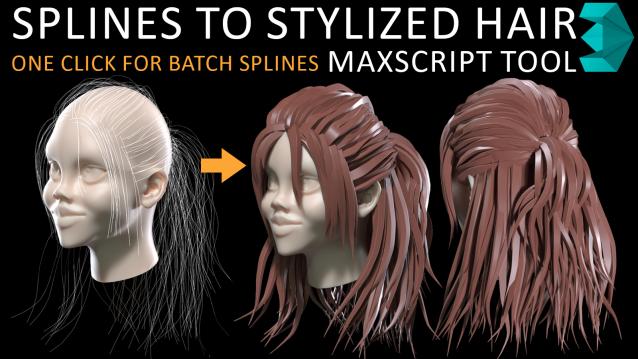
Spline to Stylized Hair

3 votes

in my hairstyle workflow i tried to turn each spline to stylized hairs but there was limitations such as lack of ability to deform a hair mesh along to all individual spline at once so i have made this MAXSCRIPT tool for helping myself turn a batch of splines to stylized hairs in one click. also there is multiple parameters for tweak hair segments ,thickness and rotation. i decided to publish this as a useful and time saving product 

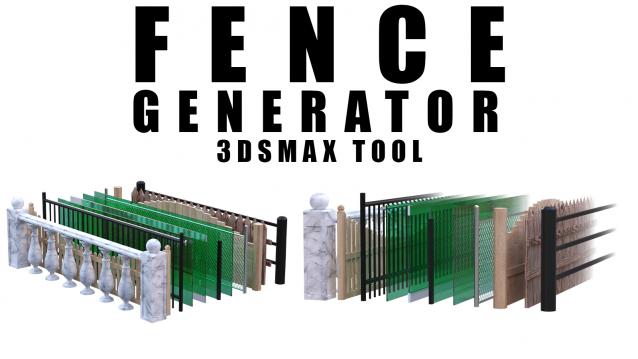
Fence Generator

0 votes

Enhance your 3D modeling workflow with our Spline-to-Fence Converter tool built with Maxscript. Easily transform splines in your scene into realistic fences and posts with just a few clicks. Choose from a selection of 11 fence types tailored to your project needs, and customize specifics such as fence height, number of posts, gap between planks, and more.

Select spline segments by matID

0 votes

With this script you can select splines' segments by matID.
There are two methods of selection:
- "Use IDs of selected segments" - select some segments and press the [Select] button. The script will find the matIDs of the selected segments and will select all other segments with the same matIDs.
- "Use IDs typed below" - type as many matIDs as you want in the field(separate matIDs with comma) and press the [Select] button. The script will select all segments with the matIDs entered by you.

Object's Normal Fix

2 votes

Small Scripts to fix the Normal of selected shapes (Exrtude Direction)  .

- Select Shapes to Fix .

- Run the Script .

- One LeftClick on any Surface to get the Normal from it , then RightClick to Exit .

Another Script Added to Auto Fix Shapes Orientation .

* If you have 3d Curved Shape its better to use the First Script to do Manual Fix .

- UPDATE 1 :

  • Make the Macros Visible/Enabled When the Selection Contain Shapes .

- UPDATE 2 :