3ds Max | MCG

Mirror Transform X Controller

0 votes

An MCG transform controller which mirrors another object's transformations across the X axis.

Includes a script which assigns the controller to all objects selected, and picks each corresponding mirrored object. Useful if you have a rig that is symmetrical and want to quickly mirror an animation.

Modifier Set Z height from spline

0 votes

My first experiment with MCG. This modifier will stretch an object along its z axis to the length of the selected spline.

Multi Spline

1 vote


Multi Spline object combines spline objects to one object while preserving original splines.

Panelizer Modifier

3 votes

3dsMax topology based paneling modifier.

Procedural tool for geometry paneling.


Polar Array Modifier

3 votes

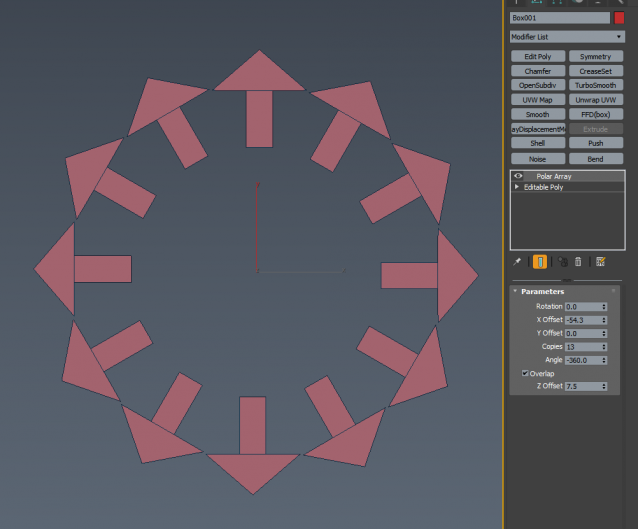
A simple polar array modifier with additional controls like Z axis (world) rotation, X, Y and Z offset (world). Z offset is gradual. P.S. X-form needs to be reset in order for this to work correctly.

parameters

Populate Drop to Surface

0 votes

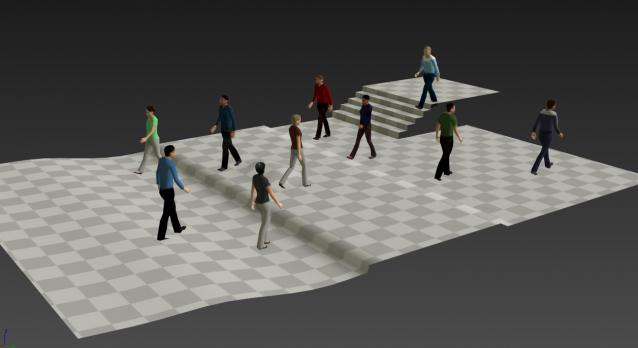
By default Populate doesn't allow you to have your characters walking on uneven surfaces. This MCG hacks a way to put them on any surface below. It's not perfect but it'll work for a lot of cases.

Quad Mirror

1 vote

This is a mirroring tool across X and Y axis for 3ds Max 2016 using MCG. It works fine with tris and quads but creates an edge visibility problem to faces larger than quads. I also attach the flipNormals compound that I use for further research. I 'll keep updating but if someone finds a solution before I do please note.

--0.2 update: weld vertices across mirroring
--0.3 update: code optimisation and solve welding problem

QuatToEuler

1 vote

This compound evaluates the MAXScript 'QuatToEuler' function.
Example:

RandomPointsOnMesh compound

4 votes

Note that the distribution is random, not uniform, i.e. some clustering is to be expected. Face size is taken into account, bigger faces may have multiple points while smaller faces none at all. If you want to get face normals together with the point position, use RandomRaysOnMesh compound instead.


 

Repeat Animation

1 vote

This MCG geometry object allows you to repeat the animation of a target object over and over again.  Use this with my other MCG for creating Looping animations and it is very powerful.

Syndicate content