Tagged 'light'

Material Layer Interface MLI

142 votes

3 new versions and reduced prices: MLI Light 2.0, MLI 2.0, MLI Pro 2.0

With the Material Layer Interface (MLI) you can create Material Layers and passes in 3D Studio Max and it’s easy to handle them!

mli_banner

Just create the layers and pick the objects. Assign materials to the objects and feel free to use different renderer or render settings for every single layer.

Quick Isolate Object

66 votes

With this useful and funny script, you can isolate in a ListBox, the category object in Geometry, Shape, Light, Helper, Camera and Space Warp in the viewport.  We can select, rename and count the items in the scene.  Useful in many work situation.

qio

Lights Grouper 2.0 (Vray UPDATE)

48 votes

"This utility allows you to define groups of lights - for easy management. You can then turn all the lights in the group On/Off and Hide/Unhide them. It is useful for task such as having the same scene with day/night light schemes, or when you have to dead with an important amount of lights.

This script is an update of Light Grouper, you can find on scriptspot. It now supports vrayShadows, and Vrayshadowmaps"

HDR dome light for max 2009

37 votes

I have modified the amazing script HDR dome light from Chris Subagio and now it works in Max 2009;
also, I have added some new features, and now it works OK if you link it to a moving object.

It uses Spot lights with Shadow Map, so it´s very fast, about 7 seconds the renders I have attached
in a Quad Q6600 2´4Ghz.

But it has a little problem: if there are many dome lights in the same scene linked to many moving
objects, the global illumination has changes along the time, with brighter and darker frames.

This is not always, only sometimes.

ClaverTech-LightCluder

10 votes

This is just a simple Tool i used for my last project, its just a quick way to setup some lights to only include/exclude a group of geometry.

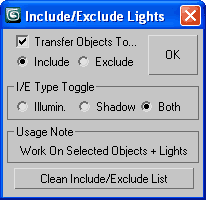
Quick Include/Exclude Lights

30 votes

qIEL_1.1

Select your objects and lights, choose I/E ops and check "Transfer..."
(if you like) to move existing obj(s) into the new I/E List.
Works on all geometry + renderable shapes (as original I/E feature designed).

Virtual GI v.0.3b

16 votes

This is the version 0.3b of the Virtual Global Illumination (VGI) script, and allows to simulate the Global Illumination outside.
Simply, a light sphere is created about to an object selected to simulate the bounce of the ray in the object.
VGI is very useful to preview some short animations in "Virtual GI" using not only the render Scanline but Mental Ray engine with very short times for the rendering! Optimum to illuminate integer scenes outdoor with a hot and suffused light.

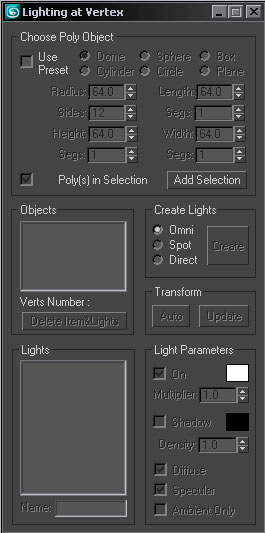
Lighting at Vertex

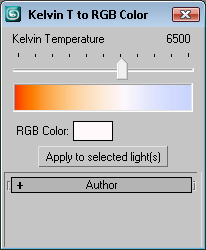
Kelvin T to Light Color

19 votes

Hi,this is my first script so I will be happy to get some comments. With this script you can check the rgb color that match any Kelvin temperature from 1000 K to 10000 K. Also you can set that color to all selected lights.
The script can be found in Lights category of the user interface.

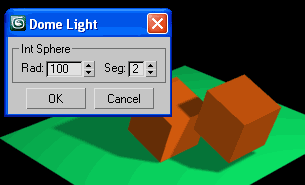
Dome Light

21 votes

Create sphere array of lights to simulate GI for fast rendering.

Dome Light