Tagged 'instance'

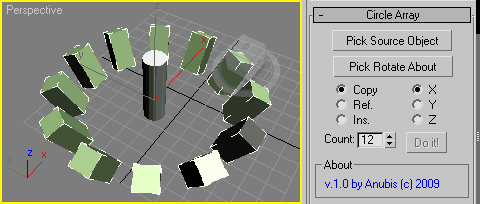
Circle Array

27 votes


Like 3ds Max Array tool but with custom picked rotate axis.
The rest you can see in the screenshot.

Enjoy!

Copy and Acquire

0 votes

This is a simple maxScript to make a copy from a base object and Acquire Position Rotation Scale and Material from the targets.

copy and acquire v1.0

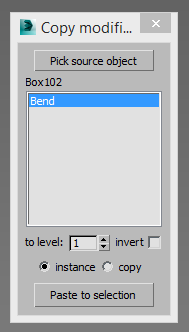
Copy modifiers

4 votes

Simple tool for copy/instance modifiers from source object to selected array of objects. Does not copy only edite_poly modifier because 3dsmax does not allow doing this by script.

findInstances

4 votes

Finds instances of the selected object and does various things to them such as selecting them - printing their names - etc.

Instancer

4 votes

A toolbar button that replaces the selected objects with instances of the object you pick after hitting the button. In other words - a UI version of maxscript's InstanceReplace command.

InstanceMoveLink

4 votes

Little utility to copy/instance and parent many objects at once

instanceTrimmer

9 votes

Takes a selection and reduces the selection to include only a single instance from each set of instances.

Tutorial:

Make a sphere and instance it once. Make a 3rd sphere, copy it once. Select all 4 spheres. Run the script in UI mode. Hit Do. Now your 3rd, 4th and either the 1st or 2nd sphere is selected.

instancer

0 votes

Script makes instances of picked main object from all selected objects.
Target objects can be replaced (deleted, primary script function) or leave untouched.
New objects can copy scale or rotation from their previous versions.

Exaples:
Have some copies of some object (not instances) and want them change all same way.
- Convert them to instances, change them at once by editing just one.

Want to make instances of main object at every object's position from selection

CopyClick

12 votes

-- Copy by Click
-- V1.0

-- How it works?
-- 1. Select objects
-- 2. Execute CopybyClick
-- 3. Click to make a instance of selection
-- 4. ESC or rightclick to cancel

------------------------ THE CODE ------------------------

macroScript CopybyClick
category:"AGGTools"
buttonText:"CopybyClick"
tooltip:"Copy by Click"

(

fn CopyClick =
try
(
maxOps.cloneNodes $ cloneType:#instance newNodes:&nnl
select nnl
Sel=selection
p = point pos:Sel.center
p.pos.z = 0
ClickPos = pickPoint snap:#2D ()
ArrayFiltroGroupHead = #()

Move/Clone to cursor

0 votes

Hi, this is simple script which move or clone selected objects to surface under cursor. You can bind it to any hotkey (I usualy use Alt+S and Alt+C). In this current version additional settings are avaiable only by hidden function call ObjToCursorSettings() which can be called via MaxScript Listener.