Tagged 'manager'

Advanced Bend Modifier

6 votes

A maxscript that gives the user more control over the bend modifier
It lets the user input a width and the script will move the center to get the correct width

features:

- uses smart snap to snap to a custom grid
- easily choose angle and direction
- apply new bend modifier with correct offset
- auto update current bendmodifier with selected settings
- realtime update of all settings!
- support for all 4 directions and 4 angles (90 180 270 360)
- choose your final width
- modify multiple selections at same time
- snap position to grid

Noise Manager

2 votes

A tool used for setting noise controller values on a selection of objects containing position and/or rotation noise animation tracks.


General Notes:

- Noise controllers must be added either directly to the main Position or Rotation tracks or setup as a list controller with a single noise in any available list track.

- Does not support multiple noise controllers on a single object. Does not support nested list controllers. Does not support noise float tracks on XYZ controllers.

Time-Ranger

2 votes

Sets up time-ranges in Max and embeds it to the max file.

Very useful tool when you have multiple time-ranges in your single animation file. Mostly used for games - but can be used for many other purposes as well.

Sometimes it's useful to have many animations of a character in one file - so its start and end positions match between the different animations. TimeRanger lets you choose which section of the animation to show in the timeline.

FumeFX ModernUI

0 votes

FumeFX ModernUI is a tool for 3ds Max that helps reducing repetitive tasks when simulating with FumeFX. It has a clear interface (therefore the name) and comes with an easy to use installer.

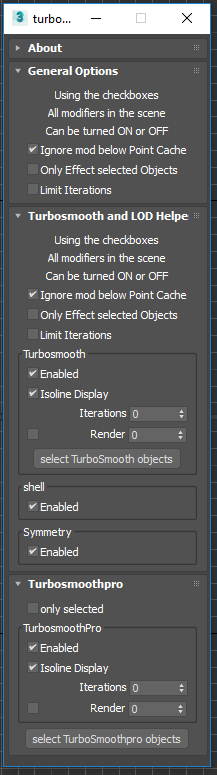
Toggle Turbosmooth , shell , and Symmetry

2 votes

Turbosmooth helper dialog

This is a simple script allows you to quickly toggle ( on or off ) all: turbosmooth , shell , and Symmetry modifers in the scene. I use it to control detail levels while I'm building up a scene. To use:

Corona Render Elements Manager

4 votes

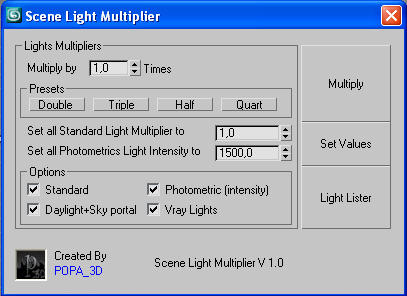
Scene Light Multiplier By POPA_3D

2 votes

Scene Light multiplier let you manage all your scene lights by multiplying their multiplier by a defined value or set all light multiplier to a defined value...

you can chose which lights will be taken in consideration

#Standard will affect:

 target Spot 

free Spot 

Target Directional ight 

free Directional light

Omni light 

Skylight 

mr area omni

BitmapPath in MatLib Relpacer

25 votes

This script can replace all bitmap texture pathes in selected matlib file. You select Matlib file,select directory you want to set, select the bitmap texture directory path you want to replace and thats all. This my first script.

BE CAREFULL. It does not make backups, but uses A LOT OF MEMORY, so if it crashes your matlib maybe damaged. Example: replacing All Evermotion ArchShaders Vol.1 + Vol.2 pathes (in one file for all maps) takes near 2,5GB! Any help and suggestions how to solve this will be accepted. This my first script:)

P.S. sorry for my english

pile

3 votes

selection set manager.
has functions that cause data loss. don't use in production.
otherwise use and modify at your leisure.

Quick Manager

0 votes

This is simple script for renaming and managing objects on the go.

To install script Just
1. Unzip "Quick Manager v1.0.rar"
2. Keep "MyLibrary.mat" to that folder if you are going to keep that folder.
If you are going to delete that folder, then put "MyLibrary.mat" to following location - "C:\Program Files\Autodesk\3ds Max 2017\materiallibraries"
1. run "Quick_Manager_1.0.ms" from MAXScipt-Run Script.
2. Then go to Customize-Customize User Interface.
3. Find "Quick_Manager" Under "Sharad Tools"
4. Assign Shortcut for it.

Script will Renames objects