
IndexJet

Ultra-Fast File Organization & Archive Processing for 3D Artists + Power Users
by EKDtools

What is IndexJet?
IndexJet is a professional-grade file organization and archive-processing tool built especially for:
-
3D artists
-
Architectural visualization workflows
-
Large asset libraries
-
Complex folder structures
-
Anyone who wants fast, automatic file cleanup
It intelligently reorganizes your folders, matches preview images with compressed archives, extracts files, removes duplicates, flattens messy directory trees, renames assets consistently, and validates 3ds Max project structures.
Whether you have hundreds or tens of thousands of assets, IndexJet turns chaos into clean, structured, ready-to-use libraries.
Key Features
Smart File Organization Automatically matches images with archives or folders, renames everything in clean sequential order, and standardizes your structure.
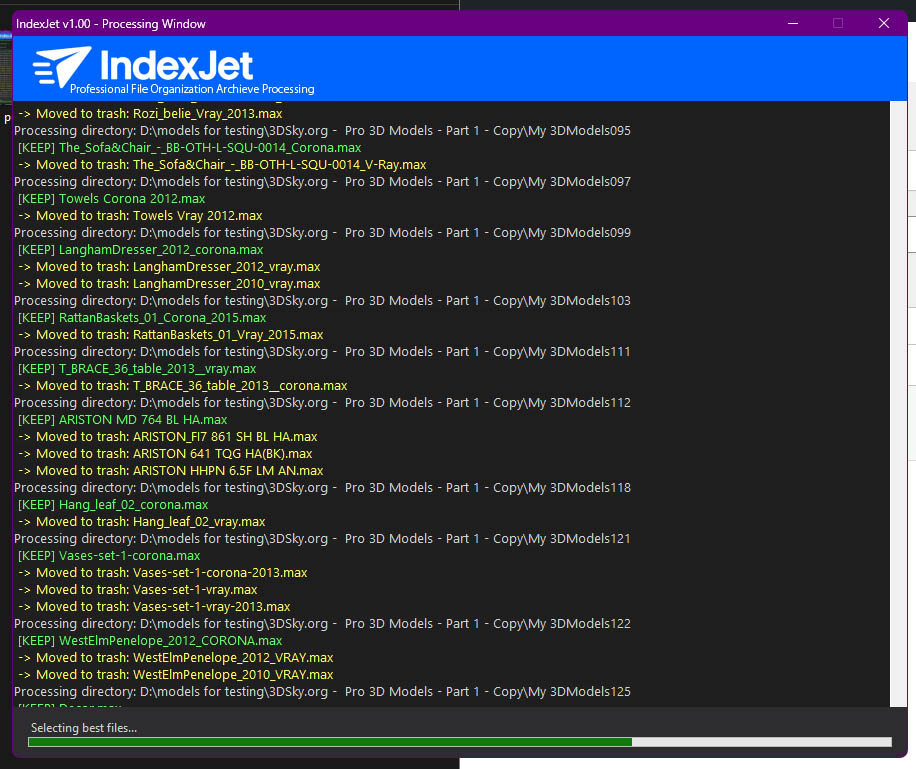
Advanced Archive Extraction Supports ZIP, RAR, 7Z, TAR, GZ, BZ2—including nested archives inside archives. Features fast multi-core extraction.
3D-Aware Intelligence Understands .max files and helps you manage versions:
-
Detects Renderer: Corona, V-Ray, Fstorm, Arnold.
-
Smart Selection: Selects the best file based on renderer priority and version year.
-
Trio Validation: Ensures each asset folder has a clean trio (Image + Folder + .max file).
Folder Flattening Turns deep, messy directories into clean, accessible folders.
Cleanup Tools Removes unwanted file types, empty directories, duplicates, and orphaned content.
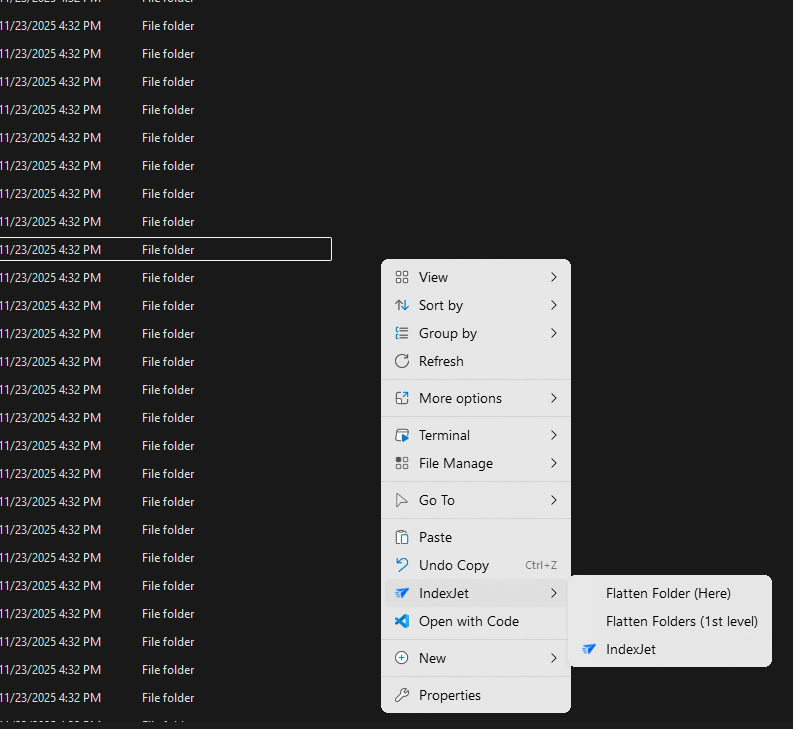
Context Menu Integration Access IndexJet directly from Windows Explorer.
Fast & Modern UI Theme-aware interface with live progress tracking.
Parallel Processing Uses multiple CPU cores for lightning-fast archive extraction.
How to Use IndexJet — Simple Scenarios
1. Organize a Single Folder Perfect for quick sorting of images and archives.
-
Right-click the folder and choose IndexJet.
-
Enter your filename prefix (e.g., project001, project002).
-
Choose Working Level: Here.
-
Pick your renderer priority.
-
Optionally enable Full Mode and start processing.
-
Results: Clean renaming, matching, optional extraction, and full structuring.
2. Organize Multiple Subfolders at Once Great for large libraries or downloaded packs.
-
Right-click the parent folder.
-
Choose Level1 mode.
-
Global numbering applies continuously across all subfolders.
-
Utilizes shared trash and storage folders.
3. Quick Organization (No Extraction) Use Simplified Mode to match and rename without touching archives.
4. Full Processing with Extraction Activates the complete workflow:
-
Extract archives (including nested ones).
-
Flatten folders.
-
Remove junk files.
-
Validate .max trios.
-
Convert image previews.
-
Clean everything perfectly.
IMPORTANT NOTICE — Read Before Using IndexJet
IndexJet performs automatic file movement, renaming, extraction, and cleanup. Because of this, files will be moved, renamed, reorganized, or deleted during processing.
ALWAYS make a full backup of your data before running IndexJet.
EKDtools is not responsible for any data loss. By using IndexJet, you confirm that you have read this warning and created proper backups.
Core Concepts Explained
Working Levels
-
Here: Processes only the selected folder. Uses local numbering (001, 002, 003...).
-
Level1: Processes all first-level subfolders. Uses global numbering (continuous across all folders).
Processing Modes
-
Simplified Mode: Fast and safe. Matches, renames, and trashes orphans.
-
Full Mode: Complete processing, extraction, trio validation, flattening, and deep cleanup.
Renderer Priority
If multiple .max files exist, IndexJet keeps only the best one based on:
-
Your chosen renderer.
-
The newest 3ds Max version.
Archive Extraction
-
Supports ZIP, RAR, 7Z, TAR, GZ, BZ2.
-
Multi-core extraction.
-
Recursively extracts nested archives.
-
Stores original archives in an "Original compressed" folder for safety.
-
Note: Requires 7-Zip (installed automatically with IndexJet).
Trio Validation
IndexJet ensures each asset is complete with:
-
Folder
-
Image (.jpg)
-
Matching .max file Anything incomplete is moved to trash.
Trash & Storage Folders
Nothing is automatically deleted permanently. Trash and original compressed folders allow for safe rollback if needed.
Installation & Activation
Installation
-
Run the installer.
-
IndexJet adds context menu items and creates a desktop shortcut.
-
Registered in Add/Remove Programs.
Activation
-
Enter your activation key.
-
Online validation is required.
-
License: Tied to hardware (No Transfer Allowed).
-
Includes one year of Updates and Support.
System Requirements
-
OS: Windows 10 / 11
-
PowerShell: Version 5.1+ (Updates automatically during installation)
-
Dependency: 7-Zip (Installs automatically during installation)
-
Permissions: Admin rights required for context menu integration
-
Network: Internet connection required for activation
Best Practices
-
ALWAYS BACKUP FIRST.
-
Test on small folders before processing large libraries.
-
Start with Simplified Mode to get used to the workflow.
-
Use correct renderer priority settings.
-
Review trash folders before permanently deleting files.
-
Keep original compressed files until the organized library is fully verified.
- Plugins
- 3D Asset Library
- 3D Asset Manager
- 3D Library Manager
- 3D Model Organizer
- 3ds Max Tools
- Animation Tools
- Archive Extraction
- Asset Export
- Asset Management
- Asset Sorting
- Automation Tools
- Batch File Movement
- Batch File Processor
- Batch Rendering
- Custom Scripts
- Digital Asset Management
- File Cleanup
- File Movement
- File Organizer
- File Renaming
- File Sorting Tool
- Folder Structure Cleaner
- Lighting Tools
- Material Scripts
- MaxScript Debugging
- maxscript editor
- MaxScript Functions
- MaxScript Performance
- MaxScript Plugin
- MaxScript Utilities
- MaxScript Workflow
- Mesh Cleanup
- Mesh Optimization
- Multi-Core Extraction
- Project Cleanup
- Render Farm Scripts
- Rendering Tools
- Rendering Workflow Tools
- Scene Cleanup
- Scene Optimization
- Scene Organization
- Texture and Model Organizer
- Texture Replacement
- ZIP Extractor