Tagged 'procedural'

Chimney maker

1 vote

I wrote this script to make an old smoke chimney. I wanted to use it with the MassFX plugin in max so it had to be made of separate parts and not just a tube. anyway its got a bug ,sometimes the bricks dont line up but a small change on the controls seems to fix it most of the time.

Photobucket

r|shaders CZ

2 votes

r|shaders is a collection of procedural shaders for 3ds max.

-- Update 11/22 : Release 1.0.2 is out, a complete new license scheme with a standalone license tool, it comes from Deep Ocean shader development, until the end of November pricelist will continue to be discounted then it will be 129,00 USD for single license and 169,00 USD for site lisence, unlimited free render nodes for both ;

Stone Placement Tools

255 votes

This script creates stone walls, quad stones pavements and irregular stone patterns for various uses. It's suitable for both realtime and production.

Rock Generator

264 votes

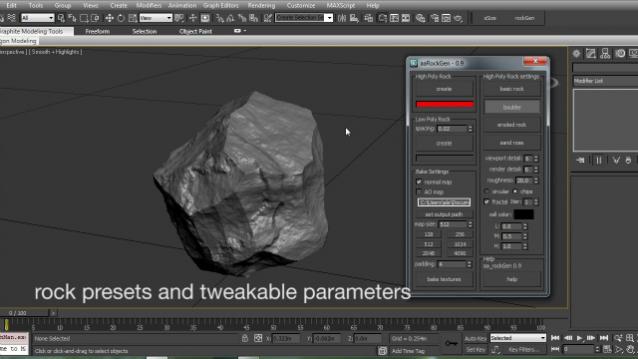
aa_rockGen 1.0 - maxscript procedural rock generator for production and real time environments.

Procedural Array

38 votes

Instructions:

This script allows you to create procedural arrays which stay editable
even after you close and reopen the file. The array objects are linked to
a parent helper which you can transform to your liking while still keeping
array qualities. This is great for creating tiles or roofs where you place the array first and still want to tweak the distance between its elements.

Procedural Map Scale

23 votes

Resize Maps

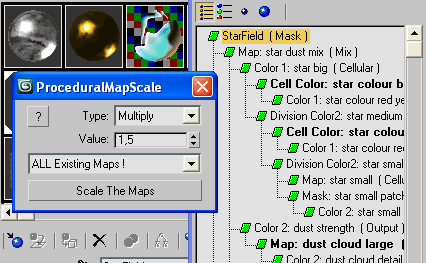
Good for global rescale at once the size of all procedurals.
Works on any resizable procedural map.

WireFence

62 votes

Create easy WireFence shape (Editable Spline).
WireFence

HollowCube

25 votes

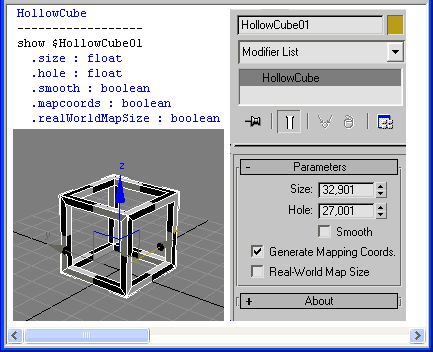
HollowCube is a simpleObject scripted plug-in.
Procedural primitive that I made today for fun.

HollowCube

Installation:
Copy this (.ms) to Max "stdplugs\stdscripts\" folder

Usage:
HollowCube is in the "Create/Geometry" tab in the "Scripted Primitives" menu

Note:

Map Loader

26 votes

1. Run script

2. In Max goto "Customize->Customize User Interface...->Toolbars
tab->Category: ColinScripts->Map Loader
" and drag "Map Loader" to a toolbar, click to run.


Loads maps into the material editor that exist in the scene.  Very straightforward. Support for special Mental Ray Maps and VRay Maps included.


Syndicate content