ScriptSpot

Plugin

SME SearchBar 1.7.1

By TuRan · 2023-04-23

Version
1.7
Version requirement
3dsmax2014-3dsmax2024
Date updated
2024-03-27
Votes
6
Download
Download
Description

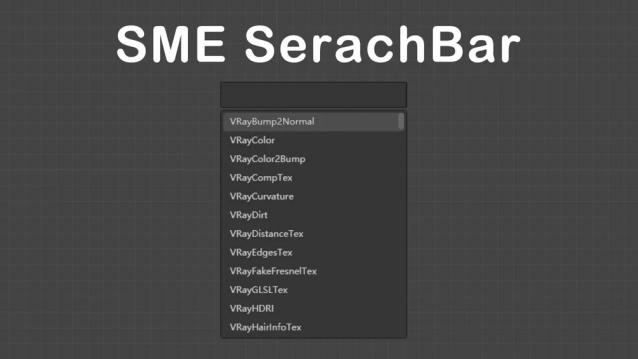
In slate material editor Quick creation of maps and materials by searchbar

V1.7.1 released

1.Making mzp installation package has solved the problem of max2024 installation failure.

notice:Please delete the SMESearchBar.dll file in maxrootfolder\bin before installation.


V1.7 released

1.Allow saving and using custom nodes

2. Cache node data to avoid instance data when opening for the first time, thereby improving the speed of opening for the first time after starting 3dsmax.


Use "-r" to refresh cache

3. Fix some bugs that cause max to crash

V1.6.2 updated

1.Optimize pop-up speed

2.Reduced search latency, keywords entered will be searched instantly

V1.6.1 updated

Move the plugin to the TRViz category under the SME group to allow setting any shortcut keys

V1.6 released

New feature!

Automatically switch to the folder you are selecting (Click on the folder when the selection dialog opens)

Optimize the startup speed, every call pops up immediately

Nodes in nodeview also support star collection

Navigate the current node view show only the root node

 V1.5 released, faster and smoother

Drag and drop the node to where you want to place it

Add a star to common nodes

Use command "-v" to quickly navigate the current node view

--Use the arrow keys or right-click to browse quickly

--there will be more commands in the future

Select texture when creating nodes

Installation:

1. Copy  to "3dmaxrootfolder\bin\assemblies\"

2. Reload 3ds Max

3. Create a new hotkey from category "TRViz"

Version Requirement: 

3dsmax2014-3dsmax2024

changelog

v1.7

1. Allow saving and using custom nodes

2. Cache node data to avoid instance data when opening for the first time, thereby improving the speed of opening for the first time after starting 3dsmax.

Use "-r" to refresh cache

3. Fix some bugs that cause max to crash

v1.6

-Automatically switch to the folder you are selecting

-Optimize the startup speed

-Nodes in nodeview also support star collection

-Navigate the current node view show only the root node

-Verification only requires internet connection on first activation

v1.5

feature

-Drag and drop to create nodes

-Favorite nodes

-Quick navigation

-Select texture materials when creating nodes

-Search optimization, support fuzzy search

-Performance optimization, faster and smoother

v1.0.1

-Fixed the problem that it cannot be activated.

-Fixed the problem that the node was created incorrectly when clicking on the item


v1.0.0
 

Videos

Tags: material, vray, 3dmax, corona, searchbar

Comments (19)

.

jahman · 2023-09-23

nice tool
if you know how to use c# sdk it is possible to add custom action item right into the SME category (no need to make your own category). This will allow user to set any shortcut to execute it. I used spacebar to call similar popup :)

in addition to fuzzy I used capital letter search to narrow down results
i.e. input VRC -> VRayColor, VRayCompTex, VRayCurvature etc...

The key has already been used?

zarko · 2023-06-25

Hi,
I just bought the script - but when I try to activate it, it says key has already been used.
I can send you the receipt if you'd like

zarko · 2023-06-25

There was an issue with my internet connection - everything is ok now. In order to activate this script you need to have an active internet connnection

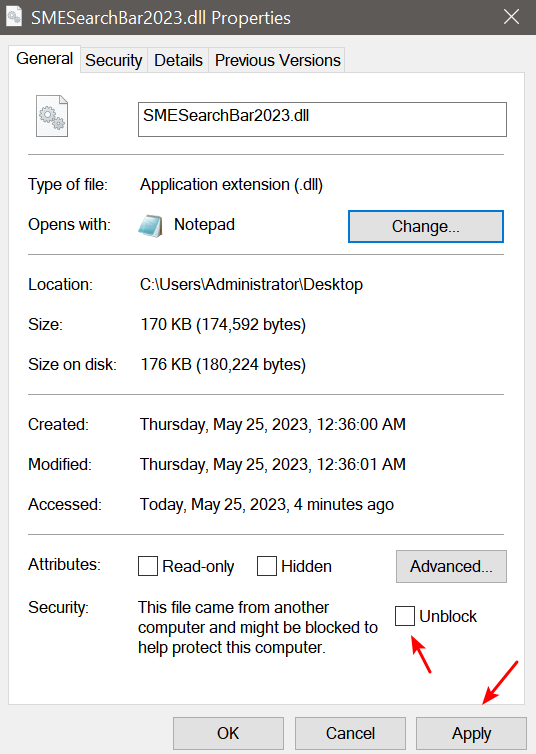
(No subject)

TuRan · 2023-05-24

Riviera · 2023-05-25

Thanks!

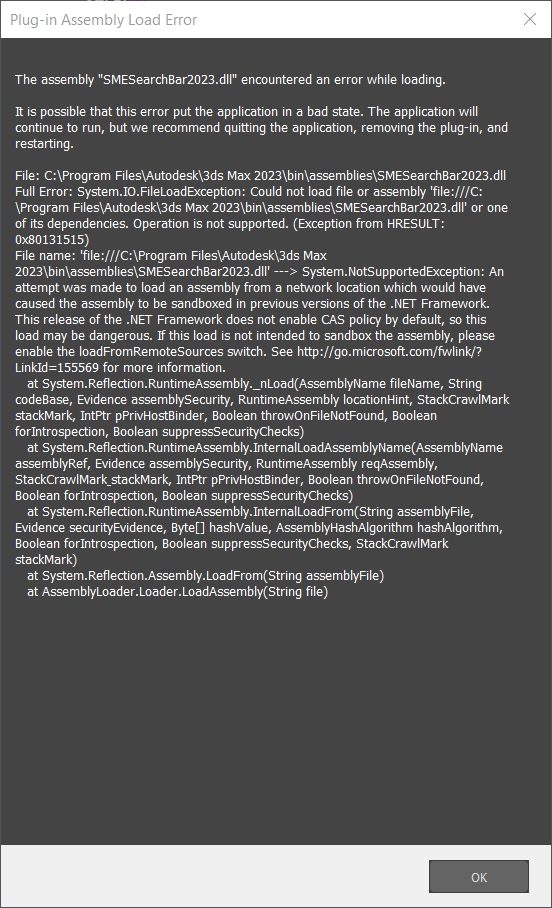
Max.NET Unhandled Exception

Bjoershol · 2023-05-24

I'm getting the same error on startup, Max 2023:

Max.NET Unhandled Exception

System.NotSupportedException: An attempt was made to load an assembly from a network location which would have caused the assembly to be sandboxed in previous versions of the .NET Framework. This release of the .NET Framework does not enable CAS policy by default, so this load may be dangerous. If this load is not intended to sandbox the assembly, please enable the loadFromRemoteSources switch. See http://go.microsoft.com/fwlink/?LinkId=155569 for more information.
at System.Reflection.RuntimeAssembly.nLoadFile(String path, Evidence evidence)
at System.Reflection.Assembly.LoadFile(String path)
at Autodesk.Max.Manager.LoadAssembly(String name, Boolean startingUp)
at Autodesk.Max.Manager.LoadAssemblies()

unhandled exception

filip · 2023-05-23

hello, first thanks for the promising script. Unfortunately I am getting this error message:

"System.NotSupportedException: An attempt was made to load an assembly from a network location which would have caused the assembly to be sandboxed in previous versions of the .NET Framework. This release of the .NET Framework does not enable CAS policy by default, so this load may be dangerous. If this load is not intended to sandbox the assembly, please enable the loadFromRemoteSources switch. See http://go.microsoft.com/fwlink/?LinkId=155569 for more information.
at System.Reflection.RuntimeAssembly.nLoadFile(String path, Evidence evidence)
at System.Reflection.Assembly.LoadFile(String path)
at Autodesk.Max.Manager.LoadAssembly(String name, Boolean startingUp)
at Autodesk.Max.Manager.LoadAssemblies()"

3dsmax2023 win11

TuRan · 2023-05-24

Please send me a screenshot of the error by email and I will send you a test version

Crash in 3ds max 2023 - using Fstorm

l1r1m · 2023-05-23

q

Crash in 3ds max 2023 - using Fstorm

l1r1m · 2023-05-23

q

Crash in 3ds max 2023 - using Fstorm

l1r1m · 2023-05-23

Hi There,

First of all thank you for sharing such a nice script, I am having issues when using this script, I got 3ds max freezes when entering Enter after I type the material/map I want. I only tested it with Fstorm render.
I also wanted to ask if is possible to type just the short word when searching for a material/map for example. vr dist ( and the script would understand that I want to find Vray Distance map)... this features is nicely integrated in houdini search node.

Thanks again for this script and I would really consider buying it or donate if you upgrade/fix the bugs/issues.

This was so needed in 3ds max I am happy to see this script
Keep up the good work

All the best,

TuRan · 2023-05-24

Sounds like a fuzzy search, I'll back him up, the error on fstorm I need to go test

support for 3ds max 2024

rusttm · 2023-05-03

please do support for 3ds max 2024

TuRan · 2023-05-04

ok

rusttm · 2023-05-03

please do support for 3ds max 2024

is it free or paid ?

fajar · 2023-04-29

failed!The key has already been used. I got this error ...
also got activate prompt dropdown

TuRan · 2023-04-29

It's free, I think it may be your network problem

TuRan · 2023-04-29

It's free, I think it may be your network problem