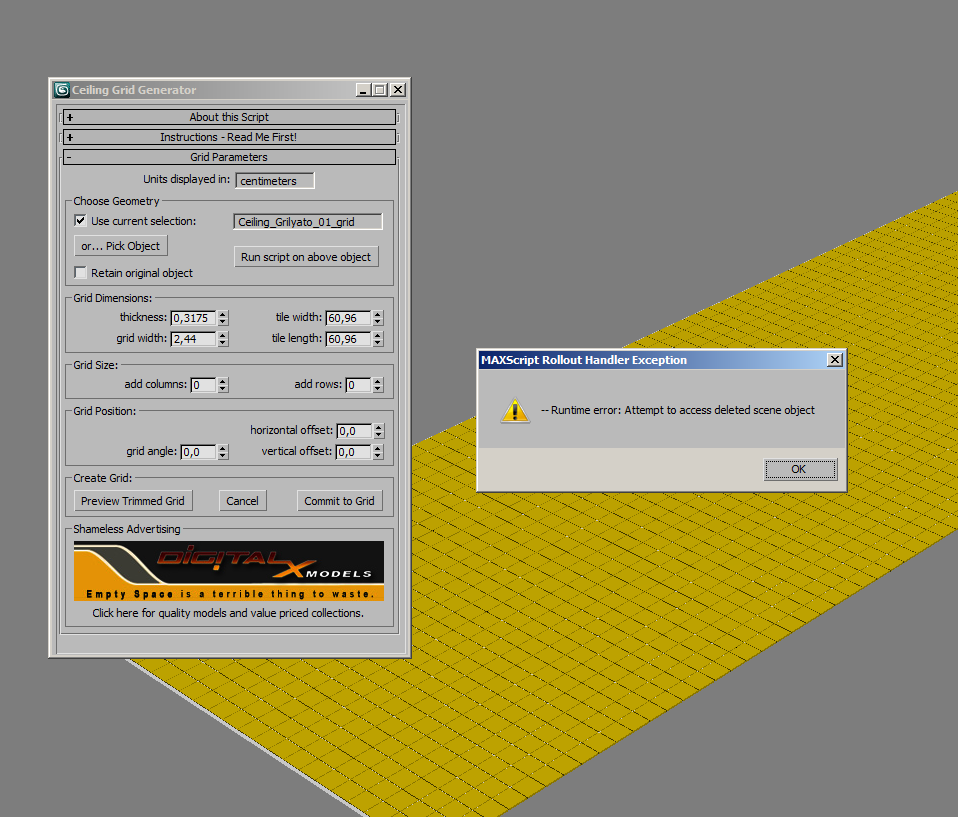
Ceiling Grid Generator is a free MaxScript that will quickly create 'metal' ceiling grids commonly seen in commercial interior spaces where acoustical tile ceiling exists.
This script allows you to set custom sizing for the tile openings, the width of the grid, the height of the grid, and also creates the strips along the border for a nice finished look. You can also shift the grid side to side or up and down as well as rotate the grid. You can then preview the final grid, or go back and make more changes before committing to a grid that fits your space perfectly.
Additional Info
v 1.1
8/30/2010
---- changed grid color to yellow to avoid blending in with light gray viewport backgrounds
---- added support to system scale set to "Feet" and modified min, max, and default settings accordingly
---- modified min, max, and default settings for system scales set to "Meters" and "Millimeters"
---- Command Panel now hides during updates to "Thickness" and "Grid Width" rather than flickering
VideosComments (20)
Doesn't Work on 2014
Iilmattiapascal · 2016-07-08
unfortunately i m not able to make it work on max 2014..
it gives me compile error when i run the script.
it would be wonderful to make it work! really a time saver..
Credit card information?
Ccolincub · 2014-05-24
This script can seriously save a lot of work but i do not understand the need for my credit card information to download a free product! If you want to charge for your script then make a call. I refuse to give my information out to just anybody!
Listen here son
DDerp Meowslurp · 2014-05-25
You don't need to enter your credit card, unless your more Derp Meowslurp than I,
just hit the checkout button
it will give you an reciept, then click the here button to retrieve your scripts.
kids nowadays. smh
Link??
Curtis W. Tooley · 2012-03-19
What a load of BS for a script to try. Not worth the time.
Watch the Video !
JJezUK · 2013-09-20
You need to watch the YouTube video - that way you'll learn that the download is FREE off of digitalxmodels.com......
Ttedhaoyang · 2012-01-25
thank you, it is great.:D
Rrexanteria · 2011-12-22
can somebody pls share this script.. thanks ini advance..
Rrexanteria · 2011-12-22
guys wheres d download link for this script?? thanks
Patterns
Oothoap · 2011-08-20
Have you considered patterns? Like honeycomb
border
Iimpi · 2011-08-19
nice script but how do you control the size (width) of the border?
Download problem
Rrusmo · 2010-11-11
Done the order but no link.
Why don't you just leave the link like normal people do?
Exactly!!
Curtis W. Tooley · 2011-08-19
"Why don't you just leave the link like normal people do?"
Exactly!!
Website issues
Ddigitalx3d · 2010-10-14
Hey folks,
As of 10/13/10, You may be seeing a Security Warning on our website today and tomorrow. We are in the process of migrating to a newer and faster server, but at the same time our SSL certificate has expired, and due to technical reasons, we are just going to wait until the new server is online to activate the new SSL certificate. If you are just wanting to obtain the free scripts, feel free to continue on through the warnings. If you are uncomfortable doing so, then wait another day or two for the new server to come online with the functional SSL certificate. As a reminder the scripts are free, so even though you will be prompted for credit card information, you DO NOT need to enter this info. Simply leave it blank.
Thanks,
John Pruden
DigitalXmodels
Ddigitalx3d · 2010-10-29
In response to my last post, the migration to the new server is finally complete. You will no longer see any invalid certificate warnings. Other than a faster browsing experience, everything else concerning the site is the same as it was.
Vvvkd · 2010-10-01
Every time I try to change "thickness" or "grid width" I'm getting "MAXScript Rollout Handler Exception: --Runtime error: Attempt to access deleted scene object". Сommand panel disappears after such attempt also. Is there any chance to correct this problem? Max:2010SP1x64 Win7x64
I just wanted to add that your script can be used for tile floors too. Once you have the grid, you can Boolean it out of a box and use the selected faces for a grout material. Your script works out the irregular shapes that will occur in some floors. Same idea applies to tile walls too. Just wanted to add that as another use. Great script!
Aassaultzero · 2010-09-18
sorry, i already did that,but the link doesnt appear...really need the script thankss...
Ddigitalx3d · 2010-09-07
I just want to clarify... it is NOT necessary to enter any credit card info. When ordering any free items, you can just leave the credit card fields blank.
To download the script, you need to register and "order" it on our website, and then you will be directed to a download link immediately. You only need to enter credit card info if you are buying something.
crystal3d · 2010-09-03
you have to write down your credit card information on his web site to buy the 0 dollar plugin.
 Curtis W. Tooley · 2012-03-19
 crystal3d · 2010-09-03