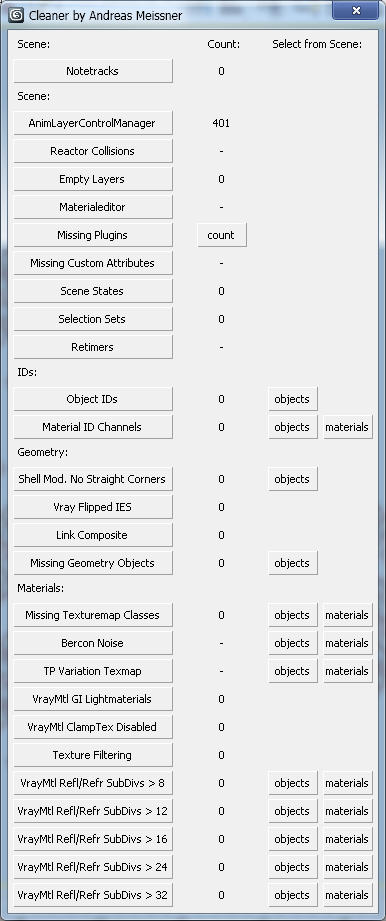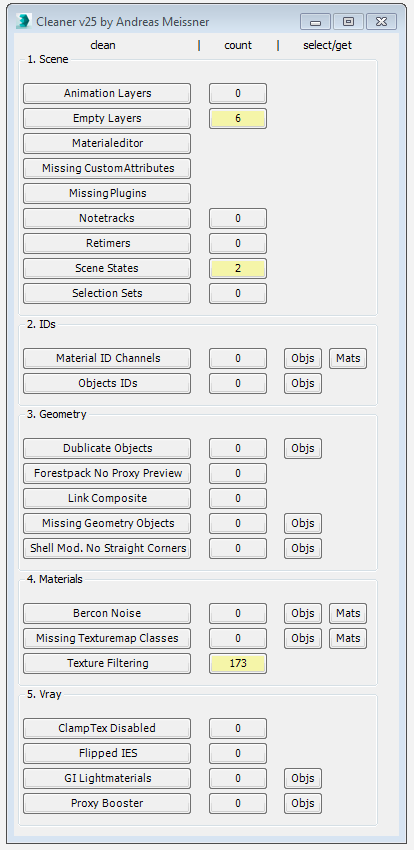
This tool can help you to clean and speed up your scene. Hover with your cursor over the clean-buttons to see tooltips for further information.
Script
 By real08121985 · Credited author: Andreas Meissner · 2012-05-09
This tool can help you to clean and speed up your scene. Hover with your cursor over the clean-buttons to see tooltips for further information.
Installation:
Tips:
WARNING: I DONT GIVE ANY WARRANTY, USE AT OWN RISK, BETTER SAVE SCENE BEFORE USE
Tags: cleanup, clean, cleaner, scene, notetracks, andreas meissner
 Ripio Suelto · 2020-08-05
Verified in Max 2020, it works fine, but you should first avoid an error present in the installer:
If you use "install macro.ms", the corresponding macro will be created in your "usermacros" folder and the script will work perfectly the first time you run, but once you restart Max it won't work anymore by throwing an error alert (something like "...undefined (+)..." or something like that, I didn't pay attention).
Ok, fix it: forget "install macro.ms" and go to the 3Ds Max scripts folder, in this place create a new folder called "Cleaner" and copy in this location the file called "cleaner.ms" and the folder called "clean", both included in the downloaded installation zip.
Finally, you must create a button to start the script, there are many ways to do it, one of them is using scripts like Macroscript Creator or MacroScript Maker, or simply do it manually and place it in any toolbar, menu, quad or shortcut.
The tool is amazing and works very well.
Thanks!
Tommy_LedZep · 2022-03-05
Just wanted to thank you for detailed explanations on how to install this script and avoid the error due to 'install_macro' script.
Thanks @ripio-suelto!
hansolocambo · 2020-02-13
MAXScript error - unable to show details
Is all I get trying to run cleaner.ms, or install macro.ms
Nothing new appears under Customize > Category
Please advise
Another way
kokospb · 2019-12-29
Hello! If the above script doesn't help for some reason, try to enter from the listener window (left low corner) the following:
t=trackviewnodes;n=t[#Max_MotionClip_Manager];deleteTrackViewController t n.controller
and Enter
gc()
and Enter
freescenebitmaps()
and Enter
clearUndoBuffer()
and Enter
Dramatically reduced the file size and stability in my case.
3D Walkthrough
auctechit12 · 2019-12-07
Nice Blog With Full of Knowledge
Thanks For Sharing.....
We have also World Class Company best 3D Walkthrough
http://auctechitsolutions.com/
troubles running the script
dianaguney · 2019-02-19
I have a huge file in 3dsmax that I urgently need help with . I try to use the script to shrink the size of the file but I cant seem to get it through because 3dsmax shuts down.
here is how I did it step by step:
*I downloaded the file cleaner_25 zip
*I go to run script and choose the install macro file
* I go to customize user interface--> toolbars and click on new ( I name it cleaner) and than I drag the "cleaner" to the new
*Now here is where I experience trouble. When I click on the cleaner rectangle that is created, 3dsmax shuts down with an error message : syntax error: at bad, expected, (factor)
PLEASE someone help me, what am I doing wrong? I really need help.
Cleaner button
anja00 · 2018-12-14
I just cant figure out how to make a button for cleaner script. I know how to make a button under 'Customize User Interface' but have no idea how to ''connect'' it to the Cleaner script. Is anybody so kind to explain it..? :(
grasshopper · 2018-12-19
In Customise user interface go to toolbars, select #Scripts Category and drag the Cleaner action to a toolbar on your interface. The icon will change in areas you can drop it.
Automation
grasshopper · 2018-12-04
Hi, What a great script, Thanks so much for this.
Is there any way to activate the individual scripts in the zip file without using the interface? We are plagued with animation layers and would love to automatically run most of the scene cleaner scripts on every file we open. Thanks.:)
WOWWWW
Haroon · 2018-11-21
THANKS ALOT MAN. IT SAVED MY TIME
proxy booster
 subfeel · 2018-08-22
hi!
in one of my scenes i've launched cleaner and had 127 of "proxy booster".
can you please add some info details about them.
when i press it all of my proxys preview option changed to another and after that i had more lags and viewport became slower =(
Awesome
 3dmotionstudio · 2018-08-20
Hello, Thanks for sharing this awesome script, I use it always. Thank you, Andreas!
3D Architectural Rendering
suggestion
 jsrocha · 2018-08-17
Hi, can i make a suggestion? create a button to clean only empty selection sets. I think that would be a useful option.
Thanks!
flavio3d2009 · 2018-08-16
ERROR IN 3DS MAX 2016
Thank you!
THINKTANK · 2018-05-16
An amazing script that should be a standard as part of Max / Vray!
Would be amazing if you could set up an automation version so you check which options you want to apply to a file and you could 'batch' multiple max files and apply the cleaning settings that you had selected to them max files.
if error
 x_OL · 2018-03-03
Just try additionaly drag cleaner.ms into viewport after draging install macro.ms. It was help me
Best Cleaner
Studio2a3d · 2018-01-19
Thanks for the update! This is one of the best scripts. We use it all the time at Studio2a. Thanks!
negative scaled objects
 Baileykos · 2017-12-19
Hello, select negative scaled objects and it will help, just try it once.
real08121985 · 2017-09-26
Thanks for your feedback, I do appreciate all your positive comments. You can find an updated version of the Cleaner that I'm currently using at work. It wont freeze during counting and has some new features like the awesome Proxy Booster by my coworker René Grosser :)
Nice simple and effective cleaning script.
 nnq2603 · 2017-09-30
My god, so long time. I thought you drop this script for years. Thanks for sharing the recent version. Good luck.
BTW, seems there's error in installing process of this version. You extract it to multi-small ms files and 1 macro script. But I install and restart 3ds max always returns error msg:
---------------------------
MAXScript MacroScript Error Exception
---------------------------
-- No ""+"" function for undefined
---------------------------
OK
---------------------------
Manually run script would work but couldn't get it to run each time restart 3ds max.
I try version-2.5 on more than 2 systems and it doesn't work.
nnq2603 · 2017-10-07
It doesn't work on 2014 after each time restart 3ds max (tried both at home and at work), only work the 1st time. So I've to make it back to old way. For anyone use 2014 and it doesn't work like me, then use this macro script to install instead of the one from author package.
macroScript oldway
	category:"# Scripts"
	tooltip:"Cleaner 2.5"
	buttonText:"Cleaner"
(
	on execute do fileIn "C:\\Program Files\\Autodesk\\3ds Max 2014\\scripts\\Cleaner\\cleaner.ms"
)
Robbert543 · 2018-07-31
Hi Andreas,
Thank you very much for your script, it helps me pretty much daily.
Is it an idea to include an option for VrayFastSSS materials to be set to raytraced instead of prepass based illumination map?
Thanks again!
You saved my life, Robert543
marcoscgart · 2018-10-19
Struggling with a downloaded 3d fruit form internet, my work refuses to render. Changing this option make my scene great again, thanks!
Brilliant!
 FireFly · 2017-09-26
I'm using it all the time! Makes your scene files so much smaller, faster and better to handle! Thank you! (Sorry for the inflationary use of exclamation marks.)
Issue with Missing Plugins function
Tommy_LedZep · 2017-09-25
Hi,
Thank you for this awesome script, I use it all the times.
I have the following issue when clicking on the "Missing Plugins" button:
MAXSCRIPT Rollout Handler Exception
--Unknown property: "cLab5" in Rollout:cCleanerRollout
It happens even with a fresh new empty scene (3dsmax 2016).
Can you help please ?
Thank you !
Awesome
Realspace3D · 2017-09-01
Very useful even now that years has passed I'm still using the cleaner tips you recommend. Awesome!
Add a funtion to remove AnimLayerControlManager into Cleaner
jefim · 2017-08-28
Thanks nnq2603
You can download modifed script here:
 Vrender · 2016-12-16
Best 3ds max script!I use this script from 2012 !Thanks Andreas!
Thanks!!
nikobus · 2016-07-14
Thank you a lot man, you really help me with a big problem in very huge files!
Super useful!
Add a funtion to remove AnimLayerControlManager into Cleaner.
nnq2603 · 2016-07-14
(struct s( tName = "--Scene--AnimLayerControlManager",

			tTooltip = "\
			3ds Max tends to automaticly save animation layers stuff. \
			However these animlayers can become quite numerous and dramatically increase the size of your scene and make saving process extremly slow. \
			So it is a good idea to keep an eye on these automaticly created notetracks and clean them from time to time. \
			Remember that you will import animlayers from other files if you are using xrefs. \
			Cleaning just the scene doesn't solve the problem, you got to clean the xref aswell or you will import the animlayers everytime you load the xref.
			",

			fn autocount =
			(
				try (getproperty trackviewnodes.Anim_Layer_Control_Manager.controller #animlayers).count catch ("-")
			),

			fn clean =
			(
				try
				(
					(getproperty trackviewnodes.Anim_Layer_Control_Manager.controller #animlayers).count=0
					gc()
				)
				catch()
			)

		);)(),
I figure out how to integrate a useful feature into this script (based on Spacefrog answer from Autodesk 4rum - forums[dot]autodesk[dot]com/t5/3ds-max-3ds-max-design-general/3dsmax-2014-huge-filesize-and-empty-file/), since the author of Cleaner no longer update his script. You can just copy the block of code above and paste into between 2 other blocks. Example between 1st and 2nd blocks, then restart max, it'd looks like this:
syntax error
khomaniac · 2016-07-27
Hey :D I have tried to import this in to my current script but when I try to run the script it always gives me some kind of syntax error or something (not to mention that I have no clue on scripting :d ) but this looks like it could save a tons of problems :D Would you be kind to provide me script file with imported line/code so that I can compare with mine in order to determine where I went wrong? Thank you very much! :D
C:\Users\***\AppData\Local\Autodesk\3dsMax\20** - 64bit\enu\
nnq2603 · 2016-08-28
Try modify the file called "_ Scripts-realCleaner.mcr" in C:\Users\***\AppData\Local\Autodesk\3dsMax\20** - 64bit\enu\UI\usermacros\_ Scripts-realCleaner.mcr or similar path. :D
I cant see this window in max
nodar1978 · 2016-06-18
Hi Guys, I download all 8 files, and insert them in max2012/script folder, and when i go to run script, i have to run them one by one, any idea how to run complete window?
thank you in advance
Nodar
 biglittlepictures · 2017-06-27
Me too, window doesn't appear. (Max 2017.)
What's frequent cause "Link Composite cleaning" unfunctional?
nnq2603 · 2016-06-08
I've got some max file always hang at Link Composite cleaning button pressed. Yes, they're modeled from autocad drawing and I wanna try to purge those things. Many times it works. But sometimes, it hangs forever and I have to kill 3dsmax.
So I was curious about what're those frequent cause with Link Composite cleaning? Is there any way to just select object involved them without delete them 'coz seems any time (in the given buggy file) I press that button it hangs the max out (and not recover from that state).
retimers
grasshopper · 2016-05-18
Hi
Thanks for the script it has become an integrated part of my workflow. Could you confirm for me, does the re-timer function remove all re-timers or only empty re-timers?
Thanks
real08121985 · 2016-05-20
should only be empty retimers, but better to check it for yourself on a sample scene since the retimer "cleaning got added by suggestion of "hamletik by Artyom and TexeL"
i dont use retimers so i never tested it myself.
grasshopper · 2016-05-23
Thanks,
I don't intentionally use them either but the scene I am working on seems to have 55 thousand of them! When I clean it reduces to 1 and I cant visually tell the difference, so a very useful little addition :)
Works fine on Max 2016 here
Tommy_LedZep · 2016-05-13
Hi,
I use Cleaner on Max 2016 without any problem: did you install last Service pack for 3dsmax (sp3) ?
Hope it helps
Script for Max 2016
elartaf · 2016-05-10
Thank you a lot for this script, I have been using it for a long time, but now I can´t make it works on 3dsmax2016, could someone do anything to fix it?
Thank you!
zahid hasan · 2016-01-12
Hi , i attached a file, which is 17 mb even after using the cleaner. this script always helped before but this time i cant figure out the problem. anybody has a clue?
its 3dsMax Design 2014 file. thanks all.
Solved
zahid hasan · 2016-01-12
this problem is solved by help from autodesk forum.
it removes animation layers. for some reason the cleaner script was unable to see this.
t=trackviewnodes
n=t[#Anim_Layer_Control_Manager];deleteTrackViewController t n.controller;gc()
Can you also add Xref removal?
 crystal3d · 2015-10-08
Hi, as a basic 3dsmax user, i find this script very useful , thank you
If you want to further enhance it, you might try adding the xref removal feature that will be handy for all 3dsmax users i assume.
good day
 er.cchadw.ck@gmail.com · 2015-09-19
Press F1, the help file in 3ds Max explains what scripts are and how to use them. If you don't understand after reading the help, then ask in the Forum section of Scriptspot.
New to Scripting - HOW DO I USE THIS
humdinger · 2015-09-19
Sorry, I am new to this...there are all the scripts to download so put them in the scripts directory. But which do you run? Why are there so many? Help a newbie please!
Vray ClampTex Disabled
grasshopper · 2015-05-19
Hi Andreas,
Thanks for this script. I only started using it recently but am finding it really really useful.
I wonder if you can explain to me what the Vray ClampTex Disabled function does? What is it clamping and how would I go about doing that manually? I need to know so I can test and see how it would effect my scenes. Your script will find and fix them but I can't work out what it's doing
Thanks
I had the same question - ClampTex
 DotScott1 · 2015-10-08
I, too, was curious about what, exactly the VRaymtl ClampTex Disabled is doing. I keep applying it and looking for changes to... anything but I haven't seen anything change yet. What, exactly, does this do?
reply: I had the same question - ClampTex
 mohseni · 2016-04-30
it allow to set colors over the pure white. it kinda break the limitation of 8 bit color input and allow to set colors over 255,255,255. it is there for compatibility issues with early versions. and it has some other applications (but not physically correct) in npr approch. so it must not be used if you want correct result and fast one. it can make vray to calculate for ages if you do not know what exactly you are doing.
macolly · 2015-05-05
A must have ! Seriously man, you own ! Thanx for this !! ;)
excellent script!
finalmethod · 2015-02-22
I used to do notetrack clean manually with a code I found on the Area site, but I had no idea about Retimers, after using this script on problematic scene, it showed I had 88093 retimers! It took about 6 minutes for this script to clean the scene and now it works fast and saves under 1 minute vs 10 minute! Great job!
help
Alyona777 · 2015-03-29
can't download, please help.
attach all objects in each layer
strangeneutrino · 2014-12-16
Hello I didn't know where to post this, i need help with button number 4.
It should attach all objects in a layer, in every layer. any help would be great.
--rollout Panos_Scripts "Vis DWG cleaner"
try (destroyDialog ::rol_Panos_Scripts and ::IRoll) catch() --this removes duplicate dialogs
rollout rol_Panos_Scripts "Vis DWG cleaner"
(
group ""
(
button btn1 "Block Remove" width:100 height:18
button btn2 "Make Unique" width:100 height:18
button btn3 "Shape Remove" width:100 height:18
button btn4 "Attach Obj in lyrs" width:100 height:18
button btn5 "Random Wirecolor" width:100 height:18
button btn6 "Obj name from Lyr" width:100 height:18
button btn7 "Mtl from Lyr" width:100 height:18
button btn8 "AutoEdge" width:100 height:18
)
on btn1 pressed do
(
max select all
for obj in selection do obj.Transform.controller = prs()
b=#()
for o in objects do if classof o==LinkComposite then append b o
delete b
)
on btn3 pressed do
(
delete shapes
)
on btn4 pressed do
(
with redraw off
(
max modify mode
for obj in selection do obj.layer.select true
for o in selection do attach selection
for o in selection do hide selection
)
)
on btn6 pressed do
(
fn renameLayerNodes considerZeroLayer:on =
(
e = if considerZeroLayer then 0 else 1
local getLay = LayerManager.getLayer, layer
for i = e to layerManager.count-1 where ((layer = getLay i).nodes &nodes ; nodes).count > 0 do
(
for n in nodes do n.name = uniquename layer.name
)
)
renameLayerNodes()
) -- dont forget to close
on btn7 pressed do
(
global lmRoll
if lmRoll != undefined do try (destroyDialog lmRoll) catch()
rollout lmRoll " Material from Layer"
(
local matLibPath = "C:/Windows/Temp/"
fn filterGeo obj = iskindof obj geometryclass and not isKindOf obj TargetObject
fn defMtlListArr =
(
local RendArr = rendererClass.classes, txt = "", resultArr = #()
if ((for o in RendArr where matchPattern (o as string) pattern:"*V_Ray*" collect o).count > 0) do ( append txt "v")
if ((for o in RendArr where matchPattern (o as string) pattern:"*finalRender*" collect o).count > 0) do ( append txt "f" )
case txt of (
("vf"): (#("• Standard", "• Arch&Design", "• VRayMtl", "• fR-Advanced", "• fR-Architectural"))
("v"): (#("• Standard", "• Arch&Design", "• VRayMtl"))
("f"): (#("• Standard", "• Arch&Design", "• fR-Advanced", "• fR-Architectural"))
default: (#("• Standard", "• Arch&Design"))
)
)
fn randWcolor clr: bw: toner: cp: =
(
case of (
(clr == true): (random (color 0 0 0) (color 255 255 255))
(bw == true): (rc = (random 0 255) ; (color rc rc rc))
(toner == true): (clr = cp ; clr.s = (random 50 255) ; clr.v = (random 50 255) ; clr)
)
)
edittext etxt_browseDir "*.mat directory:" pos:[0,0] width:0 height:0 readonly:true text:(pathConfig.stripPathToLeaf matLibPath) -- these are to small to see
button btn_browseDir "B" pos:[0,0] width:0 height:0 -- these are to small to see
edittext etxt_matLibName "*.mat name: " pos:[0,0] width:0 height:0 text:"tempMatLib" -- these are too small to see
checkbutton cbtn_UseLWClr "L" pos:[0,0] width:0 height:0 highlightColor:[28,28,28] modal:true enabled:true tooltip:"fuck it" -- these are too small to see
label lbl_ddl_mtlType " material type:" pos:[0,59] width:0 height:0 -- these are too small to see
dropdownlist ddl_mtlType "" pos:[2,2] width:100 items:(defMtlListArr()) tooltip:"pick materilal"
button btn_clm "Material from layer" pos:[2,20] width:100 height:18 tooltip:"do the job!"
local checkArr = #(cbtn_UseLWClr)
fn layerMaterial matpath: mtlTypeCtrl: checkCtrls: cpCtrl: =
(
saveMaterialLibrary matpath
matLib = loadTempMaterialLibrary matpath
idx = mtlTypeCtrl.selection
mtlType = mtlTypeCtrl.items[idx]
for m = 0 to layerManager.count-1 do
(
lmLayer = layerManager.getLayer m
layerName = lmLayer.name
layerColor = case of (
(checkCtrls[1].checked == true): (lmLayer.wirecolor)
default:(color 128 128 128)
)
layerMtl = case mtlType of (
("• Standard"): Standardmaterial name:layerName Diffuse:layerColor
("• Arch&Design"): Arch___Design__mi name:layerName diff_color:layerColor
("• VRayMtl"): VRayMtl name:layerName Diffuse:layerColor
("• fR-Advanced"): fR_Advanced name:layerName diffuseColor:layerColor
("• fR-Architectural"): fR_Architectural name:layerName diffuseColor:layerColor
)
append matLib layerMtl
layer = ILayerManager.getLayerObject m
for n in (refs.dependents layer) where filterGeo n do n.material = matLib[matLib.count]
)
saveTempMaterialLibrary matLib matpath
)
on btn_browseDir pressed do
(
matLibPath = getSavePath()
etxt_browseDir.text = pathConfig.stripPathToLeaf matLibPath
)
on btn_rndLWC pressed do
(
for m = 0 to layerManager.count-1 do
(
lmLayer = layerManager.getLayer m
checkstate = (for c in 2 to checkArr.count where checkArr[c].checked == true collect checkArr[c].checked).count
if checkstate == 1 do lmLayer.wirecolor = randWcolor clr:(cbtn_UseClr.checked) bw:(cbtn_UseBW.checked) toner:(cbtn_UseTone.checked) cp:(cp_Tone.color)
)
)
on cbtn_UseLWClr changed state do (if state == on do for c in checkArr where c != cbtn_UseLWClr do (c.checked = false) ; cp_Tone.enabled = false)
on cbtn_UseClr changed state do (if state == on do for c in checkArr where c != cbtn_UseClr do (c.checked = false) ; cp_Tone.enabled = false)
on cbtn_UseBW changed state do (if state == on do for c in checkArr where c != cbtn_UseBW do (c.checked = false) ; cp_Tone.enabled = false)
on cbtn_UseTone changed state do (if state == on then (for c in checkArr where c != cbtn_UseTone do (c.checked = false) ; cp_Tone.enabled = true) else cp_Tone.enabled = false)
on btn_clm pressed do
(
matPath = matLibPath + "\\" + etxt_matLibName.text + ".mat"
layerMaterial matpath:matPath mtlTypeCtrl:ddl_mtlType checkCtrls:checkArr cpCtrl:cp_Tone
)
)
createdialog lmRoll 100 35 1167 547 style:#(#style_titlebar, #style_sysmenu, #style_toolwindow) bgcolor:[115,115,115] fgcolor:[115,115,115]
)
on btn5 pressed do
(
max select all
(
for i in selection do
(
i.wirecolor = (color (random 0 255) (random 0 255) (random 0 255))
)
)
)
on btn2 pressed do
(
groups = for o in helpers where isGroupHead o collect o
while groups.count > 0 do
( ungroup groups[groups.count] ; groups.count = groups.count-1 )
max select all
for obj in $ do
(
if (InstanceMgr.CanMakeObjectsUnique obj == true) then
(
InstanceMgr.MakeObjectsUnique obj #individual
)
)
)
on btn8 pressed do
(
disablesceneredraw()
original_selection = getcurrentselection()
count = selection.count
max modify mode
-- Running Autoedge on grouped objects breaks Max very badly and unrecoverably on some systems.
-- (Something to do with UI enables code). This loop traps for it.
for i in selection where isgroupmember i == true do
(
messagebox "At least one selected object is a group member.\nObjects must be ungrouped before being AutoEdge-d.\nPress OK to process non-grouped objects."
new_selection = #()
for j in selection where (isgroupmember j == false) and (isgrouphead j == false) do append new_selection j
count = new_selection.count
original_selection = new_selection
select new_selection
exit
)
for i in selection where classof i.baseobject == trimeshgeometry do -- Takes care of Acad 'Mesh' objects
(
AddModifier i (Turn_to_Mesh())
convertToMesh i
)
max modify mode
for i in 1 to count where ((classof selection[i] == Editable_Mesh) and (isgroupmember selection[i] == false)) do try
(
select selection[i]
modpanel.setCurrentObject selection[1].baseobject
subobjectLevel = 2
max select all
meshops.autoedge $
subobjectLevel = 0
select original_selection
)catch
(
enablesceneredraw()
redrawviews()
)
enablesceneredraw()
redrawviews()
)
)
createDialog rol_Panos_Scripts height:215 width:120 pos:[150,200]
--createDialog Panos_Scripts 500 100
it works but its a slow script
strangeneutrino · 2015-02-12
The below script is from
www.davetyner.com
BUT it needs a little refinement. Its quite slow. any ideas?
--cluster attach courtesy of Tyson Ibele at http://www.tysonibele.com/
function clusterAttach objArr =
(
local j = 1
local count = objArr.count
undo off
(
while objArr.count > 1 do
(
if classof objArr[j] != Editable_Poly then converttopoly objArr[j]
polyop.attach objArr[j] objArr[j+1]
deleteItem objArr (j+1)
j += 1
if (j + 1) > objArr.count then j = 1
)
)
return objArr[1]
)
--this is the start
(
for l = 1 to layermanager.count-1 do
(
lay = (layermanager.getLayer l).name
thesel = for o in objects where matchpattern o.layer.name pattern:lay collect o
if thesel.count > 1 then clusterattach thesel
)
if thesel == 1 then thesel.name = lay --if there is only one item left in the layer, rename it.
)
thnks!
thhm · 2014-12-16
great script! really useful.
disable normal bump and raytrace reflections.
Fransvh · 2014-10-01
Hi, I love your script, using it a lot.
Would be nice it there where functions to disable the normal bump and raytrace reflection mapping. In my workflow these are the cause of many crashes.
Thank you!
er.cchadw.ck@gmail.com · 2014-09-25
Thank you for this great script!
My scene had 51 million note tracks. Probably from merging my client's V-Ray assets into mine.
I went from 810mb per max file down to 5mb!
Help!!!!!!
stahuu · 2014-09-18
why i can't download????
real08121985 · 2014-09-18
I checked the download link, it works for me.
@ vitalquaD
gLab · 2014-09-16
It seems that Max2014 does remove notetracks automatically when opening files.
So when you open cleaner they are gone already.
I did a quick test with an old Max2012 scene (242MB before, 92 MB after cleaning)
Opening it in Max2014 and resaving it reduces file size to 92MB (no "compress on save" in both versions)
Update ?
 istratebogdanpeter@yahoo.com · 2014-06-22
Great tool, but when shall we expect an update ?
preferably for Max 2015.
Thank you.
vitalquaD · 2014-03-31
Script does not remove Notetracks anymore. 3ds max 2014
remove empty selection sets
jsrocha · 2014-03-14
Hi, could you implement an option to clean only empty selection sets? is it possible?
thanks,
Jsrocha
 barigazy · 2014-03-14
It's simple
fn removeEmptySets = if selectionSets.count != 0 do
(
for i = selectionSets.count to 1 by -1 where getNamedSelSetItemCount i == 0 do deleteItem selectionSets i
)
error removing missing plugin
pieforme · 2014-02-05
I am trying to remove some brazil1 stuff from an old file in Max 2012, and I am getting the following error --Unknown propert:"cLab5" in Rollout. Any ideas?
Thanks
real08121985 · 2014-02-07
If you like upload the file so I can check the script on it.
juumax · 2014-06-27
Sorry its been a while but I am having the same issue with brazil again in max 2014.
Thanks
https://dl.dropboxusercontent.com/u/16347771/brazil_test.max
fajar · 2013-10-03
better UI with dotnet ?
1.6 million notetracks
crystal3d · 2013-10-02
all residing in motiondata section and i could not remove them untill your latest version! thanks again!!!!
 mad · 2013-08-13
try to add ability to remove persistent globas from scene, it can be handy in some cases
edit: not all but by list u can use this code with combination with listbox
persistGlobs = persistents.gather() --gather all persistents
persistGlobsCount = persistGlobs.count -- count them
persistents.remove persistGlobs[#glob name] --remove given persistent
Thank you
obaida · 2013-08-12
its very important script , thank you .
but , if you make it "floater" it will be more handy .
real08121985 · 2013-08-13
floater? Please explain what functionality you miss.
I'm talking about the ui of
obaida · 2013-08-20
I'm talking about the menu of this script , by replacing the last line of the script
(createDialog cCleanerRollout .....)
with
(NewFloater = newRolloutFloater "Cleaner 8" 400 650
addrollout cCleanerRollout NewFloater)
this menu have the ability to scroll , and that will be better
Awesome
 TitusLVR · 2013-08-12
It would be great if you add channel cleaner for UVs
real08121985 · 2013-07-29
Retimers added, thanks to TexeL for suggestion. Sorry for being late, but here we still work with 3ds Max 2012 and have no retimers yet. Also if theres no Vray installed it wont show the vray related tasks.
thank you
ammorymax · 2013-07-25
I work with your script cleaner ... it is very good and useful.. I used it for a
month I understand all button in its dialogue ...but I cant understand (vraymtl clamptex disabled ) and almost I have some number in every file ... please tell me what that mean .... thank
real08121985 · 2013-07-26
"Vray Build 1.50.SP2 (11 April 2008):
(*) Added hidden parameter "option_clampTextures" to VRayMtl, which is true by default for newly created materials (old scenes render as before);"
We had a render problem with the GI causing some geometry to look like they emit light. We could not find the reason until we found a hidden option in the material of those objects called "option_clampTextures". You can not find this option in the materialeditor, you can only access it by script. By default this option is enabled but sometimes (for example Archmodels) got this option disabled. This caused our renderproblems. Enabling "option_clampTextures" solved our renderproblem.
Your scene will not look different in the rendering by enabling this option, but it might prevent/solve some renderproblems.
ammorymax · 2013-07-26
thank you
Cool
 Nevil · 2013-07-25
This is so cool
the script working properly in Max2012 but in Max2014 I got this Error
-- Type error: getClassInstances requires MAXClass, got: undefined
line 734: local lLightMtlTvps = getclassinstances VRayLightMtl astrackviewpick:true
real08121985 · 2013-07-25
You got Vray installed in 2014?
I got it
Nevil · 2013-07-25
yeah, you are right problem was my V ray plug-in on max 2014.
you made a useful tool if you ignore the functions relate to V ray when V ray is not installed that will be perfect ;) this is just a suggestion.
real08121985 · 2013-07-23
Time for an update. I use this script often during work and add new functions on the fly. You see there is a bunch of new problems we had to deal with at work like missing plugins in scenes, treeleafs with filtered textures and archmodels with too many subdivs for reflaction/refraction.
This is the version I use in daily work and its customized for our company's needs, so it might have too many options for your 3d pipeline. Anyway, hope it helps!
RETIMERS
TexeL · 2013-07-20
here is an addition for script to get rid of Retimers
By the Gods - SUCCESS !
ltchest · 2013-05-21
I just have to say, you are an angel, a genius, a frikkin godsend. Your script has saved my bacon. I was suffering migraines trying to figure out why my 10mb files were expanding to 1000Mb and causing my workflow to die, with a looming deadline. I dont know why the scene had 205 million notetracks, but it did. Your script fixed it. My only guess is that Multiscatter caused the problem. The only other slightly exotic thing i used was the ivy growing plugin. Anyhoo, im still working on cleaning up the files, hopefully i have not jinxed it now......
pifitas · 2013-03-02
Thanks, very usefull script
My suggestion:
A "REFRESH" or "UPDATE" button to check is there still objetcs left once cleaned, instead closing and opening the script.
see u
After the cleaning there is
real08121985 · 2013-03-03
-
A suggestion for annoying objects tyes for AutoCAD Architecture
barigazy · 2013-03-21
Somtimes when you import AutoCad models (with windows,doors blocks ...) in max scene you will find a lot invisible objects "LinkComosite" that are very annoying and difficult to find. I use this line of code for cleaning.
delete (for o in objects where classof i == LinkComosite collect o)
chawalit_b2 · 2013-02-01
Good
Use with 3ds 2012
Voltrum · 2013-01-07
Hi! This script look great! But, I try to run him on 3dsmax 2012 64bit but he dont work. I open the "cleaner5.ms" with "Run script..." and nothing happen.
Can you help me? :'(
real08121985 · 2013-01-07
its a macro. you find it in: customize - customize user interface - toolbars - category: scripts
Cool Man :)
mr.aravind · 2012-12-28
Great Post! Thanks a Lot :)
Uninstall
 peprgb · 2012-10-31
Thanks for sharing, i not need now, could explain please how can i remove it?
Best regards,
 asymptote · 2012-10-05
Thanks, very useful, but Pug Ugly....the UI needs some work ;)
real08121985 · 2012-10-07
Go for it, the sourcecode is there.
More than 36 000 000 note tracks less ^^
 bobmorane888 · 2012-10-04
1,2 Go to 70 Mo °°_
A must-have script, thanks !
Great
 timonlp2003 · 2012-08-31
Thanks to save my time, you're Great
Hi real08121985,
barigazy · 2012-09-05
I have a idea. Maybe you can add option for cleaning autoback files.
Sometimes it happens that remain large files.
I think about this concept
autoBackFiles = getFiles ((getdir #autoback)+"/*")
mapped fn deleteLarge autoBackFiles =
(
if autoBackFiles.count != 0 do ((dotnetclass "System.IO.File").delete autoBackFiles)
)
deleteLarge autoBackFiles
Update- added buttons to
real08121985 · 2012-07-12
Update
- added buttons to select affected objects and send materials to materialeditor
- added TP Variation Texmap (something we need to clean at my workplace since not all renderslaves got that installed)
- added Missing Texmap (if the scene you opened uses texture plugins that are not installed on your computer, then these plugins will be replaces by a missing_texmap placeholder, can throw errors on renderfarm)
- fixed the count of object ids and material ids, id=0 will not be counted as id anymore
 hot chip · 2012-07-09
Hi thank you for the Script. But it works not correct with mental ray. Here some code to fix it for mental ray.
# new Function to find mental ray environment shaders
fn shader_compatible shader_definition =
(
local status=off
case classof shader_definition of
(
mr_Physical_Sky: status= on
mia_physicalsky: status= on
Environment_Background_Switcher__mi: status= on
iray_Matte_Environment: status= on
Environment_Blur: status= on
Environment_Probe_Chrome_Ball__mi: status= on
Environment_Probe_Gray_Ball__mi:status= on
Environment_Background_Camera_Map__mi:status= on
Arch__Environment_Blur:status= on
)
if status = on then (return false) else (return true)
)
####################################################################
# Your Functions optimized for mental ray
fn count =
(
local lMatIds = #()
for mat in scenematerials do ( if (shader_compatible mat)==true then ( appendIfUnique
lMatIds mat.effectsChannel )
)
return lMatIds.count
),
fn clean =
(
for mat in scenematerials do ( if (shader_compatible mat)==true then mat.effectsChannel
= 0 )
)
####################################################################
# Your Functions optimized for mental ray
if matchpattern (renderers.current as string) pattern:"v_ray*"
then meditmaterials[n] = vraymtl name:tMat
else meditmaterials[n] = Arch___Design__mi name:tMat
real08121985 · 2012-07-09
Max did not throw an error when I tried it with a MR material but okay it should be fixed now, thanks for your input.
real08121985 · 2012-06-28
Might be useful if you can also clear object ids and material id channels. Tooltips added to the buttons too.
install ?
pdw · 2012-11-12
Hello there
do you know how do i install it ?
usually is a little file .. not a text
thanks for your time
P.
appius · 2012-06-26
those notetracks scripts are too longs. it takes hours to clean.
you'd better follow those instructions:
- open the MAXScript Listener, and type / copy and paste :
trackViewNodes[#Max_MotionClip_Manager].track = copy trackViewNodes[#Max_MotionClip_Manager].track
- Hit enter, then type
gc()
- And hit enter again
http://forums.cgarchitect.com/35748-max-file-grew-too-big-pls-help-5.htm…
real08121985 · 2012-06-26
Thanks! Script is updated, it is also a macro again.
DeanPunchard · 2012-05-14
Would it be possible to have a progress bar for those massive files?
Also, do you know what causes notetracks to appear, as it seems like every other file of mine has millions of tracknotes?
Thanks,
Dean
 tassel · 2012-05-11
Tip:
- Clean Unused Materials from scene ;o)
- colapse Materials with same names to one
Again, very good script with great potential :)
barigazy · 2012-05-11
Awesome cleaner tool. Something like Windows Cleaner but
only for Max. Nice work .+1
Cleaner (Not Responding)
DeanPunchard · 2012-05-11
Hi,
I have a problem file or two, and wanted to check out your cleaner script, but when I run it on the file, Max freezes when I click Clean all selected - "Cleaner (Not Responding)", and I have to kill the 3Ds Max process.
I am running 3Ds Max Design 2012 x64, on Windows 7 Pro x64.
Also, what is a large and small ammount of notetracks to have in a scene? The one I am testing says it has 18385920, is that a lot or a little?
Thanks,
Dean
real08121985 · 2012-05-12
Congrats, 18 million notetracks is a new record, we only achieved 2 millions yet :) That is the reason why cleaner wont respond, it just needs a long time to clean your scene. You might wanna try ctrl+n, this will get rid of the notetracks too, but alot faster.
 spacefrog · 2012-05-11
Looks like a great idea & script !
What would be of great benefit regarding filsizes too, would be biped pose collection cleaning. They tend to slow savings down.There was even a bug some versions ago, where biped generated loads and loads of poses, adding 100's of megabytes to the filesize.
Might be a good idea for a cleaning task...
EDIT:
just looked up the docs, and the mxs interface exposes handy functions for this...
biped.deleteAllCopyCollections <biped_ctrl>
cmjohncheng · 2012-05-10
is it possible clean one by one, like behind the number gv a clean button, or a checkbox infront of the name, checked then clean, coz sometime maybe no need to clean all together.
real08121985 · 2012-05-10
Okay, you can do that now.
TimHawker · 2012-05-09
Great script! +1
Seems to be solving a lot of issues people are having :)
This script could have the potential to be an awesome 'clean crap out of my max file' type script.
It could be enhanced a little to add features such as removing custom attributes from objects and the globaltrack/rootnode, as well as removing persistent callbacks etc, removing all animations, removing scanline radiosity caches, and particle flow caches etc. (Perhaps some of this stuff in an advanced section)
It would also be cool to add checkboxes to each option. I'm sure that some people won't want to always remove empty layers.
Anyway, cool script and thanks again.
Tim
real08121985 · 2012-05-10
A "garbage collector" for maxscenes sounds handy. The script layout is now procedural, you can add your own tasks easily into the struct at the beginning. Maybe share some cool cleaningtasks so they can be added into the script.
I had a look into removing callbacks but it seems impossible to determine persistent callbacks and kinda tricky to remove just certain callbacks. callbacks.removeScripts() and deleteAllChangeHandlers() would erase every scripted callback/changehandler, dunno if thats what people want since some might be important to keep if you got important scripts running in your pipeline that are adding callbacks.
tassel · 2012-05-09
I think you shold do a check on "reactor.clearStoredCollisions()"
2012 and up does not have reactor anymore :)
Anyway, nice script :)
real08121985 · 2012-05-09
Ah true, checked in function 1 but not in 2, thank you.