Detriangulator
Version:
1.0
Date Updated:
04/01/2008
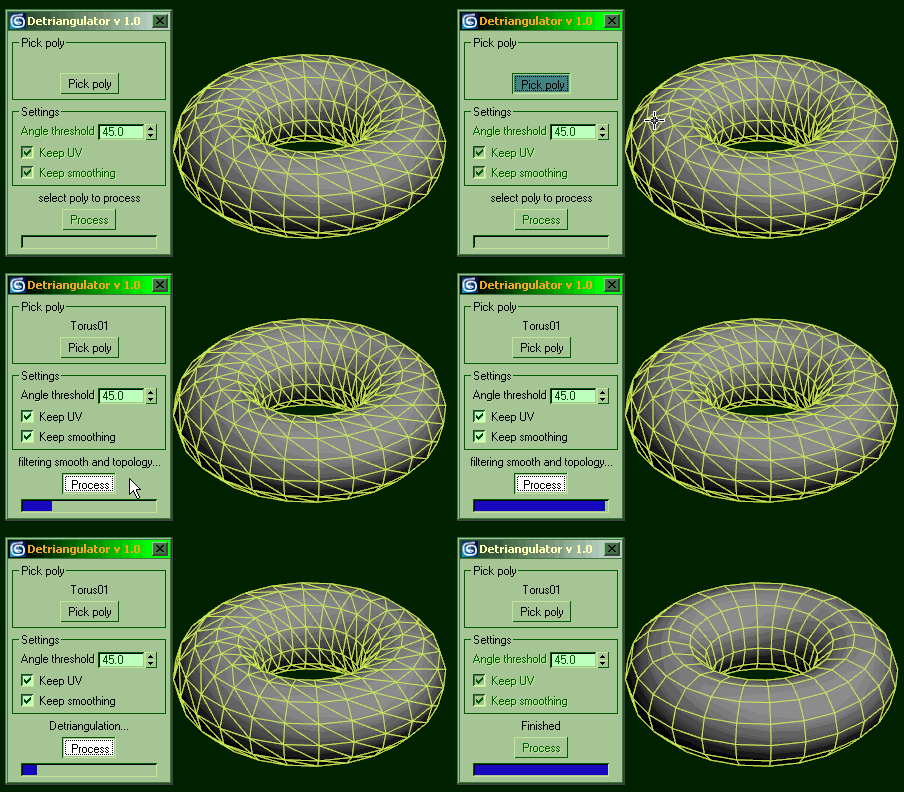
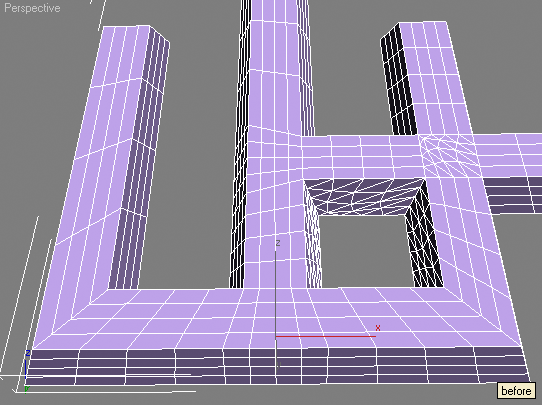
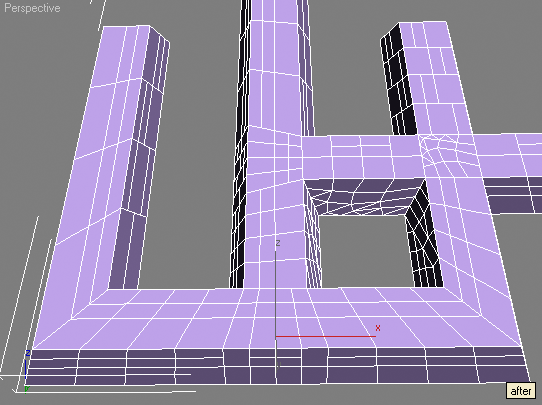
This tool is intended to remove diagonal edges from triangulated editable poly.
Optional features are:
- keep edges that have angle between faces more then specified (set 0 if this feature is not needed)
- keep UV border edges (only 1st UV channel used)
- keep non-smoothed edges
Hint: if you're not happy with the result of the script function just execute undo once, you'll get all removed edges back and selected so you can fix selection and remove edges manually.
Version Requirement:
3DS MAX 6-10 | Attachment | Size |
|---|---|
| detri.gif | 46.88 KB |


Comments
That's a nice tool what I am
That's a nice tool what I am looking for.
Thanks for providing!
This looks great. I
This looks great. I downloaded the file, and in max I went to maxscript and run script. I navigated to the downloaded file and it didn't show up as a msc file. When I tried to run it nothing happened. Please tell me what I am doing wrong!
jarvart
jarvart 2000
http://www.scriptspot.com/script-installation-in-3ds-max
Run .mcr through MAXScript>Run Script
Nothing will happen except OK appears in listener window, but now new macro appears in UI settings.
Now go to Customize>Customize User Interface
Select tab Keyboard/Toolbar/Quads/Menus depending on where you want to run this macro from, select category IN_tools and attach detriangulator to your interface.
Thanks for the quick reply.
Thanks for the quick reply. Will try that:)
Thanks you
Thanks youHere's the implementation of
Here's the implementation of the same method (angles between edges)
http://scriptspot.com/3ds-max/hide-longest-edges, and believe me it doesn't work in production, just in tests :)
But the coolest method is here - http://scriptspot.com/3ds-max/quadrangulate
With the bomb! :)
my scripts and tips/tricks:
www.sergepogosyan.com
This script offers some
This script offers some useful options and works on editable poly.
Unfortunally no bombs here.
Ok, I didn't mean to say
Ok, I didn't mean to say something bad about this script. I just want to say that in production with really crazy meshes it doesn't work. And if it happens to someone, hi/she can use another method.
my scripts and tips/tricks:
www.sergepogosyan.com
Yepp, just another tool to
Yepp, just another tool to try. Some people like it.
interesting plugin i like
interesting plugin i like it cheer's
Great script! thanks a lot!
I want to download this file
I want to download this file but i cant seem to find where i can download it from. Can you please help me ?
Sure, its in the blue
Sure, its in the blue attachment area below the script but above the comments... The author attached the script as a txt file so you'll need to rename it from *.mcr.txt to *.mcr to use it with 3ds Max.
Christopher Grant
Admin, ScriptSpot.com
Exceeeeeeelent idea
Exceeeeeeelent idea !!!!!
The tool of my dreams...
Can we imagine in the same way a unsubdivider ?? ;)
Grea great job, man, keep up the good work !
jerome Prévost (Subburb)
very Good
very Good
it's good,thanks
it's good,thanks
where is the download link
Don't Be a Bitch, Start a revolution.
In attachment area ...
In attachment area ... Beneath "version requirement" and above the first comment...
Christopher Grant
Admin, ScriptSpot.com
Christopher Grant
Admin, ScriptSpot.com
Good Idea ^_^ I tested this
Good Idea ^_^
I tested this script.
See result on images.
Man, this script does
Man, this script does EXACTLY same things that I mentioned in description above.
Sorry no miracles, this one will not replace good modeler, it will give him time for a cup of tea )))
At least you need TRIANGULATED poly for your tests
Great! Many thanks for this
Great!
Many thanks for this handy little gadget!
wow how do u uses this thing
wow how do u uses this thing lol not like other scripts i need help
i run it but after i click
i run it but after i click the pick poly. the process doesnt poke out so i can't click it.and the checks are fade so i can't select the keep uv nor keep smothing. please help me.
hey can you plz tell me how
hey can you plz tell me how to download this script.
You may select editable
You may select editable poly.
Didn't it work on some particular model?
Or it fails to work every time on your system?
very good.
very good.
i now its a stupid cuestion,
i now its a stupid cuestion, im noob at this, where is the download button?. Xd
Take a look at the
Take a look at the attachments section under description.
does this tool support 3ds
does this tool support 3ds max 64bits version?
Awesome tool! You should add
Awesome tool!
You should add support for it to process an array of objects rather than just one!
jackieteh: It does. Jordan
jackieteh: It does.
Jordan Walsh: thanks.
thank you very much........
Hello!! I am a new user in
Hello!! I am a new user in general and it is my first time that I am going to install a maxscript. I didn't understand the way to install it :(... Where can I found the zip file to download it? or there is another away..? I read the http://www.scriptspot.com/3ds-max/tutorials/script-installation-in-3ds-max but I was confused. please if it is possible for you to help me with steps that I have to take. I have 3ds max 9. Thank you very much.
its great. i lost my so much
its great. i lost my so much time to remove these triangles.
thank u creator
Salve of Allah
Salve of Allah
nice script, but very very
nice script, but very very slow.
that other one is much faster : http://www.scriptspot.com/3ds-max/scripts/quadrangulate
and works often fine too.