Script
Facial Animation Control
By floatingworld · Credited author: David Knight · 2010-07-23
- Version
- 1.0
- Version requirement
- Max 9 and above
- Date updated
- 2010-07-22
- Votes
- 12
Downloads
- make_facial_ctrls_14.ms — make_facial_ctrls_14.ms79 KB
- test_mesh.zip — test_mesh.zip3.2 MB
Tags: facial rig, stop staring, second edition, Osipa style
Description
Additional Info
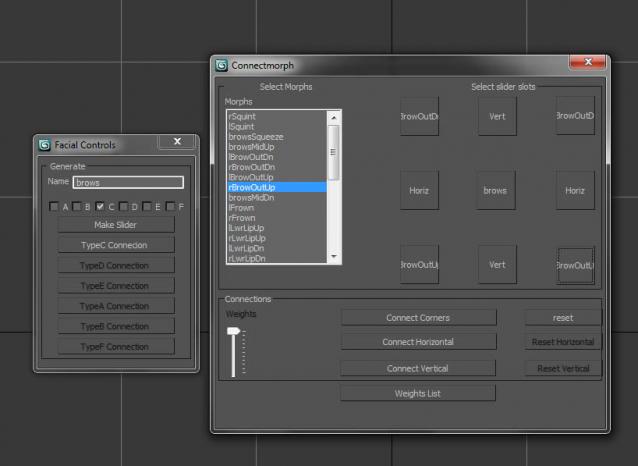
Osipa style Facial animation based on the MEL version from 'Stop Staring' second edition. Creates sets of slider controls and allows for the manipulation of any number of sets of morph targets by the same control set, and subsequent weighting by a seperate roll out.
The functionality of the script replicates that seen on this video;
http://www.youtube.com/watch?v=L5CkNu9S43o&NR=1
Read comments in the script for further information.
The script makes extensive use of Reaction Manager.
(Mesh included only as courtesy - not recommended as some of the morph targets are missing or faulty.)
Comments (13)
Can i use this if im using morph o matic???
sgiovanni · 2013-11-18
my head does not use the regualar morpher modifyer for max, .. it uses morph o matic.. will i still be able to use this plugin?
mhdmhd · 2010-09-20
I tried to run the script various ways on a sphere with two morphs but it always gives an error:
#()
#()
#()
#()
#()
#()
#()
#()
#()
#()
#()
#()
0
0
0
0
0
-- Error occurred in anonymous codeblock; filename: C:\Program Files\Autodesk\3ds Max 2009\Scripts\make_facial_ctrls_backup9.ms; position: 1536
-- Unable to convert: undefined to type: String
OK
$PolyMesh:Sphere01 @ [-0.687897,-0.413971,0.000000]
enablebutton()
-- Error occurred in anonymous codeblock; filename: C:\Program Files\Autodesk\3ds Max 2009\Scripts\make_facial_ctrls_backup9.ms; position: 1771
-- Unknown property: "value" in Morpher:Morpher
getmorphchannelnumber()
facialControltypeA()
facialControltypeB()
facialControltypeC()
facialControltypeE()
facialControltypeD()
facialControltypeF()
connectmorphsD()
connectmorphs()
connectmorphstypeA()
connectmorphstypeB()
getmorphchannelnum()
connectmorphsE()
matchslidername()
getmorphchannelnumberpoly()
-- Error occurred in anonymous codeblock; filename: C:\Program Files\Autodesk\3ds Max 2009\Scripts\make_facial_ctrls_backup9.ms; position: 36272
-- Syntax error: at on, expected
-- In line: on t
splinterD · 2010-09-15
hey
i was waiting for this script to come out for max for a long time
but im sad to say i cant seam to make it work
i can get to the main screen and create the slider but something isn't working with the connection
it connects ok the horizontal but has problems with the vertical
the steps are not explained at all
i dont know what im doing wrong
can you please record yourself doing the setup ??
i really need this script it will save me so much time in the reaction manager
 Gspoutnik · 2010-09-01
1-open the script in maxscript editor.
2-Select a mesh with morphs.
3-in maxscript editor evaluate all (ctrl+e).
the first window opens.
4-name the controller you want,clic enter, select the type.(nb:c is the best) clic on "make slider".
Your new slider appear near 0.0.0
You can select the big rectangle for moving the entire slider where you want.
That's the way for start it.
Close all script's windows and repaeat all sequences for each new slider...
It's a really good script for many animation type...
Thank's for share it.
IKS2k · 2010-08-08
hmmmm ..... max 2009 x64 , max 2011 x64 - not working ...
pacermike · 2010-08-04
Dude, I haven't tested it out yet but this is exactly what we were asking about in the other Stop Staring thread. Way to come through, man! This looks great! Thank God for people like you :)
hirokish · 2010-07-31
Hi.
Nice script.
Thank you very much.
But I have MAXScript FileIn Exception.
select basemesh -> Run Script -> make_facial_ctrls_backup9.ms
-- Error occurred in anonymous codeblock; filename: make_facial_ctrls_backup9.ms; position: 1536; line: 32
-- Unable to convert: undefined to type: String
-- Error occurred in anonymous codeblock; filename: make_facial_ctrls_backup9.ms; position: 1762; line: 40
-- Unknown property: "value" in Morpher:Morpher
max2011 x86 winXP x64
floatingworld · 2010-08-01
thnx...you say its a nice script but it fails to run? Or did u get it running once only? It would be nice to know. I just ran it on my laptop and it runs fine. When do u get the error message? After you set up connections or before? AR u able to create slider at all? It's true I have had some problems with this damn code for some reason I'm not sure of, but the problems above are usually because the mesh has not been selected. My advice is : run script again. Name the slider control. Make sure you press enter. Choose sldier type. default is C type.if the object has no morphs, of course the code will fail. I don't know wnat else to suggest.
I wrote this script for myself really, its idiosyncrasies dont bother me as it works when I want it to, mostly - if it doesn't, I simply run it again. i would like to know why it throws this error from time to time (rarely)up but to be honest, I'm not entirely sure. that's why i have exposed the script for anyone to have a look at and fix for the next version. You are welcome to have a go. I am an amateur scripter only - as i said, I built this thing just so i could do things the original MEL script did. It was either that or learn maya, which I didn't want to do. I was hoping someone had already written it in maxscript. No such luck. I will have another look at code, but on my machine, with my install of max 2010 64 bit win7 - the thing runs as it should nine times out of ten, which is good enough for my purposes.
floatingworld · 2010-07-26
Tested on another machine, another max installation. Works fine. Might have an issue with intitially recognizing mesh but everything works for me. I just run the script again. I use this tool every day now.It connects morphs to the slider as expected. Yes, I just run it from the max script editor. Nothing fancy. I guess keep trying...sorry I can't help much further...I did fix a small error with naming but part from that, ..my only advice is..if it throws up an error, just run the script again making sure that you have selected a mesh with morphs.
wicq08 · 2010-07-23
it pops up a "error name definer " or something like that , anyway I managed to make it work by run the script with maxscript/openscript , then in the mascript window I click in evaluate all. that is the only way to make it work , otherwise like drag it in the viewport doesnt wok. still it has a lot of errors when start working with it. I cant use it anyway. maybe you canmake a video tutorial.
wicq08 · 2010-07-23
doesnt work with max 2010 64 bits
floatingworld · 2010-07-23
Please explain your problem as this was written on max 2010- 64 bit.
Updates for 2012
floatingworld · 2011-07-07
Re-wrote the script to run on max 2012 64 bit...It works as designed.
Wrote reset tool for restoring control to the morpher modifer when needed.
I am also collaborating on a wiring-based version that is faster, but does not access Reaction Manager.