
L Pass Manager is a pass manager I created for (3ds Max 9 SP2 and above) as a personal maxscript project. It was primarily inspired by Vanilla Pass Manager, RPManager and XSI's Pass Mananger. To learn its capabilities and how to install it, please check out the Video Tutorial
Script
L Pass Manager
By lukashi · Credited author: Lukas Lepicovsky · 2008-04-22
- Version
- v1.13
- Version requirement
- 3ds Max 9.0 SP2 and Up
- Votes
- 57
- Homepage
- http://www.lukashi.com
- External download
- External download
Tags: render, mental ray, VRay, pass, 3ds max, manager
Description
Additional Info
L Pass Mananger Features
--All the following can be controlled per pass!
[] Unlimitted number of object Sets (Controlled by a picker, named selection set, layer group, or wildcard)
-renderable override
-cast shadows override
-receive shadows override
-visible to camera override
-Visible to reflect/refract override
-motion blur override
-apply atmosphereics override
-render Occluded objects override
-material override
-support for particle flow
[] Unlimitted number of light Sets (Controlled by a picker, named selection set, layer group, or wildcard)
-On/Off override
-cast shadows override
-Color override
[] Common Properties Override
--Frame range
--Outputsize
--Common properties options(Atmospherics, Effects, ..., Super Black)
--Advanced Lighting
--File Type
--Camera
--Pre Script
--Post Scriot
[] Renderer override (Scanline, Mental Ray, Vray and other 3rd party)
--Override all settings of the renderer(Antialising filters, GI settings, enviroment maps etc)
--Uses standard 3ds max menu
[] BackGround Override
--Background Color / Map
--Global Lighting (tint/Level)
[] Render Elements Override
--Choice of which render elements are active
[] Atmospheres Override
--Choice of which Atmostpheres are active
[] Effects Override
--Choice of which effects are active
Additional Features
-Load / Save Presets (Installs with a quick Ambient occlusion preset, and a quick object mask preset)
-Pass per light -(Automatically generates a pass per light)
-Pass per layer -(Automatically generates a pass per layer)
-Network rendering using backburner
-Colored Object Sets(For view which objects belong to the which group)
-Hide non renderable(Ability to hide object sets that are set to not renderable)
-Copy and Paste/Paste for all properties
Updates
Comments (59)
LPM / 3ds Max 2015 / Deadline 7
mike_kennedy · 2015-05-20
I was wondering if anyone can point me to making the latest version of LPM work with Deadline 7?
We are switching over to Deadline 7 and I have a think I have a slightly outdated Deadline plugin script. it is looking for
c:/deadline/deadline.ini (Error code: 1002)
I can't find this ini file and the directory is different on Deadline 7.
Any help muchly appreciated. I love LPM and would hate to lose the ability to use it.
Regards
Mike K
New build 1.13 Max 2015 support!
lukashi · 2014-11-05
I've been working on a new build of LPM recently to support max2015.
Its been tested on max2012 - 2015
http://www.lukashi.com/LPM.php
Enjoy!
-Lukas
Where is the lpm_pro_v1.096_max2014_beta1.rar file plz?
boumay · 2014-10-30
Hello,
You are talking about the file lpm_pro_v1.096_max2014_beta1.rar for 3dsmax 2015, but I can't find it on the site, or anywhere else.
Can you tell me where I can download it plz?
Thank you.
lukashi · 2014-11-05
try the official new build!
möbius
möbius · 2014-10-17
Hi Everbody,
i just insatalled the LPM on Max 2014 using the version from Royal Ghost's post (lpm_pro_v1.096_max2014_beta1.rar). Now on Startup i get this message:
Attachments
- lpm_startup_error.jpg — lpm_startup_error.jpg20 KB

 Royal Ghost · 2014-10-18
möbius: That strange, please post text from maxscript listener, which have more details about error.
Note: for max 2014-2015 you must use only lpm_pro_v1.096_max2014_beta1.rar, do not use original setup.exe.
Max 2015 support
 istratebogdanpeter@yahoo.com · 2014-10-13
Any support for Max2015 soon ?
These versions won't work on Max2015 right now.
Thank you.
I checked 2014 package, it
Royal Ghost · 2014-10-17
Peter, I checked 2014 package, it works on 2015 max (lpm_pro_v1.096_max2014_beta1.rar). Please check 2nd page of comments for it.
remove Beauty?
4strings4ever · 2014-04-23
Hey,
quick question .. every frame i render as "Beauty" in the name (ex: image_Beauty0001.png) ... is there a way to get rid of the Beauty part so that the name is someting like image_0001.png?? ... i don't render any elements if that matters.
all i entered in the Render Dialog is: \$Pass\image_
many thanks
Royal Ghost · 2014-04-27
"Beauty" postfix hard-coded in LPM. So I think no way get rid of them.
Max2013 and deadline 6
4strings4ever · 2014-04-22
Hi,
i just tried out LPM and i have to say it looks very promissing. The problem i have right now is sending passes to render on our network via Deadline 6.0, the submit button becomes ''inactive'' when the priority slider appears ... any idea how to fix this?
running LPM v1.096 Pro on win7, 3ds Max2013 pu6 and Thinkbox Deadline 6.0
thanks
@4strings4ever Try solution from this...
Royal Ghost · 2014-04-22
Try solution from this thread, it may works for you too.
Thanks ... but ..
4strings4ever · 2014-04-22
Hi,
thanks for the reply, unfortunetly i had allready tried it before posting and it dosen't work for me .. i removed the previously installed ms file and copied the new one, then restarted max .. and still can't get the submit button to work ... do i have to setup deadline in any kind of way when i install LPM or does it pickup settings by itself? sadly it dosen't give out an error so i can't explain this reaction.
thanks
Now it works!!!
4strings4ever · 2014-04-23
Hi,
little update on my part .... it now works, i created a pool call 3dsmax in deadline and now i can launch render ... i did have a pool that was named max2013 but it looks like the pool name is critical ;)
thanks for your help and great tool!!!
Network rendering Error
mike_kennedy · 2014-02-14
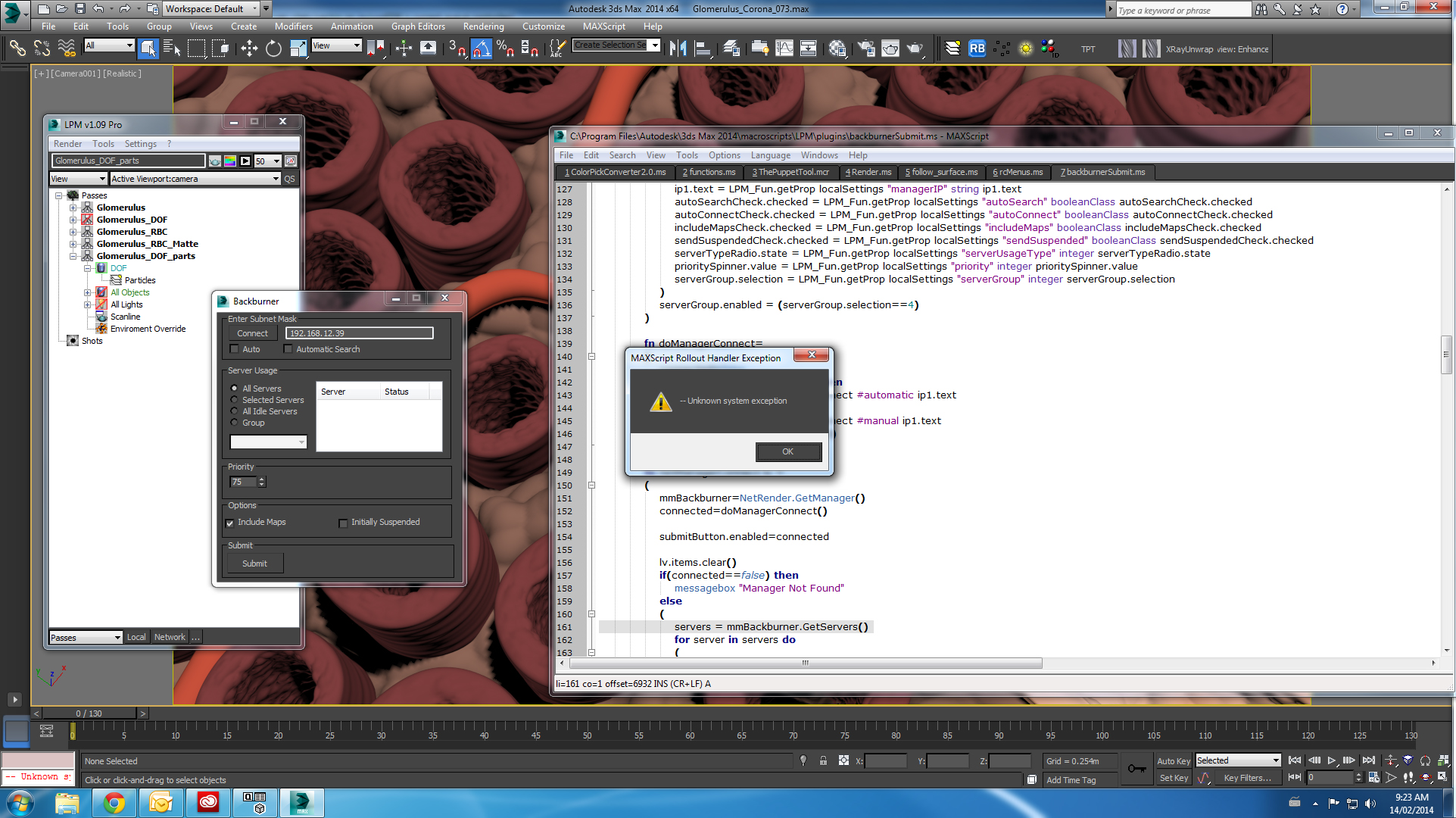
LPM sudden stopped working for network rendering for us, using both Max 2012 and Max 2014
When I go to the network render submit dialogue box and hit connect I get an Unknown error and it highlights this line in the script window that pops up:
Line 161: servers = mmBackburner.GetServers()
I have attached an image of the error state I see on screen.
Cheers Mike K
Attachments
- error_lpm_feb14.jpg — error_lpm_feb14.jpg1.2 MB
Royal Ghost · 2014-04-10
@Mike Kennedy
I just tested LPM with BB and all works as expected (max2013,2014). So maybe its problem in your config of BB.
Incredible problem with LPM and rendering...
 raistlin · 2013-11-14
Hi, does someone has encountered a problem with a file size? I've found a problem on a scene that i haven't seen and it persist since the 4 or 5 project i do last time : (First I'm working on 3dsmax 2012 X64 and Vista 64)
Each time i launch a render with LPM the file grow... Yes, i do absolutly nothing, i've just clic on the networ button and the file grow for 20 mo... My optimised scene is 35mo, and the problme was point out when i've to open the file and see that it's a 250mo file... Everything is proxy or Xref and the geometry is really on survey....
I'm absolutly affirmative, the problem is on LPM layers... I've isolated themm, there is aonly a dummy on some of them, with some informations, and the layers size approach the 27 mo... Juste after 2 render launch... I've absolutly erase everything but the LPM layers...
Please help me to uderstand, i've merged and recompose everything, delete the LPM.ini, uninstal LPM, Reinstall... Erase my LPM preferences, re-create LPM hierarchy on the scene...
i'm thinking about an interaction with some plugin or update... But i can't understand and so, found a way to solve the problem...
Thx in advance...
max2014
Royal Ghost · 2013-03-29
3ds max 2014 only!
- fixed modifyObjectOperator to work in max2014
Install:
- Extract archive to 3dsmax2014 root folder
Attachments
- lpm_pro_v1.096_max2014_beta1.rar — lpm_pro_v1.096_max2014_beta1.rar90 KB
Necro · 2013-01-15
3ds max 2013. Backburner error - No task metadata found ?
max2013
maxx043 · 2012-11-16
hi
great script
please - can somone reupload the script for max2013
cant download from http://veda3d.com
thanks
Royal Ghost · 2012-11-16
Link working well. I just checked it. Any way here attached rar.
Attachments
- lpm_pro_v1.096_max2013_beta1.rar — lpm_pro_v1.096_max2013_beta1.rar90 KB
maxx043 · 2012-11-20
Thanks a lot
- now it works
max2013 install
Royal Ghost · 2012-06-08
I made a patch of 1.096 LPM to get it work with 3dsmax 2013.
Installation: Unpack .7z archive to 3dsmax root folder. You don't need use original installer.
Must have!!
akisey · 2011-01-24
For everyone doing serious visualisation work, this is the must have plugin/script for MAX.
This should be embedded in every future release. I can't imagine working without it anymore. We tried LPM, loved it and is now integrated in our day to day workflow.
A magnificent work from Lukashi and I'd like to thank him for that!!
pixela · 2011-02-20
I tried LPM and I love it.
Wonderful script! I would like to thank Lukashi for the great work and share.
 noel_d3 · 2010-01-26
When I change the wirecolor I wish I could come back before.
Ditto for the hide by pass.
Best regards,
Léon
pixela · 2010-01-25
Hello,
I would like to try this script.
The download link is not working.
Where can I downlaod this?
edited:
I think it was a temporary problem with site. Now is working fine. Thanks :)
lukashi · 2009-04-20
v1.06
New Features:
[+] New API for custom operators, this will allow new node types to be easily added.
[+] Added custom operator for modifiers, allows user to pick an object per pass and change its active modifiers.
[+] Render support for EnFuzion Render Manager, http://www.axceleon.com/products.html.
[+] Added quickscript to fix particle objects that are on the wrong layers.
Fixed Bugs:
[-] Fixed a bug with render presets closing LPM.
[-] Fixed bug with LPM not closing when the scene is changed.
 maknien · 2009-03-23
I'm running the script on Max9 sp2, and I get this error whenever I try to render passes:
MAXscript Rollout Handler Exception
-- Type error: Call needs function or class, got: undefined
And it highlights this row on the code:
x=getLocalTime()
lukashi · 2009-03-23
v1.05
[+] Added Deadline 3 Support, Jake Jeziorski
[+] Double Click edits a node instead of renaming it, Jake Jeziorski
[+] Renaming a node requires F2 to be pressed, or ENTER, Jake Jeziorski
[+] Major Code restructuring for RenderAPI, Jake Jezerioski / Lukas Lepicovsky
[+] Added detected for some unknown system exceptions.
Fixed Bugs:
[-] Removed "No info found on passDDL Warning"
[-] Fixed minor bug with previewMode
[-] Fixed bug in shot submission where inactive passes are submitted.
lukashi · 2008-12-15
Hi Everyone,
I'm pleased to announce version 1.04
v1.04
New Features:
[+] Passes inside shots can now be turned toggle on and off by pressing on them.
[+] UI redraw speed significantly improved.
[+] Object Sets can now pick objects by material assignment. This makes it very easy to override a specific material in the scene.
[+] Added pass groups, this allows you to organize passes into groups.
[+] Added ability to have multiple render overrides per pass. Only the first active one is used.
[+] Added per pass settings. Select a pass and hit edit.
[+] Added ability to change the root directory per pass.
[+] Added default actions for passes in the settings menu. Passes can now automatically hide all objects/disable all lights, eliminating the need for
an extra object set with a wildcard that turns off all objects. This behavior can be set also per pass in by selecting and a pass and hitting edit.
[+] Common Properties can now Disable Image Output, useful for Vray Global Illuminations.
[+] Quick Scripts now parse subdirectories.
[+] Added a new node type, script. It allows you to type in a script and also choose when to run it.
Fixed Bugs:
[-] Fixed bug with renaming of after creation causing and error.
[-] Removed modal state from Purchase screen, due to possible hangs.
[-] Removed bug where post render script was incorrectly labeled in common properties override.
[-] Removed active Passes only from the render dialog.
[-] Removed bug in max 9 and render previews.
Thanks
-Lukas
lukashi · 2008-10-09
v1.03
New Features:
[+] Support for $Element tag in the filepath. This allows the user to split seperate elements into different folders and folder structures.
For those who prefer this, I would suggest using "$Shot\$Pass\$Element\$Pass_$Element_" as their default pathString.
[+] LPM_RenderSwitcher material can now be used without being installed across the network.
[+] Added a new dialog in tools-> quick scripts. Scripters can add scripts into the specified folder and they will appear inside LPM.
[+] Added quick script, Object Id Manager.
[+] Added quick script Ambient Occlusion Render Element for Mental Ray.
lukashi · 2008-09-17
v1.02
New Features:
[+] Shot and pass sequences can now be viewed in the Ram Player, right click a Shot or Pass and pick 'view Ramplayer'
[+] Pass Drop down list and Camera Drop Down list now resize when the ui is resized.
[+] 'Open Max File Folder' now available in the Render file menu.
Bug Fixes:
[-] Fix bug with light shadow properties not being restored when overriding shadow properties.
[-] Fix bug with include maps not working with backburner submits.
lukashi · 2008-09-03
Hi Everyone,
LPM update with some cool new features and a new tutorial!
v1.01
New Features:
[+] Common Properties override now has a aspect lock and the ability to save and load presets.
[+] Deadline support, using Settings->Max File Render Type.
[+] New video tutorial, "3rd Party Network Managers / Render Strips"
[+] Renaming passes / shots automatically filters out windows filename characters such as *<>|...
lukashi · 2008-08-27
v1.0
New Features:
[+] Licensing Support via Paypal.
[+] Demo vs Pro version, Demo has Limit of 3 Passes, 2 Shots.
[+] 6 Redone video tutorials!
[+] Forum specifically for LPM at http://www.lukashi.com/ForumInstall/index.php
[+] Full support for VRay Frame Buffers, Vray Render Elements, Vray-Raw Image File, Vray Split Render Channels.
[+] Support for command line rendering, this allows for Tile Splitting of render, amongst other things. Commandline rendering can be accessed via the Maxfile Network Type in the Settings Menu.
[+] Creating a render override now automatically asks for the render type.
[+] Shots now have a new feature under Shot->Select Passes: Display Pass, when the user hits the Play button, the display pass will be shown. Also when the user MMB picks a pass, the display pass will be shown.
[+] When MMB hitting a shot, all cameras except the shot camera are hidden.
[+] User Prop Buffer / Vray Properties can now be instanced and copied,
Bug Fixes:
[-] Fix minor bug with Hardware preview not showing the correct nodes.
[-] Fix minor bug with Pass Per Layer, object set layer names being cutoff
[-] Fix issue where having auto key on puts visibility keys in objects when a pass is rendered.
[-] Fix bug when LPM auto renames a Render Override after a custom name is entered.
Cheers,
Lukas
lukashi · 2008-08-14
v0.98
New Features:
[+] Integration of Thorsten Hartmann (www.infinity-vision.de) Photostudio as a new Override. This is for max 2008 and later only.
[+] Render Override, Common Props, Enviroment Overrides, Photostudio now can all be enabled / disabled from the main ui (left click on icon).
[+] Fileoutput Gamma can be specified per pass in the Common Properties Override.
[+] Preview compositor added many new features, users no longer need to use the material editor.
[+] Default file format can now be specified in the settings menu.
[+] Previews are rendered using the default format.
[+] RenderProps auto rename themselves to the name of the renderer being used.
[+] Common Props with auto-rename show if they have a pre / post script.
[+] Network / Maxsubmit names are now easier to read {Shot} (Pass) [Maxfile]
Bug Fixes:
[-] Fix bug with LPM_Hardware_render not being found.
lukashi · 2008-07-28
v0.975
New Features:
[+] Added a new material type, LPM Render Switcher. It supports 3 sub materials (Scanline, Mental Ray, Vray) and when a render is made LPM automatically chooses right the material based on the renderer used.
[+] Major speedup in loading objects sets/ restoring object sets. It turns out backing up applyAtmospherics takes about 1000x longer than anything else such as material, motion blur, visibility...etc.
Therefore apply atmospherics is now backedup only when it is needed. In my test scene setting all objectSets applyAtmospherics paramater to "--" caused the pass loading time to drop to .45 seconds from 7 seconds!!
[+] Expanded the preview compositor with new functionality, such as easy image loading, automatic image reloads after a preview is rendered and so on...
[+] Added local submit, and network submit buttons to the bottom of the main ui.
[+] Pass per light now has a light selector so that the user can pick which lights to create passes from.
[+] Shot per camera also has a selector.
General Changes:
[+] When rendering shots, all passes belonging to that shot are rendered, regardless of that pass being active.
[+] Updated AO, Mask Presets.
Bug Fixes:
[-] Fix bug with network submit dialog, when not finding LPM_RenderPass causing a submitting error, LPM_RenderPass is now global so it is always found.
Cheers,
Lukas
lukashi · 2008-07-21
v0.97
New Features:
[+] Added support for new network render type, "Submit to Max File". This saves out seperate maxfiles for each passes or shots.
These max files can then be submitted to 3rd party network render managers.
[+] Partially rewrote hardware previews, they now have a progressbar, and compute faster/use less memory.
[+] Help button added, listing common hotkeys.
[+] Mini display panel added.
[+] F2 can be pressed to rename nodes.
[+] Added two new overrides to object sets that allow control over the hidden and frozen attributes, this is triggered when you when you middle mouse click on a pass.
[+] Two new right click menu functions for render overrides, the first loads the stored render settings to the default renderer, the other loads the default renderer to the render override.
[+] Hitting the compositor button loads a preview window that shows the result of the composite, this window can be refreshed.
[+] Added select camera to right click menu of common properties.
[+] Middle mouse pressing on a shot also selects the shots camera now.
[+] Layer picker now remembers its size.
[+] Added to the settings dialog a viewport preference for the middle mouse button shot preview function.
[+] Settings menu allow changing the default value of objectSet/LightSet renderability.
[+] Duplicating a pass now no longer appends "01" to the names of objectSets, lightsSets etc.
Bug Fixes:
[-] Fixed slowdown when hidding using the middle mouse button and having the display panel open.
[-] Middle mousing clicking on a layer is reveals the nodes much faster.
[-] Fix bug with pass per camera, pass per light, pass per layer names being cutoff.
lukashi · 2008-06-19
V0.94
-Xref scene overrides are now supported, this allows you to pick which xref scenes belong to a pass. This is also supported in the hide button.
-Hardware previews now hide by object sets before performing the preview, revealing the correct nodes.
-Middle clicking on a shot now changes the camera to the shot camera and the time range to the shot time range.
-Shots now have a new right click menu has an item, render shot locally.
-Support for vraysun and other lights that use .enabled instead of .on
-Sort passes/shots added to right click menu.
-Delete all passes/shots added to right click menu.
-LPM_RenderPass, LPM_RenderHalfPass now launch LPM to pick a pass if it no pass is active but LPM data is found.
-Render Menu now remembers the root path.
-NetRender Rollout is now resizable.
-Up and Down buttons can now be hit repeatably without reselecting the nodes facilitating moving nodes around.
lukashi · 2008-06-15
Here is another update of LPM,
V0.93
-Jakub Jeziorski
- Network submit dialog now shows server state as icons.
- Network submit dialog now supports groups. This is however limitted to max 2008+ due to a bug in max 9, see (http://discussion.autodesk.com/thread.jspa?threadID=605364).
-Network submit dialog now shows a progress bar.
-Lukas Lepicovsky
-Layers inside of object Sets and light sets have a new right click menu function, add selected objects to layer.
-LPM_RenderPass, LPM_RenderHalfPass now pop up a dialog to pick a pass if it no pass is active.
-Fixed bug where the camera picker dialog would come up at the end of rendering a pass.
-Dialog for picking object/light set layers is now alphabetically organized.
-The active pass is loaded in the pass drop down list (to the left of the teapot icon) when LPM starts up.
-Pass rendertimes are now printed, hit F11 to view them.
-Middle clicking on a pass now to actives that pass and also hides nodes in the scene based on their object/light set visibility.
-Fixed a bug with lpm not closing on new scene/open file / reset
lukashi · 2008-06-07
Hey guys,
I found some new bugs and wanted to fixed them ASAP v0.925
V0.925
-Fixed bug with color/hide buttons
-Fixed bug with common props giving an error in shots
-Added 2 new macroscripts:
-LPM_RenderPass which is hotkeyable and renders the active pass, or performs a default max render if there is no pass to render (F9).
-LPM_RenderPassHalf Same as above but at half resolution.
Cheers,
Lukas
lukashi · 2008-06-06
Hey guys,
New version
V0.92
-Group support for object/light sets
-fixed daylight system not overriding
-removed trailing ".max" when the $max tag is used in the render dialog
-added loop button when playing shots using the play button
-fixed a bug concerning shot names and camera names
Cheers,
Lukas
lukashi · 2008-05-19
V0.915 is in!
lukashi · 2008-05-13
Mailing list and new website are up.
lukashi · 2008-05-13
You do not need to install it on network machines.
Thanks, let me know if you have any other problems.
bragibjornson · 2008-05-13
im just in the testing phase with this script - can someone tell me if i need to install this script on network machines if i want to render to a farm via backburner?
Thx,
filip · 2008-05-13
Many thanks mate, your script is great!
lukashi · 2008-05-11
Big update:
V0.90
-Hardware rendering for previews
-UI Improvements
-Exposure Control override
-Toggle for splitting renders into seperate folders
Unfortunately this version is not compatible with previous verions.
However this version should be forward compatible with future versions.
Thanks!
lukashi · 2008-05-02
-V0.86
2 new video tutorials!
-Storing of composite maps, for using 3ds Max as a compositor (check out the new video tutorial )
-Animation button (Check out the new video tutorial on how to playback passes)
-quick storing of time ranges / cameras for common properties.
lukashi · 2008-05-01
-Version 0.85 -fix bug of teapot button not rendering
-fix bug of right click render not rendering.
-Rename after creating pass, object set, light set etc...
lukashi · 2008-04-30
Version 0.84 is in
-V0.84 Network rendering submitting to backburner is now one click.
-Minor bug fixes.
lukashi · 2008-04-29
Version v0.83 using filein instead of includes,
Hey Marco, it is so there are not a lot of global functions, just for encapsulation.
 Marco Brunetta · 2008-04-29
What are the benefits of storing the functions inside a struct if you don´t mind me asking?
lukashi · 2008-04-28
New version 0.82 is in,
Thanks,
Lukas
raistlin · 2008-04-24
hey it must be interesting to have some presets no? like Ao or reflection pass? a set of "click this button and go"
In vanilla seed there is also a preview window for the different pass it must be interesting also
thanks a lot for your work
Best regards
Raistlin
lukashi · 2008-04-24
There is an AO preset, if you hit merge preset, there is also a preset for Masks.
You can also easily make you own presets!
lukashi · 2008-04-22
Thanks guys!!
Update:
-V0.81 Vray Properties/User Properties are now supported
 vsai · 2008-04-22
sweet looking script, and excellent video explanations. Cheers!
raistlin · 2008-04-22
Fantastic job guy, it's a great idea to group all the benefits of vanilla pass and other into one script... And free !!!
Thanks a lot !