Updated 2023/12/29
Added udatasmith and stl formats.
How to use:
Drop script into your Scripts folder.
Assign objects you wish to be exported together as one file to a new layer in the Layer Manager. Name the layer according to what you would like the exported file name to be.
Each layer with its assigned contents will be exported as its own file based on the format of your choosing and named according to its layer name. So if you have 10 layers in the Layer Manager you will get ten exported files.
Anything assigned to Default Layer 0 will not be exported. Use Default Layer 0 for anything you don't want to export out such as reference planes.
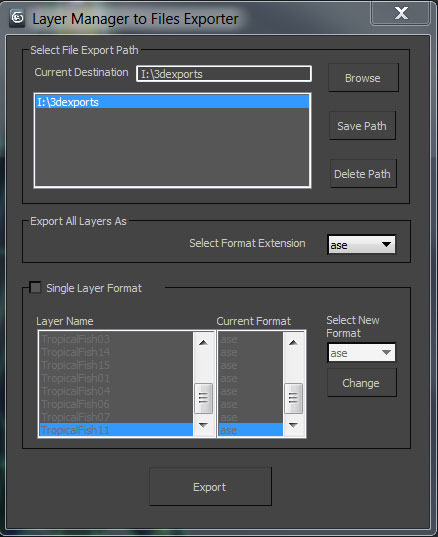
After layers are created simply run the script, select your format and target destination, and then click the export button.
Feature requests are welcomed...
Updates***
Version2.1-
Delayed bug fixes. No new features until version 3.
Current known bugs:
-layer list doesn't update automatically. You will need to restart the script each time you add a new layer into the layer manager.
- Dragging script into the viewport will result in script breaking. Script must be executed by maxscript-> RUN.
Version2 -
Added ability to save and delete destination locations. Added ability to set export format on a per layer basis.
Version1- cleaner interface with ability to select destination path.
 crystal3d · 2012-01-16