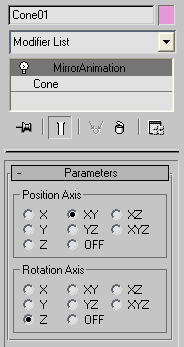
Mirror position/rotation animation tool written as modifier.
Script
 By Anubis · 2010-09-13
Mirror position/rotation animation tool written as modifier.
Tags: Animation, modifier, Controllers, Position, mirror, rotation, Keys, anubis, plugin
Not works
sanyigz · 2012-03-19
The script isn't works, it does for first look(except rotation, that does some random mirroring), but when i try to collapse the modifier, then i get an error message with undefined something call, then it crashes MAX. If i install the script it can to this at random modifier collapses which not have any relation to this modifier (for example i get sometimes the same error message if i collapse the uvw unwrap), and can be solved by wiping this script out from max.
Same happens under max 2012 and 2010 so be aware that this script cause random problems.
it works!
Anubis · 2012-03-21
1st to say, you not need to collapse modifiers stack, this modifier works like utility so just delete it. as for the rest strange events, who knows... :)
does not work in Max 6
mark pigott · 2011-11-23
get the maxscript scriptedplugin exception
--unknowmn property:"dependentNodes" in #Struct....
Yes, you need AVG
Anubis · 2011-11-23
for Max 9 and below need to install the free AVG extensions
mark pigott · 2012-11-23
which directory does the AVG_DLX60.dlx go to (3ds Max 6)
I have it in plugins
Hey Mark
Anubis · 2012-11-29
That's correct, you have some problems with AVG?
mirroring a biped
AnnieAnimation · 2011-06-29
Thanks for the script, much appreciated! I noticed some people were having issues using this on a biped... there no need for a script in that case... just go to "keyframing tools" and hit the "mirror" button. :)
yes, i know
Anubis · 2011-03-21
biped animation is a different story in max
biped animaion
mhouse777 · 2011-03-21
Hi,
Doesn't seem to work on biped animation. I tried grouping the biped too, but didn't see anything happen ,Any Ideas?
Thx
update
Anubis · 2011-02-28
Finally I'v got a way to restore the keys when the modifier is deleted. This is still tiny but wanted improvement, so enjoy.
veneta · 2010-09-15
Cool! Works fine on my Max2009, thanks.
Anubis · 2010-09-14
Thanks Paul, glad to hear it works :)
P.S. - Just a few more notes about deleting...
Seems simple in theory to turn the mod off on deleted:
on deleted do (this.posAxis = this.rotAxis = 8)But... the help say that undo buffer block this event, and clearUndoBuffer() not help. So, deleted event handler (in all scripted plug-ins) is called only on File New/Reset, which unfortunately limit the advantage of deleted handler a lot.
 tommym · 2010-09-14
I have just used it, works good.
Thanks Paul
 JokerMartini · 2010-09-13
Is there a way you could restore the original keyframes when the modifier is deleted?
Anubis · 2010-09-13
Nope :/ Need to choose "OFF" radio button before deleting the modifier.
The post-factum way would be to add new MA modifier and to change the same axis again :)
Edit: I append notes about in the description.
Anubis · 2010-09-13
Thanks for the comment. That reminds me that I should add some usage notes :) Yes, I know, it's an limitation, turning off the modifier in the stack does nothing, for that I include "OFF" radio button.
JokerMartini · 2010-09-13
When you delete the modifier or turn it off the animation is still flipped based on the last settings chose on the modifier.
Bug?