ScriptSpot

Script

PowerPreview: High Quality Nitrous Previews

By spacefrog · 2011-12-05

Version
0.71a - Beta 9
Version requirement
Max 2012 and up, runs on versions Max 2010 and 2011, but without Nitrous of course
Date updated
2017-04-27
Votes
33
Download
Download
Description

This is an updated version of my PowerPreview script for Nitrous....
Here's a preview pic of the GUI and a high quality nitrous viewport showing the great quality you can achive with Nitrous😎
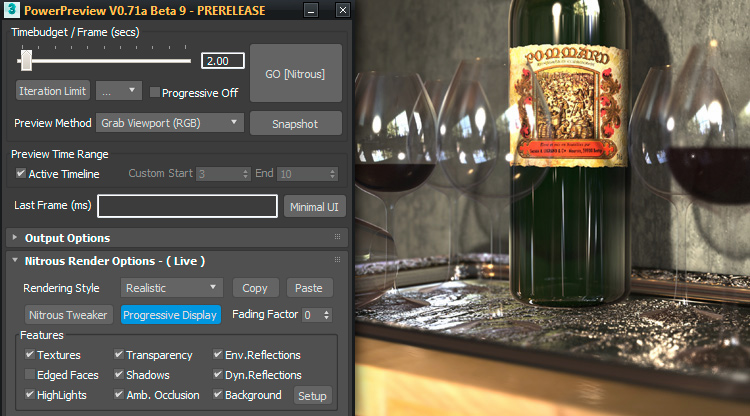
PowerPreview for 3ds Max 2012+


Here is a link to the full screen snapshot done with PowerPreview, the timelimit was set to 90secs, but it would have been perfect quality wise already after 30-40 secs...

PowerPreview

The purpose of the script is to be able to create viewport previews in the highest Nitrous-rendering quality possible. Additionally the size of the preview is NOT limited to  the desktop/or 3ds Max window size. There is a hard limit at 6400*6400 currently, but that is set in the code to prevent people from killing their Max sessions by dialing insane numbers in the resolution spinners. I successfully created some 4800*2400 avis on my 512MB graphics card 😆

See more details below...

DETAILS:

-------------------------------------------------------------------------------------------------------------------------------------------
 PowerPreview V0.71a Beta 9
-------------------------------------------------------------------------------------------------------------------------------------------
Power Preview :  High Quality Nitrous Preview  - !!! BETA RELEASE !!!
Created:  June  6, 2011
Modified: April 27, 2017
-------------------------------------------------------------------------------------------------------------------------------------------

LIMITS EXISTING UP TO THIS VERSION:

  • 3ds Max Limitation: 3ds Max has to be the foreground application, otherwise Nitrous will stop refining the viewport progressively. Because of this issue IT'S IMPORTANT TO DISABLE THE SCREENSAVER.
    Energy saving mode is okay, even if it is set to put the display to sleep...
  • 3ds Max Bug:  AVI files bigger than 1GB get corrupted, please file a bug report at Autodesk (fixed in Max 2013)
  • Pressing "Cancel" on 32 bit Max might crash 3ds Max, this is currently under investigation
  • Locked target file (eg. playing in an AVI Player) cause PowerPreview to report an "Internal Error"
  • Advanced Nitrous options ( eg. dynamic reflections) tend to fail from time to time on lower-end GPUs
  • Workarround: set timebudget high enough, press create preview/snapshot, look at output: if something's wrong, toggle any Nitrous option on&off. This will eventually bring Nitrous's output back to glitch free again,
    If everything looks okay, turn down the timebudget again and wait for the preview to be created

-------------------------------------------------------------------------------------------------------------------------------------------

HISTORY:

HISTORY

Version:  V0.71a - Beta 9 - PRERELEASE - 3ds Max 2018+ Compatibility Fix

  • added missing icon in installer package (3ds Max2018+) to prevent exception at launch causing incomplete UI

Version:  V0.71 - Beta 9 - PRERELEASE

  • Implemented progressive refinement while 3ds Max is not the active Application ( 3ds Max 2014+ only)
  • Object Selection is maintained during preview creation now (including stack selection).
    This allow previews with selected object features (like wireframe selected, modifier stack's "Show Endresult" etc...)
  • fixed world axis being visible in previews


Version:  V0.70b - Beta 8, ( 3ds Max 2014 related Update + Bugfixes )

  • fixed NitrousTweaker's Procedural Texturesize error
  • fixed Viewportmenu disappearing after using 3ds Max's internal "Make Preview" functionality
  • fixed various Maxscript compiler related errors in 3ds Max 2014 and above

Version:  V0.70 - Beta 8 - Internal PRERELEASE

  • Increased resolution limit again ti 6.4Kx6.4K. Beyond that, severe graphics driver crashes might occure
  • unintended bitmap scaling fixed, this caused subtle graphics artefacts, especially visible on wireframe previews
  • complete code restructuring and modularization (some of it still in progress)
  • implementation of various (still internal only) data structures for future project managment usage
  • Nitrous Settings Copy&Paste functionality ( between viewports )
  • Some UI reorganization
  • fixed viewport switching/resolution issues

Version:  V0.60 - Beta 6, ( 3ds Max 2013 related Update)

  • Increased resolution limit again ti 6.4Kx6.4K. Beyond that, severe graphics driver crashes might occure
  • unintended bitmap scaling fixed, this caused subtle graphics artefacts, especially visible on wireframe previews
  • implemented basic preview creation mode switching feature, choose between various methods,
    currently you can switch to the default 3ds Max's "Make Preview" mode and back only
  • Filename postfixing based on token expansion added. Added checkboxes for convenient use
    Known tokens are currently: "%scene", "%view", "%date", "%time","%begin","%end",
  • DOF/Boken shape/image handling added:  per viewport bokeh shape mechanism implemented
  • UI rearranged, introduced "Minimal UI" button
  • Checkbox to disable  "Progressive Refinement" added for fastest previews
  • Various additional fixes...

 Version:  V0.51a - Beta 5, DC20120216, HOTFIX

  • Fixed "visibility in undefined" error for people having the viewcube-plugin completly removed
  • Please note regarding the gamma fixes:
    due to a Max bug/Limitation, maxscript always uses an output gamma value of 1.0 when it saves a bitmap
    Thus when doing a "Preview", the current display gamma settings are applied to the written files,
    that means it' provides complete WYSIWYG ("What you see is what you get")
    Contrary to the "Preview" creation, when doing a "Viewport Snapshot" and using the framebuffer save button to save the bitmap, the current "output gamma" setting is applied to the written image

Version:  V0.51 - Beta 5, DC20120215

  • Fixed filename-frame numbering when writing to  image sequence
  • Fixed double gamma issues with snapshot mode when display gamma is enabled
  • Implemented ViewCube hiding ;-)
  • Implemented basic UI and options for upcoming nitrous features (3ds Max 2013 DOF,Bokeh)

Version:  V0.50c - Beta 4, DC20120104, HOTFIX

  • Fixed time jumping bug during simple snapshot creation
  • Implemented simple Nitrous glitch recovery mechanism (still experimental)

Version:  V0.50b - Beta 4, DC20111221, HOTFIX

  • Fixed stupid installer bug: install only executed when existing PowerPreview install was detected - D'oh!!!!!
  • Removed dummy D3D button in Direct 3D mode - D3D options still wait to be implemented....

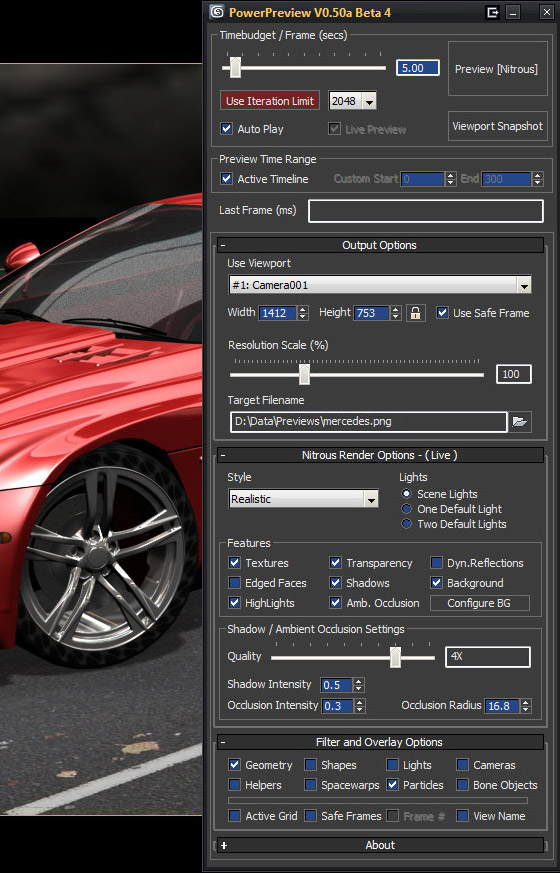
 Version:  V0.50a - Beta 4, DC20111220

  • Complete GUI rework, now features flexible rollout support, minimizing etc...
  • Introduced Nitrous config rollout
  • Experimental Nitrous options ( eg dynamic reflection ), buggy but work most of the time
  • Introduced Viewport SnapShot feature, supporting the same resolutions and features like the preview creation tool
  • Implemented update check tool, simply press a button to know if you have the latest version installed
  • Implemented timerange configurability, fixed bugs in previous versions related to timeline changes in the scene
  • Implemented Object Category Filtering and rudimentary overlay options (WIP)
  • Cranked up limits ( timelimit to 90 secs, max. resolution to 5000 x 5000 )       

Version:  V0.46a - Beta 3, DC20111212

  • Implemented compatbility wiht German and French Max Versions
  • Further improved UI logic and behavior
  • Improved future and internal 3d Max version stability 

Version:  V0.45c - Beta 2, DC20111210, HOTFIX

  • Fixed crash-to-tdesktop bug after preview creation on 32bit 3ds Max Versions
  • Fixed bug which could cause 3ds Max dialogs and menus to close immediatly after preview generation
  • Improved parts of the UI and the viewport selection change dedection code ( still work in progress)


Version:  V0.45b - Beta 1, DC20111205

  • Fixed various UI related issues, which messed with the parameters on viewport selection
  • Reimplemented iteration-based limiting ( enabled by default, set to 2048 Nitrous refinement iterations)
  • Note: all parameters in Timebudget Group are tweakable on the fly while a preview is in progress..
  • Statustext reflects wether the last frame did hit the time based limit, or the iteration limit
  • Fixed framerange detections ( WIP ), parameters are updated when "Create Preview" is pressed
  • Script works now in Direct3D mode  too, but of course without progressive options

Version:  V0.40c - Initial Alpha Release, DC20110728

-------------------------------------------------------------------------------------------------------------------------------------------
AUTHOR:

-------------------------------------------------------------------------------------------------------------------------------------------

FUTURE PLANS:

  • Too many to list 😎

-------------------------------------------------------------------------------------------------------------------------------------------

INSTALLATION:

  • 3ds Max Version 2012 and up and viewport set to Nitrous recommended
  • Use automatic installer or copy the zip contents to your Max folders manually....
  • "Spacefrog Tools-PowerPreview.mcr" should go to your "usermacros/macroscripts" folder
  • "SF_PowerPreview.mse"  should go to your userscripts folder ( usually "[MaxRoot]\Scripts\" )
  • Assign keyboard-shortcut/button or menu to "PowerPreview: Enhanced Preview" in the "Spacefrog Tools" category

-------------------------------------------------------------------------------------------------------------------------------------------

USAGE:

  • Start the script using your prefered method and select the viewport you want to have a preview generated from...
  • The script detects when you select another viewport and adjusts its output resolution automatically,
  • To create "bigger than screen" previews use "Preview Scale Factor" - slider and/or resolution spinners
  • Set the output file and format. Due to a bug/limit in 3sd Max, number of codecs available on 64 bit is limited
  • Adjust the timebudget( ms) you want Nitrous to give per frame ( first slider ),
  • You can re-adjust the budgets during preview creation if you are not satisfied with the output quality
  • Nitrous options are currently "Live" too, meaning  changes in the options are directly applied to the output,

-------------------------------------------------------------------------------------------------------------------------------------------
NOTES:

  • Please do not share the script directly, simply guide people to this page or share the download link
  • There are bugs, quirks and shortcomings in the script of course
  • Thus feedback is welcome,  please post here or on the original threads i created on various boards
  • Of course i do not take responsibility if the script burns your GPU, toasts your hamster or turns you into a bunny
  • You have been warned!
  • Happy Previewing! 😎

-------------------------------------------------------------------------------------------------------------------------------------------

Tags: Preview, viewport, quality, Nitrous, Progressive, 3ds Max 2012

Comments (98)

broken link

harumscarum · 2019-02-01

please re-upload

animation don`t work...ERROR

chinaman · 2018-12-14

max2014) animation don`t work...ERROR I\O. How to fix it?

brilliant

Robinbrownmartin · 2018-11-18

this is fantastic shame autodesk didnt add somthig as good as this
my only wish was that it could do matte shadow materials then it would be the best script ever
thanks for your work on this

Thank you! may I suggest some new features

windwolfx23 · 2017-09-18

I love this script, making preview easier and better, may I suggest some new features:
1.save and load setting presets,or at least make some settings stick to last time(resolution, file path,progressive off,custom time range...).
2.auto switch vray light shadow to standard shadow map for better viewport display,switch it back when preview is done.
3.include resolution and file name in minimal UI.
4.check is there any quicktime process not closed before exporting .mov format, or equivilant process for other format.(preview getting very slow, and won't overwite, when it's done, the file is still the original one).

thank you again for the great tool!

New udpate incl. 3ds Max 2018+ Hotfix released

spacefrog · 2017-04-27

I just released a new package containing a small update and the fix for the 3ds Max 2018 issues ( missing icon ). Just download and reinstall. This update includes small fixes for all users, so even when you are not on 3ds Max 2018 yet, you may want to install the new version anyways...

A major improvement should be that now 3ds Max hasn't to be kept as the frontmost application ( on 3ds Max2014 and up), but should continue to create a preview even when it is running in the background
cheers, Josef

rs3d · 2017-04-27

Thank you very much for the quick fix!

Resolution Limit

rs3d · 2017-04-26

I can't find the Resolution Scale Factor for making Previews larger than screen resolution. Has this been removed?

spacefrog · 2017-04-27

Thanks for reporting:
It's a small glitch, because of a missing icon in 3ds Max 2018+. This leads to an internal Powerpreview error at launch, causing the interface creation to fail. I'll create a small fix package ( simply drag and drop installer ) which will install that missign icon, and eventually update the whole Powerpreview installer package to do the same.
Thanks for reporting , cheers Josef

Visibility

3di · 2016-11-30

Hi spacefrog, thanks for sharing this.

Using 2017 I was having problems with being unable to turn off shadows in quicksilver so thought I'd give this a bash. Really like the ability to control the passes.

I do have one issue. I have several objects from different sub layers grouped together and their visibility animated from 1 to 0 using the graph editor. In the viewport it all fades away as expected, but when I export a preview animation using Max's export preview, or when using your script, only one section of the group becomes transparent.

Any thoughts on how I can fix this?

Hey 3di:Just tested this and

spacefrog · 2016-12-01

Hey 3di:
Just tested this and i see the same effect: object visibility which quite perfectly animates while dragging the timeline, does'nt animate with Powerpreview. It does so with the internal Make Preview for me though. Material opacity animates perfectly on both.
Max 2017 compatibility with Powerpreview is limited anyway, as the viewport managment changed a bit. Honestly, i don't know when i can find time to work on Powerpreview again, as have to care more for some money earning endeavours ( 2016 has been a horrible year for me project wise/financially ...)
So if you have animated visibility, i would recommend falling back to the internal make preview functionality.

vbn · 2016-03-07

Thanks for this great script! I made some nice previews with it.

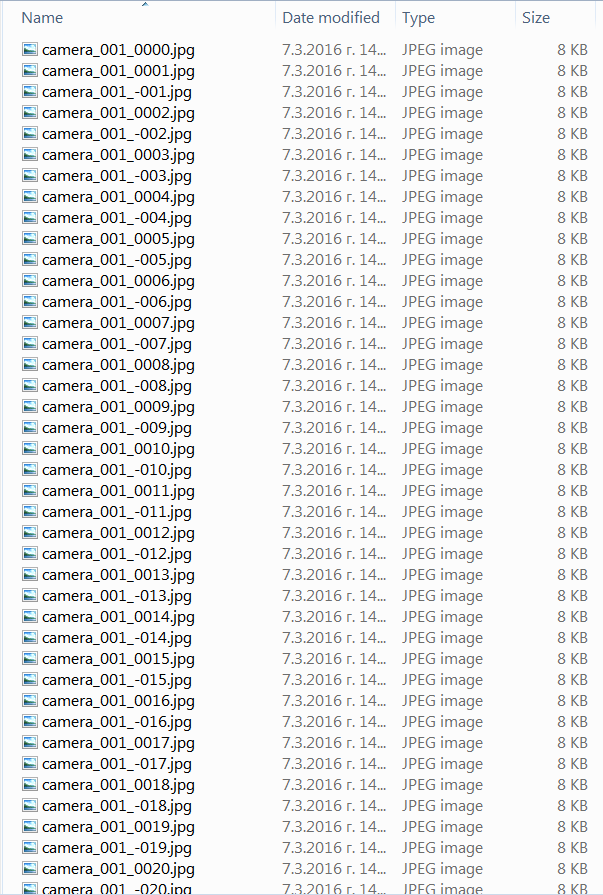
Do you take suggestions? I tried to render a camera sequence that started at negative frame numbers but it seems that it doesn't work well in that case. When I rendered such preview, the files had a very strange sequence numeration. Can this be fixed? Please check the attached screenshot. Loading this sequence in After Effects doesn't work. If I render from frame -200 to 200, the sequence should look like this:

camera_001_-0200
camera_001_-0199
camera_001_-0198
.....
camera_001_0000
camera_001_0001
camera_001_0002
.....
camera_001_0200 

not:

camera_001_0000
camera_001_0001
camera_001_-001
camera_001_0002
camera_001_-002
.....

Attachments

max 2016

Talpo · 2016-02-23

Hi!
first of all: thanks for sharing this very useful tool!!

i'get a "--Compile error: Duplicate struct member name: CaptureViewportConfigDialog" error while launching the script on 3ds max 2016.

It's me or this version (0.70b_beta8) is not max 2016 compatible?

Tnx!

spacefrog · 2016-02-23

Hmm - i just tested this version on Max 2016 and it worked as expected. Maybe your installation went wrong. How do you run the script and where is it located after installation ( the SF_PowerPreview.mse file ) ?

savannahcampbell · 2015-02-02

Thanks for sharing, for this applicable resource. I never heard about this before, I just learned something new.Thank you for the script, it's awesome. Keep it up!

CHECK THIS OUT --> cheap soundcloud downloads

Timebudget bug

ebee · 2014-02-07

Hi! Thank you for this great tool. A small problem.

The timebudget seems to work about on half of the frames. Ie. if the timebudget is 1 second, for half the frames powerview ends at ~1000ms, but very often it goes to ~2000ms or even ~4000ms.

Don't know if this problem was already addressed, I could't bring myself to page through all the comments.

I'm using english 3ds max 2014 sp3 with win7, and vray adv 2.40.03 if that makes any difference to viewport grabbing.

Getting reflections working

xtravolution · 2013-07-19

This may be a little off topic but I was wondering if I could get some help with getting reflections working in the viewport.

I have a simple scene with a box, sphere and plane. They each have a reflective material (raytrace in the reflective slot). I have also put an image in the environment background.

I have enabled relections from the environment. I have also written a little script...

vvsi = NitrousGraphicsManager.GetActiveViewportSetting()
vvsi.DynamicReflectionEnabled
vvsi.ReflectionEnabled

When run this gives a true result but I still get no reflections in the viewport.

Any chance you can help me out Josef?

WARNING: this script hardly work yet!

NinaNinja · 2013-11-27

I'll tell you how to "get it working", but it's only for fun test scenes but I'm afraid for any REAL use it's completely useless at currently buggy state.

Problem is it will include EVERYTHING in its reflection, hidden layers, hidden objects. Which makes the reflection look buggy but also SUPER slow if you have a lot of objects in hidden layers.

For test shots however what you need is just:
1) Arch Design material at default settings.
2) Views > Show Materials in viewport as > with maps (that's the key step that ppl forget)
3) Enable env and dyn refl.

Your post's title is wrong

spacefrog · 2013-11-28

PowerPreview simply records the 3ds Max viewport contents. It is no renderer or similar, it simply allows you to take snapshots of the existing viewport contents.
I was not aware that Nitrous viewport shows reflections of hidden layers and objects, that's a new one for me too. It seems that the Nitrous shader cache is not getting rebuild when objects are hidden/unhidden. Maybe i'll find some way to enforce that in the future...
For the time being, after you hide objects, only saving and restarting Max will rebuild the shadercache and fix this problem.

So please, if you get faulty reflections in the viewport, blame Nitrous and 3ds Max, not PowerPreview. As stated in the readme , realtime reflection ( not Environment reflections which do work ) are really buggy in Nitrous by itself, that's the reason they are not exposed to the 3ds Max UI normaly, only via maxscript.

NinaNinja · 2013-11-30

"if you get faulty reflections in the viewport, blame Nitrous and 3ds Max, not PowerPreview"
Good point, sorry. (No edit-function on these comments tho so can't change the title)

Your advice to restart max each time you hide and show stuff is also good.

transparency

psyphex2011 · 2013-06-22

thanks for the update. what material you used for refraction? which is visible in nitrous as i tried many but no success in transparency.

spacefrog · 2013-06-23

Real refraction is not possible/supported in Nitrous. The glass material you see in the above picture, is a heavily tweaked (for Nitrous display) AD material with gamma/gain multiplier with pumped up gain value in the reflection color slot. And of course a HDRI environment to make those highlights possible. Overall it was a pretty heavily tweaked material.
Overall i have to say that transparent material are pretty hard to tweak (especially less transparent materials) and it would really be great if Nitrous would support real refraction.

psyphex2011 · 2013-06-24

thanks for your prompt reply.

Great script for previewing

gaso · 2013-06-06

This script is awesome for previewing purposes! Saved me tons of time in my last project.

One thing I found slightly annoying was the resetting of the render resolution when you click a viewport. Would it be possible to have PowerPreview remember the resolution after you've entered it once?

Anyway, thank you for this script, great work!

- Henri

spacefrog · 2013-06-06

It's already possbile:
simply activate the "Lock" icon and the resolution currently set should stick...

bradholister · 2013-05-16

Sending in a script without making sure that the grammar is correct sends the message that you're not serious, and that you are lazy. It's not hard to do. Take the time and check your grammar.

harumscarum · 2013-05-08

yeah i tried snapshot, but it doesnt save file, just frame buffer window appear

i would happy to make a donation - do you accept skrill (moneybookers)?

spacefrog · 2013-05-08

Yes - that's indented: the frame buffer window has a save icon that lets you store the image in any format you want. I don't think this is a problem for single snapshots ...

harumscarum · 2013-05-08

excuse me for my bitching, but i mean single screenshot as non-sequence, but many thick and fast, each in one click. simplest solution is be able to set sequence from 0 to 0
thanks

harumscarum · 2013-05-07

thanks for update
is it possible to make single screenshots? would be also great to keep output settings, so dont need to change avi to jpeg each time
thanks

Single Screenshots is easily

spacefrog · 2013-05-08

Single Screenshots are easily done with the snapshot function. There is a specific button for this below the big fat main button.
Regarding the other features like saving settings etc:
It's all on the plan, but i'm soooo busy doing contract work for money, that i simply haven't got the time to implement them. I think i'll go with some donation based route with PowerPreview in the future, so that i can invest more time in pushing it further.

Works in 2014

Univerpix Studio · 2013-05-06

Thanks for the update. Now it works perfectly in 2014.
Nice job.

New update is online !

spacefrog · 2013-05-05

As promised, i have put the new update online. This version works with Max 2014 and has some pretty hefty changes under the hood. Just read the history section. It's been on internal testing for some time now so it should work without major bugs...
And finally i changed the preview pic in the title post. Be sure to check out the full res glass image. The link is at the beginning of the introductory text

Happy previewing !

cheers, Josef

YEES!

SethHamburg · 2013-05-05

It works!

Thank you for this very usefull Script :-)

Greetz,
Stefan

Error in 2014 x64

Univerpix Studio · 2013-04-30

I git this error message at run:

--Compile error: Duplicate struct member name:
CaptureViewportConfigDialog

I use 3ds Max 2014 x64, Win7

.

SethHamburg · 2013-05-04

I too :-(

2014

c0mpani0ncube · 2013-04-29

get this error with 2014

-- Error occurred during fileIn in #C:\Users\cube\AppData\Local\Autodesk\3dsMax\2014 - 64bit\ENU\scripts\SF_PowerPreview.mse; line number: 2259
-- Error occurred in anonymous codeblock; filename: C:\Users\cube\AppData\Local\Autodesk\3dsMax\2014 - 64bit\ENU\usermacros\Spacefrog Tools-PowerPreview.mcr; position: 310; line: 7
-- Frame:
-- encryptedScript: "C:\Users\cube\AppData\Local\Autodesk\3dsMax\2014 - 64bit\ENU\scripts\SF_PowerPreview.mse"
-- vanillaScript: "C:\Users\cube\AppData\Local\Autodesk\3dsMax\2014 - 64bit\ENU\scripts\SF_PowerPreview.ms"
>> MAXScript MacroScript Error Exception:
-- Compile error: Duplicate struct member name: CaptureViewportConfigDialog <<

Hi CompanioncubeThanks to

spacefrog · 2013-04-30

Hi Companioncube

Thanks to you for reporting this error. I wondered when the first person would think it's worth posting about it ;-). It has to do with some changes to Maxscript that happend with Max 2014.
The problem is fixed already here and i will prepare and update the download during this week. Would have done this already if i would'nt be so damn busy with other things ...

So be sure to check back at the end of the week, an update is coming ;-)

c0mpani0ncube · 2013-04-30

thanks alot for taking the time to update. i've found this script very very useful last couple of years!

single screenshots

harumscarum · 2013-04-25

great script. thank you
i use it just for single screenshots and would be great to have an option "only current frame"
also important suggestion to keep user settings for path/filename.extension

i love filename templates feature, could you please add one template for path - %projectfolder (screenshots to be saved in "screenshots" folder which is in same folder where cureent *.max file is)

thank you again for such a useful tool

Dynamic/realtime reflections?

Braiz · 2013-02-28

Hi Spacefrog, I've been looking for this script for quite a while. Simply beautiful work, nothing less. I do have some trouble getting the realtime viewport reflections to work. Am I doing something wrong? I've tried pretty every setting in the UI, changing shaders and so forth. I'm running a gtx 560, which is a fair GPU, not great though.

Can you help me with this issue?

osmanzort · 2012-12-13

Thanks so much for your effort, I'm sure this will be very useful in real time works like the game industry.

I don't know how to run a script so I couldn't try it out. Can you post a simple method to run it?

PFlow

darthsaschi · 2012-07-11

Josef!

Thank you for that incredible script. For me it replaced the standard-preview completely.

I have a little problem: when I use PFlow PowerPreview kills all caches whenever I start it - and the caches (rebuilt while preview) are killed again when the preview is finished. This eliminates the advatages of the PFlow cache-system when using PowerPreview.

The standard-preview does the same, at least the cache-killing when starting the preview, so I think it´s not really a PP-related problem - but do you think it can be solved?

Thank you and kind regards.

Sascha

Hi Sascha,I guess you talk

spacefrog · 2012-07-11

Hi Sascha,
I guess you talk about the pre-calc phases PFlow does when you scrub the timeline and i asume you are not talking about some disk caching features?
As PowerPreview does nothing PFlow related, i think this is simply because those pre-calcs do not survive when you scrub the timeline in largers steps too..
I'll take a note about the problem, but can't asure anything, as it might be well out of PowerPreviews reach to change something that's caused deep in PFLow's handling of those things...

mhdmhd · 2012-07-03

Your tool is very nice and fast, why is it faster than quicksilver(isn't it the same tech?) at the same quality even double the resolution?

I have some problems ,one is that I can't use it for multiple shots and different cameras as in backburner , second thin geometry appears to flicker and some frames fail to get high quality and appear grainy(low iterations)

spacefrog · 2012-07-11

If some frames are of bad quality, you might try to disable the "Iteration Limit" button, which is on by default. When this is on, PowerPreview simply counts the redraws in the viewport and progresses one frame after the limit is reached, as nitrous redraws the view after each refinement step. But this can cause some frames to be skipped too early from time to time, because other things might trigger redraws too.
So by disabling this check-button, you asure that PowerPreview only steps to the next frame after the time budget has been completely used up...

Thank you

1k0 · 2012-06-08

A BIG Thank you Spacefrog, your script helped me to complete my last project on time by rendering characters with PowerPreview!

It made an incredible work, can't wait to see the coming improvements.

http://1k0.blogspot.fr/2012/06/yoru-and-i-making-of.html

spacefrog · 2012-05-04

Sorry guys for the late ( and short) reply...

Currently i'm again under heavy workload with money earning jobs, thus my silence and short reply.

@Gamma: Yeah i know - it's a mess, not only that Maxscript handles Gamma differently when i grab the viewport, or save directly to a file or via the framebuffer etc. etc., Max2013 and Max 2012 treads all those things differently. With Gamma enabled using the internal "Make Preview" with Max 2013 should work correctly i presume (did'nt check extensively). I will have to reevalutate check the whole Gamma handling in PowerPreview, but as said above, currently i'm busy with other stuff

@Usage Steps:
There is no specific driver version/hardware required: As soon as you have decent Nitrous viewport quality, PowerPreview should work with it ...
I admit that the script is already in a state where it would require documentation, but again: time is sparse for that...

Next big update i have to do is having some sort of Settings/Preset management, so that you would not have to readjust everything when you restart Max / or the scripts...

Cheers, Josef

gamma for large scale images

iancamarillo · 2013-01-17

If I use the Preview Method: "Grab Viewport" (because I want to make 4k previews) and use h.264 compression with quicktime, the gamma looks close. But I'm not sure. is there another work around for outputting large scale sequences?

Hidden still in reflection

Gspoutnik · 2012-04-29

A little bug ...
Hidden objects remain in the dynamic reflection.
I did a test with a skinned character rig with a Cat.
I masked the Cat, but rest visible in the sphere I created with an arch design & chrome.

Today i do an other test with the same scene and no more problem with Hidden objects in the dynamic reflection. I think it's just the viewport update.

WhaT about mr exposure & gamma setting

Gspoutnik · 2012-04-29

Hello,
Can you explain how to use PowerPreview with Gamma settings.
I use as I think everyone, a Gamma 2.2 and MR Exposure.
But if I made ​​a GoNitrous, my film is dark with bad Gamma.
If I disable the Gamma but with Mr exposure On, the viewport is washed out and Preview, WYSIWYG, then washed out as well.
If I disable Gamma and Mr exposure, I have to redo all my lighting but the preview is correct.
But If I have to redo my lighting, it is no longer a ... Preview
I hope that there is a better workflow to use than mine with Powerpreview and Mr exposure,because I find it just great.
With 3dsmax 2013 now we can use a. mov file with lots of codecs, rendering with Powerpreview becomes incredible.
Please give me the solution.

usage steps?

MrTyner · 2012-04-16

Hi, first thank you so much for making this!

Second, I can't seem to get mine to work on a quadro 5000 using 3ds max design 2012 w/SAP.

The VC driver is out of date but IT has a policy against my installing the latest. Is there a min. driver version?

If that's not the issue, is there a step by step of how to set it up that I undoubtedly missed?

New Version V0.60 Beta 6 posted !!

spacefrog · 2012-04-12

I bit the bullet early and completed the work on the next release already.
So here it is: V0.60 Beta 6

This one is fully Max 2013 compatible and adds some usefull features i think...
As always, feedback about problems and success is welcome !

Happy previewing !

cheers, Josef

jedie · 2012-04-12

Thank you for your work! Great tool.

Is it right, that the settings would not be saved?

spacefrog · 2012-04-12

Yes - currently no settings are saved between sessions. I already started to provide for ini file saving, but simply i have'nt got enough time to really implement it. I'm currently juggling different projects ( which involve money earning ;-) ), and got less sparetime for PowerPreview

Nevertheless, the new update for Max 2013 (+other nice goodies) should come out in the next couple of days. Next version will bring some UI tweaks, DOF/Bokeh handling for each viewport, a simple option for intelligent AVI file naming ( more is in the works). Introduces preview creation method switching ( currently only adds the revamped standard 3ds Max 2013 "Make Preview" functionality )etc... So stay tuned, i hope i can get it out over next weekend....

BTW:
The current version already supports the new DOF feature of Max 2013 ( plus Bokeh image loading ), but has a very ROUGH UI for that - so be warned !
other features like default light handling should work right out of the box..

dof & motion blur

Gspoutnik · 2012-03-22

Hello,
First thank you for this super script it's very cool for my design product preview...
Any chance to have deep of field ??
i see this fonction in nitrous max 2013 then perhaps its possible with 2012 for a good scripter like you??

Best regards
Gspoutnik

spacefrog · 2012-03-28

PowerPreview will support Nitrous DOF in Max 2013. But there is no way to make it possible in Max 2012, as this functionality does'nt exist in the Max 2012 Nitrous version (not even possible via hacky way like the realtime reflections are)

Higher resoloution

maxnix · 2012-03-16

Thanks for the reply and testing out higher resolutions. Any idea if anti-aliasing could be turned on in nitrous? If that were so 5K would be plenty of res.

Max Ehrlich

spacefrog · 2012-03-16

Progressive refinement does a pretty good job with antialasing. Except for lines/wireframe, but that limitation lies in the rendering methods Nitrous uses ( deferred rendering AFAIK). Thus there is no way to enable AA'ed lines currently in Nitrous, but don't forget that PowerPreview should work in Direct3D mode too, where you have the option to enable AA ( up to 8 Samples)

Just tested some functionality in D3D mode, but as i did'not test that much before releasing the previous versions, i think there is currently an error popping up...

But stay tuned, a new version is coming soon, having this error fixed, and introduces some new features...
BTW: the scaling Bug which introduced some strange artefacts on wireframe is fixed too in the next version. I think it was you who reminded me of that problem a few weeks back...

cheers, Josef

barigazy · 2012-03-09

Hi spacefrog,
Your script is very useful and produce awesome result.
Perhaps if you fix "crash Max" bug Autodesk will integrate
this script into the next version of Max. :)
These videos shows current research related to the Nitrous accelerated graphics core.
After all, maybe this will motivate you
http://www.youtube.com/watch?v=p3626CuK8EM&feature=plcp&context=C472c21c…
http://www.youtube.com/watch?v=D_xMREE8ZPw&feature=plcp&context=C41075c0…
http://www.youtube.com/watch?v=1T8BHMsoZLg&feature=plcp&context=C4fe855a…

spacefrog · 2012-03-09

Hehe - thanks for the second link - did'nt know that video till now ...
And regarding the third video: well - it was me who created this video last year right before the official Max 2012 release.

Regarding future Nitrous features:
Powerpreview already has some of the coming Nitrous goodies integrated so stay tuned for that ;-)

This script is very useful

maxnix · 2012-03-01

I find myself using this allot. Thank you for posting it. Would it be possible to get a higher res output for stills? I would like to render linework stills at say 10k and scale them down to smooth out the aliasing.

Thanks
Max Ehrlich

spacefrog · 2012-03-09

The limit is set to 5k currently because this limit is related to hardware resources. Max tends to crash on higher resolutions.
Remember that the script resizes the viewport window to that output size, and that might not go well with more limited graphics hardware...
I will investigate a bit and maybe introduce some checkbox to allow higher resolutions, together with the warning that using it might crash Max....
might happen in a few days , if nothing else is preventing me from working on the script again

spacefrog · 2012-03-09

Okay - i tested going higher now with the resolutions

The absolute (hardware ) limit possible is 8192. Even if i stay below that limit, it's not only Max which is crashing, the whole graphics driver is crashing. That means therse a good chance that you are left with a dark screen and cannot continue to work without a reboot...
So i think i will leave the limit as it is currently , maybe increase it up to 6.4K or something a bit higher in the future...
But 10K/8K is definitely out of reach ....

Merton Removals

DaynaBen · 2012-02-23

Genius work.very useful software and info.Thanks

Viewcube fix is Up !!

spacefrog · 2012-02-23

I just released a hotfix version for the error showing up when the viewcube plugin is completely removed. Please read the gamma related comments in the "History" section for this version too. It provides some info on how gamma works in relation to PowerPreview

not working if viewcube is erased

harumscarum · 2012-02-16

-- unknown property "visibility" is undefined error occurred if doesn't have autocammax.gup in 3dsmax's stdplugs folder (always kill it after max's install)

spacefrog · 2012-02-16

thanks for report ing... damn...
i should have checked for that, because i previously did the same and removed that viewcam plugin completely but stopped doing so ...

Will fix that, new fix should be online in a few hours ...
Very important would be reports about problems when doing previews/snapshots while having display gamma enabled and various image output gamma values set...
I'm not quite sure if i fixed all the problems people might have when using display gamma

New update posted V0.51 - Beta 5

spacefrog · 2012-02-15

Hi !

just put a new update online - includes following fixes:

* Filenaming with image-sequences ( wrong frame numbers )
* Double gamma applied when doing snapshots with display gamma enabled is fixed
* Viewcube/Steeringwheel now are hidden during preview/snapshot

New Hotfix posted

spacefrog · 2012-01-04

Hi !

just posted another quick hotfix:

* fixes the time jump occuring when creating snapshots
* implemented a simple mechanism which tries to prevent Nitrous's graphical glitches

Happy new year and have fun !
Josef

Great

AAREN Ace · 2011-12-27

When i saw the picture I thought that it's in front of my eye, than my minds work, its 3D image duffer, great work done.

Wimbledon Removal

spacefrog · 2011-12-22

Thanks JonnyRandom ;-)

Note: just detected a bug in the viewport snapshot feature:
Currently it always jumps to the first frame in the timeline, but of course you want to get a snapshot at the current timeslider position

Workaround:
Deactivate "Active Timeline" checkbox and adjust the start spinner to the frame you want to do a snapshot from -> now you got the correct frame

Will fix that ASAP, but currently christmas things steal away my time ;-)

Happy holidays to all, btw

JohnnyRandom · 2011-12-22

Great script Josef!

Thanks :-)

V0.50b Beta 4 - HOTFIX up...

spacefrog · 2011-12-21

And once again:
Posted a small HOTFIX version ( V0.50b Beta 4)
Mainly fixed the installer, which did nothing if you haven't had a previous version installed
.... shame on me 😳

But this is a great opportunity to test my little update button in the About rollout - don't you think ?


Ready for download and testing 😎

titane357 · 2011-12-21

hello, thanks for your job.
I can't manage to hace reflections... what material, render do I need to use ?
Thanks.

titane357 · 2011-12-21

ooooops,... thanks

New version V50.a Beta 4 posted

spacefrog · 2011-12-20

Just posted the new Version ( V50a Beta 4)

Ready for download and testing 😎

Sorry for anoying!!

karimje · 2012-03-08

Thanks for the great work!!
as someone before talked about the reflection I'm having the same problem. yes I read what you replied and read the CG post.
I've so many times to get the update to the New version "V0.51a" , but still it doesn't work when i install it and open 3dsmax again it says that I have the old version "V0.51" and there is an update "V0.51a". so accualy what is happening is that the check update and the post for the latest update are downloading the old version "V0.51" not the "V0.51a" and still no reflection.
thank you any ways!

spacefrog · 2012-03-09

Thanks for reporting the problem with the version number.
Seems i missed to update the version number in the script code itself, thus it always reported being an older version...
I corrected the problem and now the script title and update would report the correct Version number (V0.51a)

Regarding reflections:
so you arenot able to get realtime reflections in the viewport ?

No!! I'm not having the real time reflection in the viewport...

karimje · 2012-03-09

Halo!! Wie Geht es Ihnen? Thank you for being supportive and generous.

I tried so many render settings and so many different materials, but still no reflection. (especially the mental ray materials, since the plugin works with mental ray and tried the standard material with raytrace not the raytrace material itself.
Is there any special settings your are using weather in the plugin or with rendering or with the materials. It would be great if you give just one setting that you've tried and sure of that it works. maybe than I could know weather the problem is from me or not.
My laptop has GPU: ATI Radeon HD6770M 2GB,
CPU: Intel core i7 2630QM 2.0GHz,
RAM: 8GB.

By the way the name issue is not solved yet it still can't detect that it's the new version, but as long as it is just the name then no worries.

Thank you for your kindness! :)

It Worked

karimje · 2012-03-12

I tried more... I discovered it was my mistake!
It's MARVELOUS! MAGNIFICENT! OUTSTANDING!...
I can't stop smiling! :)
Special thanks. Your the one!
Thank you, Thank you, ...!!!

spacefrog · 2012-03-12

thanks ;-)

actually i retested the script's update functionality and found all was working correctly on several installs here. Nevertheless i would have posted sooner or later..but glad you sorted it out

cheers , Josef

The Name!!

karimje · 2012-03-13

Just want to note that the script name in the new installation still shows as "V0.51" and says that an update is available "V0.51a"

again thanks for everything!

spacefrog · 2012-03-13

There seems to be something wrong than on your installation...
You did drag the downloaded *.mzp package into a 3ds Max viewport - did'nt you ?
The download does NOT autoinstall, you have to install it manually the way i described in the previous sentence...

New Version coming ...

spacefrog · 2011-12-21

Just wanted to let you know that a new (major) version is going to be released either today or tomorrow. Features some big improvements in the interface and features, like

  • Dynamic Viewport Reflections,  anyone interested in such a thing ?  😎
  • whole new GUI
  • update check, never miss a new & updated version
  • more to come ....

Stay tuned and be sure to grab it as soon it gets released 

Here is how it will look like ...

Upcoming PowerPreview Version

Another update...

spacefrog · 2011-12-12

Just posted another update. Mainly it introduces compatibility with 3ds Max versions in french and german language.
PLEASE:
French users: please report wether the progressive refinement option get's correctly enabled when you create a preview with PowerPreview and have the option disabled prior launch - thanks !
I have no access to a french Max version so this was kind of a blind flight ;-)

Raven365 · 2011-12-12

Yes after restarting the menu still did not work. Have seen on the area that a few other people have experienced the problem, mainly if trying to load ui from previous versions of max (I did not do this). So it is a max glitch, I think with Excalibur project there will be plenty of these type of minor bugs until Max 2013 or 2014.

spacefrog · 2011-12-12

okay - thanks for clarification
This was indeed not a PowerPreview caused problem than. Messed up menu and ui config files can cause such problems in 3ds Max in general...

Raven365 · 2011-12-11

Will give the new version a test run. To fix the viewport menu had to reload default UI.

just to be exact:the bug

spacefrog · 2011-12-11

just to be exact:
the bug that's mentioned in the readme and got fixed, caused menu's & dialog boxes to close immediatly after opening (after creating a preview).It was a problem with the viewport config dialog box handling, the code closing this dialog simply could keep running in certain situtations, which caused the issue. This could have been solved by restarting Max btw...
Did you try to simply restart Max before loading the default UI?
Because that might have been the best option, at least if the viewport menu issue really was caused by PowerPreview...

V0.45c Beta 2 released

spacefrog · 2011-12-10

released a Beta 2 / HOTFIX version for some serious problems with the previous version. Please see history for exact details about fixes

@Raven:
i will keep the idea it in my brains backlog, but some serious groundwork has to be done before it might happen ( no promises), because i have a huge number of things on the todo already ;-)

Raven365 · 2011-12-10

cool must be a coincidence, well thanks for powerpreview. love it. Would it be possible to add quicktime support at all? I know someone else did a script that allowed quicktime support in Max x64. H264 is great for smaller files.

Cheers

Thanks

Raven365 · 2011-12-08

Excellent love it.
Thought of this as soon as I saw Nitrous (wondered why it isn't standard for previews).
One problem, after I installed it, now my viewport appearance menu no longer works, any idea how to get that back? I tried uninstalling but no effect. The general and POV Menus still work fine, just appearance one is broken.

thanks again for an excellent solution to better previews.

Rave:that's strange, the

spacefrog · 2011-12-10

@Raven:
i think i found the issue regarding he non-working viewport menus etc...
It can happen under special conditions during a "Create Preview" button press
Please redownload the new version ( Beta2 or later ) - i have fixed that issue,
forget about the inital text in this post ( i leave the obsolete part it in here for transparency)

Following text is obsolete:
OBSOLETE TEXT - OBSOLETE TEXT - OBSOLETE TEXT -
Raven: that's strange, the script does'nt manipulate any of the menu entries or other UI stuff. Is the viewportmenu not working directly after Max launch, or only after you launched the script ? And do you mean the display modes aren't set  correctly, or that the viewport menu does'nt appear at all? For me it sounds as there is some other problem going on on your 3ds max installation, because i can't imagine any means powerpreview could cause that..
OBSOLETE TEXT - OBSOLETE TEXT - OBSOLETE TEXT -

thank you!

harumscarum · 2011-12-07

.

br0t · 2011-12-07

I like the idea. I dont have a scene to test this right now, but hopefully will do so later. Some things that came to my attention: your installation instructions are invalid; the .mzp did not work for me and also I do not have a userscript or usermacros folder anywhere inside my MAX ROOT folder. GetDir #userscripts gets me a folder somewhere inside the Local/AppData area, where you dont have easy access. Maybe you should think about storing the script files somewhere else. I had to manipulate the path inside the .mcr to make it work.
Another thing for the UI: It is hard to set a precise value with the spinners, you should make that edittext field next to them accept numerical input and link it to the spinner.
Thanks for sharing,
Cheers

br0t: Thanks for the feedback

spacefrog · 2011-12-08

Thanks for the feedback.
This "User folder not accessible" problem seems have to hit me in my installer ( despite using the symbolic path names like #userscripts / macros ). The installer itself was kind of last minute work , and that shows i guess .Will find a way to make the installation more flawless under those resdrictions ( i use "useUserProfiles=0" in my "InstallSettings.ini", thus those folders are in the MaxRoot on my system. So i did'nt catch that problem everyone else already was talking about since W7 release ;-) )
Will improve the interface too, of course, thanks for the suggestions !

Please Note: might not work correctly on non-english version

spacefrog · 2011-12-06

Problem:
Progressive mode not enabled during preview creation on non-english 3ds Max versions

Workaround:
On non-english 3ds Max  version, enable progressive mode manually before creating the preview
See details below

Details:

Just found out that on non-english 3ds Max Versions, Nitrous's "Progressive mode" might not get enabled by the script automatically and hence the preview would not refine during the preview creation.
This happens because the code looks for UI elements in plain english.
If you are using a non-english 3ds Max Version, the work-around is to manually enable progressive refinement for the viewport you are creating the preview from. The fastest way to do this, is to activate the small button at the bottom of the statusbar, depciting a hollow cube.
The tooltip for this button should read "Progressive Display" in the english version, or "Progressive Anzeige" in the german version. I hope you can figure out the button in your language...

I started research on a workaround for this maxscript shortcomings (no MXS access to the progressive refinement options ..) and will implement a fix for it in the next version...