RappaTools v1.9

15
votes
Version: 
1.9
Date Updated: 
01/29/2010
Author Name: 
Remus Gabriel Juncu aka. RappyBMX

rappatools v1.9

Additional Info: 

RappaTools it's a script for the artist that likes to randomly click 4000 polygons instead of just one button.

made by Remus Gabriel Juncu aka. RappyBMX | http://remus.313designstudio.com/

The script is compatible with 3ds max 9, 3ds max 2008, 3ds max 2009 and 3ds max 2010. (x86 and x64 support for all versions)

-----

-----

    v1.9
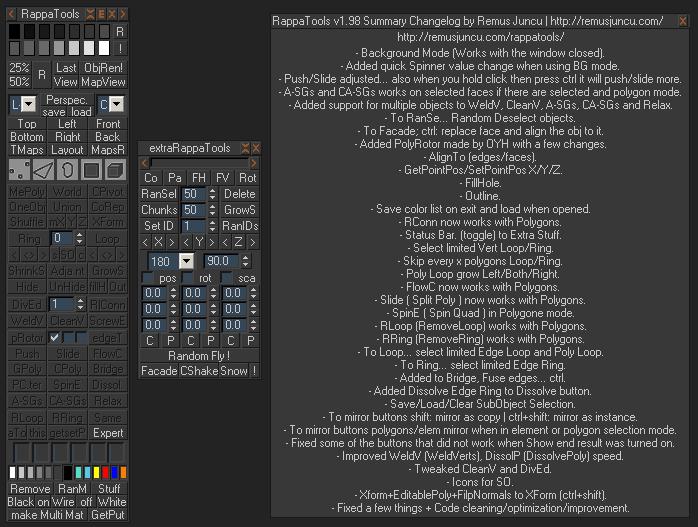
        - Added TMaps (Toggle Maps, ctrl: Toggle Hardware Maps).
        - Added Layout. Quick ViewPort Layout changer.
        - Removed EMaps and DMaps.
        - Replaced InsRep with CoRep (CopyReplace). ctrl:instance and shift:reference.
        - Collapse to WeldV (ctrl).
        - Detach selected polygons to OneObj (ctrl+shift).
        - Detach selected polygons to element to OneObj (shift).
        - Get ID to Set ID (ctrl) poly and mesh.
        - ctrl+box to make swirly box (in the dropdown menu).
FEATURES LIST !!!
- Multiple Color List.
- Random Wire to selected obj.
- Random Wire to all obj in the scene.
- Random Wire to selected obj different color.
- Render at 1/3 of the current size.
- Render at half of the current size.
- Render selected object only.
- View File and View Clipboard Image.
- MapView.
- Quick Select Scene Lights.
- Quick Select Scene Cams.
- Reset view and Hard view reset.
- Save the current viewport poz and load.
- Create blueprint for top, left, front, bottom, right and back viewport.
- Toggle Maps View and Toggle Hardware Maps.
- Quick change Viewport Layout.
- Reload All Bitmaps.
- Convert selection to Editable Poly.
- Convert selection to Poly then move to the center of the scene.
- Convert selection to Mesh.
- Move the selected obj in the center of the scene (position 0 0 0).
- Z pozion = 0 (on ground).
- Distance tool.
- Move group selection to [0.0.0].
- CenterPivot.
- Put the pivot at the center bottom of the object.
- Place Pivot.
- Align Pivot to selected vert.
- Makes the selected obj one.
- Explode, detach sub objects (for poly,mesh,spline).
- Detach selected polygons.
- Detach to element.
- Union selected objects (Pro Boolean).
- Subtract the first selected object (Pro Boolean).
- CopyReplace (replace selected obj with a copy of the first object).
- InstanceReplace.
- Reference Replace.
- Shuffle (randomly swaps objects between them).
- Mirror objects on x axis.
- Reset XForm then convert to EditablePoly.
- Add XForm modifier.
- Add UVW XForm Modifier.
- Add UVW XForm then convert to EditablePoly.
- Ring sub selection in EditablePoly objects (verts, edges, polys).
- Loop sub selection in EditablePoly objects (verts, edges, polys).
- Shrinks the current SO selection.
- No SO selection for an EditablePoly object.
- Grows the current SO selection.
- Hide selected polys.
- UnHide hided polys.
- Invert hided with unhided polys.
- Devide Edge.
- Ring Connect.
    VertexMode: no vert selected enters cut mode. | two verts selected connects them.
    EdgeMode: no edge selected enters cut mode. | one edge selected it will Ring connect. | more then one will connect them if ctrl pressed will ring then connect.
   BorderMode: will cap.
   PolygonMode: one or more polygons selected will bevel. | no polygon selected will enters cut mode.
   Default: enters cut mode.
- Weld verts, with a specific Threshold. (defined by spinner) or Collapse.
- Clean Verts, with a specific angleThreshhold.
- ScrewEdge.
- Push, let's u push or pull the verts,edges,polygons along their normal.
- Loop then push.
- Ring then push.
- Slide, let's u slide the edge loop.
- Connect Slide.
- Connect Slide Push.
- Don't loop through selection and slide.
- Flow Connect.
- Flow Connect without ring select.
- GeoPoly, create a perfect geometric shape from a polygon.
- Create Poly, from selected verts or edges.
- Bridge.
- Point Center, creates a point helper in the center of the selected polygon.
- Spin Edge.
- Dissolve Poly, removes the edges that are inside the seleted polygons.
- Auto SmoothingGroups.
- Auto SmoothingGroups with threshold:180.
- Clear All SmoothingGroups, removes all the smoothing groups.
- Relax verts, edges, polys, objects.
- Hard Relax.
- Remove Loop (vert, edge).
- Remove Edge Ring.
- Same: Select Polys that are the same.
- Select identical polys.
- Expert Mode.
- Show/Hide Command Panel.
- Tweak Mode.
- UVW Edit Mode.
- Quick add modifiers: "Edit Poly", "FFD Box", "Lathe", "Noise", "Shell", "Symmetry", "TurboSmooth", "MeshSmooth", "Unwrap UVW", "UVW Map", "Greeble".
- Quick create primitives: "Box", "Sphere", "Cylinder", "Tube", "Plane", "BzPlane", "VRPlane", "Line", "Rectan", "Circle", "Arc", "Helix", "Teapot".
- Quick create Lights and cameras: "CamT", "CamF", "BCam", "B2Cam", "VPCam", "LightTS", "LightFS", "LightTD", "LightFD", "LightO", "Skylight", "BLight", "B2Light", "VLight", "VSun".
- Quick select: "tris", "quads", "e-poles", "6-poles", "7 or more-poles", "NonQuad".
- Quick Assign Medit material to selection.
- Extra Stuff: "Copy obj", "Paste obj", "Copy trans", "Paste trans", "Asset Browser", "Max Test", "Change Max Priority".
- Quick Box mode on/off for selection.
- Quick assign wirecolor or material.
- Remove Material: from selected obj.
- Removes material to all the obj in the scene.
- Remove ViewPort Background Image.
- Random Material to selection.
- Random Material to all the obj in the scene.
- Random Material to selection different material.
- Quick assign diferent modeling materials.
- Wire material.
- Quick assign Matter Shadow material.
- Make MultiMaterial from selection.
- Make MultiMaterial from images (select folder).
- Makes MultiMat form images and searces sub directories.
- Get mat from obj into the selected material slot.
- Put selected meditmaterial to selection.
- Uv Copy.
- Uv Paste.
- UV Flip H.
- UV Flip V.
- UV Rotate.
- Random Select (Obj, vertex, edges, polygons).
- Delete % of the selected obj.
- Chunks, Slice objects in pieces.
- Grow Structure.
- Set ID to selection.
- Get ID from polgon.
- Random IDs.
- Mirror selected objects.
- Mirror objects relative to the world.
- Rotate Object, Random Rotate.
- Position Copy/Paste.
- Rotation Copy/Paste.
- Scale Copy/Paste.
- Random Fly, random position,scale, rotation.
- Facade.
- Camera Shake.
- Make Snow on Object.
Version Requirement: 
3ds Max 9, 2008, 2009, 2010.
Video URL: 

Comments

Comment viewing options

Select your preferred way to display the comments and click "Save settings" to activate your changes.
RappyBMX's picture

version 1.91 has timeslider

version 1.91 has timeslider toggler :) (autoupdate)

RappyBMX's picture

 what are you talking about

 what are you talking about ???

for extraRappa press E next to close X.

----

http://remus.313designstudio.com/

fajar's picture

Why I cant use

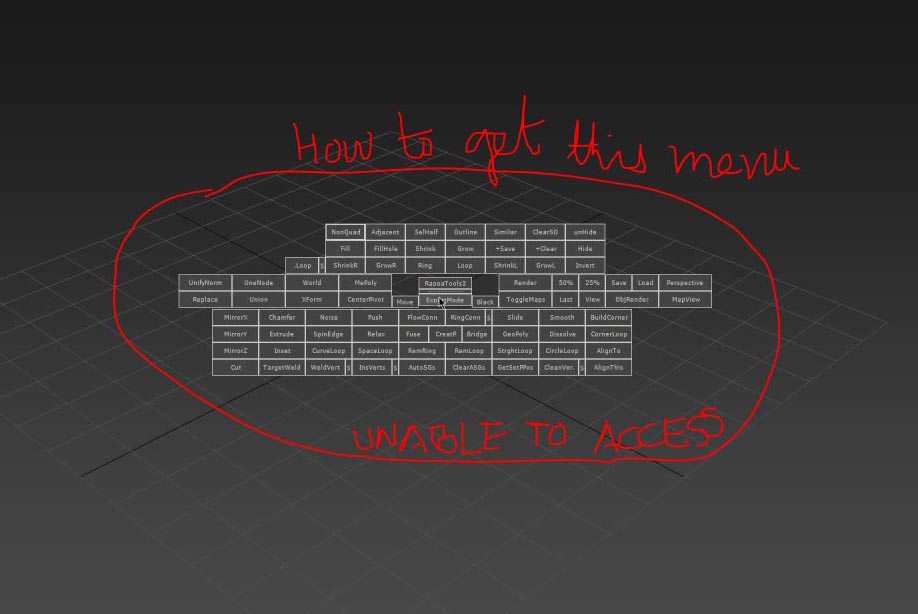
Why I cant use Ctrl+Shift+rmb fetarure for modeling in 1.8 Version!!?

Edit:

Sorry for my bad.... I don't know that I must setup it my self, is that suppose to be automaticly done like the previous one? and where I can acces rappa tools stuff?

RappyBMX's picture

you can create your own

you can create your own quadmenu with the rappatools stuff... that's a predefined one :)... or you could assign a shortcut to it :)

Ankebut's picture

Great script but I have a

Great script but I have a question: How can I change the Hotkey for the QuadMenu? STRG+SHIFT+RIGHT CLICK is a little bit tricky...i would change it..how can I do it?

Or it would be better if I could integrate the QuadMenu in the Right Click Menu...please write back

thanks

RappyBMX's picture

hey 70086504 try this

hey 70086504 try this version http://313designstudio.com/rappatools/RappaTools-v1.7c.mzp let me know if it works...

@YoyoGraphics - hmm... no error... don't have 3ds max 9 so i can't do test (also i don't have free space to install it) ... i'll add the old method to ctrl+click...

YoyoGraphics's picture

Ever since I installed this

Ever since I installed this latest version, DivEd hasn't been working. It just puts me in vertex mode without creating any new vertices no matter how many I tell it to make.  I am using Max 9.Thanks - Geoff

- Geoff

70086504's picture

70086504...why is that ? are

70086504...why is that ? are you getting an error or what ?

thank you for your reply

i got an error like this img

my max is max2009

AttachmentSize
error1.jpg 65.05 KB
cg_max_wu's picture

Great~~ Thank you very

Great~~
Thank you very much~it's working in my max9!
非常感谢,我的英文不好,不知道用什么言语来感谢你,打几句Chinese吧~谢谢你的热情帮助~
Thank you very very very much!!

RappyBMX's picture

cg_max_wu now that you

cg_max_wu now that you posted that i figured out your problem :)... i've sended you rappatools version 1.7the version that i'm working on... shoud work :)

70086504...why is that ? are you getting an error or what ?

Comment viewing options

Select your preferred way to display the comments and click "Save settings" to activate your changes.