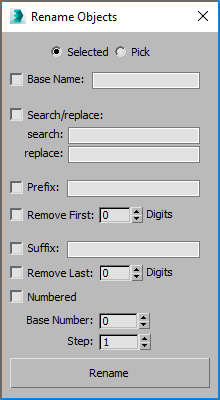
Rename objects... - extended with search/replace function
Version:
1.00 I extended the original "Rename objects..." tool with search and replace function. I hope you find it as useful as me :)
Installation:
1. Exit 3ds Max.
2. Copy .mcr file to <3dsmax_path>\MacroScripts folder
3. Copy .res file to <3dsmax_path>\en-US\MacroScripts folder (or in any other language directory depend on the language you use)
4. Start 3ds Max.
Version Requirement:
3ds Max 2008 or newer | Attachment | Size |
|---|---|
| macro_rename.zip | 3.32 KB |
| macro_renameobjects.jpg | 56.18 KB |

Comments
Amazing and simple
This deservers way more recognition that it's got! It helped me rename a lot of objects with dependencies in a matter of seconds. The only other option I had was to try and write a manual macro without a ui which isn't ideal in this kind of situation. Well done!
Perfect!
Had to rename a bunch of bones to fit a specific naming convention for some IK and this was a huge help. Thanks!
Like my stuff? Follow me on social media!