ScriptSpot

Script

RenderMask

By Ivan Tepavicharov · 2009-02-03

Version
5.90.0
Version requirement
3dsmax 2012 - 2019
Date updated
2018-09-03
Votes
377
Download
Download
Description

Render different types of masks (Luminance, RGB, Reflection, Lights/Shadows, ObjectsID, SSS, Texture, AO, ZDepth, Specular, Refraction). The script don't affect the scene materials, lights and render settings.
(this version support only V-Ray render engine)

 Version: 5.90.0

  • add support "V-Ray Next" (this version support only V-Ray render engine)


Additional Info

Category "IllusionBoxStudio"

Tags: render, Rendering, VRay, mask

Comments (312)

Keep updating RenderMask ?

theedge · 2022-11-22

Hello,
It would be very sad to let such a great script die.
Would any MaxScripy competent good soul(s) be willing to take over the maintenance and update the script for new versions of VRay ?
I am a very poor scripted but I'd gladly offer my help in any other useful fields.
Thank you very much !

To Ivan

KirilAlexandrov · 2022-06-10

Hi Ivan,

Recently I've encountered the issue of not rendering the opacity maps as well. Not finding any update on the subject, I was forced to edited your script to fix the problem for myself. As you're no longer using Vray, I can give you the updated code for you to share.
This tool that you've developed is amazing and quite useful so I'll be glad to contribute to the community.

Best,
K.

2021 update

magicseed · 2021-10-03

Could there be any update here? It's crashing in 3dsmax 2021..

Plsss..

2021 update

magicseed · 2021-10-03

Could there be any update here? It's crashing in 3dsmax 2021..

Plsss..

vray map opacity update

magicseed · 2021-01-25

Hi Ivan,

I hope you can give a small token to update your script which I truly loved in my entire career!

It is not working in vray material opacity map. I know you can fix it. :-)

Ivan Tepavicharov · 2021-01-26

I don't have vray installed on my PC, someone to share some info please (print screens, the info from maxscript listener) something related to this error.

Ivan Tepavicharov · 2020-07-09

I don't use Vray anymore and I can't check the problem .... for now, sorry about that.

Best
Ivan

j.a.burrell · 2020-07-09

In case you do get around to it, I think I have found the issue. It appears to fail when a material has a map in the opacity map slot of a material but the map is missing or the path is just 'empty' so to speak.

Broken again

j.a.burrell · 2020-07-09

Unfortunately Vray 5 seems to have broken the script. Something to do with Vraylightmtl Opacitymap?

fixed link

Ivan Tepavicharov · 2020-05-12

the link is fixed, sorry for the late

Best
Ivan

Download link needs updating please

marko1887 · 2020-05-07

Hi, thank you for this great script. Please can the download link be updated to v5.90.0?
Thanks

rendermask version

kostasdio · 2020-05-06

Still the wrong link. V5.82 up.. :(

link is for an old render mask

ron4D · 2020-04-19

hi

the link provided is for RenderMask 5.82
can you please add a link for RenderMask 5.9

Wrong link

theedge · 2020-04-20

Same for me. Still have vesion 5.82 through the download link...

rendermask can't DL v5.90

thikithiki · 2020-04-17

Hi,thank you for your tools everytime.
download link is v5.82. so please upload rendermask v5.90 again!
v5.82 doesn't work on 3dsmax 2020.

the download link gives us to

mrc64 · 2020-04-07

the download link gives us the 5.82.0 version, from 2015. :(

Ivan Tepavicharov · 2020-04-08

I will check this

Download link is broken

Sirius24912 · 2020-02-14

The link is not working.
Can I somehow get v5.90.0? really needed, thanks!

Ivan Tepavicharov · 2020-02-14

I will fix this tomorrow.
Sorry for the broken link, we update our site and developers deleted everything from server.

render mask for v-ray next

mrc64 · 2020-02-27

I'm sorry but the link to the file still doesn't work :(

Vendetta · 2020-03-18

Still Down..

Ivan Tepavicharov · 2020-03-19

the link was updated, you may download the script

download link is broken

a7med.ee · 2020-02-11

please Fix

Max2020

henryyu · 2019-10-31

Hi

Just wondering, will you have 2020 version soon?

Ivan Tepavicharov · 2020-02-11

I don't use 3ds max anymore.
The script should work under max 2020, if the problem is in the installation file, please install the script to 2020 root dir.

proxy objects - wire color... shadows / black spots

ChinmayT · 2019-06-19

hi in the wire color with proxy objects i see some kind kind of spots / shadows with vray next and render mask 5.90 also tried the mod...

I have not really understood the solution to this..

Hope there is a fix

Thanks in advance...

Really love the script.. very useful

Thanks

FIX

zrK · 2019-01-17

Hello everyone ! here is a fix to the script, including the addons, and fixes for the 2 sides issue and keep opacity issue.

Cheers,

Please Ivan, consider adding those into your future releases !!

Attachments

Ivan Tepavicharov · 2019-01-18

i check this addons a months ago and i don't want to add something which is good only for one or two people.
Sorry.
In future i don't want to spend time for this script. For me is good as it is now.

FIX (again)

zrK · 2019-01-18

I hope some people will find those addons usefull in the future :)
Render masks through glasses, for example, is for me a huge improvment !
Thanks for your work, and here is a minor fix (there was a bug with groups)

Attachments

Problem with one-sided geometry

Moritz · 2018-12-19

Whenever we try to render a mask for a forestpack object, or any other object with on-sided geometry (eg. leaves), all faces with their backside towards the camera are rendered black. This happens only with version 5.9., the older Verion is working fine. Any idea what is causing this? It seems something like "force two-sided" is missing.

best regards,
Moritz

Vray next addons

zrK · 2018-12-21

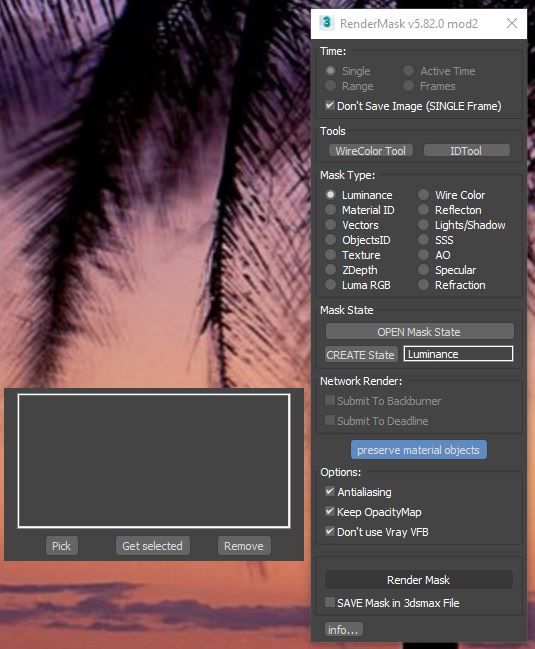
Hi Ivan ! Please please could bring into your new version the modifications that was very usefull : "preserve material objects" button & "don't use Vray VFB" opition ??
If needed i can resend you the modified version of the 5.82 !
I hope this can be doable :)

edit :
I encounter also the same problem as Moritz, rendermask doesn't work with single sided polygons !

Attachments

no more scanline???

renatokg · 2018-12-14

Why only VRAY? why whyyyyyy

Deadline 10.7

Katarina1928 · 2018-11-15

Hello! I have to say that I really like RenderMask and find it so much useful, saved me a lot of time and I have to thank you very much for it. I am thankful that there are people like you and I hope to share many things that I make in future.
I have a small question. Is it possible for you to make it work in Deadline Repository 10.7? :) It would help me a lot. I really don't know how it works or if it is much work, but I had to ask at least.

Thank you very much in advance!

Katarina

Opacity Bug

AntonTkachuk · 2018-11-15

Hi Ivan,

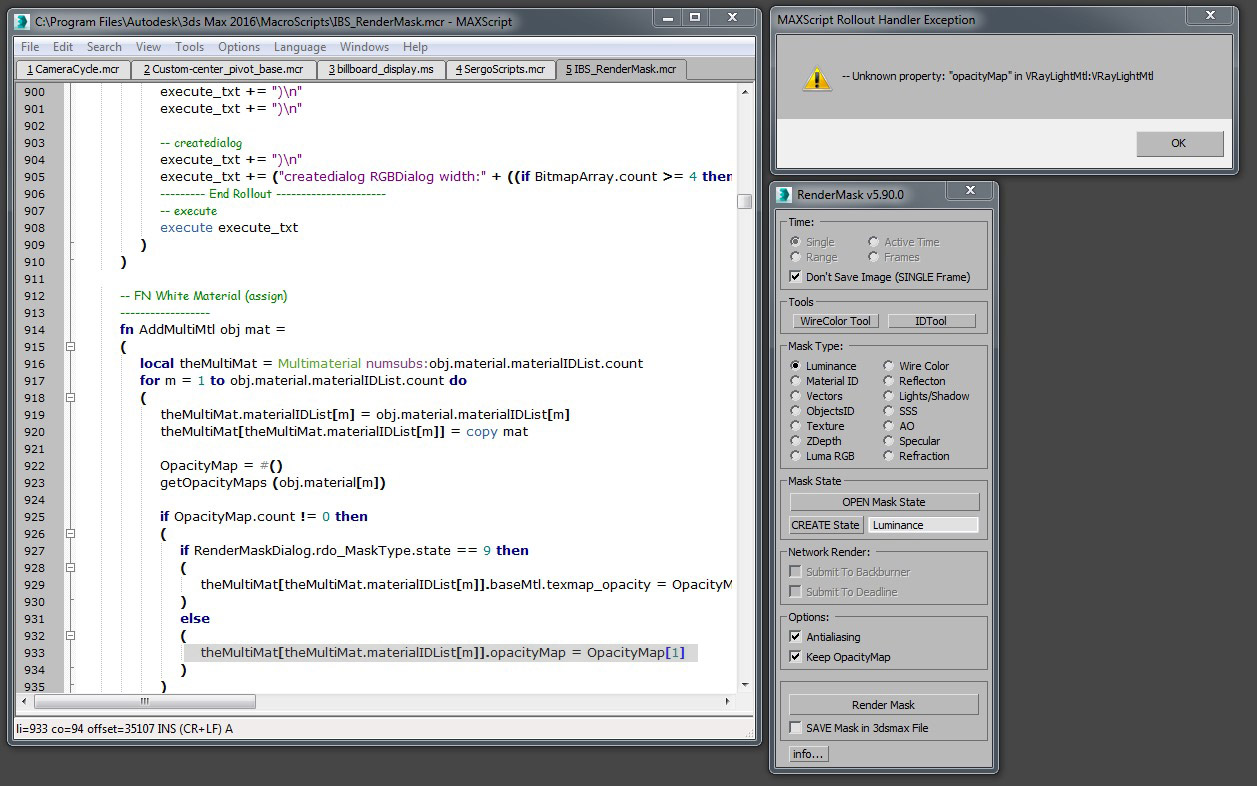
We are having the problem with the opacity map. Whenever we switch it on script crushes and comes up with the same error as previously reported "Unknown property: "opacityMap" in VrayLightMtl:VrayLightMtl"

After the crash the file becomes corrupt and when rendering normally it renders only Black & white (As if it was rendering masks)

Would be great if you had a look at this!

We only experience it in Max 2019, Vray 3.6 & new Rendermask

Much appreciated.
Anton

Keep OpacityMap Bug

Pazsi · 2018-11-16

Hi,

When I try to render a simple luminance mask of a tree which has "OpacityMap", I tick the "Keep OpacityMap" and hit the render mask button. Nothing happens and even the 3ds Max objects become unclickable.

What could be the reason or solution? Thank you for your help in advance! (2019 3ds Max - Vray Next)

Fix

AntonTkachuk · 2018-11-19

Hi,

Please do like Ivan suggested in his previous post.

You will need to go to Render mask Right Click-Edit Script

Then you will need to go to the top bar Search-Go to- in the Destination line type in 933

Replace the line with this one
theMultiMat[theMultiMat.materialIDList[m]].opacity_texmap = OpacityMap[1]

Then on your Macroscript window go File-Save and close the editor

Best,
Anton

birket · 2018-10-19

any update on this one? Struggling to get it to work with VRay 3.6 in Max2019 also

AntonTkachuk · 2018-11-19

@birket

1 Mask done, then black after that

Morne Studio · 2018-09-21

Hi

Thanks for the script. I'm on Max 2019 and VRay Next. I rendered 1 mask fine and saved out an EXR. Then closed the script. Then I want to carry on with normal, but it renders black as if I still have the mask active

Morne Studio · 2018-09-21

Looks like the script may have added a state set, but I dont know how to remove it

Thanks a lot!

gLab · 2018-09-20

for updating the script!

Fo me it works perfectly. Only one minor issue: When a selected object has a multmaterial with a submaterial containing a falloff map in the opacity slot the script crashes with "Unknown property: "opacityMap" in VrayLightMtl:VrayLightMtl"
The script opens with line 933 highlighted:
theMultiMat[theMultiMat.materialIDList[m]].opacityMap = OpacityMap[1]

Thanks again
g. Lab

Attachments

Ivan Tepavicharov · 2018-09-21

ok, thanks a lot for this report. if you want you may replace this line with this:

theMultiMat[theMultiMat.materialIDList[m]].opacity_texmap = OpacityMap[1]

vray next

pacitores · 2018-09-12

the script doesn´t work with vray NEXT. i dont know if i did something wrong during the installation...any suggestions please?
thanks

Ivan Tepavicharov · 2018-09-12

How to help when the info is 'the script doesn't work'. Please specify the problem.
Which version of the script you use?

pacitores · 2018-09-13

hello, sorry for the minimum information. I´m using last version of render mask (5.90.00) with vray NEXT. When i use it and click render mask it open the vray frame buffer but then the render is completly black.

THANKS for your quick answer :)

PABLO

ok, thanks.i will see what

Ivan Tepavicharov · 2018-09-13

ok, thanks.
i will see what happening, i don't have V-Ray Next but before sharing the script here, my friend from Chaos Group test the script and everything working fine.

So, try this please:
select some objects try to make mask (Luminance) but turn on "SAVE Mask in 3dsmax File", then open the file and look the material of the objects, i need to know:
- what material these objects have (Standard, VrayLightMtl, VrayMtl, etc.)
- what is diffuse color of the material

I would be grateful if you could share this information with me.

thanks man.

if you wish send me email.

pacitores · 2018-09-13

ok! i tried to do a mask in a new file and it is working. I created the 3dsmax files before updating the script so maybe that´s why it didn´t work.

Thanks for your time anyway :)))

PABLO

pacitores · 2018-09-13

I tried to copy the file into a new one and it is not working again the script, so im not sure why is this happening.

thanks again

PABLO

Update for V-Ray Next ?

theedge · 2018-07-14

Hello,
I know you are very busy and would like to thank you for this useful script.
Are you planning to update Rendermask to work with V-Ray next, as the new version stopped support for standard materials.

Thanks.

Update for Vray Next?

gLab · 2018-07-15

Hi,
I'd be very happy too if you could update the script for Vray Next. As far as I can see it no longer works at all. Even with Vray Materials. The Frame Buffer stays black. (Tested only with luminance as this is the mode we use most of the time.)

I would like to donate if you'd make it work again :)

Thanks!

Donation / commercial version

theedge · 2018-08-29

I would also gladly pay for this script as it is incredibly useful and proved to be very reliable over the years.

Ivan Tepavicharov · 2018-08-31

i work on it, free of charge :-))))

Ivan Tepavicharov · 2018-09-03

"V-Ray Next" support done.
This version of the script (5.90.0) support only V-Ray render engine.

I don't have this version of the Vray and that's why i upgrade the script without testing, please if you find some bugs send me mail with some info (print screens, info from maxscript Listener, etc.)

enhancements

zrK · 2018-09-03

Hello Irvan ! thanks a lot for your update :) will this work also with the previous vray releases or only with the "next" version ?
Also, would it be possible for you to add the enhancements that was made some months ago (render in max frame buffer, keep material on some objetcs, and so on ..) ??
If so i can send you the modifications that was made in your code !
Cheers,

Thomas

Ivan Tepavicharov · 2018-09-03

This version work with all V-Ray versions.

Ok, send me what you want, no problem.

modification

zrK · 2018-09-06

Thank you very much :) here is a link with the modified version of your script :

https://www.sendspace.com/file/sakr3a

As a reminder here are the modifications : possibility to use max frame buffer instead of the VFB to preserve history and avoid color mapping on masks & option to preserve material on selected objetcts (very useful to allow rendering of an object behind glasses !)

Cheers !

Attachments

Fstorm support

evanesac · 2018-04-29

Any chance to support Fstorm Renderer! Until now i couldn´t make it to work there...
Thx

Ivan Tepavicharov · 2018-04-30

impossible on this stage, i freeze this script for now because my priorities is different
sorry about that

Love it

Studio2a3d · 2018-03-05

We still use this script all the time. Thanks!

Fstorm render

DimP · 2018-03-04

Hello Ivan Tepavicharov, your script is amazing could you please make it compatible with fstorm render.

Gr8 work.. is it possible to add another feature??

pinokio28 · 2017-12-05

Hi.. loving this script day by day... great work has made my life easier..

Just wondering if wire color would include / render opacity maps? ( Like 3ds max's / Vray's original wire color )

Thanks a lot !!!

lol ... found it!! :P

pinokio28 · 2017-12-06

lol ... found it sorry!! :P

rendermask 2018

demmiurg · 2017-11-17

Hi Ivan
Are you planning to release version for max 2018 ?

Ivan Tepavicharov · 2017-11-17

from installation file try to use 2017 version, i don't have max2018 but should be work.

max 2018

Turnim · 2017-11-16

Hi Ivan,

any chance to add max 2018 into the install script?

If you dont have time for it, any way to explain a manual installation?

Thanks

Cheers

Uwe

corona 1.7 + max 2017

slavcho · 2017-10-31

From my experience with vray this script is life saver. Does it now work with Corona 1.7 and max 2017? Best regards

Corona Version

vfga10 · 2017-10-30

Hi, I know in Corona you can render Masks, but I still think this script is pretty handy to render quick mask you might need in psds files, so could you do the script available to Corona or make another script for it.
Thank you so much.

Victor

Corona Version

vfga10 · 2017-10-30

I saw on your website that you updated the script:
"add support “CoronaRender” (partly)"

Still it isn't working for me, either because I'm using Corona or Max 2018

doesnt work with corona

valwizard · 2017-10-19

Hi, there. It is a powerful tool but does not work with corona renderer at all. Used max 2017+ corona + RM v5.82.3

Max froze while Render Mask was trying to reneder a mask

vinai.v · 2017-09-27

Hi Ivan,

This is a wonderful tool ,it has have saved me a lot of time in my workflow.
Thank you very much for sharing it. Love it..

At the moment Max crashed while rendermask was trying to render a scene leaving the scene in that mask state. Now all my cameras render in that mask state.

Could you/anyone please help me to revert the scene back to the normal state?
It would save a days work for me.

Thanks in advance

Max froze while Render Mask

Ivan Tepavicharov · 2017-09-27

I can not do anything if I do not have a maxfile that is causing the problem.

Best
Ivan

Max 2018

nunoqsm · 2017-08-18

Hi!

This script is really useful, I use it on a daily basis!
Could you please update it to Max2018?
Thanks!

max2018

Ivan Tepavicharov · 2017-08-18

from installation file try to use 2017 version, i don't have max2018 but should be work.

Thanks Ivan!

nunoqsm · 2017-08-22

It works like a charm :D
Keep up the amazing job!

uninstall

karimje · 2017-08-11

How can I uninstall rendermask? Please help!

uninstall

Ivan Tepavicharov · 2017-08-18

find "IBS_RenderMask.mcr" in MacroScripts folder inside 3dsmax root and deleted.

MaxScript rollout handler exception - "vfb_autosave_enable"

jexororo · 2017-05-29

Hi, thanks a lot for this script. It's part of my workflow since the day i found it!

I'm trying to use it with Corona, but i'm getting an error every time i try to render a mask. I'm attaching you a printscreen of the problem.

https://pasteboard.co/c5L7ddmjV.jpg

Thanks again for taking the time, creating and improving this script!


Vray VFB -> temporary deactivate of corrections

Alex_H · 2017-04-01

Hello Ivan,
thank you very much for that great script. It saved my life already hundred times.

Would it be possible, that rendermask temporary disables levels, exposure, .. corrections done with Vray Frame Buffer ?

Thank you
Kind regards
Alex

already done !

zrK · 2017-05-23

Hello Alex, this modified version of the script bring that feature, using the Max FB instead of the VFB !!

" Submitted by zrK on Fri, 2016-04-15 07:28.
Modifications

Hello again :) I took the liberty to hire a talented guy who modified your script with my previous request. Here is a link to this version that i find very very usefull, maybe you can add those mods into your installer if you find them interresting ? Cheers

https://www.sendspace.com/file/soe9ld

(Credit Andriy Pogribniy)
"

Unfortunately, Ivan didn't kept those changes into his release, i found them very usefull for production

Forest Pro doesn't seem to work with RenderMask

birket · 2017-03-29

I have a forestpro object that contains a load of bushes (they are vrayproxies). When I select the forestpro object and use rendermask, the render is just black. Does render mask not support forestpro properly? We are on Max2016. Cheers.

Ivan Tepavicharov · 2017-03-30

version of the Forest Pro?
Is there an option to send me maxfile with one object that makes problem?
thanks

thank 2017

imgestudyo · 2017-03-16

thank you for 2017

Deadline 8 support

skeay · 2017-03-13

Love this script but can we have an update to Deadline Version 8? Thanks :)

Ivan Tepavicharov · 2017-03-14

yes

Ivan Tepavicharov · 2017-03-15

Done :))

Deadline 8

skeay · 2017-04-07

Thankyou!

hurry 2017

imgestudyo · 2017-01-04

we wait 2017 version please add quickly ı like you ıf this script not on max max is emty

i don't have max2017 :))look

Ivan Tepavicharov · 2017-01-06

i don't have max2017 :))
look in root of max installation if there have "MacroScripts" folder, then use the max2016 installation of the script....or install the script in empty folder (it doesn't matter where) and copy the *.mcr file manually..... OK, cool? :))

max 2017

sipherlucian · 2016-12-07

Hey Guys,

Just wondering will you be making an update for max 2017, we've tried installing it but so far had no joy getting it to work

Make same script for Corona Renderer?

vfga10 · 2016-10-17

Hi, I used your Script a lot when I used Vray, but now that Im using Corona, I cant use it because It doesn't work, Could you make and update version which works with Corona? Thank you

Ivan Tepavicharov · 2016-10-18

it's almost ready, but i don't have free time to finish

shadow mask problem

llld · 2016-06-22

Thanks for your script.
but "shadow mask" dosen't work in vray.it's all black.i can't see and select the shadow in ps. so i read the script and found that all selected objects are black material, same as unselected objects.and the background color is black too.is that a bug or maybe i missed somthing?

Modifications

zrK · 2016-04-15

Hello again :) I took the liberty to hire a talented guy who modified your script with my previous request. Here is a link to this version that i find very very usefull, maybe you can add those mods into your installer if you find them interresting ? Cheers

https://www.sendspace.com/file/soe9ld

(Credit Andriy Pogribniy)

Frame Buffer

zrK · 2016-03-17

Hello Ivan :) Using your script almost everyday, i am wondering if a slight tweak could be possible ?
I'm using the Vray Frame Buffer, and it would be fantastic if RenderMask could force using the max Frame buffer instead ?

That would preserve the previous render (for region renders for examples) and mainly, that would avoid the color corrections or exposure corrections applied on the VFB, that affect a lot the masks !!

I have no idea if this is possible though ...

Cheers,

Forest Pack Support

Duckraid · 2015-10-21

First we would like to thank you for the life saver script its our number one script in the office:).
We are trying to use RenderMask with the Forest Pack plugin Pro from itoo soft.
Sometimes it works and sometimes it doesn't, most of the time it does not work and we tried several tricks and modes (Wirecolors, Luminance etc..) selecting at the same time the distributed elements and the surface we are scattering on, non of these works. So I thought sharing this with you.
Thank you a lot for your efforts and the good work.

Forest

ale_i3 · 2016-03-03

Hi, if you want that Rendermask work fine with Forest pro, you have to unchheck the CONSOLIDATE button on the Geometry panel in each Forest object. ;-)

Almost perfect.. almost! Except opacity map issue.. :(

Growanimated · 2015-09-27

Thanks for your script.

But there is an issue with the opacity map option. The rendered matte cutout and the foreground object material opacity don't match up!

Perhaps this is because of 2 sided material?

Is there a way to fix this? Or am I missing something?

3ds max "matte element with object id" works perfectly but using it render times are a lot bigger.

Cheers!
G

Thank you !

Tommy_LedZep · 2015-07-17

Hi Ivan,

It is a great news for me that you have updated this wonderful script (I'm talking about the long awaited Multimaterial feature).
I'm going to wait the next update with the output's format lock feature asked by zrK to do the update though :)

Thank you again !

Problem with opacity masks

fabiodacosta · 2015-07-03

Hi, great script.
Unfortunately there's a bug on the opacity map function in the latest version of Rendermask. If checked, and there's only one object with opacity map in the scene, all other objects get the material with opacity mask applied to them when rendermask is rendering.

I'm using 3DS Max 2016 with mentalray for rendering.

Thanks for your work!

Fabio

Ivan Tepavicharov · 2015-07-04

Found and fix, update soon.
Thanks

protocol · 2015-07-05

Thank you so much for this real time saver script !!! amazing !
Any chance to fix the multisub material opacity with the next update ?

Regards,

Sadly, the multisub opacity problem remains in the last 5.80.7 update ;(

zrK · 2015-07-06

I second this request :) Would be great if the Multi/Sub opacity was fixed !

Thank you for this script !

Ivan Tepavicharov · 2015-07-06

ОК, send me sample files or explain in more detail.
Оbviously 'Keep Opacity Map' does not work in all situations.

zrK · 2015-07-06

Thanks fo taking time to look at this :)
Here is a sample file of a tree using a multisub for example.
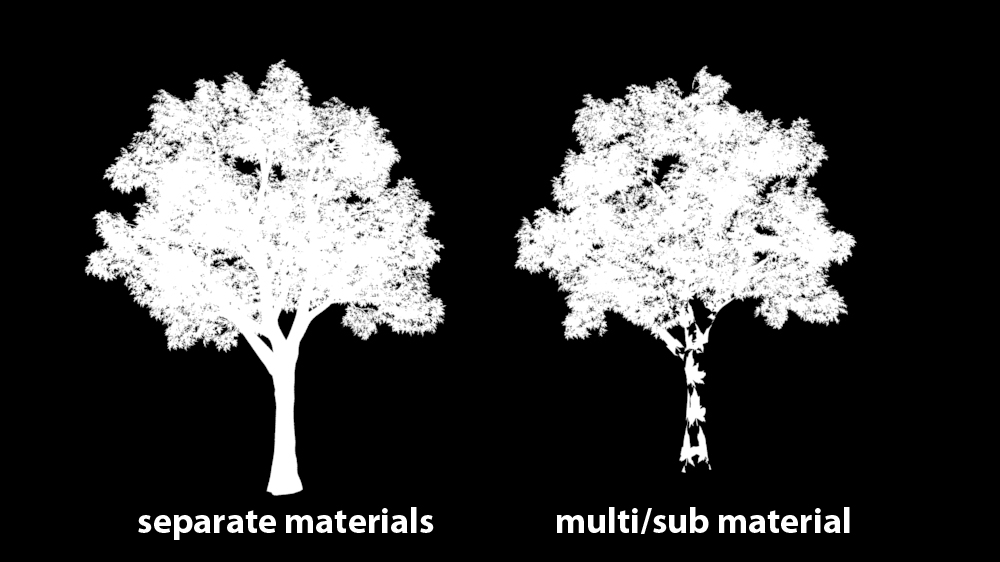
The render alpha is ok, but when rendered by your script, the opacity of the leaf is used on the trunk also ...
Hope this helps !!

Kind regards,

Attachments

Ivan Tepavicharov · 2015-07-07

start checking....... :-)

Ivan Tepavicharov · 2015-07-16

Done...

zrK · 2015-07-17

Thanks a lot Ivan for your work ! i'm impatient to test this !!!
I'm facing a problem installing this version, it seems to interfer with a previous
installed version. I'm stuck on the 5.77.5
Is there any to clean/uninstall previous and reinstall the new one ?
(Only one computer did this, others install correctly)

Also i was wondering if this is possible to lock the output's format, for exemple on *.jpg files when you hit the "Render Mask" button, just like 3ds max do ?

Your script should be fully intagrated into 3ds max, a must have ! Cheers !!

Ivan Tepavicharov · 2015-07-17

For 3dsmax 2013 - 2015 look in 'macroscripts' folder in 3dsmax root. Find 'IBS_RenderMask.mcr' or 'rRenderMask.mcr' and delete it.
Install script again.

No problem for '.jpg' format, check for update soon.

Ivan Tepavicharov · 2015-08-03

"*.jpg" support, Done.

zrK · 2015-08-20

Fantastic ! thank you for the update !!

VrayRT support

istratebogdanpeter@yahoo.com · 2015-03-25

Hi mate,

Will this great plugin get support for VrayRT any time soon ?
Thanks.

Regards,
Peter.

luminance dont work with keep opacity map

kritikoskostas · 2014-12-29

If I have more than one object in the scene which covers the subject I want to do the mask, opacity map works as if you've applied to all objects.
Even if I have two objects with different opacity map again to mask apply one of the two maps.
Thank you in advance for your solution to this problem.

pastilan2014 · 2014-11-25

Anybody else in this world needs a stable life. - Marla Ahlgrimm

1rv · 2014-11-11

Ivan, many thanks for really amazing tool.
May I ask you what render settings should be used to achieve this level of antialiasing? I simply can't get this quality in my VrayWireColor, VrayMtlSelect and other passes.
Thank you in advance.

Deactivate effects on mask render ?

bobmorane888 · 2014-11-06

Hi, you're script is a real timesaver !
Thanks for sharing it !

I was wondering if you could add the environment's effects deactivation when rendering a mask ?
(For example, pass renders white when having a fog in the Environment)

And maybe set the background to white for AO and Shadow pass (Easier when blending it in Photoshop)

I managed to make it simply by putting a line in your script:

if mask_type_rdo.state == 6 or mask_type_rdo.state == 10 then (backgroundColor = white) else (backgroundColor = black)

but it's not perfect with the Shadow Pass ; background renders transparent gray because of the VrayColorMapping...

Opacity map doesn't work with Multi/Sub object

Tommy_LedZep · 2014-11-05

Hi,

Your script is great but the "Keep OpacityMap" option doesn't work with Multi/Sub-Object materials (VRay 3, 3dsmax Design 2015). I see I am not the only person interested by this feature.

Do you plan to update it ?
It would be much appreciated :D

Thank you

titane357 · 2014-09-20

Any chance to have an Octane render workflow ?

Ivan Tepavicharov · 2014-09-20

No....

problem with keep opacity map

kritikoskostas · 2014-09-18

don't work with keep opacity map! test with 3ds max 2014 & vray3.03. pleaase help!!!

Problem with Opacity on Multisubtextures

real08121985 · 2014-09-05

Hi, awesome script, I use it daily at work and it helps alot!

One problem: When I render a mask of a multisubmaterial object then opacity maps will not be masked correctly. Your script applies one opacity mask to the whole object, not only the material id the opacity map belongs to. Here is a possible fix for the "White Material -- Luminance" section, but it doesnt always work:


	local multisub = multisubmaterial numsubs:i.mat.materialList.count
	for n=1 to i.mat.materialList.count do
	(
		local standardmat = StandardMaterial diffuse:white selfIllumAmount:100
		standardmat.opacityMap = i.mat.materialList[n].texmap_opacity
		multisub.materialList[n] = standardmat
	)
	i.material = multisub

monah62rus · 2014-08-16

Please adapt under CoronaRender!

Ivan Tepavicharov · 2014-08-20

for now is a little complicated for CoronaRender

Great script

outgribe · 2014-08-03

It could be absolutely excellent if Z-depth map can recognize opacity/refraction. For example all oblects under glass have same depth map as glass object.

stenionet · 2014-07-20

Very good scritp.
Is there a way to get rid of the Aliasing?

Ivan Tepavicharov · 2014-08-04

#stenionet - Yes, I plan to have the option to disable AA.


Render mask and Proxies

joscott3d · 2014-07-17

Hi all,

Does anyone know how to get rendermask to successfully render out masks of proxied objects? I have over 3,000 objects which I needed to convert to .vrmesh as my file would have crashed. When I try to render a mask of these it doesn't give a smooth black and white mask?

Can anyone help with this?

Cheers,
Jo

Atmosphere Effects

3dbybrunolopes · 2014-07-11

It would be nice to have a option to disable all the atmosphere effects while using rendermask...

And yes, it would be nice to make it work with corona :)

Keep the good(amazing) work with this script.

Corona Renderer

rzoreda · 2014-04-14

Hi, great and usefull script.
So help to use it in Corona Renderer, please!
Thanks.

Opacity Map Problem

gLab · 2014-04-07

Hi,
Thank you for this great tool!

Unfortunately the opacity map bug described by daveb867 is still present.
As soon as one material in a multi/sub material has an opacity map, the whole object is rendered with that map when "keep opacity map" is ticked. (See attached image)

Any chance to fix it in a further release?
Thanks
g.

Attachments

help please

guykeren3d · 2014-03-24

hey all,
i have installed rendermask in my max 2014 and when i try using it to render a simple luminance mask it renders a mask of all the objects in the scene and not only the selected one, + it renders the mask in black so in the RGB channel it's black on black insted of white on black.
anybody knows?
thx
guy

NicolasC · 2014-03-06

no way to download the last version on your website :( thanks ...

dsp_418 · 2014-03-06

Download works just fine here

NicolasC · 2014-03-07

Ok, I guess it's due to access control here at the office, I guess we're not allowed to download .exe files directly ... I'll find another way, like downloading it from my phone :) cheers.

colinsenner · 2014-02-17

Absolutely love this script, added to my can't live without scripts. Keep up the good work, and consider losing the .exe installer and do it through an MZP file. :)

A+
Colin

Opacity Maps

daveb867 · 2013-10-17

I'm having issues rendering objects that have a multi-sub material applied to them where some of the sub materials have opacity masks and others dont.

For example a tree. The trunk doesn't have opacity but the leaves do.

Whenever I try to render either a luminance or wire colour with 'Keep Opacity Map' checked, it seems to apply the opacity map to the whole object. So the leaves are correct, but the trunk and branches also have the leaf opacity map applied to them?

Is there any fix for this?

I should probably add that the objects I'm trying to render are VRay Proxies and so separating the leaves from the trunks isn't an option.

ZDepth problem

birket · 2014-01-28

I am trying to render out a zdepth pass in a vray interior scene using rendermask, but the render is just black. Any ideas why?

latest version download

NicolasC · 2013-08-21

Hello Ivan,

it seems that the latest version isn't on your website ... or maybe am I doing something wrong :) could you please check that ?
Thanks A LOT !

Cheers.

RGB pass

richierr · 2013-08-13

Hello,
firsty thanks a lot for this great tool. I would ask, is there possibility to render directly RGB pass with alpha, or I should render Lumininance pass and then I have to compose it?
Thanks.

NicolasC · 2013-08-07

Yup same problems here (max2012 / latest VRay version) ... not tested on max2014 yet. But please, an update :)

Thks !

Issues

alexyork3d · 2013-07-04

It does appear to work sometimes on some scenes and not on others. I can't narrow down why some scenes won't work. I think it might be something to do with Vray and colourcorrection maybe.

Ivan Tepavicharov · 2013-07-05

OK, I apologize for this but ..... I do not have "3dsmax 2014" and Vray 2.40 to test.
Тhe problem seems to be some changes in Vray (I think so).
Check for update soon.

alexyork3d · 2013-07-05

Great news. good luck with the bug hunt!

barigazy · 2013-07-19

In vray 2.40.04 "adaptationOnly" settings are changed. Now instead of checkbox (BooleanClass) option U need to use dropdown list (integer)


renderers.current.colorMapping_adaptationOnly = int_value (zero based)
-- adaptationOnly modes:
int_value = 0 -- Color mapping and gamma
int_value = 1 -- None (don't apply anything)
int_value = 2 -- Color mappimg only (no gamma)

working

bronius · 2013-07-02

It's working to me on 3dsMAX2014

Boolean Woes

alexyork3d · 2013-07-01

Yes, it does appear this script is now totally broken. I think this is something to do with the latest Vray version.

Sadly this script is now unusable... does anyone know of a good alternative temporarily?

max 2014 error

danb4026 · 2013-06-29

Maxscript rollout handler exception

Unable to convert: 1 to type: Boolean

this happens on line 2171: renders.current.colorMapping_linearWorkflow = false

I have come to rely on this script...can you get it to work?

Does Ivan even look at these comments?

max 2014 error

bronius · 2013-06-29

I just deleted this line in script.

2014 error

alexyork3d · 2013-06-28

hi,

Great script! Getting an error with 2014 design and vray 2.40.04.

---------------------------
MAXScript Rollout Handler Exception
---------------------------
-- Unable to convert: false to type: Integer
---------------------------
OK
---------------------------

line is:

renderers.current.colorMapping_adaptationOnly = false

UPDATE:

If I change the above from "false" to "1.0" (it told me it should be an integer) it works!

chakib · 2013-06-30

Same error here !

Me too - vray 2.40 - 3dsmax 2014

Pmaggia · 2013-06-30

Any idea?

Vray 2014

jedchambers · 2013-06-26

Hey Ivan,

Brilliant script!! so good!

Just updated to Vray 2014, and it doesnt seem to work anymore. Im on Max 2014, and it worked fine with Vray for 2013.

Installs fine, but when you go to render mask, MAXScript rollout handler exception appears and the render fails...

What is the best way to fix this??

Thanks again, you are a champion

Jono

vray proxy and opacity textures problem

whereareyou · 2013-06-24

Hi, this tool is great!! I always use!! thanks and congratulations Ivan, I only have a little problem with vray proxy and opacity textures, the script make the mask wrong, with a lot of holes... Any tip?

Hi everyone.Great tool -

k2000 · 2013-05-22

Hi everyone.
Great tool - perfect one!!
Is there any way to add option - production render of selected object/objects
(no masks)?

Thx

themaxxer · 2013-04-23

want to push the instance option...
"is it possible to add an option to the wirecolor tool to handle instances as one object?"

thanks. I use the script almost every day...

best regards
themaxxer

stealthx · 2013-04-08

It is fast and it works ... incredible!!! Thank you.

themaxxer · 2013-03-13

is it possible to add an option to the wirecolor tool to handle instances as one object? if you add random colors all instances get an other color, that's not so nice...

great script, thanks.

best regards
themaxxer

Ivan Tepavicharov · 2013-03-13

themaxxer - OK

stanley_asbeek · 2013-03-01

Nice one caebrasil, thanks a lot, I will check that out ASAP ;-)

Ivan, I was wondering if you already thought about maybe using layers as a selection in staid of actually selecting the object in your scene.

We where actually talking about all this on VRay's forum, and the idea of using layers as a selection went up, and I think it would be a great way to handle large selection sets.

Now, I know it's easy to select the object through the layer manager, but the idea is to go a little further and being able to see through XRef as well.

Often, now, if I need to render a mask of something in a XRef, I need to merge, select, render, and the scene are becoming big (several hundred Mo compressed) and fastidious to work with.

If the layers where a way of selecting object, and it would be reading through the XRef, it would be a life saver.

I hope I'm not bothering you too much at once ;-)

Cheers,

Stan

ps : Yo Kab, tout va super ici! Gros bisous de nous deux!

scene scale

kab · 2013-02-28

Hi Ivan,

First of all, big thank for that script. It's one of the most usefull!

But, I noticed most of the passes (Zdepth, AO, etc.) don't care about the scene scale and are always computed in meters.

It's a bit annoying cause, even if the value can be edit, it refuses decimals...

Could you fix that?

(@Cabbage: I guess you have that kind of problem, try to scale down (1/100) the zdepth values and you will have a correct zdepth rendermask pass)

Private:
Iow Stan! What's up in Australia? Bonjour à Reb! Bizzz!

Matte Objects

stanley_asbeek · 2013-02-26

Hey Ivan,

I'm using a lot of Matte object, and I was wondering if you planned to add this in your script, it would be such a time saver...

A little bit like the "Black Hole" in DeeX V-Ray Arsenal, but inverses.

Thanks a lot

Stan

Ivan Tepavicharov · 2013-02-26

stanley_asbeek - this is very different from the idea of the script.

stanley_asbeek · 2013-03-01

Hi Ivan,

I'm sorry if I didn't understoud the idea of the script in your way.
But as far as I know your script is design to create a mask of OA, luminance, ID, reflection, texture, etc

Isn't the whole idea creating a mask of the selected object by rendering out only those with specified properties (OA, refl, texture, color, etc) and all the rest black?

If yes, I don't really see how having only the selected object rendering with the material that are already applied and the rest black would be completely out of the idea of this script. :-)

I might have misleading when I pointed that "DeeX V-Ray Arsenal" but that was only because they have a script that renders only selected object with the rest black (matte). Not for all the rest of the script which is basically a solid rocks for maya.

Now it's right, the only difference with all the other options that you're providing, is that for the base material (to be rendered correctly) need to have the rest as matte objs.

I hope I made me more clear about my thoughts,

Anyway, Thanks for your script, it's great, and you're greatly helping the community by providing updates and attention to us.

Cheers

Stan

Ivan Tepavicharov · 2013-03-01

stanley_asbeek - ОК, I'll do some tests and try.
best regards :-))

Z depth distance

Cabbage · 2013-02-15

I love this Script, most used script i have, please can you fix the far distance on the z depth mask, its waaay too close:(

Change Units setup

kimbaway · 2013-02-28

I think rendermask works in meters.
If you work in cm, think to divide your values ​​by 100 and your Zdepth will be correct ;)
Is it possible to add a function for change the Unit in rendermask? Because for the radius of the AO is limited to 1 and I can't put a smaller value.

Thanks.

Ivan Tepavicharov · 2013-01-31

New in 5.77:

- add Mentalray support in "Reflection" and "Light" mask
- add "Specular" mask
- add turnoff active Effects
- add switch "anti aliasing" in "ZDepth" mask
- add "auto detect" in "ZDepth" mask

barigazy · 2013-01-31

Hi Ivan.
Again you done very nice job on this update.
It is posible to add the option for extracting velocity pass from *.exr g-buffer. Vray have a huge problem with generating this pass.
Acurate motion blur is very difficult to achieve without a precise V-pass, but other than that this pass can be used for flickering reduction
http://www.juvano.com/Deflickering-with-Velocity-Pass
Cheers!

Ivan Tepavicharov · 2013-01-31

will test and try :-)))

Ivan Tepavicharov · 2013-01-31

stanley_asbeek - find and delete "rRenderMask.mcr", then install new version

Small request

trixian · 2013-01-28

Hi.

This script is a life saver, but one thing that bothers me is that if I have vray lens effects on, it calculates those. Could you make it automatically disable all effects and such?

Ivan Tepavicharov · 2013-01-29

trixian - ok.

stanley_asbeek · 2013-01-17

Hey there

I don't know why, but it's a few versions new that I can't update, I'm sticking with version 5.

I try to install it a few the time but it doesn't update in my max,

I tried to find your scripts in the user profile enu folder and inside max folder but I can't find them, so I can't delete the old versions...

Is there a chance you release your script not as a exe?
I would make it much easier to manage workstations ;-)

Thanks anyway, the news features looks awesome :-)

idea

laron · 2013-01-13

hey!
amazing script here! thanks!

one additional wish if possible:
would be great having an option to just simply "render selected" as is. rgba(+chanels maybe).

Ive just run to an issue of need to render only one object with all reflections and shadows on it but I dont need the rest. there are several workarounds for this but all needs some hassle... with this script it would be just a press of a button I imagined :)

just an idea.., thx anyways!
Aron

Dont appear when i hit rendermask button!

ecemoksuz · 2012-12-29

Hello thanks for such a great script first of all..It used to work fine, i have no idea what i might have done, but when i hit rendermask button it doesnt appear on my window anymore, any ideas?

Bug report - exposure control

crystal3d · 2012-12-24

Hi,

I have used your tool and it is promising already, however it does not remember the "vray exposure control" settings afer usage for example:

my exposure control effect is set to "vray exposure control" and it switches to "no exposure control" after making an alpha with script.

will be fixed

Ivan Tepavicharov · 2012-12-26

crystal3d
will be fixed

yunusbbayram · 2012-12-24

mental ray support would have been nice though.

working on it

Ivan Tepavicharov · 2012-12-26

#yunusbbayram
working on it

You did it again

chakib · 2012-12-17

Man, you're a king !

NikkoN · 2012-12-13

Thanks for the update! Powerful plugin. AO and DOF is very cool!

barigazy · 2012-12-13

Hi Ivan,
very nice update in this version.
A suggestion:
In most cases when it comes to do some compositing in Nuke or Fusion, additional passes like ZDepth, Alpha and other masks types need to be rendered in double resolution without using antialiasing filtering.
It would be nice if your script has that option (turn on/off AA).
Cheers!

barigazyYes, the next step is

Ivan Tepavicharov · 2012-12-13

barigazy
Yes, the next step is "turn on/off AA"

Ivan Tepavicharov · 2012-12-12

ZDepth very soon. :-)

Ivan Tepavicharov · 2012-12-09

For SSS you must have light selected in "sss dialog".
Z Depth???? I want it too :-))) Soon maybe.

Great new adds

chakib · 2012-12-09

I love the fast AO pass !!! the SSS mask doesn't work for me ( everything looks black, maybe a demo should clearify that )

I have 2 request if possible :
- Can you add a depth z_map mask type too ?
- Can you add also the vrayshadow ( not the vrayshadow map )
to the shadow mask type please ?

i will be very thankful !

fajar · 2012-10-19

@ character making max 9 cant running this script, Ivan can you fix that....say

@"\submission\3dsmax\SubmitMaxToDeadline_Functions.ms" 

become

"\\submission\\3dsmax\\SubmitMaxToDeadline_Functions.ms"

also could you add the function on submit to deadline to check it installed or not....(dont have deadline so I Cant try it)

in case windows didnt installed on "C:\\" (some XP user , dual booting user)


local MyWinPath= sysInfo.windowsdir
local MyIePath = getFilenamePath MyWinPath + "Program Files\\Internet Explorer\\iexplore.exe"
		
  on help_btn pressed do
   (
     ShellLaunch MyIePath "http://www.tepavicharov.com/scripts.html"
   )
  on donate_btn pressed do
   (
    ShellLaunch MyIePath "https://www.paypal.com/cgi-bin/webscr?cmd=_s-xclick&hosted_button_id=4TJFMZJQA4RP8"
   )

thanks for the beautifull script

Ivan Tepavicharov · 2012-10-19

Thanks fajar, will be fixed soon

It didn't supported particle system

flame · 2012-10-19

😛Ivan,I found this tool didn't supported PF Geometry,I hope you can improve the function.

exe

impi · 2012-10-02

Ivan
Can you have the install as a zip/rar ...?
Exe + no admin right = :(
Thanks

Itoo forest

cotentin · 2012-10-12

Thank you for this so usefull script.
I try to use it with itoo forest but it doesn't work.
For example, if i have a forest with a multimaterial object randomize, it only renders the first ID on each plane.
Is it normal?
C*

Ivan Tepavicharov · 2012-10-13

You must install itoo forest to see where the problem

Question

chakib · 2012-08-04

I did a test for the light/shadow mask, but it work only with "Vray shadowmap" ad not with the standart "Vrayshadow", i don't use vrayshadowmap so this is my question : why choosing this shadow mode instead of the standart one ?

Ivan Tepavicharov · 2012-08-07

I did a test with all types of shadows, works well for me.
which version of Vray you use?

version 2.30.01

chakib · 2012-08-07

that's weird it doesn't work here with Vrayshadow :s...

Namoi · 2012-07-26

Sorry to bump myself, but the "keep opacity" is still broken using Mental Ray renderer.
I looked at the code : in the get_all_opacity_map function you only look at the "opacity" string to retrieve opacity map, but in Arch and Design material it is cutout_map.

Also :
Is it possible to have "force 2 side" as an option.
I explain : If you create a mask for a tree as an example, single faced leaves are transparent depending of the facing normals which result in an incomplete mask.

And it would be wonderful if the shadow Mask option worked with Mental Ray renderer.

Thanks for this great script

You did it !!!

chakib · 2012-07-20

Thank you so much for adding the shadow map it's very useful !!!

Max 2011

brodie · 2012-07-18

Can I get this to work for Max 2011? I noticed that the installer only listed 2012 and 2013.

-Brodie

Ivan Tepavicharov · 2012-07-19

Use "2012" installer, work for all version befor 3dsmax 2013.

fajar · 2012-07-17

Thank you very much ivan, i did quick test and it work well. Thanks.

Ivan Tepavicharov · 2012-07-17

v5.72
- Add "Shadow Mask"
- BugFixed in "ObjetsID Mask" when use "Default Scaneline Renderer"

- BugFixed in "ObjetsID Mask" when create dialog whit tumbs.
- Replace "Keep OpacityMap - White Matte" and "Keep OpacityMap - Black Matte" whit one button "Keep OpacityMap"

v5.71
- Upgrade "Mask State", now each object can be in more than one group.
- "Mask State" corresponds with "Name Selection Set"
- BugFixed when save file in "*.exr" file.

caebrasil · 2012-07-13

Excelent addition, "ObjectsID Mask"! And max 2013!!
Thanks!

Please

chakib · 2012-07-04

Can you make and option to make just the shadow maps for only selected objects?

Ivan Tepavicharov · 2012-07-04

Yes, I hope. I want that too. :-)))

for max 2013

Ivan Tepavicharov · 2012-07-04

Fixed installation for 3ds max 2013

Ivan Tepavicharov

ed3d · 2012-05-31

Привет Иван.Я Тебе письмо отправил, но Ты не ответил )))))

Отменный просто скрипт рендермаск, спасибо большое.

Однако есть сразу несколько вопросов.

1. Куда конкретно установились все файлы скрипта ?

Я указал путь ( папку с 2012 максом ) и всё установилось, всё ок работает отменно, кнопку сделал.

Потом я заметил что у меня древняя версия 5.4 а у Тебя уже гораздо свежее и лучше.

Решил удалить вручную старую версию, но ни сами файлы ни в поисковике, вообще нигде так и не нашел.

Как удалить то его, чтобы четко поставить новую версию ?

2. Поддерживает ли анимацию ?

Вот у меня анимация на 3000 кадров ( роботы трансформеры, взрывы, всё как обычно )

В самом максе, например в вирее четко выставлены кадры с 1 по 3000 и выбрана папка куда рендерится анимация ( сохраняются кадры )

Так вот можно ли ( и как ) отрендерить те же 3000 кадров но уже только этой самой макси ( например как в моем случае "броня" ) ?

object IDs

dub73 · 2012-05-29

How about an option for object IDs? sometimes material IDs are not the right one, objects IDs and a randomize ID function would be great :)

Ivan Tepavicharov · 2012-05-30

...How about an option for object IDs? sometimes material IDs are not the right one, objects IDs and a randomize ID function would be great :)...

good idea.

Force 2 sides

Namoi · 2012-05-08

Hi,

Is it possible to have "force 2 side" as an option.
I explain : If you create a mask for a tree as an example, single faced leaves are transparent depending of the facing normals which result in an incomplete mask.
It's the only problem i found in this script.

... and RAHH, i've jsut installed last version and it is not possible to choose the renderer anymore WHY ? Please add it back, pretty, pretty please !

I also confirm that the "keep opacity" is broken usin Mental Ry renderer.
I looked at the code : in the get_all_opacity_map function you only look at the "opacity" string to retrieve opacity map, but in Arch and Design material it is cutout_map.

Thanks

Nafetsu · 2012-04-23

VrayMtl (like before)

Ivan Tepavicharov · 2012-03-16

..."Keep opacity" option seems to be broken...

What kind material you use?

opacity

Nafetsu · 2012-03-15

"Keep opacity" option seems to be broken.

Reinstall 4.82 on max2012 and get back "opacity keeping"...

Anyway, great great script thanks a lot for it !

mariohyeah · 2012-02-04

great!!
any chance to get the "floor" reflection for the masks?

I mean, you render a room, with a TV on it, with reflective floor, and want to composite it in fotosop or after effects

Ivan Tepavicharov · 2012-02-21

"...any chance to get the "floor" reflection for the masks?..."

Difficult to do for now. I will think about it.

3d script

dollah3d · 2012-02-03

hello im new here

Gyrch · 2012-01-29

Спасибо Иван за Script.
Очень полезная и удобная штучка.Просто праздник какой то!
Удачи и здоровья Вам!

Mask "lights"

3dbybrunolopes · 2012-01-23

Hello,

Nice update but when I use the mask "lights" type, it turns off the lights and doesn't restore...

Ivan Tepavicharov · 2012-01-23

Hello, Nice update but when I use the mask "lights" type, it turns off the lights and doesn't restore...

I did a test and everything looks good.... What kind of lights did you use?


3dbybrunolopes · 2012-01-23

It happens with the vrayies lights, and it turn's off the VrayExposureControl too...

Ivan Tepavicharov · 2012-01-23

"It happens with the vrayies lights, and it turn's off the VrayExposureControl too..."


Which version of the Vray you have?

Ivan Tepavicharov · 2012-01-23

Try to turn on "Use PhysicalCamera Parameters" to keep VrayExposureControl.

Установка на старую версию ???

cloobok · 2012-01-20

Привет,! После установки на предыдущую версию, ничего не меняется. Может нужно подчистить где то ? MAX 2012.Спасибо.

Разобрался !!!

cloobok · 2012-01-20

Пришлось подчищать_C:\Users\Admin\AppData\Local\Autodesk

Rendermask wont start

lord_vogel · 2012-01-05

Hello there,
I try to use Rendermask with my 3D S Max 2012 x64 on a win 7 x64 system but it didnt start even when i try to start by "run script"...

what should i do?

Ivan Tepavicharov · 2012-01-06

After installation go to "Customize","Customize User Interface" in the "Category" dropdown list find "RequiemScripts"

tnx

shayanzoro · 2011-12-23

really thanks

themaxxer · 2011-11-25

great script!

I have an idea to make it even better. is it possible to generate "masks" for all used materials in scene automatically? the script has to give every material an unique matID and make an array to render them. or am I wrong and this is much more difficult?

thanks and best regards
themaxxer

Тhe idea is interesting

Ivan Tepavicharov · 2011-12-23

I have an idea to make it even better. is it possible to generate "masks" for all used materials in scene automatically? the script has to give every material an unique matID and make an array to render them. or am I wrong and this is much more difficult?

The idea is interesting. I'll try.

Ivan Tepavicharov · 2011-10-27

birket - in "Render Scene" dialog is the "Render Hidden Geometry" is turned ON?

Yes?

birket · 2011-10-28

No - we never have that checked.

(BTW, the cars that you can see being reflected are in an XREF Scene file - not sure if that has anything to do with it)

Ivan Tepavicharov · 2011-10-28

The script does not support xRefObjects & xRefScenes. Sorry.

Just perfect !

subburb · 2011-11-11

You made a genius tool : simple, efficient, and absolutely useful. congrats !

Seems to have a problem with VrayCarPaintMtl

birket · 2011-10-25

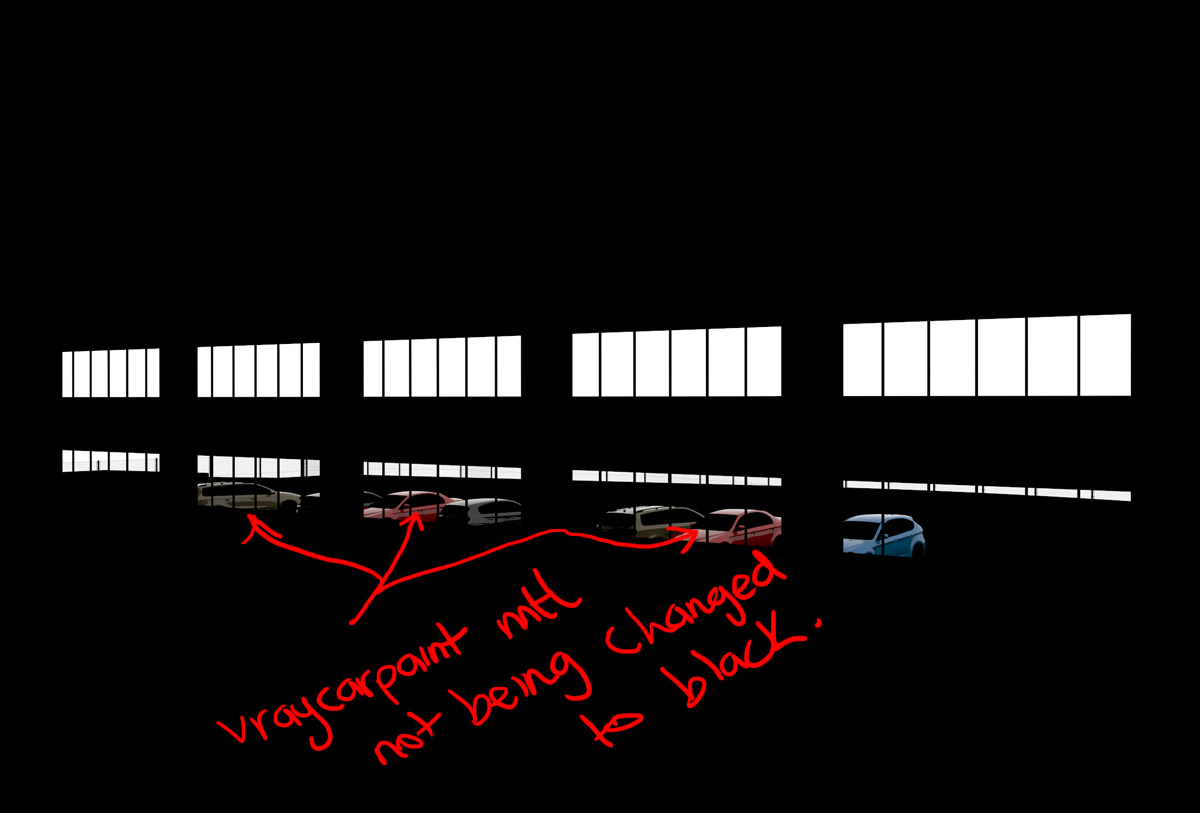
I'm doing some RenderMasks of Env.Reflections, and where there are VrayCarPaintMtl shaders in the reflected objects, I am just seeing the actual carpaint - not a B+W matte.

I'm using Vray 2.0

Ivan Tepavicharov · 2011-10-26

The idea of "env.reflection" is to generate reflections from the environment as a black and white image which is different from objects materials. The script ignores all materials in the scene and set new reflecting materials.
This gives you more freedom in composing.

Env.Reflection problem

birket · 2011-10-26

Maybe I wasn't being clear. Here's a render of an environment reflection showing the problem. Can this be sorted out?

Attachments

Awesome

onodi.andras · 2011-10-18

Amazing script. I was always trying to look for scripts that I needed, but by checking the front page of scriptspot i realized that there are tons of other situations I can use scripts in. :)

Suggestion

Leandro Salerno · 2011-10-10

would be interesting in future to create "State Sets".
the new feature of 3ds max ...

congratulations for the script is excellent!

Barbiturat · 2011-09-05

Спасибо! Отличный скрипт.

загрузка

cloobok · 2011-07-18

не могу загрузить по ссылкам

Ivan Tepavicharov · 2011-07-18

По каким ссылкам пытаетесь загрузить?
Ссылку,которую я оставил введет к моему сайту, с которого можно скачать скрипты.

загрузка

cloobok · 2011-07-18

нажимаю загрузка на сайте через _хром_. Выдает :

Suggestions:

  • Try reloading: www.­tepavicharov.­com/­scripts/­render_mask.­exe
  • Search on Google:нажимаю на ссылку exe и тоже самое повторяется.Раньше срабатывало иногда, а сейчас вообще перестало.Может если не затруднит скинуть на ящик ?

Ivan Tepavicharov · 2011-07-18

На какой ящик скинуть?
Я проверил - через хром качается нормально, может с твоим браузером проблема :)

cloobok · 2011-07-19

может быть....но проверил через пару других - тоже самое, буду разбираться

Still having big delays

birket · 2011-07-15

We are still having major problems with RenderMask. It is a key part of our pipeline and difficult to work wothout it. We are still on Max 2009 x64 and are now using Vray2.0.

It seems that problems started since we started using a lot more ForestPro objects (large areas of grass, shrubs and trees). Clicking on RenderMask creates huge hangs - sometimes before a render even starts, but sometimes once the render has completed. The renders themselves usually take only about 1 minute. Only real solution is to quite out of the scene and start again.

Can this be solved at all? Are there compatability issues with ForestPro?

EDIT:-
As soon as I click on Render Mask, note at the bottom of screen says 'MXS auto increased heap to 10301440'. Not sure if this is relevant. Max just hangs with one processor core at 100% activity, and ram useage for 3dsmax.exe session is fixed at 630,160k. I have left it 10-15 minutes but no change. Only way to get going is to crash out of Max.

Ivan Tepavicharov · 2011-07-15

We check, hopefully soon be fixed

birket · 2011-07-15

Thankyou. I am happy to donate funds if this can be sorted. Do you have any ideas what the problem might be?

Ivan Tepavicharov · 2011-07-15

I have only some guesses.
I hope to have an answer by Monday

birket · 2011-07-15

That would be hugely appreciated! Email me if you want me to test.

Ivan Tepavicharov · 2011-07-15

birket

Send me your email to ask you something.

birket · 2011-07-15

rich at birket.co.uk
or
richard.birket at blinkimage.com

RenderMask - new in v5.3

Ivan Tepavicharov · 2011-07-13

The big change in this version is a search function for opacity maps. Now the options "Keep OpacityMap - White Matte" and "Keep OpacityMap - Black Matte" work more accurately. The next step is to work with Xref scenes. I hope soon to deal with it.

make a paypal

kurson · 2011-07-06

great work, big tool for my Pipeeline, (plaese Ivan, make a paypal donate buton)

Ivan Tepavicharov · 2011-07-06

soon :-))

Materials ID

mustafa mamdouh · 2011-06-17

First it is really useful script ..
I want to know if there is a way to deal with one selected object has multi\sub material applied and i want to render only one id from it

Ivan Tepavicharov · 2011-06-20

mustafa, if I understand correctly, will be very difficult.
To be sure give me an example (what you have in the material of the object and what you want to be the final result)

mustafa mamdouh · 2011-06-20

Sorry i didn't explain it properly .. may an example can do it
if i have object has multi/sub-object material applied for his polygons level .. say glass and brick mat .. and i want to mask glass only >> but the result of script will be the whole selected object so i need to detach every polygon group separately to mask them one by one ... can you do it without making this silly process

Ivan Tepavicharov · 2011-06-21

Now I understood. I know about this flaw. In the next version will be included. Initially it will only work with one object or more objects but with identical material.

Thanks for the advice

Great News

mustafa mamdouh · 2011-06-24

I can't wait to see it ...
okay i have more suggestions for you to make it more great

-> you may add feature to convert all masks to selections (channel layers) within photoshop file (PSD)

-> support for alpha channel (opacity material)

by the way I tested it in 3ds max 2012 64-bit .. and working very well

anyway thanks to make our workflow better

Very slow to recover after render complete

birket · 2011-05-13

I am experiencing very very long delays once the rendermask is complete on my projects. They are reasonably complax projects of buildings with quite a few ForestPro objects (trees/grass/bushes etc). The rendermask (for the glass objects, for example) completes in under 2 minutes (using Vray distributed rendering). However, 3dsmax locks up ('not responding' message) for quite a few minutes after completion. CPU is set at 100% on one of the 4 cores and memory usage is not changing.

My system is Windows 7 x64, Max 2009 x64, Vray 1.5rc5, 8GB Ram

Any ideas? Its painful!

Ivan Tepavicharov · 2011-06-13

- repa2
for now I can not do anything with Xref scenes. The concept and original idea of the script which I started, does not allow to write for Xref scenes.

- kazzagazza
Go to:
"maxroot\ui\macroscripts", find "rRenderMask.mcr" end delete.

- birket
I know about this problem. Try to turn on "Keep OpacityMap - Black Matte"

uninstall?

kazzagazza · 2011-05-11

Hi, great script, but I need to uninstall so that I can install the latest version (installing new version over top of old one is not working) Please can you advise how to do this?

Thanks in advance

PS I'm using 3ds Max design 2011

great plugin

repa2 · 2011-03-17

Thank you Ivan for this amazing plugin!
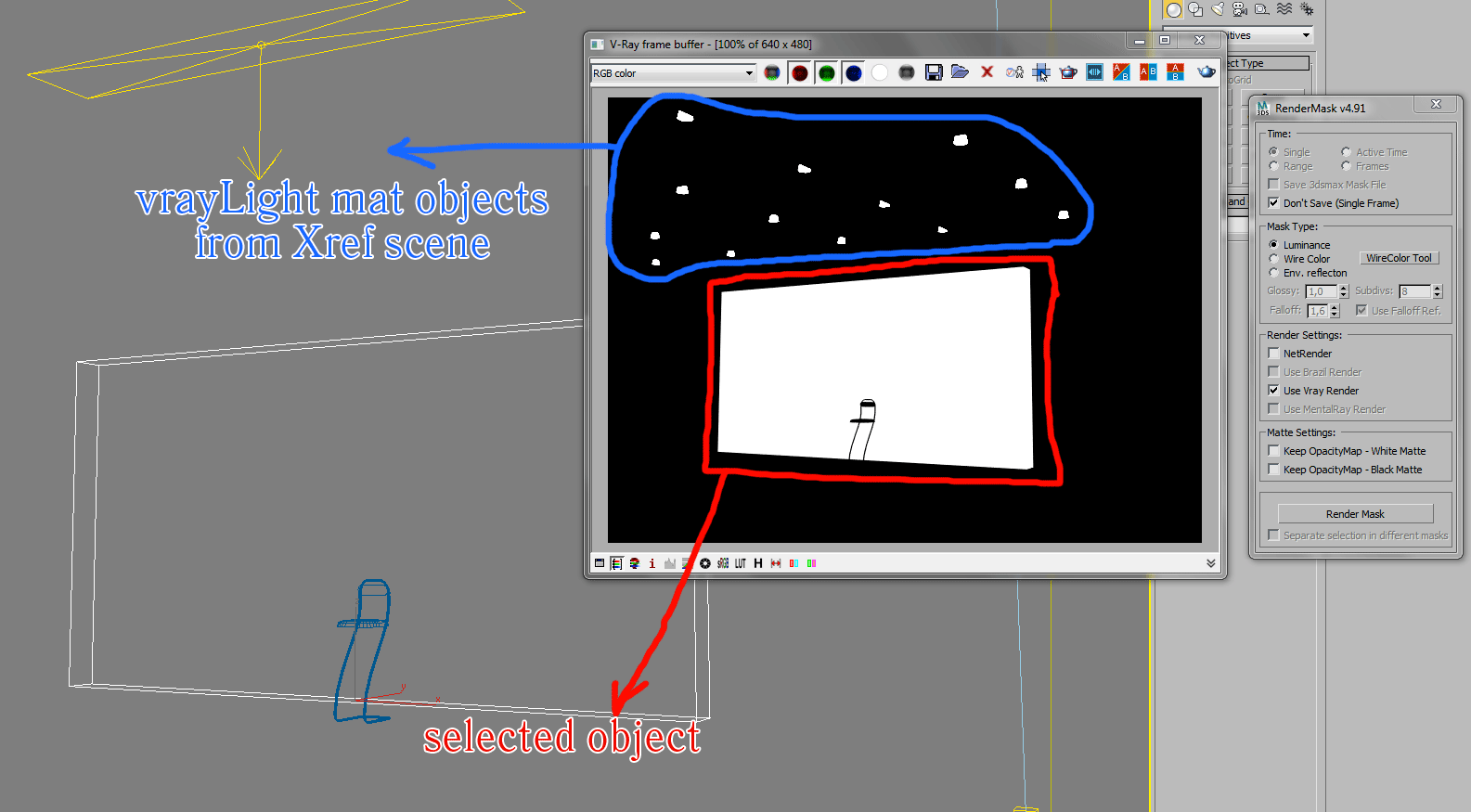
But I have a bug: if vray Xref scene has objects with vrayLight mat, these objects will be always included in the mask.

Example attached.

Attachments

cklaassen · 2011-03-14

Hey Ivan,

Thanks a lot, i can stop nagging my boss now!

Cheers
Chris

Install without exe?

cklaassen · 2011-03-11

Hey,

Is there anyway of being able to install this without running the .exe file.
We have security on the workstations that prevents users from installing and it would be useful to just have a drag and drop script or mse installer.

Thanks
Chris

Submit to Deadline option?

3dbybrunolopes · 2010-11-19

Hello,

I use your script for several years. but every time I need to render a mask, I need to do it locally, because i use Deadline as my render farm manager, and the plugin only allow us to send to netrender.

How about a option to submit to deadline?
Or a bake changes to scene option, and after I can submit to deadline as a regular render, after saving the file as "maskready" file.

Just a suggestion that I think that will be useful in other kind of pipelines.

Thanks.
Bruno Lopes

Script

calvin · 2010-11-19

This script is great, I use a lot for years now! Thank you very much!
One thing you cold add is "Copy to Clipboard" option. So with this I can just Paste on Photoshop, without save it. Original "Copy Image" on "Rendered Frame Window" doens`t work properly if I have rendered big images (it consider zoom and windows frame, for example).

Falloff and XREFs

birket · 2010-11-10

RenderMask is ACE!, but can we have an option to have no falloff if we choose to render an Env Reflection? Its a bit of a pain - normally we just want a plain black/white matte of where reflections are and where they aren't. At the moment, I have to ramp up the Falloff value quite high, and then run levels in Photoshop to get it to be pure black and white.

Also, we make extensive use of XREF scenes in our pipeline. It would be great if, somehow, rendermask would allow us to select objects (by name or material) that are buried within an XREF scene. At the moment, we have to merge a particular XREF(s) in to use RenderMask.

Would this be possible?

Ivan Tepavicharov · 2010-11-10

The idea to have the option to remove the "falloff" is good, and i will add it as soon as possible.
As "xRef" things sit a bit more complicated, but will try.

Ivan Tepavicharov

Ivan Tepavicharov · 2010-11-10

OK, the "on/off falloff reflection" is now ready.

Ivan Tepavicharov

birket · 2010-11-11

Fabulous. Will give it a try.

birket · 2010-11-11

It seems that rendering an env mask with XREF scenes doesn't work properly:- you need to merge in the XREFs in order to get it to work.

Any ideas why? Could this be fixed?

caebrasil · 2011-01-28

Me too, I use XREF a lot.
But I don't have this problem, it works fine without merge in scene. I'm using 3dsmax 2010 (64bit).
Maybe this is a problem with 3dsmax version? I mean, if you use 2011 version...

birket · 2010-09-01

I'm using Vray 1.50.SP4a and Max2009 x64. I'm using DR to render out mattes using the latest version of RenderMask. All DR buckets render black, whereas local buckets render fine.

Any ideas?

(I am trying to produce a mask on a ForestPro object. Could that be the problem?)

(my scene also includes a number of XREF scenes)

brittnell · 2010-08-10

I appreciate your intent on motivating me to learn more about maxscript, however, my reasoning in asking the original author about the possibility of a z-depth specific modification/version was mainly due to the fact that most of the complex (it's not as simple as it might seem) groundwork is already evident in his script... Without me having to learn, and then re-invent, the wheel.

The reason I say it is complex (at least to me) is that it is doing more than simply scripting a black environment fog, and then adding a global self-illuminated white material override (which can also be done in Mental Ray). This script doesn't seem to take such a simple approach, but appears to go through all scene materials, find existing opacity maps in each, leave them, while changing diffuse to white and self-illumination to 100%. It then resets all materials back to their original state after render.

This is what I am most excited about, and is what gives the (excellent) effect of rendering out the z-depth with proper rendering of opacity-mapped objects such as foliage planes or other sorts of billboard objects. The global material override leaves things like billboard trees as solid rectangles (same as Max's default z-buffer render element).

With that said, it still may be that the material digging/bitmap swapping/etc. seems easy to an experienced scripter, but to me it does not seem like an efficient use of time to "put some of my own effort into it". Especially when the script is usable for nice "proper" z-depth passes as-is with just a little bit of "user guidance".

In all honesty, I'm not a scripter, and likely never will be (too many other pots already on the fire), but I'm not sure that should preclude me from making general "Hey wouldn't it be cool?" type suggestions... even if they are pie-in-the-sky.

brittnell · 2010-07-28

Hmmm... How difficult would it be to convert this script to render all objects (full scene) out with the same transparency/illumination settings you're using now (specifically: "Mask Type: Luminance"/"Keep OpacityMap - White Matte"), but also with a black environment fog?

Such an approach should be able to output z-buffer passes that work with transparency (well, at least better than Max's native render element).

Ps. I almost forgot to mention that I love this script, and use it frequently.

Edit: Works fine just putting the environment fog in there manually. Just need to remember to turn it off for the beauty pass. Would still be great to have a dedicated "render z-buffer" button on this script that would add the atmospheric for the pass, then ditch it when done... But no pressure from me, this works pretty darn well as-is.

Thanks again!

jonahhawk · 2010-08-08

Really this would be a totally different tool no? It would be a ZBuffer tool, not a mask tool.

It would not be hard for you to write this yourself. It sounds daunting but it is pretty basic stuff as far as maxscript goes.

If you use VRay, you could even just set the override material to a white and then the environment fog to black. pretty easy. You'll also want to hide any of your glass objects if you want to consider the z depth behind them.

Look up 'Working with Atmospherics' and 'renderers' in the MaxScript Reference and specifically renderers.current. You can get all the information you need out of those two topics.

After you have written something with a some success, you can find a lot of help in the forums here or the maxScript forums on CGSociety.

http://forums.cgsociety.org/forumdisplay.php?f=98

People will be more likely to help you after you have put some of your own effort into it.

caebrasil · 2010-07-04

This script is great, I use a lot for years now! Thank you very much!
One thing you cold add is "Copy to Clipboard" option. So with this I can just Paste on Photoshop, without save it. Original "Copy Image" on "Rendered Frame Window" doens`t work properly if I have rendered big images (it consider zoom and windows frame, for example).
Anyway, thanks!

pixela · 2010-05-15

Thank you for this great plugin.
Any chance that it would be updated for Max 2011?

Ivan Tepavicharov · 2010-02-23

I do not use 3dsmax 2010 and I have no idea whether it works or not. If there are any specific problems, please let me know.

Thanks

mipmap · 2010-02-22

Hi, is there any chance to see a max 2010 version? It would be useful
Thankyou for your great work man

andrewdavidyoung · 2010-01-21

Great plugin. I use it all the time.

I render some scenes that have mirrors in them. Is there any way to render a mask for the objects reflection?

renderhjs · 2009-10-02

why is there even a *.exe file linked. I would never download that.

"why is there even a *.exe

Ivan Tepavicharov · 2009-10-12

"why is there even a *.exe file linked. I would never download that."

 In this case the problem is not in exe files. Try to download, do not bite.

Anubis · 2009-09-25

Hey Ivan, your download link open some "Sexy gallery Blogstream" :(

Ivan Tepavicharov · 2009-09-26

Yes, i have a problem with hackers :-(((

try to download now

HeyThere is a worm on

dedandy · 2009-09-21

Hey

There is a worm on website!... My Avast close connection 

apb042 · 2009-09-15

amazing plugin, but i have two quick questions-
does this work with vista 64?
are there installation instructions available? i had this running on my xp 64 machine (which fried), and can't remember how i got it running. thought i found a tutorial video somewhere on the interwebs. thanks!

Ivan Tepavicharov · 2009-09-16

The script is tested in max2008 & max2009, x32 & x64 version.
Install script in 3DSMAX ROOT directory. Run 3dsmax end find "RenderMask" in "Customize User Interface", category "RequiemScripts"

af13 · 2009-09-14

Ivan, you are amazing.

By adding that "separate render" checkbox, you just saved me hours. Literally.

THANK YOU!

"By adding that "separate

Ivan Tepavicharov · 2009-09-17

"By adding that "separate render" checkbox, you just saved me hours. Literally."

next step is to put a new function that divides each mask in a separate folder (optional)

af13 · 2009-09-11

I love this script and use it all the time. But, here's my dream suggestion.

I would love to be able to have it render several masks at once. So, I could select several objects (from a list or just selecting them) and then have it batch render individual masks for each of the items. Now that would be incredible.

titane357 · 2009-09-10

fast and nice updates , thanks !! but your web page give always a warning message...

andrewjohn81 · 2009-07-28

I love this script as well. It definitely saves some serious time. I have had it crash though, so be careful. Although, I can only get it to crash on one particular file, so I'm not too worries. Just save first and you should be golden. It only crashes on trying to render. Assigning wire color is fine.

Anyway, I added cyan, yellow, and magenta to the script as well. I don't really know how to do position well, so "random" and "select RGB wirecolor" aren't quite aligned in the center, but that's really not important to me.

I'd recommend the original creator to add those colors. I won't post that script, but if someone needs it I can paste you the updated parts, and where to put them. I just don't want to send this out since it's not my script.

the additional colors may not work as well, but they are still pretty darn good. In photoshop you can just select Red, minus blue, minus green...for red. Red, plus green, minus blue for yellow...etc. I just create actions for that to speed it up a bit and assign them to hotkeys. If you have a bunch of parts you need to make adjustments on, the additional 3 selections can really reduce the need for more renders. If parts aren't touching, you might reuse colors and use the intersect selection option. I can't remember the hotkey for it, but there is a key combo for intersect as well. Just make your selection for all the colors, then lasso+intersect option around the part you need to focus on.

Loving this plugin. Hopefully the additional colors/option to add them yourself, will be added on the next release.

DeadClown · 2009-06-08

I love the script, but could you please support finalRender? Anyway, thanks for the script!

visualz · 2009-05-29

i love this friggin' script! 

gary m davis // visualZ.com
3d animation and compositing specialist
3ds Max/Mudbox | Combustion/Toxik

tecnat · 2009-04-08

Now it works fine!!

Thank you

tecnat · 2009-04-01

v.4.24 exe file installs the old v4.23 version. It still doesn't works with vRay SP3 on my computer.

I use it with SP2 and saves me lot of time making my masks. Thank you for this great tool!

Ivan Tepavicharov · 2009-04-02

"v.4.24 exe file installs the old v4.23 version. It still doesn't works with vRay SP3 on my computer."

Try to download again. If still have problem, please send me printscreen of the message with the error.

This version of the script work on my computer.

What is your version of 3dsmax?

fajar · 2009-03-25

Hmmm.... great script !!

thank man!! very much thank!!

I've seen your video tutorial !! I'm little interest about your litlle script/plugin called tress collection v2.00. could you upload it!! or give some information about it, something like where I can get/download it!!

thank's man!!

jamoka · 2009-03-22

great script..thnx

---------------------------------
cgattack.com

titane357 · 2009-03-10

Love your plug, but nead a SP3 flavor ! :-)

Pepster3D · 2009-02-17

Looks like a great plugin. I installed it and when I try to run the script, nothing happens. What did I do wrong?

nuosyo · 2009-02-12

muy bueno el scrip... muchas gracias

trick · 2009-02-06

Why doesn't this tool have more points. It's practically the only easy masking tool that supports opacity maps with VRay. ***** stars !!!

Ivan Tepavicharov · 2009-02-06

I have some problem with update of post.
I delete the old post then post again.
The point is not important. :-)))

trick · 2009-02-06

Hi Ivan,

Can VRayMtlWrapper support opacity maps in underlying materials ? When I have opacity mapped leaves in a VRayMtlWrapper-VRay2Sided-VrayMtl structure, the opacity maps are not correctly rendered.

titane357 · 2009-02-03

Nice plug !!! very easy to use => fun