ScriptSpot

Script

Reset 3DS Max Windows

By tassel · 2011-04-16

Version
1.3
Date updated
2011-05-04
Votes
250
Description

–--
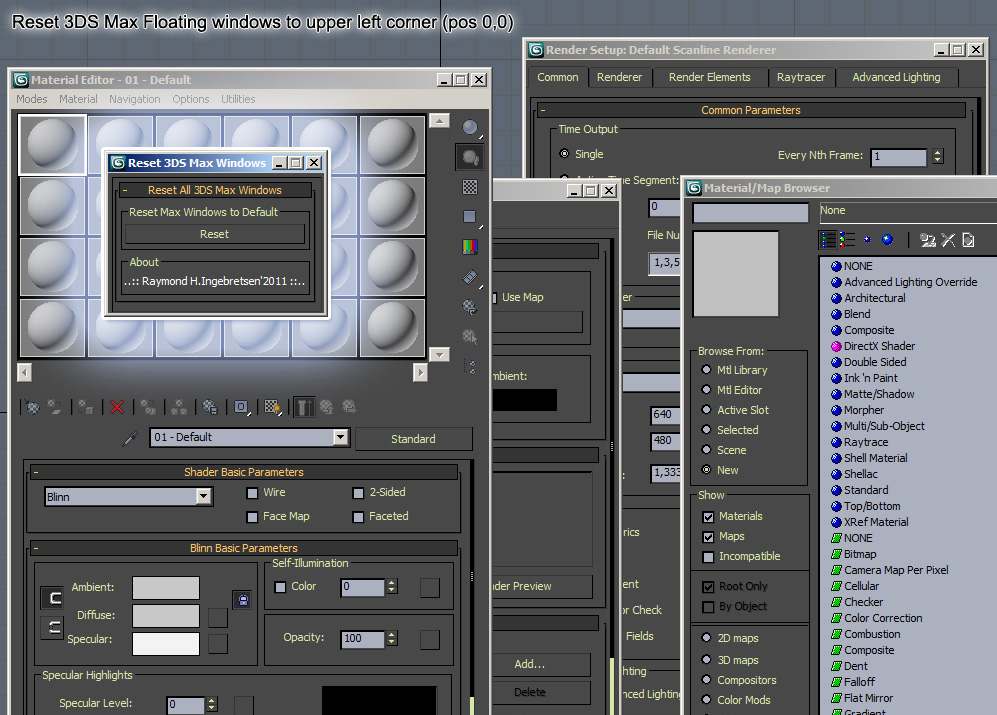
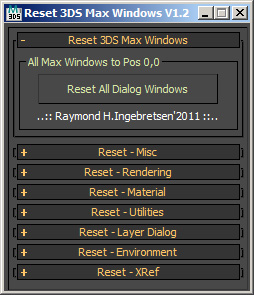
A tiny little script to reset 3DS Max “floating” Windows to position 0,0 in upper left when they are gone or out of range.
Just give me a note or comment to add more floaters since i guess i have missed some of them, or just add the line(s)yourself to the script and upload the file again ;o)

Additional Info

[DESCRIPTION] Reset 3DS Max Windows V1.3 – Reset All 3DS Max “floating” Windows to position 0,0 upper left when they are gone or out of range. [INFO] - Put the files in maxroot\scripts\ (e.g.: C:\3dsmax2012\Scripts\) - Tested with 3DS Max 2009 <--> 2012 [CREATION INFO] Last Modified: May 04, 2011 Author: Raymond Homme Ingebretsen Webpage: http://www.homme3d.com [NOTE] Use & modify at you own risk. [SPECIAL THANKS TO] Anubis for 3dsmax.ini backup code Webpage: http://project3d.narod.ru [History] V1.0: First version. V1.1: Added more 3DS Max Floater windows. V1.2: Added support to reset invidually. V1.3: Added Backup 3dsmax.ini (By Anubis / http://project3d.narod.ru)
Attachments
Comments (18)

jgk1981 · 2016-08-11

Is it possible to Reset custom toolbars?
For example when the toolbar was on another monitor and now working with one monitor the toolbar position is still exist on the position it was with the second monitor. can you bring the floating toolbar to the center?

otmorozen · 2016-08-10

Hi!
Thank you for you script!
Can you please add function for reset "isolate selection" floater. And for resetting floating toolbars if it possible.
Thanks a lot!

jewoneone · 2013-04-26

good

stealthx · 2011-10-12

Thank you!

Amazing Scrip!

carlesimo · 2011-09-20

Thanks dude!

evilmpire · 2011-08-25

great script! i miss the option to reset the Curve Editor though ;)

Reset position of icons to OTHER DISPLAY PLZZ

Dariusz · 2011-06-15

Heya

BIG. HUGE. ENORMOUS... favor plox.

Can u make settings to set up on other display than 0.0 ?

I have dell 1920x1200 and Centiq 1600x1200 and I use max only on Centiq, Its such a pain when icons keep ALL the time reseted on other screenn... Can u plz make option to set new default icon positions on second screen plz ?

The color swatch is specially anoying... wrrrr

Thanks, ciao ! :D

www.dariuszmakowski.com

MarkD · 2011-06-08

I was mostly thinking of positioning a window where you want it and by clicking a button, set its new default position. This isn't so much an issue with max's windows like the material editor, but more with scripts and various plug-ins that always pop open a window in the dead center.

So for example every time you launch 5 or 6 scripts and they all pop up in the center and each time you have to arrange all the windows. It would be awesome if there was a way to set the default position for each one.

It's probably less of a global max issue and more of an individual script issue that would require something entirely new and unique, probably like a script manager that copies the scripts and edits their position if that's even possible... That sounds like a lot of work... =P

YES

othoap · 2011-06-08

MarkD - I AGREE 1000%
This is my number one max UI compliant. It's as if the rollout's know exactly where your working and place the window right on top of your work. If I had my way there would be NO floating rollouts. Rollouts would open in the "Control Panel"

MarkD · 2011-06-01

Would it be possible to add a "set current position as default" option to this great little tool? That way people could not only retrieve windows from off screen but set their default position to something more desirable.

tassel · 2011-06-02

Hi MarkD

What do you mean by "set current position as default" ?

You want the 3ds max current positions when you installed 3dsmax to be the current positions?
OR
You want to take a backup of you window positions, so these can be restored when 3dsmax.ini screws up?

Anyway, all off you: feel free to improve and optimize the script to make it better.

I think Lonerobot's solutions is much nicer than this one, and maybe he will add some more functionality to his script like making it even more usefull if people request it? :D

Lonerobots solution:
http://www.scriptspot.com/3ds-max/scripts/give-me-back-my-dialogs

nice script

Anubis · 2011-05-05

Thanks for the credits ; )

tassel · 2011-05-04

Hi,

Pewi: Thank you, I'll look into it when I get time :)

Smal update: Just added Anubis "Backup Max INI File v.1.0" script (Thank you Anubis) :)

SlateMatEd

Pewi · 2011-04-20

Hi.
Testing the script with Max2012 it seems that the SlateMatEd is not included. It is not reset when pressing the "Reset All Dialog Windows" button.
Other than that, a wonderful script.

Thanks a bunch.

Added more of 3ds max

tassel · 2011-04-18

EDIT: Uploaded V1.2

Added more of 3ds max floating windows. Help me out here people. Is there more too add? ;o)

I'm working on an V1.2 where you can delete invidually also.

tassel · 2011-04-16

Hi,

real08121985:

Yes, I found this earlier, but it does not work so well with 3DS Max 2012.
So I thought I could make a little more user-friendly script, or max script friendly version that is easy to change when new versions of 3ds max shows up.
But I must say that the whole concept to Lone Robot is really good: o)

Christopher Grant:

Yes, this script is basically done because someone at work do not know where to look for files when they are to find, edit and delete content within files.

Autodesk has not made ​​it very user friendly to reach the files in recent years. : o)

real08121985 · 2011-04-16

LoneRobot also worked on this problem and tryed to find a solution for any window, his script can be found here: http://lonerobot.net/?p=710. He uses some version dependent 3ds max icons, which may not work for every version of max. Try the attached file in this case. Still very useful and easy script tassel!

Attachments

Admin · 2011-04-16

Great idea - I've seen this happen to people a lot over the years. Nice to see such an easy solution.