


OOHHH !! what I have done!! I uploaded my stuff !!
It could return a lot of money !!
NO
I ended skinning sufferance for ever :)
Hello evry one
Finaly ! skinning task will be much quicker and easy
the script category: "Mohamed Sami Hadef"
its free , Enjoy :)
Features :
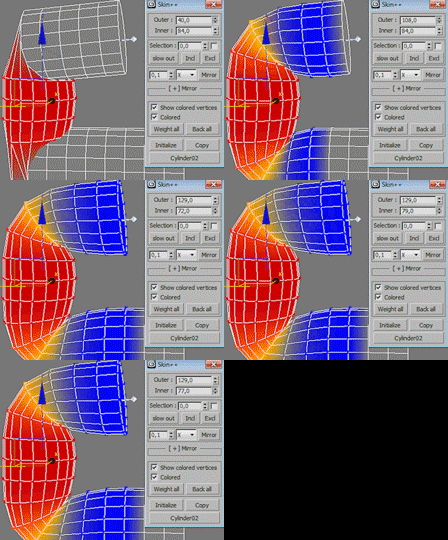
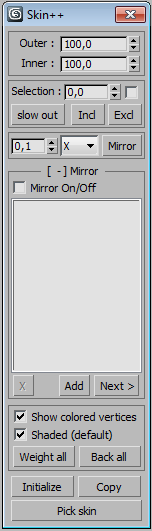
-- skin with 2 spinners outer & inner
-- select verts according to weight
-- improved include & exclude
-- mirror selected verts
-- auto detect left&right bones
-- can change coloration
-- backup weight to verts , and reverse
-- initialize envelops (work good for non biped bones)
-- copy envelops settings from other skinned++ character
-- ability to modify geometry whithout loosing skin data
new v1.1 :
-- auto mirror for CAT bones , and for any bones that has the same names but diferent in "L" or "R" , "l" or "r" , "Left" or "Right", "left" or "right" , "LEFT" or "RIGHT"
for example :
"HandL01" and "HandR01"
"Handleft" and "Handright" ...
-- tutorial added
-- bug fixed: when select item from mirror list
-- bug fixed: can add the same 2 bones many times
todo :
-- fix bugs & optimize
-- maybe add icons
Comments (20)
Comment policy
it's don't pick a skin with CAT rig. sad...
after all picked but if no any modifiers are on top of skinned mesh. just notice that.
This is just Love!
Is perfect!!!!! amazing, no words for the great job, to the developer, THANKS! this make the world more happy, thanks you ^^!
Installation
Hey guys,
I use this script on 3ds max 2016 so i think some of you guys are not intalling the script correctly. All you need to do is :
-Run script
-than in customize tab>Customize user interface>go to Tool bar Tabs> in Category look for Mohamed Sami Hadef> than drag Skin Plus to your Ui.
Its a great script Mo, i am using it for each of my project, really handy tool
I installed SP3 on 2015 but still not working, what else can I do?
Not working on Max 2015
Just install ServisPack3 for max2015.
I have same problem with max2014
compatibility
Hey man, nice skinning method, is it compatible on max 2014 i am currently unable to run the script
fill free to tell me any modifications or wishes :)
I think I can publish a new release of 3ds max yaay LOL :)
I was having problem with internet connection,
if I didn't answer please be patient
thank you
+1000000
thank you :)
you welcome
tanks
thanks for your free script :)
there is a possibility for download this your bipedtool?:
https://www.youtube.com/watch?v=i1FPoTnqHcY
(sorry my bad english -google translator-).
you welcome ,yes soon but
@notapix
you welcome ,
yes soon but don't spoil the surprise :)
ah, ok.
thank you sir ;)
new v1.1 :)
new update v1.1 :)
tutorial & CAT bones & fix
thanks
شكرا جزيلا أخي
--
العفو اخي ، ان شاء الله يكون مفيد
thank you all,
next> add auto-mirror for cat bones
+1
Yup.That will be nice.
I send you PM
thank you barigazy
sorry for the delay , I send reply ,your suggestions and optimizations are very nice thank you
whaou, looks good ! Thanks
Thank you
nice work "Mohamed" and thank you for make it free .