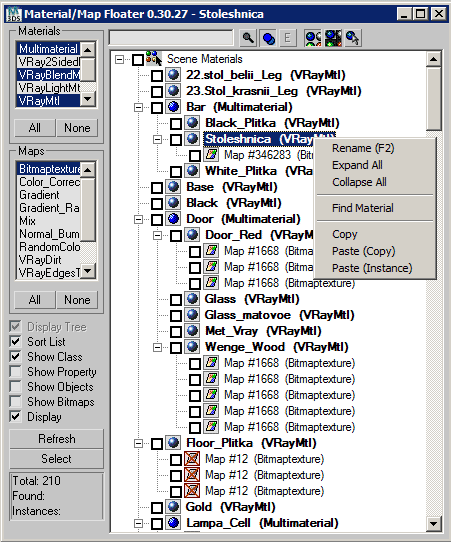
A Material/Map browser similar to the one found in max
- Able to FILTER Materials/Maps by class types
Script
 By Jeff Lim · 2006-10-21
A Material/Map browser similar to the one found in max
- Able to FILTER Materials/Maps by class types
- Find Materials/Maps by name
- Show Material/Map instances
- Toggle viewport map display from the hierarchy
- Icons to represent Localized or UNC type filename paths for Bitmaps
- Material/Map Count
- Rename - show bitmap - open bitmap path in explorer
related thread @ www.cgtalk.com: http://forums.cgsociety.org/showthread.php?t=317640
Notes:
- On scenes using Particle Flow - you may need to run the Particle Flow cleanup utility first - this helps on reduced lag/crash with pflow nodes associatied with materials.
- Show Objects can be slow on large scenes - because each material will read through its dependents on the scene in order to get a list of objects.
Future updates:
- edit mode - select any number of items - and replaceinstance those with the active material or map from the editor.
- root materials only option
- highlight active from material editor/selected object
- display missing maps only
- options to customize highlight colors
Location
Custom · 2018-10-11
menu "Rendering">"Material Explorer"
good tool . can you add new menu
dussla · 2014-02-07
thank you good tool
pls can you add menu
in right menu ,there is find material and copy
i woulid like to selected map image -> copy that in new path and relink that
can you understand ?
pls
How to initiate this script on max2013.
shekhu27 · 2013-06-06
How do we install this script on max 2013. is it compatible.
I tried to place the macroscript in macroscript of max. but when launch the built in material explorer 0.4, gives a lot of errors
how do we make use of it.
seems like very handy tool.
please help.
regards
 Kstudio · 2010-06-09
Fixes.
Now you can use "Rename" options for renaming Material or Texture map
and "Set path" for replacing Bitmap file.
Thanks Jeff
igamaximus · 2010-12-13
Very very valuable tool next to max's poor mat.editor info system.
One wish: is it possible to add "select objects by material" fuction, for each of the materials listed in upper left area of floater?
georgiiiina · 2010-06-08
hi, i have an error when i try to rename:
"array index must be positive number, got:undefined"
very useful thanks
georgiiiina · 2010-06-07
i have an error when i try to rename
LINE 19333
local val = MatMaps[the_index].getName()
--RUNTIME ERROR : array index must be positive number, got: undefined
very very usefull script, thanks
Kstudio · 2010-01-23
Hi Jeff!
Thank your for this script.
Very useful!
The past summer, I updated the site and link to download the changed.
This is a new link - http://3d-kstudio.com/?download=Material-SceneMaterialMapFloater - DotNet version
Jeff Lim · 2010-01-24
No prob! I updated the link, and thanks again!
cheers!
jeff
Jeff Lim · 2010-01-23
Hi Track! I never got to say "Thank You for updating the script!"
so.. Thank You very much for updating the script! :D
I'll update the post above to link to your file.
(I'm also planning to look into updating the class list, I think I remember manually writing down each and every material/map class by hand. This isn't good because newer classes won't appear in the list. Probably the best thing is to use the .classes property..)
thanks,
jeff
bragibjornson · 2009-04-17
How about the ability to select a material class? Id like to select all the Multi-Sub Objects in my scene. Can this script do that? If so, how? Thanks.
pokoy · 2009-04-15
hi Track,
i tried the new version and the error doesn't seem to occur anymore.
many many thanks!
Kstudio · 2010-01-23
Update.
Fix find texturemaps by name.
http://3d-kstudio.com/?download=Material-SceneMaterialMapFloater - DotNet version
To Pokoy:
I have not received an error at creation the material.
Try on last version.
If the error repeats, lay out please a test scene at which there would be this error.
pokoy · 2009-04-09
hi track,
i just took some time to chase the bug.
the error occurs when you place any map with submap slots directly in a material slot of the material editor AND assign a submap to it. Assign it then to the environmant slot for instance to make sure map floater will list it.
now, if you open the map floater it will throw out an error. if it does not - close it, open again or click on the maps available in the list.
if i use an output map with a submap the error is:
--Unable to convert: Map "MapName":Output to type: Material
ther is no error if there's no submap assigned.
i found out it does throw an error with the RGB multiply map too, so i guess it doesn't like any map in the material slot in general.
tell me if you need a better explanation.
pokoy · 2009-03-24
thanks for the answer.
my map looks like this: output > colorcorrect > bitmap, so that shouldn't be the problem.
however it is not nested in a material, but it's placed as a map in the slot. could this be a problem?
i'll do some testing when time allows it. sorry to bother you without giving you a proper report.
 maknien · 2009-03-24
.mcr didn't work for my max9 sp2
First I tried the .ms file on the top of the page, and it works fine, but the DotNet version gave me all kinds of errors all the time. I might do you a proper report if needed.
One feature I would like to see:
When you search for a particular bitmap, it would select the bitmaps (not just highlighting), and then user could select all the objects using that bitmap at once with the 'Select' button lower left.
I'm not sure if this was ment to be the feature:
"- With Shift + Click findmap icon will be selected objects with found materials and Maps" ?
Kstudio · 2009-03-23
Has just tested on 3dsmax 2009x64 - all works. 
Lay out please a test scene at which there would be this error.
pokoy · 2009-03-23
I get some errors on starting the script:
- --Unable to convert: 'MAP_NAME':Output to type: Material
This is a bitmap nested within an 'Output' Map.
I also got some errors with the 'ColorCorrection' map type and several others... i'll have to take a closer look to make a proper bug report, i guess.
This happens with max2009 64bit, didn't test the 32bit version.
Unfortunately the script is unusable right now :-/
 hongxu · 2009-03-23
very useful script. Thank u very much
pokoy · 2009-02-11
yay, thank you for posting this! i owe you a vodka or two, you don't mind if it's a polish one ;-) ???
Kstudio · 2010-01-23
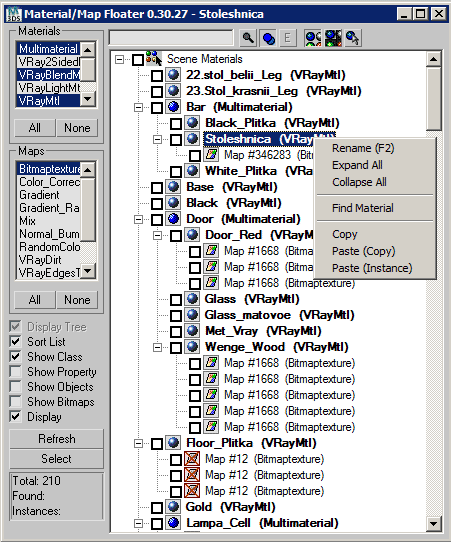
Material-SceneMaterialMapFloater_DotNet
Recently rewrote this great script to use functions DotNet.
It also added new features:
- Copy-Paste map / Material
- Assign to Selection
- With Control + Click findmap icon all non-instansed materials and maps will be placed in the Material Editor
- With Shift + Click findmap icon will be selected objects with found materials and Maps
- Save User selection map / material (for scenematerials only)
pokoy · 2009-02-10
Hi, I hope you're doing well!
i'd like to use this script with max 2009 (64bit in my case...) as it was EXTREMELY useful for large scenes with tons of materials and it has been in my toolbox whenever working mith max 8.
i cannot run it with max 2009, i get an error message:
--Runtime error: Cannot create the ActiveX control:MSComctLib.TreeCtrl
Reported error message: Class not registered (the last phrase is translated from german, might be inaccurate...)
Anyway, i'd love to see this updated since it is a great tool and a huge workflow improvement.
thanks in advance,
Marcin