SceneShutter — Camera Viewport Export Tool for 3ds Max
Batch export clean, safe-frame camera previews with overlays and flexible aspect ratios — in seconds.
What is SceneShutter?
SceneShutter is a powerful yet lightweight tool for Autodesk 3ds Max that allows you to quickly export clean, safe-frame viewport previews from multiple cameras — without rendering.
Built for architectural visualization and animation professionals, SceneShutter simplifies client review, improves team workflows, and saves hours by letting you export multiple camera angles with overlay labels and custom aspect ratios — all in just a few clicks.
Key Features
Batch Export from Any Camera
Supports Free, Target, V-Ray Physical, and Corona cameras.
Safe Frame Cropping
Automatically captures only the visible safe frame, ensuring aspect ratio accuracy without cropping in post.
Overlay Support
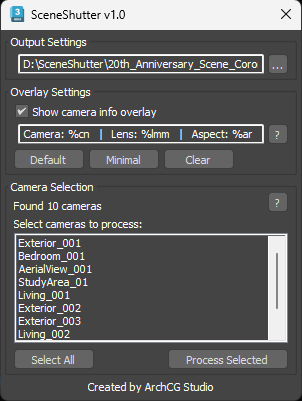
Add customizable text to each preview (camera name, lens, aspect ratio, timestamp, user, etc.)
→ Perfect for client review — clients can easily reference “Camera 3 - Living Room” instead of guessing from unnamed images.
Flexible Aspect Ratios
V-Ray Physical Cameras: Uses built-in resolution override
Other cameras: Fully compatible with Camera Resolution Mod to simulate different aspect ratios without manual input
Instant Viewport Capture
Uses real-time viewport screenshots instead of full renders, making preview generation 10x faster than traditional batch render workflows.
Intuitive UI
Simple layout to select output folder, pick cameras, adjust overlay, and export — no setup required.
Built for ArchViz & Animation Workflows
✔ Present multiple angles to clients for selection
✔ Export in social, video, or print-friendly formats (1:1, 16:9, 4:3, 2.35:1, etc.)
✔ Speed up design feedback loops
✔ Ideal for internal reviews, storyboards, or lighting studies
SceneShutter doesn’t replace rendering — it helps you work faster before rendering.
What’s Included
.mzp installer for 3ds Max
Full UI tool with camera overlay, safe frame capture, batch export, and ratio control
Requirements
Autodesk 3ds Max 2021 or newer
Optional: V-Ray (for resolution override)
Optional: Camera Resolution Mod