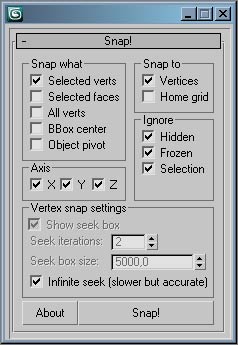
* Moves selected or all vertices of one or more objects to nearby vertices or grid points
* You can snap multiple selected objects with one click
* Only snaps to and from Editable Poly or Editable Mesh objects, other types are disregarded
* You can filter out hidden, frozen or currently selected objects to gain snap speed on larger scenes
* Use the "selected" flag to keep objects apart when snapping multiple ojects
* Added axis constraints
* Lower seek distance speeds up large snap selections in large scenes
* Infinite snap will try to snap to any valid point at any distance, its slow on large complex scenes
* Remove debug snap seek box visualisation to gain speed, it disables screen redraw
Script
Snap!
By Molin · Credited author: Daniel Molin · 2008-11-27
- Version
- 1.00
- Version requirement
- 3dsmax 9 or above
- Date updated
- 2008-06-27
- Votes
- 8
Downloads
- snap_ui.jpg — snap_ui.jpg20 KB
- snap!_release.rar — snap!_release.rar12 KB
Tags: snap
Description
Comments (3)
Great script !
tuxmask75 · 2014-05-30
Any plans to update this so it works with Edit Poly Modifier ?
hot key
 charzamm · 2012-03-28
Is there a way to make this menu a hotkey. im not familar where to put mse other than drag and drop in scene every time i need it. :)
thanks!
titane357 · 2009-07-10
hello,
it would be great to have a .ms or .mcr :-)))