Quick tools in one place. Dockbar!
Script
By strale88 · Credited author: Strahinja Drazic · 2015-10-05
Tags: Tools, VRay, import, architecture, smooth, clean, Flow, 3ds max, weld, layer, vertex, geometry, smoothing groups, xform, pivot, unify normals, Normals, insert, archviz, shell, ffd, cubic UVW, proxie, rename multiple objects, detach elements, box display, quadify, selects all helpers, select all cameras, select all geometry, select all splines, select all proxies, proxy display, select all lights, vray phisical camera, vray lights, square UVW, UVW xform, random UVW xform, normal maps, wirecolors, 2.2 gamma, sun system, vray sun, vray dome, architectural visualization
Quick tools in one place. Dockbar!
INSTALLATION:
1. Go to MAXScript, Run Script, find StrTools_vX.XX.ms
2. Find the script button in Customize/Toolbars/StrScripts/StrTools
3. It's recommended to restart 3ds Max
4. If you want to run automatically when 3ds Max starts, place StrTools_v2.88_Startup here: C:\Program Files\Autodesk\3ds Max \scripts\startup
*v2.88
-bug fixes
*v2.87
-xObjects now supports randomization by editable poly elements
-Improvements to sAttach
-Collector now automatically collects the assets in assets folder(still working on relink)
-On and Off buttons "Enables/Disables all selected Lights, Cameras (Targeting), and Plugin objects (Forest Pack, TyFlow, etc.)."
-Motivation button added
-New simpler layer structure
-New copy paste buttons. Uses a History Shifting system to copy objects to a temporary .max file and paste them back. It maintains a history of up to 10 merge files and you can load them in new "Copy/Paste" option that was added to the selections dropdown.
-Cleaner button was updated to include fixes for "V-Ray Material clamping" and deleting unused plugin references.
-Various code improvements and Bug fixes
***Read the buttons tool-tips for more detailed information on how to use!
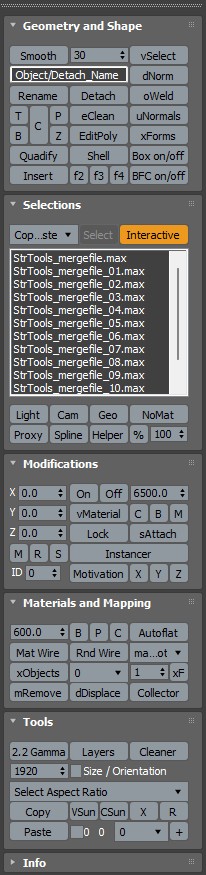
The point of this script is to speed-up workflow on my architectural visualization scenes with these simple combinations of tools.
In this script you will find:
Smooth selected objects for the value.
Place pivot on object surface where you need it.
Place selected objects pivots on top.
Place selected objects on bottom.
Place selected objects pivots in center.
Place selected objects pivots on 0 (xyz zero).
Weld vertices on selected objects.
Unify normals on selected objects.
Deletes edges on flat surfaces.
Fixes muddy faces.
Select vertices that uses only two edges.
Rename all selected.
New name of all selected/detached.
Detach all elements in selected objects.
Resets xForm on selected objects and splines.
Display selected as box. Right click to disable box display.
Display selected Backface Cull. Right click to disable selected Backface Cull.
Quadify the selected mesh.
Insert edges and sets flow on selected edges normal.
Add edit poly modifier.
Add shell modifier to selected objects.
Add FFD 2x2x2 modifier to selected object/faces for quick modification.
Add FFD 2x2x2 modifier to selected object/faces for quick modification.
Add FFD 2x2x2 modifier to selected object/faces for quick modification.
Select all Proxies in scene.
Display selected proxies as Point Cloud (Corona) and Faces (Vray).
Display selected proxies as Box.
Display selected proxies as mesh.
Select all Helpers in scene or view.
Select all Geometry in scene or view.
Select all Proxies in scene.
Select all Splines and Shapes in scene or view.
Select all Cameras in scene or view.
Select all Lights in scene or view.
Turn on or Right click off selected Lights (VRay and Corona) and camera targets (VRayPhisical and Physical).
Change selected Lights and Cameras white balance.
Lock selected (If locking camera or sun, it will also lock their target).
Unlock selected (If unlocking camera or sun, it will also unlock their target).
Selects all objects without materials.
Randomness on X axis. Minimun % for scale
Randomness on Y axis. Maximum % for scale
Randomness on Z axis.
Randomize positions of selected objects based on input numbers. (Groups are ignored, each selected in group will be randimized)
Randomize rotations of selected based on input numbers. (Groups are ignored, each selected in group will be randimized)
Randomize scale in percentages of selected. X input=Minimum, Y input=Maximum. (Groups are ignored, each selected in group will be randimized)
World coordinate system for randomizations. For scale this will be ignored, local only.
Select objects by material.
Update scene material list. This may take a while...
Atach all selected into single object. More objects=slower. *Tested only on 3ds max 2016.
Quick assign ID to selected.
Quick select objects by ID.
Random select objects in selection. *Tested only on 3ds max 2016.
UVW Box mapping on selected objects (600x600).
UVW Plane mapping on selected objects (600x600).
UVW xForm modifier on selected objects.
Remove materials on selected objects.
Disable/Enable displacement on all applied materials.
Random wirecolor by material.
Random wirecolors by object.
Random UV offset on selected objects.
UVW xForm rotations by object
Autoflat with Unwrap UVW.
Flat selected on X axis
Flat selected on X axis
Flat selected on X axis
Show materials in viewport. Right click to hide.
2.2 Gamma workflow.
VRaySun
Corona Sun
Layers for architectural visualization scene.
Clean empty layers, garbage, trackview nodes, fixes large file size problem.
Popular aspect ratios presets for output size.
Copy (Save) selected for merging into another 3ds Max application.
Paste (Merges) previously Copied selection into exact position.
Incremental Save.
Set region.
Weld
Jarmo2127 · 2023-09-29
Hey mate
Just having a play around with you script is there a way to adjust the weld settings
Cheers
 Waseem3D · 2021-08-26
Can I make all lights have 1 specific value in this script?
how to run automatically on startup
magicseed · 2019-04-26
I really really love this script. I've been using it in all of my works since the day I installed it. The only thing I wish is to have it run right away every time I start 3dsmax. Is this possible? I tried to save the .mcr file into script startup folder but no success. Please help .
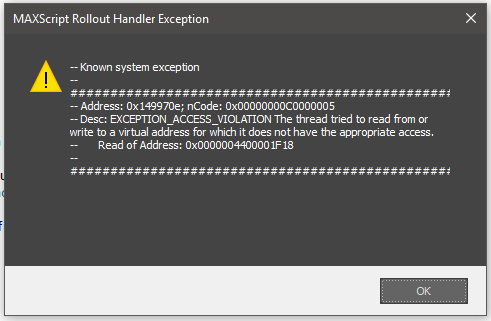
error message on installation
Malte · 2019-04-10
https://i.imgur.com/4PdYrvi.png
using max 2019, win 10 64 bit.
i had v 2.26 installd for max 2017.
never had a problem installing it but it won´t install on max 2019.
ps: i had to run max as an admin. i normaly don´t have to do that when installing scripts.
Very Useful
 darawork@gmail.com · 2019-01-22
Hi, thanks for this... it's very handy :)
I found a couple of spelling mistakes:
CSun; Environment
Quiet countdown file save reminder (hehe)
float window plz
chinaman · 2018-10-03
how it make in float window?
idea: detach and assign a random material ID
Malte · 2017-08-25
it would be nice to have your script assigning material ID´s when detaching.
either random (give a choice to choose how many differnet material ID´s), or one explizit ID for each element.
i now use two tools for that task (yours and Tik_Mass_Randomizer).
only a suggestion, if you need some ideas what might be usefull. :-)
Rnd Wire
strale88 · 2017-10-29
@Malte
There is a button "Rnd Wire" in the script witch does exactly what you need.
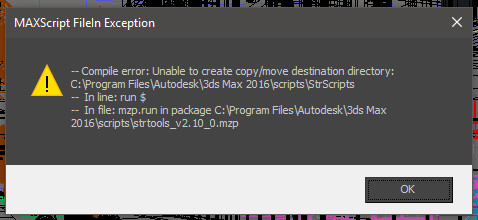
Can-t install it ... run script install failed on max 2017 sp4
vinyvince · 2017-08-18
here's the error i got...
Love this script, very disapointed i can t use it for now, do you mind to help please?
thanks
vincent_
sp4??
Malte · 2017-08-25
"Can-t install it ... run script install failed on max 2017 sp4"
SP4??
runs fine here with 2017 sp3.
where did you get a SP4? or is this a typo?
run as administrator
strale88 · 2017-10-26
@vinyvince Sometimes scripts can't run until you run 3ds max as admin and then run the script.
Great Timesaver
 Turnim · 2017-02-22
If you are working with 3ds max many hours on a daily base then this script is definitely a good timesaver.
It takes a few days to get to the new workflow, but after that it saves A LOT of unnecessary mouse moving and double, triple, quadruple clicks on multiple buttons
I truly love it and i really hope that the developer keeps it up :)
Error
 3dbybrunolopes · 2017-02-01
Lately I'm getting this error using your tools
Which 3ds max version are you
strale88 · 2017-03-03
@3dbybrunolopes Which 3ds max version are you using when getting the error? 2017?
Eclean
Spline · 2016-12-05
Hi, It would be nice to be able to edit the threshold on the eClean feature because the edge on a chamfer or a curve surface disappear completely.
Keep up the good work, very useful your tool!!
2.1 error
3dbybrunolopes · 2016-11-24
Hi, when intalling the new update gives me the following error
fajar · 2016-11-24
basically its administrator problem, try to run your max as admin.
strale88 · 2016-11-24
You can just rename the .mzp file to zip and extract the StrScripts folder to your scripts folder in 3ds max folder.
v2.11 -I've fixed the dNorm button.. It resets the normals. Right click to add Edit Normals modifier for extra tweaking.
Regards.
Edit Normals/Reset
3dbybrunolopes · 2016-11-20
What would be nice, is to add an reset normals through and edit normals modifier.
I work with sketchup and revit/archicad models, and normally we must to reset the normals in order to fix normal issues
strale88 · 2016-11-14
Customize/Toolbars/StrScripts/StrTools
Can't open
KTF25 · 2016-11-13
Hello,
How do I access this? When I click on Run Script, nothing pops up...or is it hidden somewhere else? I'm using 3DS Max 2016, so I doubt that's the problem. Help would be most welcomed, please.
Thank you!
Where is the XSLAP?
sirmontal · 2016-11-07
Hey dude - love your script by the way - however with the new update, did you get rid of the xslap? I used that for random uvw mapping
strale88 · 2016-11-09
Thanks for liking my endless collection of buttons :)
It's called autoflat now.
Thanks but...
sirmontal · 2016-11-10
Thanks mate but it doesnt work the same.
When i apply a uvw box map of 1m. It used to randomly move teh geometry around. It still does this but it does it weirdly and stretches on one of the planes. Hard to explain but it doesnt work quiet the same
+10
vladeemeer · 2015-11-10
great tool man!
You gathered so many useful things that i've been searching for, and all that in one place!
Thanks! Works perfectly!
...+1
 barigazy · 2015-10-07
Very well organized tool with nice UI.
Cheers!