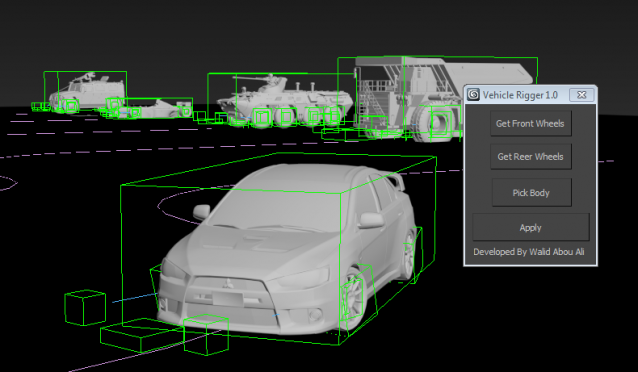
This simple script allows you to rig your wheel based vehicle easily for creating nice vehicle animations in littile minutes
Script
By w1992d · Credited author: Walid Abou Ali · 2013-08-23
This simple script allows you to rig your wheel based vehicle easily for creating nice vehicle animations in littile minutes
Tags: vehicle rigging car
Works Great in Max 2024
 RobH2 · 2024-02-17
Thank you for this very simple and handy script. Simple to use but it can be used to do some pretty complex animation with multiple paths. Works great in Max 2024.
Car rig tutorial
lizandrohurtado19 · 2019-11-03
Wheel Rotation
Digital_AL · 2018-12-11
Thanks for the plugin! One question, is there a way to animate the tire rotation to stop with the vehicle? When I set a key to bring the wheel rotation to zero, the wheels' rotation reverse instead of coming to a gradual stop.
The infamous syntax error
cihanonarici · 2016-12-14
Dear friends, the syntax error comes from a character at the beginning of the script. Max 2014 and beyond can ignore it in favor of their extended Unicode support. what you will do is this:
1) Open mcr file in MS Word and select MS-DOS coding when asked.
2) Delete the first character of file (non-Unicode character that causes error)
3) Save your file as plain text.
That's it.
jazak ALLAH khair, thankyou very much.
nazreality · 2016-01-12
am grateful.
Wire parameter
necatiatali · 2015-11-15
Hi base dummy position - wheel rotation
wire parameter connect
how to do ?
Body Roll
tsam170 · 2015-04-01
Hi Walid; first i must say its an excellent simple and effective script, i enjoy using it and it makes rigging my vehicles quick and effectively easy. i was wondering about a feature i wasn't sure if you were going to implement into the rigger and that is one for Body Roll. since the body does lean or roll when going into a hard turn or accelerating and decelerating, maybe this is something that can be added as a slider so that we can roll the body on the X and Y Axis.
thank you :)
need a help...
excellence · 2015-04-01
Hi waleed
thx for this nice script... but i have a problem when i use it on 3ds max 2012, it says;
--Syntax error: at bad, expected
-- In line: 
please reply me as soon as possible...
thx again...
error de sintaxis
josepito · 2014-12-17
hi please help guyes what will do when I am trying to run script it shows the syntax error. --Syntax error: at bad, expected -- In line: 
Vehicle Animation
Amy Jackson · 2014-08-23
Vehicle rigger is used to prepare animated parts of vehicle and after that we came to know many new features of the newly developed vehicle parts in real. It helps in animating the real parts that will require in future after that these real parts will be placed in Cars like BMW or Mercedes and we got a good and smooth test drive. This technique we will be needing in future for proper service and solution of the problem we face in our cars.
Best BMW Mechanic Los Angeles
error syntax
Neil · 2014-08-21
hello please help me: i have an error when run script error syntax:
--Synttax errror:at bad,expected
-- In line: 
Vehicle rigger
glennwilson · 2014-08-06
We can use animation technology in several ways and here we have found that how can we use animation technology for making different types of projects such as; plotting, 3D effects and vehicle rigging. Most probably animators are using Maya software (animation software) for putting better affects; most of the vehicle manufacturing companies are also using vehicle rigger option to create better designs. In most of the vehicle repair and service centers, very soon we have also found these techniques to identify the exact error and exact solution while repair and service customer's vehicle.
Mercedes repair Manhattan Beach
Automated Car Wheels
cgtiger · 2014-03-30
HI I love your script...
Do you think it will ever use a terrain to keep the wheels on the ground, just thinking if you have hills etc, buts its great on Flat surfaces.
I like how you can just quickly turn on the wheels to rotate.
I have used a script called 111_Carwheel in the past, I forget who wrote it.
but that script can analyse the speed of movement of body and rotate the wheels based on this movement, so you check the radius button, so it can work out wheel diameter, and voila it turns the wheel based on body movement.
So if the car stops the wheel stops, if it goes fast, it rotates fast. it also steers the wheels.
Have you thought at all about making the wheels turn more intelligently to the motion of the Car.
I am only asking, as I think what you have done so far is fantastic.
thanks
Error
TexasTuner_RaceWard · 2013-12-14
question about file, what language was it written in originally. I believe the character in question might not be converting languages properly and the leftover information for this charater is being left open as excess information
Autodeck 3ds 2009
--Syntax error: at bad, expected <factor>
-- In line: 
PS: awesome MERC vid
syntax error
sunil kumar · 2013-10-07
hi please help guyes what will do when I am trying to run script it shows the syntax error.
help
marderocio · 2013-10-08
it serves for max 2012
error syntax
sunil kumar · 2013-10-03
hi please help me: as I am run the script then i have an error when run script error syntax:
error syntax
nikpur2004 · 2013-09-16
hello please help me: i have an error when run script error syntax:
Great script
 Sen · 2013-08-26
Thank
w1992d · 2013-08-27
thanks for your opinion
Script Max vehicle rigger 1.0
antonio sajara · 2013-12-23
Hello Walid
In my Max Design 2012 the following error message is displayed!
How do I fix this situation? Do you have a newer vertion of the script for Max Design 2012?
Message:
--Syntax error: at bad, expected
-- In line: 
Thanks for the help ypu may provide.
Antonio Sajara
sajara@sajara.com.pt