Apply with one clic a vertex weld on an editpoly, with a 0.001 threshold.
No matter if there are some modifier.
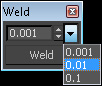
If you want to change the default position of the script window, edit the .ms and change [x,y] values of pos:[85,385] .
Script
 By Vinc3r · 2013-02-21
Apply with one clic a vertex weld on an editpoly, with a 0.001 threshold.
No matter if there are some modifier.
If you want to change the default position of the script window, edit the .ms and change [x,y] values of pos:[85,385] .
After running the script, you'll find the category "Vinc3rz tools" in the customize menu.
Works fine now with higher values :)
Tommy_LedZep · 2015-06-19
Seems to work fine now with values ranging from 0.001 to 100 :)
Vinc3r · 2016-06-02
i will include this little change in my script.
I find strange to use this high value, do you take care of your scene scale ? Or maybe it is usefull when you use inch ? (i'm not familier with this unit) :)
Vinc3r · 2016-06-02
script update
Doesn't work when not collapsed to Editable poly
Tommy_LedZep · 2015-06-19
I found that your script doesn't work with non editable poly objects.
For example, create a plane, add an Edit Poly modifier on it and try to run your script: it won't do anything unless you actually convert it into an editable poly before.
Just to let you know.
Modified it to work with higher values
Tommy_LedZep · 2015-06-19
I modified your script a bit to have it working between 0.001 and 100 values.
I am not an expert at all with Maxscript so I hope I did not bug it but, so far, it seems to work :)
macroScript weld
category:"Vinc3rz tools"
toolTip:"Weld"
ButtonText:"Weld"
(
global weldDialog
global weldTreshold = 0.001
global arrTresh = #(.001,.01,.1,1,10,100)
weldMyFuckingsVertex
try (destroyDialog weldDialog) catch()
rollout weldDialog "Weld" width:78 height:48
(
button btnWeld "Weld" pos:[2,24] width:74 height:20
spinner spnValue "" pos:[2,4] width:60 height:16 range:[0.001,100,0.1] scale:0.1
dropdownList ddlPresets "" pos:[60,2] width:16 height:21 items:#("0.001", "0.01", "0.1","1","10","100")
--label lblInfo "nothing to say" pos:[4,47] width:74 height:15
on btnWeld pressed do
(
for o in selection do weldMyFuckingsVertex o spnValue.value
)
on ddlPresets selected itm do
(
spnValue.range = [.001,100,arrTresh[itm]]
print spnValue.value
)
)
CreateDialog weldDialog pos:[85,385] style:#(#style_titlebar, #style_toolwindow, #style_sysmenu)
function weldMyFuckingsVertex o weldTreshold =
(
if(classOf o==Editable_Poly) then
(
o.EditablePoly.SetSelection #Vertex #{1..(o.verts.count)}
o.weldThreshold = weldTreshold
o.EditablePoly.weldFlaggedVertices ()
o.EditablePoly.SetSelection #Vertex #{1..1}
)else
(
--lblInfo "not editpoly !"
)
)
)
Set welding value higher than 1 ??
Tommy_LedZep · 2015-06-19
Thank you so much for this great script, it is a real time saver !
But I'm surprised I can't set values higher than 1 ... is it normal ?
Works great in 2014!
thhm · 2015-01-28
Just what I needed for those nasty rhino imports:)
 airbrush · 2013-05-27
works great now...thanks for the addition of the dropdown box options, nice touch...will be using this all the time.
airbrush · 2013-04-26
has this been updated to deselect all verts after welding?
Vinc3r · 2013-05-02
Hi ! Sorry, i don't take time to rewrite this script yet :/
I'll try to do this :) (and I think that i will put all my scripts on github, so everybody can upgrade scripts)
[edit] done ! https://github.com/Vinc3r [/edit]
airbrush · 2013-05-02
getting an error (max 2012 64bit)
>> MAXScript Auto-load Script Error - C:\Program Files\Autodesk\3ds Max 2012\scripts\startup\weld.ms Exception:
-- Syntax error: at <, expected
-- In line:
to > airbrush
Vinc3r · 2013-05-27
thanks for the report, i think it's now works
Vinc3r · 2013-05-27
It's now select only vertex #1 after the weld ;) (i will try to find how unselect all)
This button workflow does not accelerated. Remake on the hotkey
 Nik · 2013-02-22
:)
Vinc3r · 2013-02-27
I have an hotkey on Weld (poly), but the threshold is 0.1, so I can't use it.
airbrush · 2013-02-21
script should deselect all verts after welding...