 By Pixel Envision · 2012-02-17
With this script, you will be able to easily render cubemaps ready to import to Unity for use as reflection maps or skyboxes. After execution, script will generate 6 image files with the correct naming scheme for Unity.
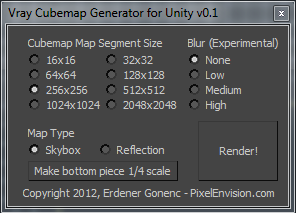
- Keeps your current render settings, after you’re done executing the script your settings will be restored.
- Rendered images will match max’s bitmap output gamma settings.
- You may output to all type of images supported by 3DS MAX. You will be able to select your output path.
- Rendered images will have correct naming scheme appended based on the type, skybox or reflection.
- Fully selectable cubemap sizes.
- When creating skyboxes you have option to render bottom piece 1/4 smaller than rest of the image set.
- There is an experimental blur feature, might be useful specially for reflection maps.
- Detects if Vray is your current renderer and offers an easy switch if it is not.
- New: Option to rotate back piece by 180 degrees. (v0.2)
For further details, installation & usage instructions plase visit the homepage url...