3dsmax Safe Frames Script
Hi guys,
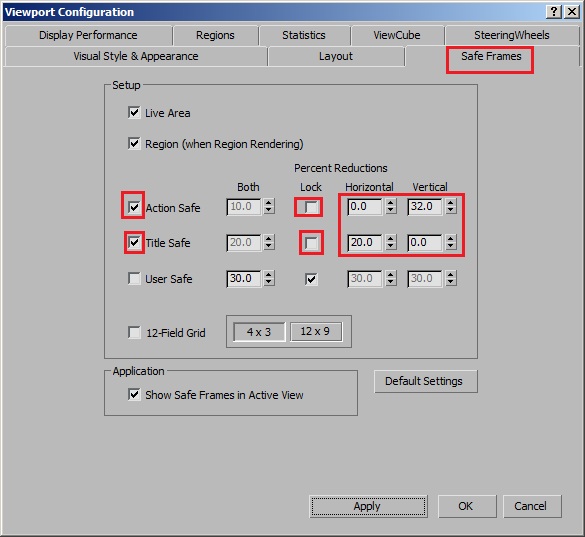
I am trying to develop a script to put custom values in 3dsmax title safe and action safe values.
I know how to toggle safe frames on and off but I do not know how do we..
1. turn on title safe and action safe check boxes
2. put custom values in the horizontal and vertical percent reductions
I read somewhere that this can be achieved with the help of dot net but since I have no knowledge about it, I'm totally relying on you guys to help me out.
Ankur
| Attachment | Size |
|---|---|
| safeframes.jpg | 63.26 KB |

Comments
Ok, I got it working somehow.
Ok, I got it working somehow. This code switches to safe frame tab and switches on the Title safe, Action safe and Show Safe Frames in Active View checkboxes.
Please assist me now in setting the values of the spinners.
Cool. But spinners don't have
Cool. But spinners don't have the names. "Horizontal" and "Vertical"
are just label ctrl. Now you need to collect all controls of "Safe Frame" tab and check theses values.I'm busy now, i suggest you to see these thread http://forums.cgsociety.org/showthread.php?f=98&t=639812&highlight=viewp...
bga
Ok the code worked but we
Ok the code worked but we need to have the "Viewport Configuration" Dialog on "Safe Frames" TAB.
That's kind of weird as the script should switch to the appropriate TAB automatically.
And what about rest of the options I need. How do I change the spinner values.
Thanks for the reply but I
Thanks for the reply but I checked your code, its not working(max2012), neither the cgtalk link!
Sorry but I use max2013 and
Sorry but I use max2013 and not have later version for testing. Maybe someone else can help.
bga
Similar concept you can find
Similar concept you can find on these thread where Rotem Shiffman (lo) explains how to turn on/off "Use Environment Background" chekbox
http://forums.cgsociety.org/showthread.php?f=98&=981677
I recreate this a little to produce same result but for toggling
Safe Frame checkboxes "Title Safe" anf "Action Safe"
bga