ScriptSpot

Forum topic · General Scripting

Change the Hard Drive letter for all the assets

By stanley_asbeek · 2012-08-10

Description

Hi there,

I'm searching a way to list the assets that are in the asset tracking and simply change the driver letter.

Here is the thing : when I finish a project, I archive the project on my archive drive (which is essentially going from drive letter P to R)

I keep all the same folder structure, I just don't want to use a script that search through my whole hard drive (and it can take forever) to re-path all my assets if I have to go quickly back to a project that is on my archive drive.

so is there a quick max script that could re-path the Root directory from P to R and reverse maybe?

Thanks a lot

Stan

Comments (4)

Try this :-)macroScript

jenglert · 2017-11-23

Try this :-)

Look onto my profile...once it was approved by moderation youll find a script that does what you wants.

Find&Replace

Kstudio · 2012-08-14

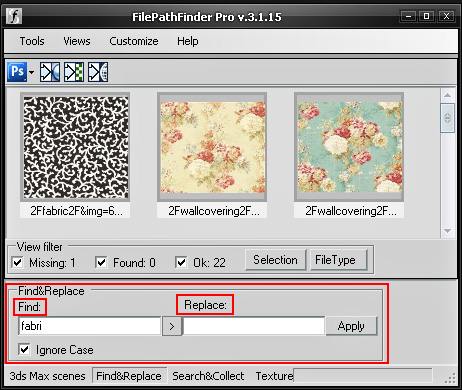
You can use the "Find&Replace" opportunity in the FilePathFinder Pro.

stanley_asbeek · 2012-08-12

Please, someone ? :)

barigazy · 2017-11-23

Simple example. First copy your file and test this function on copy file


fn changeDriveLetter maxfile: driveletter: = if doesfileexist maxfile do
(
	local metaData = getMAXFileAssetMetadata maxfile
	local newPaths = for i = 1 to metadata.count do
	(
		data = metaData[i].filename
		metaData[i].filename = driveletter + trimleft data data[1]
	)
	gc light:true
	setMAXFileAssetMetadata maxfile metaData
)

You not need to open this file. Just reset max, run first function and then run next line.
Of course as maxfile argument use path of your file and your driveletter

changeDriveLetter maxfile:@"c:\Users\Desktop\11.max" driveletter:"D"