ScriptSpot

Forum topic · General Scripting

press OK btn after copying an object with SHIFT

By artrender.info · 2013-06-05

Description

Is it possible to press ok in script when copying with shift automatically?


fn handleBox =
(
local windowHandle = DialogMonitorOPS.GetWindowHandle()
if (windowHandle != 0) then
(
local title = UIAccessor.GetWindowText WindowHandle
format "\tWindow Title: %\n" title to:f_error
format "\tWindow Body:\n" to:f_error
local children = UIAccessor.getChildWindows windowHandle
for child in children do
(
format "\t\t%\n" (UIAccessor.getWindowText child) to:f_error
)
--local error = UIAccessor.GetWindowDllDescription WindowHandle
UIAccessor.PressDefaultButton()
true
)
else ( false )
)
DialogMonitorOPS.RegisterNotification handleBox id:#hello
DialogMonitorOPS.Enabled = true

but it is not working!

Comments (11)

Explode Mesh to Objects

harumscarum · 2024-02-17

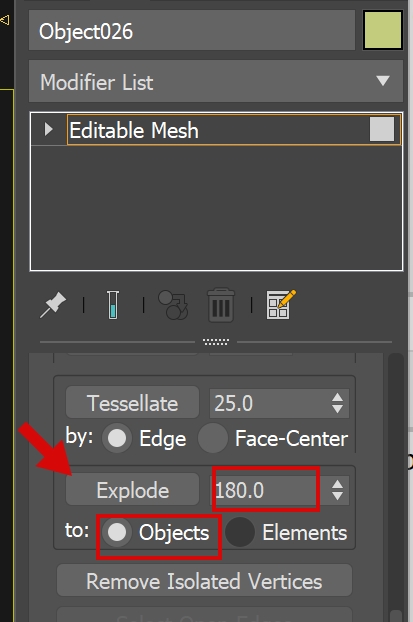
Would this trick allow to Explode EditableMesh to the Objects?

P.S. this is fastest and most efficient way to get thousands individual objects from object elements

Attachments

oh

artrender.info · 2013-06-06

if so, then there is no reason to move it outside!
Anyway, thank you both, Barigazy and miauu

miauu · 2013-06-06

To place the rollout outsied of the screen use this:


(
	global rol_
	try(destroyDialog rol_)catch()
	rollout rol_ ""
	(
		
	)
	rol_width = 100
	rol_height = 100
	rol_posX =  -150
	rol_posy = 600
	createdialog rol_ rol_width rol_height rol_posX rol_posy
)

To make the dialog visible - run the code above, but with positive value for rol_posX. If you mean to hide the clone options window - may be you can do it, but the window will appear in the center of the screen and then will be moved outside of the screen.

I will take a look on cgtalk thread this evening.

or at least

artrender.info · 2013-06-06

is it possible to put this window pos[x,y] out of the screen? wow, I've just seen you word - outside of the screen!
So, how to put flickering window outside of screen?
and then to put it back to the center if needed

barigazy · 2013-06-06

If you are looking solution outside desktop screen then you can use this
let say that your rollout have width 200 and height 100

-- center position
x = roll.width --=200
y = roll.height --=100
posX = ((dotNetClass "Screen").PrimaryScreen.WorkingArea.Width/2) - x/2
posY = ((dotNetClass "Screen").PrimaryScreen.WorkingArea.Height/2) - y/2
-- to go outside the screen
posX = -(x+1) --1px more then width
posY = -(y+1) --1px more then height

I've done this

artrender.info · 2013-06-06


global theTimer
  	fn onTick =
  	(
  		try(
  				local RollOutHandle = (windows.getChildHWND 0 "Clone Options" )[1] 
  				UIAccessor.PressButtonByName RollOutHandle "OK"	
  			)
  		catch()
  	)
  	theTimer = dotNetObject "System.Windows.Forms.Timer";
  	theTimer.interval = 1; --ms
  	dotnet.addEventHandler theTimer "tick" onTick
  	theTimer.start()
  	--theTimer.Stop()

But it is still not what I want! I will prepare the question better then! Thx for you wish to help!

miauu · 2013-06-06

The script is ready. :)


(
	global theTimer
  	function onTick =
  	(
  		try
		(
			child = (windows.getChildHWND 0 "Clone Options" )
			if child != undefined do
			(
				for btn in (windows.getChildrenHWND child[1]) where (btn[5] == "OK") do
				(
					UIAccessor.PressButton btn[1]
				)					
			)
		)
  		catch()
  	)
  	theTimer = dotNetObject "System.Windows.Forms.Timer";
  	theTimer.interval = 1
  	dotnet.addEventHandler theTimer "tick" onTick
  	theTimer.start()
  	--theTimer.Stop()
)

Instead of dotNet timer you can use the default maxscript timer. The rollout that you have to create can be placed outside of the screen.

miauu · 2013-06-06

What exactly do you want to do? Can you show as a gif image or a video, where we can see what have to be done?

I was just trying

artrender.info · 2013-06-06

to press CTRL+E on window pop up!

artrender.info · 2013-06-06


dialogMonitorOps.unRegisterNotification id:#test
fn checkDialog = (
local hwnd = dialogMonitorOps.getWindowHandle()
if (hwnd == 0) then ( false )
else (
format "==================================================\n"
format "%\n" hwndText
local children = uiAccessor.getChildWindows hwnd
format "--------------------------------------------------\n"
for child in children do (
format "%\n" (uiAccessor.getWindowText child)
)
format "==================================================\n"
--uiAccessor.pressDefaultButton()
UIAccessor.PressButtonByName hwnd "&Yes"
true
)
)

dialogMonitorOps.enabled = true
dialogMonitorOps.interactive = false
dialogMonitorOps.registerNotification checkDialog id:#test
--loadMaxFile "c:\\temp\\atextfile.txt" silent:true
--dialogMonitorOps.enabled = false

this doesn't help also