ScriptSpot

Forum topic · General Scripting

S.O.S!!!

By Gnn · 2016-12-04

Description

Hi,
I'm very new with maxscript,
and i need to deconcatenate (with split and slice?? like in js) some strings
and unfortunatly, i'don't have any idea how to do that:

--1 make a collection of all obj in the scene named "*_Master":

for h in $*_Master do print h.name

-- i obtain a list:
--"A135_gg_PersoName_Master"
--"B256a_AnimName_a_gg_Master"

-->2 i need to keep only the fisrt letter: "A" or "B" of each obj founded
-->3 make a condition: if it's A: split "_" to obtain: "PersoName"
-->4 find this PersoName folder and import it

if anyone can help me with this, it would be geat because i'm lost :(

Comments (31)

Gnn · 2016-12-27

Hello again Miauu,
I'd tryied your last script and wonderfull video about moving layers, and it's working, except when i've got nested layers inside others layers... it's seams to be difficult to move layers exact sub hierarchy and contained nodes?

.

miauu · 2016-12-27

Send me a scene that contain all layers and objects and tell me the layers that you want to be moved and the name of the layer where they have to be moved. My email is miau_u@yahoo.com

Gnn · 2016-12-18

I can't attach you a jpg or png of 57K, the answer is: File upload error. Could not move uploaded file... there's another way?
yes, i need to select only layers inside another layers,
for example all the layers childs of the layer named "Characters"
and put them in another and keep their hierachy,
the same problem arrive when i want to put the parent of a merged max file, all is in mess because i can't select just the layer :(

MergeAsset=#("G:\models\A_MP_Persos\MP_05_Gryff\AutoRIG\A005_Gryff.max")
with undo off with redraw off
(
for i in MergeAsset do
(
clearselection()
local newlay = LayerManager.getLayerFromName "Characters"
mergeMaxFile i #select #autoRenameDups #useMergedMtlDups quiet:true
for i in selection do newlay.addnode i
)
)
newParent = LayerManager.getLayerFromName "Props"
(LayerManager.getLayerFromName "Clones").setParent newParent

File upload error..

vusta · 2016-12-19

this comes and goes...sometimes I waited til next day..it then worked...

or simply upload pic somewhere that's bombproof...then just paste the link here...

Gnn · 2016-12-19

it's true, thanks you :)

Attachments

.

miauu · 2016-12-19

The code below will move all nested layers from the layer with the name "Characters" to a layer with the name "New_Layer". The "New_Layer" must exist.


(
	--	"the name of the layer whose nested have to be moved"
	mainLayerName = "Characters"
	--	"get the main layer"
	mainLayer = LayerManager.getLayerFromName mainLayerName
	--	"the layer where to put the nested layers from the main layer"
	targetLayerName = "New_Layer"
	--	"the target layer exist, so get it. Or create it if it not exist"
	targetLayer = LayerManager.getLayerFromName targetLayerName
	
	fn GetObjectsInLayer layer: =
	(
		local objsArr
		layer.nodes &objsArr
		-- return the objects
		objsArr
	)	
	
	--	"check if the main layer have nested layers"
	numChildLayers = mainLayer.getNumChildren()
	if numChildLayers != 0 then
	(
		--	"have nested layers"
		--	"for each nested layer..."		
		for i = 1 to numChildLayers do
		(
			--	"get the nested layer"
			nLayer = mainLayer.getChild i
			nLayerName = nLayer.name
			--	"get the objects in this layer"
			objsInnLayerArr = GetObjectsInLayer layer:nLayer
			--	"recreate the nested layer in the target layer. You can't have two layers with the same name, 
			--	"so the moved layers will have the _cloned suffix."
			clonedLayer = LayerManager.newLayerFromName (nLayerName + "_cloned")
			for n in objsInnLayerArr do clonedLayer.addNode n
			--	"make the cloned layer nested to the main layer"
			clonedLayer.setParent targetLayer
		)
	)
	else
	(
		--	"no nested layers. Possibly only objects"
		
	)
)

Gnn · 2016-12-19

Thank you maou,
it's almost perfect!!! there is only one problem, it's when there's is more than 1 child, it can't find the name of the last nested layer, and retun "undefined" and so don't do anything... ther's another way to do: nLayer = mainLayer.getChild i ?
or may be it's the cycle: if numChildLayers > 0 then ?

mainLayer = LayerManager.getLayerFromName "Props" -- "get the main layer"
targetLayerName = "Clones" -- "the layer where to put the nested layers from the main layer"
targetLayer = LayerManager.getLayerFromName targetLayerName -- "the target layer exist, so get it. Or create it if it not exist"

fn GetObjectsInLayer layer: =
(
local objsArr
layer.nodes &objsArr
objsArr -- return the objects
)
numChildLayers = mainLayer.getNumChildren() -- "have nested layers"
if numChildLayers > 0 then
(
for i = 1 to numChildLayers do -- "for each nested layer..."
(
nLayer = mainLayer.getChild i -- "get the nested layer"
print nLayer
nLayerName = nLayer.name -- "get the objects in this layer"
objsInnLayerArr = GetObjectsInLayer layer:nLayer
nLayer.setParent targetLayer
)
)

Gnn · 2016-12-20

it's strange, i've got always the same problem, it's working for you?
if i'v got severals childs in the layer, it tells me:
-- Unknown property: "name" in undefined
if i try this:

mainLayer = LayerManager.getLayerFromName "Props" -- "get the main layer"
targetLayer = LayerManager.getLayerFromName "Clones" -- "the target layer exist, so get it. Or create it if it not exist"

fn GetObjectsInLayer layer: =
(
local objsArr
layer.nodes &objsArr
objsArr -- return the objects
)
numChildLayers = mainLayer.getNumChildren() -- "have nested layers"
if numChildLayers > 0 then
(
print numChildLayers
for i = 1 to numChildLayers do -- "for each nested layer..."
(
nLayer = mainLayer.getChild i -- "get the nested layer"
print nLayer
nLayerName = nLayer.name -- "get the objects in this layer"
print nLayerName
objsInnLayerArr = GetObjectsInLayer layer:nLayer
nLayer.setParent targetLayer
)
)

the answer is:

-- In i loop; filename: F:\la_station\manue\UTILS\MoveNestedLayer.ms; position: 679; line: 19
-- member of: anonymous codeblock
-- Parameters:
-- i: 2
-- Locals:
-- objsInnLayerArr: undefined
-- nLayer: undefined
-- nLayerName: undefined
-- i: 2
-- Externals:
-- targetlayer: Global:targetlayer :
-- mainLayer: Global:mainLayer :
-- owner:
-- GetObjectsInLayer: Global:GetObjectsInLayer : GetObjectsInLayer()

Gnn · 2016-12-21

Thank you for your infinite patience, the video, and all your explanations, as soon as I have a little time I'll retent it, for the moment I just give you a donation, it is convenient your system of paypal, bravo mec!!

.

miauu · 2016-12-22

Thank you.
I saw the donation before this post and sent you a mail to ask about the donation, but now I know who is the donator.

Gnn · 2016-12-22

you welcome, viva Bulgaria :)

Gnn · 2016-12-18

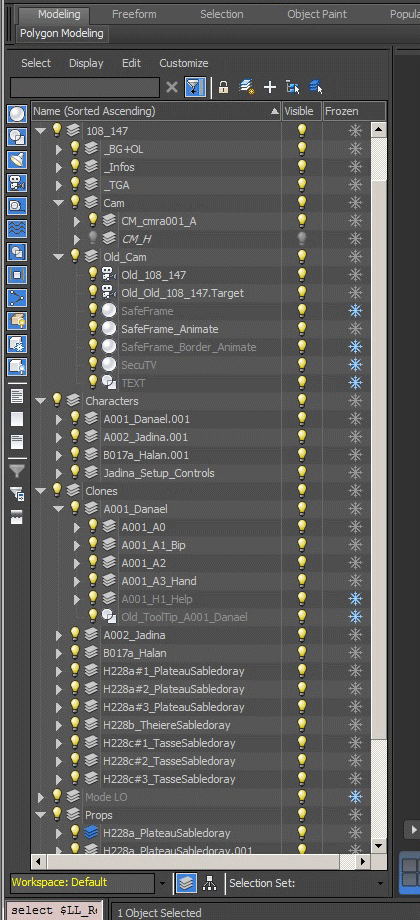
Yo mawou, thanks for all the explanations and the video you made, you're the boss! but as me, it's not possible to select layers inside another layer? this: ".nodes &objsArr" doesn't collect layers also?

fn SelectObjectsInLayer layerName: = -- list of layers founed to founded in the layer "Clones":
(
local objsArr
(LayerManager.getLayerFromName layerName).nodes &objsArr --is it possible to filter only the layers founded (first childs)?
objsArr -- return the selected layer
)
objsInLayerArr = SelectObjectsInLayer layerName:"Props"
select objsInLayerArr -- here the layers aren't selected

.

miauu · 2016-12-18

I thought that you want to select only the objects in the layer, not the objects in the nested layers.

Can you post an image to show how your layers are organized and which objects do you want to be selected?

Gnn · 2016-12-18

--HEllo MIIAU, sOrry Again and Again, but as i'd never work without js in softimage , and it's the last script that i need, i feel totaly lost in maxscript ...
-- About operations on layers, nothing appened, what did i miss? i thought "SelectObjectsInLayer" will select childs, but no.. (ligne 12)
-- it's possible to use the sign OR in this way in maxscript? (ligne 28)
-- why is my mergeMaxFile variable false? (ligne 31)
-- always my probleme to select a layer... (ligne 35)
-- Can you tell to me the way to put a variable string in a selection set? (ligne 41)
-- how to write and save a message log (in a.txt file)? (ligne 46)
fn SelectObjectsInLayer layerName: = -- list of layers founed to founded in the layer "Clones":
(
local objsArr
(LayerManager.getLayerFromName layerName).nodes &objsArr --is it possible to filter only the layers founded (first childs)?
objsArr -- return the selected layer
)
objsInLayerArr = SelectObjectsInLayer layerName:"Props" -- here nothing appened
select (
if objsInLayerArr.count != 0 do
(
for o in objsInLayerArr do
(
arrAsset = (o.name)[1] -- find the first letter of the layer's child name
if arrAsset == "" do
(
strArr = filterString o.name "_"
arrNum = strArr[strArr.count - 1] -- find the Number of the layer's child name (NameAsset)
arrName = strArr[1] -- find the Name of the layer's child name (NameAsset)
if arrAsset == "A" do
(
Mergepath = "Z:\\LL_common\\models\\A_MP_Persos\\"
if (arrNum != "") || (arrName != "") do
(
arrNum2 = arrNum[slice 2] -- slice the 2 first digits (arrNum=A001 > arrNum2=01)
mergeMaxFile @"+Mergepath+"MP_"+arrNum2+"_"+arrName+"\AutoRIG\"+o.name+".max" #select #neverReparent #autoRenameDups #useMergedMtlDups missingDLLsAction: #default quiet:true
-- Path expected: mergeMaxFile @"G:\models\A_MP_Persos\MP_01_Danael\A001_Danael.max" #select #neverReparent #autoRenameDups #useMergedMtlDups missingDLLsAction: #default quiet:true
layer = LayerManager.getLayerFromName "Characters" -- find layer Characters
for n in (selection as array) do layer.addNode n -- put the mergeMaxFile in layer "Characters"
)
NewMaster = arrName + "_Setup_Ctrl_MasterWalk_C_O_G" -- New Master
OldMaster = "Old_"+arrName+"_A0_"+arrName+"_Master" -- old Master
)
)
select (#() + $NewMaster + $OldMaster) --how to select 2 strings variables?
for n in (selection as array) do n.isFrozen = False --unFrozen selection
for n in (selection as array) do n.isHidden = False --unHide selection
NewMaster.transform = OldMaster.transform --align masters
)
else ( print " Asset not find ! " + layerName) -- write and save a message log (in a.txt file)?
)
)

.

miauu · 2016-12-18


(
	fn SelectObjectsInLayer layerName: = -- list of layers founed to founded in the layer "Clones":
	(
		local objsArr
		(LayerManager.getLayerFromName layerName).nodes &objsArr --is it possible to filter only the layers founded (first childs)?
		objsArr -- return the selected layer
	)
	objsInLayerArr = SelectObjectsInLayer layerName:"Props" -- here nothing appened
	select objsInLayerArr
	if objsInLayerArr.count != 0 do
	( 
	-- 	logFile = createFile @"D:\\LogFile.txt"
		for o in objsInLayerArr do
		( 
			NewMaster = undefined
			OldMaster = undefined
			arrAsset = (o.name)[1] -- find the first letter of the layer's child name
			if arrAsset == "" do
			(
				strArr = filterString o.name "_"
				arrNum = strArr[strArr.count - 1] -- find the Number of the layer's child name (NameAsset)
				arrName = strArr[1] -- find the Name of the layer's child name (NameAsset)
				if arrAsset == "A" do
				(
					Mergepath = "Z:\\LL_common\\models\\A_MP_Persos\\"
					if (arrNum != "") or (arrName != "") do
					(
						arrNum2 = arrNum[slice 2] -- slice the 2 first digits (arrNum=A001 > arrNum2=01)
						--	WRONG SYNTAXIS
	-- 					mergeMaxFile @"+Mergepath+"MP_"+arrNum2+"_"+arrName+"\AutoRIG\"+o.name+".max #select #neverReparent #autoRenameDups #useMergedMtlDups missingDLLsAction: #default quiet:true
						--	THIS IS CORRECT
						mergeMaxFile (Mergepath + "MP_"+arrNum2+"_"+arrName+"\\AutoRIG\\"+o.name+".max") #select #neverReparent #autoRenameDups #useMergedMtlDups missingDLLsAction:#default quiet:true
						--	CHECK IF THERE ARE SELECTED OBJECTS BEFORE TO CONTINUE
						if selection.count != 0 then
						(
							-- Path expected: mergeMaxFile @"G:\models\A_MP_Persos\MP_01_Danael\A001_Danael.max" #select #neverReparent #autoRenameDups #useMergedMtlDups missingDLLsAction: #default quiet:true
							layer = LayerManager.getLayerFromName "Characters" -- find layer Characters
							for n in (selection as array) do layer.addNode n -- put the mergeMaxFile in layer "Characters"
						)
						else
							messagebox "No objects are selected/merged" title:""
					)
					--	if NEWMASTER and OLDMASTER are objects then convert strings to actual nodes
					NewMaster = getNodeByName (arrName + "_Setup_Ctrl_MasterWalk_C_O_G") -- New Master
					OldMaster = getNodeByName ("Old_"+arrName+"_A0_"+arrName+"_Master") -- old Master
				)
			)
			if NewMaster != undefined and OldMaster != undefined do
			(
				select #(NewMaster, OldMaster) --how to select 2 strings variables?
				for n in (selection as array) do n.isFrozen = False --unFrozen selection
				for n in (selection as array) do n.isHidden = False --unHide selection
				NewMaster.transform = OldMaster.transform --align masters
			)
		)
		
		--	THIS CAN"T BE USED HERE. USE IT WHERE YOU WANT TO CHECK IF THE ASSED IS FOUND OR NOT
	-- 	else 
	-- 	(
			--	print " Asset not find ! " + layerName
	-- 		format "Asset not find ! %\n" layerName to:logFile

	-- 	) -- write and save a message log (in a.txt file)?
	-- 	close logFile
	)
)

Watch this video to see that the part of the script that selects the objects in the layer works properly: https://dl.dropboxusercontent.com/u/35093423/Other/Videos/Layrs_001.mp4

Gnn · 2016-12-15

hello again and thanks to be so patient,
do you know how to call a script inside another one, like in .js the command: Application.ExecuteScript ( oScriptPath + "MakeScript.js")
and what do you think aboutBatch it Max? it don't look to make the job??
Do you know another way to run a script in batch in severals scenes at once, and save them like it?

.

miauu · 2016-12-15

To run a script inside another one you have to use the FILEIN command.


fileIn @"C:\\MyScripts\\HideAllObjects.ms"

Batch in 3dsMax works ok. There are a lot of scripts in the forum that uses Batch to do differnet kind of tasks.

Gnn · 2016-12-15

Hello Miaou,
Since i'd tryied this, and all my problems seems to be gone with mergeMaxFile :

mergeMaxFile @"Z:\LL_common\models\A_MP_Persos\MP_01_Danael\AutoRIG\A001_Danael.max" #select #neverReparent #autoRenameDups #useMergedMtlDups missingDLLsAction: #default quiet:true

thanks a lot, again for for your patience,
but do you know why nothing appened when i try to move the layers? it answer me: OK and make nothing
i think i miss something very simple and essential...because i like your idea to make the script faster like doing object mode:

(
-- get the objects from the layer with the name "Layer001"
fn SelectObjectsInLayer layerName: =
(
local objsArr
(LayerManager.getLayerFromName layerName).nodes &objsArr
-- return the selected objects
objsArr
)
objsInLayerArr = SelectObjectsInLayer layerName:"Props"

-- move those objects to a layer with the name "Layer002"
layer = LayerManager.getLayerFromName "Clones"
for n in (selection as array) do layer.addNode n
)

.

miauu · 2016-12-15

Your code for moving objects in Clones layer not works, because the script moves only the selected objects. If no objects are selected then there will be no moved objects.

If you want to move the objects, selected from the Props layer, then see the code below.


(
	-- get the objects from the layer with the name "Layer001"
	fn SelectObjectsInLayer layerName: =
	(
		local objsArr
		(LayerManager.getLayerFromName layerName).nodes &objsArr
		-- return the selected objects
		objsArr
	)
	objsInLayerArr = SelectObjectsInLayer layerName:"Props"

	-- move those objects to a layer with the name "Layer002"
	layer = LayerManager.getLayerFromName "Clones"
	--	if you do not have selected objects then no objects will be moved to the Clones layer using the code in the next line
-- 	for n in (selection as array) do layer.addNode n
	--	if you want to move the objects, selected from the Props layer, then you have to use
	for n in objsInLayerArr do layer.addNode n
)

Gnn · 2016-12-15

thanks a lot!!!
do you know why max is merging the layers when merging similars max file? and how to avoid this?

maw

Gnn · 2016-12-14

whaou! are you a human?
it's almost perfect, but it's opened the oldest scene, it's possible to inverse it, and get the newest instead?
do you know how to close the dialogue box after pressed the button?

i'v got only 2 others littles troubles and after it's hollidays for you and me :)
-- how to select a merged max file?
-- and skip messages box when merging a Max File : message box 1: objet :autorename -- message box 2: materiel: use merged materials
--i'd try this but nothing appened...
mergeMaxFile @"Z:\ModelPath\ModelName.max"; #select #autoRenameDups #useMergedMtlDups

--how to select all the first childs of a layer and put them in another?
layer.setname "LayerName"
select (#() + LayersChilds) -- ???
for n in (selection as array) do layer.addnode n

.

miauu · 2016-12-14

The code that I post finds the last modified scene. I don't know why it not works for you. This is the part of the script that does the job:

lastModifiedDate = amax filesModDateArr

You can try this:

lastModifiedDate = amin filesModDateArr

to see which file will be selected. OR write your own function that will compare the results in the filesModDateArr and will find the last modified file.

-- how to select a merged max file?
To select mered objects you have to use the #select argument

-- and skip messages box when merging a Max File :
the quite:true argument

Using your code(there is no ; after the file path):


mergeMaxFile @"Z:\ModelPath\ModelName.max" #select #autoRenameDups #useMergedMtlDups quiet:true

--how to select all the first childs of a layer and put them in another?
To select the objects from layer with tha name "Layer001" use this:


(
	fn SelectObjectsInLayer layerName: =
	(
		local objsArr
		(LayerManager.getLayerFromName layerName).nodes &objsArr
		select objsArr
	)
	SelectObjectsInLayer layerName:"Layer001"
)

To put the selected objects in another layer(with name "Layer002") use this:


(
	layer = LayerManager.getLayerFromName "Layer002"
	for n in (selection as array) do layer.addNode n
)

By the way, there is no need to select objects when you have them stored in array. Selecting the objects in the script will selects the objects in the scene and this will slow down the speed of your script. For example, you can combine the two snipets above like this:


(
	--	get the objects from the layer with the name "Layer001"
	fn SelectObjectsInLayer layerName: =
	(
		local objsArr
		(LayerManager.getLayerFromName layerName).nodes &objsArr
		--	return the selected objects
		objsArr
	)
	objsInLayerArr = SelectObjectsInLayer layerName:"Layer001"
	
	--	move those objects to a layer with the name "Layer002"
	layer = LayerManager.getLayerFromName "Layer002"
	for n in (selection as array) do layer.addNode n
)

Gnn · 2016-12-13

Hello miauu,
sorry to had send you so much text last day, it was an error... when i want to open the scene by last modifaication date:

-- prompt user to ask a number of a plan
global LL_Layout
try(destroyDialog LL_Layout)catch()
rollout LL_Layout "Enter Layout Plan to open"
(
edittext plan_name "plan"
button open_plan "OPEN"

on open_plan pressed do
(
if plan_name.text != "" do
(
-- get the number entered and make a variables:
planName = plan_name.text
camName = "107_"+ planName
-- path for open scene:
LoadPath = getFiles ("C:\\Users\\manue\\Desktop\\la_station\\les_legendaires\\"+camName+"\\"+camName+"*.max")
-- open last scene by date founded:
if filesArr.count != 0 do
(
filesModDateArr = for f in filesArr collect (getFileModDate f)
lastModifiedDate = amax filesModDateArr
index = findItem filesModDateArr lastModifiedDate
lastModifiedFile = filesArr[index]
format "_indx: % \n" index
format "filesArr: % \n" filesArr[index]
format "filesModDateArr: % \n" filesModDateArr[index]
-- "works with the last modified file"
resetMaxFile #noPrompt
loadMAXFile lastModifiedFile quiet:true
)
)
)--end on
)--end rollout
createDialog LL_Layout 250 75

the answer is:

- [stack level: 0]
-- In open_plan.pressed(); filename: G:\manue\MaxButtons\OpenLastLayoutScene.ms; position: 594; line: 19
-- member of: Rollout:LL_Layout
-- Locals:
-- planName: "278"
-- filesArr: undefined
-- LoadPath: #("C:\Users\manue\Desktop\la_station\les_legendaires\107_278\107_278.max", "C:\Users\manue\Desktop\la_station\les_legendaires\107_278\107_278_v000.max", "C:\Users\manue\Desktop\la_station\les_legendaires\107_278\107_278_v1.max")
-- filesModDateArr: undefined
-- lastModifiedDate: undefined
-- lastModifiedFile: undefined
-- camName: "107_278"
-- index: undefined
-- Externals:
-- owner: Rollout:LL_Layout
-- LL_Layout: Rollout:LL_Layout
-- plan_name: RolloutControl:plan_name in rollout:LL_Layout : EditTextControl:plan_name

do you know why? thanks again :)

.

miauu · 2016-12-13

What you post(and use) is not the script that I post earlierl. The error is on line 19.
The filesArr variable is not defined in your code. You have LoadPath variable(which collets all files). So, replace filesArr with LoadPath, or replace LoadPath with filesArr and test the script again.

i'm back

Gnn · 2016-12-11

Hello again (and sorry to ask you again so much)can you help me one more time (and last?) do you know how to get the scene by last modifaication date?
and correct my bad language??

-- prompt user to ask a number of a plan
global LL_Layout
try(destroyDialog LL_Layout)catch()
rollout LL_Layout "Enter Plan to open"
(
edittext plan_name "plan"
button open_plan "OPEN"

on open_plan pressed do
(
if plan_name.text != "" do
(
-- get the number entered and make a variables:
planName = plan_name.text
camName = "108_"+ planName
-- path for open scene:
LoadPath = getFiles ("F:\\la_station\\A_FAIRE\\108\\"+camName+"\\"+camName+"*.max")
-- path for save as scene
SaveASPath = "C:\\Users\\manue\\Desktop\\la_station\\les_legendaires\\"+camName+"\\"
-- open last scene by date founded:
if LoadPath.count != 0 do
(
for f in LoadPath do
(
resetMaxFile #noPrompt
loadMAXFile f quiet:true
-- get the variable and make another:E
OldcamName = "Old_" + camName
extName = "_v000.max"
SaveFile = camName+extName
saveScene = SaveASPath + SaveFile
-- make folder:
-- "makeDir SavePath"

-- Renomme camName > Old_camName
select $camName
$.name = OldcamName
-- import the new cam and align postion and rotation on old cam
mergeMaxFile @"C:\Users\manue\Desktop\la_station\les_legendaires\SetupCamera.max";#select #autoRenameDups #useMergedMtlDups
macros.run "Coordinate System" "Coordsys_Local"
$cmra001_A_WORLD_001.pos = $OldcamName.pos -- align position
$cmra001_A_WORLD_001.rot = $OldcamName.rot --align rotation
-- and rotate it in rotation -90 en Z
rotate $cmra001_A_WORLD_001 (angleaxis -90 [0,0,1])
-- rename the new cam > camName
select $cmra001_H_camera_001
$.name = camName
-- select the oldCam and more to create a new layer called > Old_cam
select #($Old_108_242, $'Old_108_242.Target', $SafeFrame, $SafeFrame_Animate, $SafeFrame_Border_Animate, $SecuTV, $TEXT)
LayerManager.newLayer("Old_cam")
-- Rename the layer: CM_cmra001_A > "cam"
NewCamLayer = LayerManager.getLayerFromName "CM_cmra001_A" name
NewCamLayer.setname = "Old_cam"
--paste layer Old_cam in the layer "cam"
--...??
-- create 2 new layers called: Characters and NewProps
LayerManager.newLayer("Characters")
LayerManager.newLayer("NewProps")
-- select childnodes of layers: Clones + Props > rename Objects: decocher base name, cocher prefix: Old_
--...
)
)
)
)--end on
)--end rollout
createDialog LL_Layout 250 75

.

miauu · 2016-12-12

I can't test the code


-- prompt user to ask a number of a plan
global LL_Layout
try(destroyDialog LL_Layout)catch()
rollout LL_Layout "Enter Plan to open"
	(
	edittext plan_name "plan"
	button open_plan "OPEN"

	on open_plan pressed do
	(
		if plan_name.text != "" do
		(
			-- get the number entered and make a variables:
			planName = plan_name.text
			camName = "108_"+ planName
			-- path for open scene:
			filesArr = getFiles ("F:\\la_station\\A_FAIRE\\108\\"+camName+"\\"+camName+"*.max")
			-- path for save as scene
			saveASPath = "C:\\Users\\manue\\Desktop\\la_station\\les_legendaires\\"+camName+"\\"
			-- open last scene by date founded:
			if filesArr.count != 0 do
			(
				filesModDateArr = for f in filesArr collect (getFileModDate f)					
				lastModifiedDate = amax filesModDateArr
				index = findItem filesModDateArr lastModifiedDate
				lastModifiedFile = filesArr[index]
				format "_indx: % \n" index
				format "filesArr: % \n" filesArr[index]
				format "filesModDateArr: % \n" filesModDateArr[index]
				--	"works with the last modified file"
				resetMaxFile #noPrompt
				loadMAXFile lastModifiedFile quiet:true
				-- get the variable and make another:E
				OldcamName = "Old_" + camName
				extName = "_v000.max"
				SaveFile = camName+extName
				saveScene = saveASPath + SaveFile
				-- make folder:
				-- "makeDir SavePath"

				-- Renomme camName > Old_camName
-- 				select $camName
				$camName.name = OldcamName
				-- import the new cam and align postion and rotation on old cam
				mergeMaxFile @"C:\Users\manue\Desktop\la_station\les_legendaires\SetupCamera.max" #select #autoRenameDups #useMergedMtlDups
				
				toolMode.coordsys #local
				
				$cmra001_A_WORLD_001.pos = $OldcamName.pos -- align position
				$cmra001_A_WORLD_001.rot = $OldcamName.rot --align rotation
				-- and rotate it in rotation -90 en Z
				rotate $cmra001_A_WORLD_001 (angleaxis -90 [0,0,1])
				-- rename the new cam > camName
-- 				select $cmra001_H_camera_001
				$cmra001_H_camera_001.name = camName
				-- select the oldCam and more to create a new layer called > Old_cam
				select #($Old_108_242, $'Old_108_242.Target', $SafeFrame, $SafeFrame_Animate, $SafeFrame_Border_Animate, $SecuTV, $TEXT)
				LayerManager.newLayer("Old_cam")
				-- Rename the layer: CM_cmra001_A > "cam"
				NewCamLayer = LayerManager.getLayerFromName "CM_cmra001_A"
				NewCamLayer.setName "Old_cam"
				--paste layer Old_cam in the layer "cam"
				--...??
				-- create 2 new layers called: Characters and NewProps
				LayerManager.newLayer("Characters")
				LayerManager.newLayer("NewProps")
				-- select childnodes of layers: Clones + Props > rename Objects: decocher base name, cocher prefix: Old_
				--...
			)
		)
	)--end on
)--end rollout
createDialog LL_Layout 250 75

By the way, paste the code using "

  --your code here 

"
without the quotes

Gnn · 2016-12-10

You're a genius as cats, like what words can care all evils, I love you :)

Gnn · 2016-12-10

thank you so much for your generosity miauu!!!!

i've got another trouble today, if can you help me again with this script you can save me definitively...
anyway thanks you so much

Hello everybody! i'm trying to make a maxscript to open a scene and save it, do you know where i'm wrong? because nothing is working :(
by advance, thank you to make my dream become true...

-- prompt user to ask a number of a plan
rollout LL_Layout "Enter Plan to open"
(
edittext plan_name "plan"
button open_plan "OPEN"
on open_plan pressed do
(
if plan_name.text != "" do

-- get the number entered and make a variables:
planName = plan_name.text
camName = "108_"+ planName

-- path for open scene:
LoadPath = getFiles "E:\\"+camName+"\\"+camName+"*.max"
-- path for save as scene
SaveASPath = "E:\\Users\\"+camName+"\\"

-- open last scene by date founded:
if LoadPath .count == 1 do (
for f in LoadPath do (loadMAXFile f)

-- get the variable and make another:
OldcamName = "Old_" + camName

extName = "_v000.max"
SaveFile = camName+extName
saveScene = SaveASPath + SaveFile

-- make folder:
makeDir SavePath

-- save as the scene in the folder created:
saveMaxFile saveScene
)
)--end on
)--end rollout
createDialog LL_Layout 250 75

.

miauu · 2016-12-10

YOu have some errors in your code.
I assume that you want to open and save each file separately?

makeDir tries to create a folder that is not declared in the script. If my example is wrong, use the proper variable.


-- prompt user to ask a number of a plan
global LL_Layout
try(destroyDialog LL_Layout)catch()
rollout LL_Layout "Enter Plan to open"
(
	edittext plan_name "plan"
	button open_plan "OPEN"
	
	on open_plan pressed do
	(
		if plan_name.text != "" do
		(
			-- get the number entered and make a variables:
			planName = plan_name.text
			camName = "108_"+ planName
			-- path for open scene:
			LoadPath = getFiles ("E:\\"+camName+"\\"+camName+"*.max")
			-- path for save as scene
			SaveASPath = "E:\\Users\\"+camName+"\\"
			-- open last scene by date founded:
			if LoadPath.count == 1 do 
			(
				for f in LoadPath do 
				(
					resetMaxFile #noPrompt
					loadMAXFile f quiet:true
					-- get the variable and make another:
					OldcamName = "Old_" + camName
					extName = "_v000.max"
					SaveFile = camName+extName
					saveScene = SaveASPath + SaveFile
					-- make folder:
					--	"SAVEPATH is not defiend.Use the proper variable."
					--	"makeDir SavePath"
					if makeDir SaveASPath == true then
					(
						-- save as the scene in the folder created:
						if (saveMaxFile saveScene quiet:true) == true then
							format "SAVED: %\n" saveScene
						else
							format "NOT SAVED: %\n" saveScene 
					)
					else
					(
						format "Can't create folder: % \n" SaveASPath
					)
				)
			)
		)
	)--end on
)--end rollout
createDialog LL_Layout 250 75

.

miauu · 2016-12-07


(
	objsArr = for o in objects where (matchpattern o.name pattern:"*_Master") collect o
	
	if objsArr.count != 0 do
	(
		for o in objsArr do
		(
			firstChar = (o.name)[1]
			if firstChar == "A" do
			(
				strArr = filterString o.name "_"
				--	"if the PersoName is always the third element in the array use"
				persoName = strArr[3]
				--	"if the PersoName is before the _Master then use"
-- 				persoName = strArr[strArr.count - 1]
				--	<filename_string> must be the path to the file that you want to import
				importFile <filename_string> #noPrompt  
			)
		)
	)
)

You can't import a fodler. You can import a file. So, modify the script to works as you want.