Hi
Has anyone got a script that will take a custon polygon mesh and output the code to build it in a max script. ie save out all the point and polygon data?
I am trying to make my own custom helper objects.
Thanks
Gram
Forum topic · Scripts Wanted
By gramx · 2010-12-24
Hi
Has anyone got a script that will take a custon polygon mesh and output the code to build it in a max script. ie save out all the point and polygon data?
I am trying to make my own custom helper objects.
Thanks
Gram
Garp · 2011-01-03
Nice!
You might want to update the script before going any further though. The bug you found has been fixed (and in the Primitive Maker too).
gramx · 2011-01-03
Ah ha - All fixed in one line, well done!
on clone orig do buildTriMesh()
cheers
g
Cam Rig with custom helpers
gramx · 2011-01-03
Hi Just wanted to say thanks again for all your help :) I have finished my first camera Rig:-
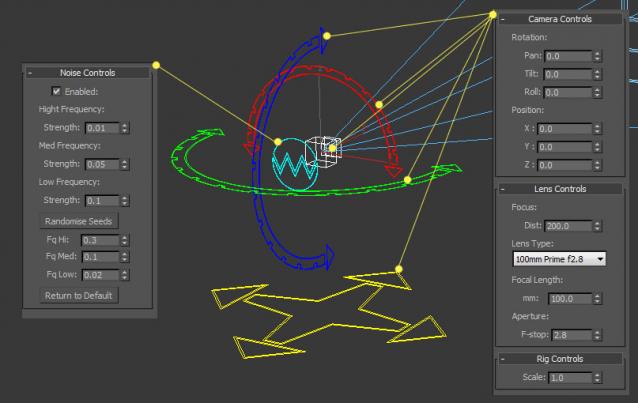
I have attched the Max scene file and the helper plugins. Have a play, your welcome to use it also! It uses a Vray camera. I am going to make a crane Rig next. Always wanted one for creating realistic camera moves. I will be able to create some cool crane helper objects now :)
camrig2: bug fix - Updated helpers
Cheers
Gram
Garp · 2011-01-01
This one then:
http://www.scriptspot.com/3ds-max/scripts/helper-maker
Before looking at the script itself, run it and look at the plugin file it outputs.
What the maker scrip does is just write the plugin code to disk. The rest is essentially building the UI and checking if the plugin name and/or the plugin file are already defined.
If you look at the example code in the doc, you can see that the 'on getDisplayMesh' block returns a trimesh. So you just need to give the trimesh definition to the plugin.
Since you need to define it only once, don't put it in the block but outside in a function that is called by the 'on create' and 'on load' handlers.
To pass the data from the maker script to the plugin file, you do something like
local theVerts = for v = 1 to getNumVerts myObject collect getVert myObject v
format "v_arr = %\n" theVerts to:output_file
Same principle for the faces and edge visibility. The primitive version passes a few more things but it's basically the same code.
Hope that clarifies a few points.
And of course, Happy New Year guys! :)
Ha Ha
gramx · 2011-01-01
Cant beleive I missed that one! lol
Problem solved, Its been a very good learning exercise anyway.
Many thanks
g
 Graph · 2011-01-01
yeah and usually you'd use the createInstance function to do that but i tried it here and it didnt work with the mesh
better use a TriMesh() to do that, have a look in the help how to build that, cant help atm, way fuked up
happy new year
edit: not at all garp, he's just learning some maxScript, your plugin is still cool
gramx · 2011-01-01
Sounds like you've had a good night!
Yes I have been trying the createInstance function without any success! I have also been looking at TriMesh and it looks like you have to use the .mesh function to define it, which I am already doing:- theMesh = copy meshObj.mesh. Cant find anyway round it ;(
Hope your feeling better soon!
g
Allmost done!
gramx · 2011-01-01
Hi
What I am trying to do is different as I am trying to define Helper Objects directly without building a mesh in the viewport and the passing it to the helper. With help(thanks) I have got the converting mesh to code working fine! What I am trying to do now is to define this mesh in memory and then pass this to the display mesh of the helper. At the moment what ever I try builds a mesh in the viewport which then needs deleting after being passed to the diplay mesh. I have put the code for a simple helper below.
plugin Helper Helper_Test
name:"Helper Test"
classID:#(0x1e6a3439, 0x18067b16)
category:"Standard"
extends:dummy
(
	local  meshObj, theMesh

	on getDisplayMesh do
	(
		if meshObj == undefined then
		(

			meshObj = execute "(mesh vertices:#([0,0,50], [-40,-40,0], [40,-40,0], [40,40,0], [-40,40,0], [0,0,0]) faces:#([1,2,3], [1,3,4], [1,4,5], [1,5,2], [2,6,3], [3,6,4], [4,6,5], [5,6,2]));"
			theMesh = copy meshObj.mesh
                        delete meshObj

		)
		theMesh
	)

	tool create
	(
		on mousePoint click do
		case click of
		(
			1: nodeTM.translation = gridPoint
			2: #stop
		)
	)
)
I am trying too pass a tri mesh to theMesh directly so I dont create geometry in the max scene and then have to delete meshObj. Cant figure it out!
Cheers!
Happy New Year!
Garp · 2011-01-01
"a script that will take a custon polygon mesh and output the code to build it in a max script. ie save out all the point and polygon data"
Did I miss something?
Graph · 2011-01-01
by simply returning the var that holds the mesh at the end of the string to execute as it turns out ^^
local test = execute "#simple"
print test
nope thats correct,
Graph · 2010-12-31
just add a few lines to add that stuff to the string. if itd been that easy it wouldnt have been a good exercise, now would it?! ;)
Updated script
gramx · 2010-12-31
I have added a loop to check for any invisible edges and added a setEdgeVis to the string. see example below. I had to also assign the mesh to a variable so that I could reference it in the setEdgeVis function otherwise it wouldn't work! I still need to figure out how to add this as a nodeRef to the local scope of the pluginNode. I will keep trying! Thanks for being patient and all your help!
example:-
execute "(themesh = mesh vertices:#([-2.5,-2.5,0], [2.5,-2.5,0], [-2.5,2.5,0], [2.5,2.5,0], [-2.5,-2.5,5], [2.5,-2.5,5], [-2.5,2.5,5], [2.5,2.5,5]) faces:#([1,3,4], [4,2,1], [5,6,8], [8,7,5], [1,2,6], [6,5,1], [2,4,8], [8,6,2], [4,3,7], [7,8,4], [3,1,5], [5,7,3])); setEdgeVis themesh 1 3 false; setEdgeVis themesh 2 3 false; setEdgeVis themesh 3 3 false; setEdgeVis themesh 4 3 false; setEdgeVis themesh 5 3 false; setEdgeVis themesh 6 3 false; setEdgeVis themesh 7 3 false; setEdgeVis themesh 8 3 false; setEdgeVis themesh 9 3 false; setEdgeVis themesh 10 3 false; setEdgeVis themesh 11 3 false; setEdgeVis themesh 12 3 false;"
[code]
(
--mesh vertices: faces: --[ materialIDs: ] \
fn obj2Code obj =
(
if isValidNode obj do
(
local tMesh = copy obj.mesh
local nVerts = tMesh.numverts
local nFaces = tMesh.numfaces
local edges = #()
local verts = for v = 1 to nVerts collect getVert tMesh v
local faces = for f = 1 to nFaces collect getFace tMesh f
local str = "(themesh = mesh vertices:"
with printAllElements true
(
str += verts as string
str += " faces:"
str += faces as string
str += ");"
for f = 1 to nFaces do
(
if (getEdgeVis tMesh f 1) == false do
(
str += " setEdgeVis themesh "
str += f as string
str += " 1 false;"
)
if (getEdgeVis tMesh f 2) == false do
(
str += " setEdgeVis themesh "
str += f as string
str += " 2 false;"
)
if (getEdgeVis tMesh f 3) == false do
(
str += " setEdgeVis themesh "
str += f as string
str += " 3 false;"
)
)
)
tMesh = undefined
return str
)
)--END obj2Code FN
local tString = (obj2Code selection[1])
format "%\n "tString
tString
)
[\code]
Garp · 2010-12-30
Hi gramx.
This might do what you want:
http://www.scriptspot.com/3ds-max/scripts/primitive-maker
gramx · 2010-12-30
Yes, its very similar to what I am doing. cheers
Graph · 2010-12-30
bla bla btw every geometryNode in max is essentially a trimesh (well at least the important ones 😛)
why dont you try to modify the function i made to also add code for setting the edge viz for the new object? its simple and you can make your helper way dynamic by saving the string with the geoCode in a parameter of the node... that way users can either choose between preset helper shapes or pick their own geo shapes... dont forget that for that you need a temp global var to pass the nodeRef to local scope of the pluginNode
edge visibility
gramx · 2010-12-31
I tried modifying your code to this to add edge visibility:
(
	--mesh vertices:<array_of_point3s> faces:<array_of_point3s> --[ materialIDs:<array_of_integers> ] \

	fn obj2Code obj =
	(
		if isValidNode obj do
		(
			local tMesh = copy obj.mesh
			local nVerts = tMesh.numverts
			local nFaces = tMesh.numfaces

 			local edges = #()
			local verts = for v = 1 to nVerts collect getVert tMesh v
			local faces = for f = 1 to nFaces collect getFace tMesh f

 			for f = 1 to nFaces do
			(
				local facef = #()
				append facef (getEdgeVis tMesh f 1)
				append facef (getEdgeVis tMesh f 2)
				append facef (getEdgeVis tMesh f 3)
				append edges facef
			)

			local str = "(mesh vertices:"
			with printAllElements true
			(
				str += verts as string
				str += " faces:"
				str += faces as string
				str += " edgevis:"
				str += edges as string
				str += ");"
			)
			tMesh = undefined

			return str
		)
	)--END obj2Code FN

	local tString = (obj2Code selection[1])
	format "%\n "tString
	tString
)
this adds edgevis: to the code but its not recognised in the mesh command. Just gets ignored when executed.
Looking at the help it appears that you can only set the Edge viz with the following command setEdgeVis
Am I missing anything?
Graph · 2010-12-28
nope
btw you should only create the node in memory, that way you dont have to delete anything, afaik that fn doesnt work with a mesh but hey something for you to experiment with :)
try:
meshobj = createinstance pyramid()
to understand what i mean
Custom Mesh Helper Script
gramx · 2010-12-29
Not sure how to only create the node in memory. It seems to work OK so far! I adabted the code from this forum :- http://forums.cgsociety.org/archive/index.php/t-288270.html
It also seems that standard helpers can only be tri-meshes and only display as wireframe.
I have added edge visibility to the code otherwise you get a horrable triangulated mesh helper!
(
--mesh vertices:<array_of_point3s> faces:<array_of_point3s> --[ materialIDs:<array_of_integers> ] \
fn obj2Code obj =
(
if isValidNode obj do
(
local tMesh = copy obj.mesh
local nVerts = tMesh.numverts
local nFaces = tMesh.numfaces
local edges = #()
local verts = for v = 1 to nVerts collect getVert tMesh v
local faces = for f = 1 to nFaces collect getFace tMesh f
for f = 1 to nFaces do
(
local facef = #()
append facef (getEdgeVis tMesh f 1)
append facef (getEdgeVis tMesh f 2)
append facef (getEdgeVis tMesh f 3)
append edges facef
)
local str = "local vertsArray = "
with printAllElements true
(
str += verts as string
str += "\nlocal facesArray = "
str += faces as string
str += "\nlocal edgeVis = "
str += edges as string
)
tMesh = undefined
return str
)
)--END obj2Code FN
output = newscript()
local tString = (obj2Code selection[1])
format "%\n "tString to: output
)
--end
The code now outputs a new script in the following format:-
local vertsArray = #([-2.5,-2.5,0], [2.5,-2.5,0], [-2.5,2.5,0], [2.5,2.5,0], [-2.5,-2.5,5], [2.5,-2.5,5], [-2.5,2.5,5], [2.5,2.5,5])
local facesArray = #([1,3,4], [4,2,1], [5,6,8], [8,7,5], [1,2,6], [6,5,1], [2,4,8], [8,6,2], [4,3,7], [7,8,4], [3,1,5], [5,7,3])
local edgeVis = #(#(true, true, false), #(true, true, false), #(true, true, false), #(true, true, false), #(true, true, false), #(true, true, false), #(true, true, false), #(true, true, false), #(true, true, false), #(true, true, false), #(true, true, false), #(true, true, false))
I then drop this code into the following ---mesh--- section of the scripted helper plugin:-
plugin Helper Mesh2Helper
name:"Mesh2Helper"
classID:#(0x15424e9f, 0x5f189e30)
category:"Standard"
extends:dummy
(
local lastSize, meshObj, theMesh, lastpshape
parameters pblock rollout:params
(
size type:#float animatable:true ui:size default:1.0
)
rollout params "rt Helper Parameters"
(
spinner size "Size:" range:[0, 1e9, 1]
)
on getDisplayMesh do
(
if meshObj == undefined OR size != lastSize then
(
--------------------------------------------------------------- MESH---------------------------------------------------------------------------------
local vertsArray = #([-2.5,-2.5,0], [2.5,-2.5,0], [-2.5,2.5,0], [2.5,2.5,0], [-2.5,-2.5,5], [2.5,-2.5,5], [-2.5,2.5,5], [2.5,2.5,5])
local facesArray = #([1,3,4], [4,2,1], [5,6,8], [8,7,5], [1,2,6], [6,5,1], [2,4,8], [8,6,2], [4,3,7], [7,8,4], [3,1,5], [5,7,3])
local edgeVis = #(#(true, true, false), #(true, true, false), #(true, true, false), #(true, true, false), #(true, true, false), #(true, true, false), #(true, true, false), #(true, true, false), #(true, true, false), #(true, true, false), #(true, true, false), #(true, true, false))
--------------------------------------------------------------------------------------------------------------------------------------------------------
meshObj = mesh vertices:(for v in vertsArray collect v*size) faces:facesArray
for face = 1 to edgeVis.count do
for i = 1 to 3 do
setEdgeVis meshObj face i edgeVis[face][i]
theMesh = copy meshObj.mesh
delete meshObj
lastSize = size
)
theMesh
)
tool create
(
on mousePoint click do
case click of
(
1: nodeTM.translation = gridPoint
2: #stop
)
on mouseMove click do
case click of
(
2: (size = length gridDist)
)
)
)--end
I have only tested it with simple geo, aslong as you give each helper a new name and a unique classID then it all works. I will try some more complex geometry next!
g
lets get this going
Graph · 2010-12-28
execute "(mesh vertices:#([0,0,51.5526], [-39.0721,-40.7057,0], [39.0721,-40.7057,0], [39.0721,40.7057,0], [-39.0721,40.7057,0], [0,0,0]) faces:#([1,2,3], [1,3,4], [1,4,5], [1,5,2], [2,6,3], [3,6,4], [4,6,5], [5,6,2]));"evaluate that snippet î to see the result of what is so far..
the current function simply creates you a string that creates a mesh. to use it as code directly use the first line printed (a=createinstance code, mesh = a.mesh .. or something alike); otherwise use the string and execute it
doesnt have smoothing groups, matIDs or tVerts but you wont need that for a helper.
(
	--mesh vertices:<array_of_point3s> faces:<array_of_point3s> --[ materialIDs:<array_of_integers> ] \

	fn obj2Code obj =
	(
		if isValidNode obj do
		(
			local tMesh = copy obj.mesh
			local nVerts = tMesh.numverts
			local nFaces = tMesh.numfaces


			local verts = for v = 1 to nVerts collect getVert tMesh v
			local faces = for f = 1 to nFaces collect getFace tMesh f


			local str = "(mesh vertices:"
			with printAllElements true
			(
				str += verts as string
				str += " faces:"
				str += faces as string
				str += ");"
			)
			tMesh = undefined

			return str
		)
	)--END obj2Code FN

	local tString = (obj2Code selection[1])
	format "%\n "tString
	tString
)
have phun
Pyramids
gramx · 2010-12-28
Cool, It makes a Pyramid!
I will have a go at making a scripted plugin to build a new helper object now.
Great stuff!
Thanks
Gram
Custom Poly Helper
gramx · 2010-12-28
I have written a script to turn your pyramid into a custom helper(code below). Unless I am missing something it appears that you can only create wireframe helpers! If you run the script below it creates a wireframe helper pyramid. Is there anyway to display a shaded polygon helper?
-------------------------------- start
plugin Helper rt_Helper
name:"rt Helper"
classID:#(0x357d24c1, 0x52e1d978)
category:"Standard"
extends:dummy
(
local meshObj, theMesh
on getDisplayMesh do
(
if meshObj == undefined then
(
meshObj = mesh vertices:#([0,0,51.5526], [-39.0721,-40.7057,0], [39.0721,-40.7057,0], [39.0721,40.7057,0], [-39.0721,40.7057,0], [0,0,0]) faces:#([1,2,3], [1,3,4], [1,4,5], [1,5,2], [2,6,3], [3,6,4], [4,6,5], [5,6,2])
theMesh = copy meshObj.mesh
delete meshObj
)
theMesh
)
tool create
(
on mousePoint click do
(
nodeTM.translation = gridPoint;#stop
)
)
)
----------------------------------- end
gramx · 2010-12-29
How do you put your code in a nice box like that?
gramx · 2010-12-27
That would be very cool, I have seen a few posts on the forum with people wanting to have a similar script!
Thanks
gram
Garp · 2010-12-26
I have to write a 'make primitive' script.
If you can wait a few days...