HCG Asset Browser is now BOA Asset Browser
Rewritten to work with current versions of 3ds Max (2025–2027) -> Still free.

Script
 By Francisco Hermida · 2009-06-29
Rewritten to work with current versions of 3ds Max (2025–2027) -> Still free.
This page is kept for history. HCG Asset Browser has been rebuilt and renamed BOA Asset Browser — the current download, install steps, and full feature list live here:
assets.boxofapps.com/tools/boa-asset-browser →
Latest update (v0.2.1): browse subfolders, convert placed models to/from proxies, faster large-library browsing.
What it does:
Tags: Browser, Library, models, asset, manage, thumbnail, meshs
Issue with max 2019
 vyle · 2018-08-03
It seems that it does not run on max 2019! Please help! I have been using your script since max 2015, and can't work without it!!!
See screenshot attached
vyle · 2018-08-03
No worries I had done a mistake. Forgot to remove old version. working perfectly now. LOVE THAT SCRIPT! Thank so so so so much.
Choose model path
Spline · 2017-12-13
Hi, nice tool!
It would be great to let the model in his native folder, on the network. There is no point to change all my models to a new repertory.
Thanks
runmax · 2017-12-11
Thank you so much! it's test good with max2018~
thanks
 lazhu · 2017-12-05
vary good
Corona model ?
sedus69 · 2017-10-31
Hi Francisco,
I can't count how many hours saved thanks to your script, I thinks Weeks !
Can you tell me if there is a way to send Render thumbnail model/texture to a Corona thumbnails setting ?
I try to simply resave default render.max and defaultrender.rps but get stuck in a recursion problem
If you don't have time no worries, and thanks again
 3dwannab · 2017-06-29
Just use connecter :)
Thanks for the info , but HCG AB is exceptional
poornajaya · 2017-06-30
Thanks for the info, its useful too..
But to be honest HCG AB pro is exceptional.some of the functions cannot find in any other Plugin or Script specially Model Paint option on the scene directly with randomise settings.those things Make workflow more easy and smooth. simply cannot compare :)
I really miss this after upgraded to 3dsmax 2017.
3dwannab · 2017-07-06
Think this is the same dev. (Not sure but this could be what you're after) Seems this project is dead. http://www.scriptspot.com/3ds-max/scripts/project-manager
DESIGN CONNECTED can paint on objects too.
Drag asset into max and use: merge option > alt key > select obj to choose where you want to align to and use ctrl to rotate and shift+alt which aligns the object to a normal.
It's not written in msx so is 10x faster. The only thing it lacks it .mat support but there's this amazing tool for that. http://www.vizpark.com/shop/material-manager/
poornajaya · 2017-07-11
Thanks again for finding more info and suggests.
Project Manager is bit similar but also functional wise limited.
HCG AB Pro is not just providing paint option only it has many other functions.
please have a look this video you will understand how powerful is this
https://www.youtube.com/watch?v=uV17f4VlHq4
Thanks again for your effort to help
I hope Chico will continue his great development and get this amazing tool live again.
Francisco Hermida · 2017-08-02
I'm not the developer of Project Manager. It is an excellent script that offers a lot more features and seems to be in constant development.
Connecter is great as well, I've been using it for a while.
Thanks for suggesting material manager I wasn't aware of it.
Francisco Hermida · 2017-08-02
Hey Poorna thanks for you comments :), are you having any problems running the script on 3ds max 2017? I tried it here it seems to be working fine, just email me if you need anything. Cheers
Thanks for the Quick Update!..It works for Max 2017!
poornajaya · 2017-08-10
Hi Chico,
Thanks for the quick update and Its working for 3ds Max 2017 now.. :)
Many Thanks!
Cheers!
reupload
nimitz · 2017-06-12
Can someone please reupload 1.3.2, link dead , thanks!!!
Francisco Hermida · 2017-06-19
Reuploaded the installation file, thanks for letting me know!
Update for 2017?
poornajaya · 2017-06-29
It would be great if you can produce updated version for max 2017.
Many Thanks!
Keep up your good work!
gazarika · 2015-05-12
Why I cant use the search?
its faded!!!?
search box
niem987 · 2015-06-30
it's been faded on my for a while too, greyed out
Drag and drop issues
vitul3ddesigns · 2015-04-11
Hi Francisco.
I've just installed HCG pro for max 2015, all loads up fine, can add libraries etc. But when we try to drag and drop library assets into the scene it gives us the standard Open/Merge/Xref dialogue as though it is drageed from the desktop etc.
Any help would be appreciated!
Cheers
double click
niem987 · 2015-06-30
hi, i double click on the thumbnail then right click in the viewport to place.then shift+left click to rotate
thumbnail render error.
fatalorganizma · 2015-04-10
When i try to thumbnail render i get an error " unable to convert: undefined to type: Integer" anyone has any idea ?
That would be awsome
gazarika · 2015-03-30
Could you add this feature when we drage to merge the model only without the scene camera or lights
runtime error 3dsmax2015
MrDojo · 2015-03-26
I really really want to use it.. but whenever I try installing this I get a runtime error :/ !
Warkama's "fix" did not work for me sadly..
Anyone ??
3ds max 2014 runtime error
martingiles91 · 2014-11-29
hi i am new here and trying to get this to work in 3ds max 2014 i unzipped the files and copied them to the file location mentioned above, however everytime i go to run the plugin i get an error was wondering if anyone could help me thanks
Same error
placerouge · 2015-02-13
An Issue for this ? :c
Fix 3ds max 2014 runtime error
rachka · 2015-03-11
Put a HCGAB folder also in C:\Users\USER\AppData\Local\Autodesk\3dsMax\2014 - 64bit\ENU\scripts\
This is a folder from the Customize Menu > Configure System paths, in 3ds Max. The address may vary according to different users. The error says there is no such folder in this location. So put that folder there in order to be found.
FIXING .NET error
 warkarma · 2014-11-27
So yeah, all you have to do is:
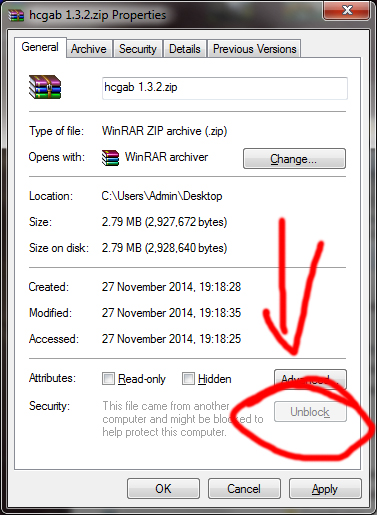
1. Right click the .ZIP file and click the little unblock button in "General" tab.
2. Copy all files like it says.
3. Done
Works 2015
3dwannab · 2015-01-18
Much wow sir. Thank you.
Error when launching
SerkBer · 2014-11-08
Hello! The Tool seems to be awesome and very VERY handy. But i get this error after trying to initialize.
http://fotos.subefotos.com/e489c78d184d8030b89c0ce4a5dedffao.jpg
I've tried in 3ds Max 2015 and 3ds Max 2014. Also i've update my .NET version. The error stills.
Any idea please?? This script could save hours and hours of work in my proyects. Really want it.
Backwards compatibility / Source Code
sels · 2014-10-15
Hi Francisco,
would it be possible to maybe share the source code for your asset browser script?
I would like to be able to change the max file it saves so it is backwards compatible and maybe an option to save it as obj. It would be very kind of you if you could share it so we could try to modify it to our needs a bit.
Thanks in advance.
2013 version?
othoap · 2014-09-30
is there a 2013 version available?
thanks for all your hard work!
HELP error: doNet
gelker.ribeiro · 2014-08-13
HCG installed on my machine that was formatted installing windows from scratch and this message appears, I've put the max with administrator privilege ... Has anyone experienced this? And I also already installed NetFramework.
Yes I have
othoap · 2014-09-30
when I tried to get 1.3.2 to work with 2013
Yes I have
othoap · 2014-09-30
when I tried to get 1.3.2 to work with 2013
SerkBer · 2014-11-08
Same error here, bro. Please if you find a solution, tell me. I will do the same thing.
Remove delete files
KiboOst · 2014-07-21
Hi,
Could you add an option (cuztomize/prefs ?) to disable the possibility to delete files just hitting "del" button on browser ? Turning all file deletion off ? Would rocks
3dsmax 2015 support
OccultArt · 2014-07-03
I just found this script, and it works really good in 3DSMax 2014. Could you please make it work in 3DSMax 2015?
Awesome script need 2015 version
Chris Brown · 2014-06-09
Awesome script, just need 2015 version please!
Tried current version on 2015 and get a runtime error sayoing cannot resolve type maxCustonControlsWin32HandleWrapper
Any help would be really appreciated.
Thanks
Chris
any chance to get in max 2015 ???
 ironfonzy · 2014-05-14
Harggggggggggg these is the tool we need for max 2015....Francisco we can make a group donation to develop that :)
Nothing that similar exists....keep the good work...!! Hope we see that for max 2015....!!!
What am i missing??
4strings4ever · 2014-04-03
Hey ...
again great tool, i had some problems getting some options to work, like i don't have access to the Merge Perpenadicular option as seen around the 1min mark in the Assets Pro clip ... then i kind of figured out that i was not installing version 1.3.1 but the 1.2.4 one as stated in the About of the Help menu ...
so, could someone point me to the latest version please
many thanks
Great Tool!!
4strings4ever · 2014-04-01
I just have to say it .. think is a great tool!!
thanks you for that ..
i was just wondering how, in the Asset Pro demo clip (around the 55sec mark), you get the chairs to face the table when you copy them ... i've been trying to replicate that and had no luck as of yet.
so please, what's the trick??
thanks
Francisco Hermida · 2014-07-07
@4strings4ever press shift and shift+ctrl when you click to create a new instance of the model
I LOVE IT
3dwannab · 2014-03-12
Thank you for this wonderful script. You should defiantly set up some sort of donate button on your website. Well worth contributing to. :]
trofei · 2014-03-02
Installation file HCG Asset Browser 1.3.1
trofei · 2014-03-02
Installation file HCG Asset Browser 1.3.1. INSTALLATION FOR MAX 2014
Provide Un-encrypted Script
 JimHoux · 2014-02-18
Francisco Hermida,
Would you mind releasing an unencrypted version of this with regular MS file instead of an MSE file? It would be very nice for other people to be able to maintain this script and develop bug fixes in the event that you become unable to support it.
Please consider.
Thank you,
Jim
I'm planning to do that at
Francisco Hermida · 2014-07-07
@JimHoux I'm planning to do that at some point.
Model Lights
eyepiz · 2014-02-06
Hello,
Thank you for the update!...Finally Works in Max 2014. We have Found that no matter what we do the model lights do not render in the preview, only the scene lights Render I'm I missing something?
I would appreciate any assistance.
We are using V-Ray lights.
The script removes the lights
Francisco Hermida · 2014-07-07
@eyepiz The script removes the lights intentionally, the purpose was to keep the previews consistent across messy library, but now I guess it would make sense to make it optional
legendofpersia · 2013-12-24
hey thank you ive been waiting for this whole year!
but unfortunately i get this error " --Runtime error:dotnet runtime exception: An attempt was made to load an assembly from a network location which would have caused the assembly to be sandboxed in preious versions of .Net Framework. This release of the .Net framework does not enable CAS policy by default, so this load may be dangerous. if this load is not intended to sandbox the assembly, please enable the loadfromremoatesources swtich. see http://go.micsrosoft.com/fwlink/?linkId=155569 for more information"
could u see into it? i tried to fix it but no chance
leolozone · 2014-01-15
Hi, you must change 3dsmax.exe.config. You can find it in here;C:\Program Files\Autodesk\3ds Max 2014. Open with notepad and add the command line
<runtime>
<loadFromRemoteSources enabled="true"/>
</runtime>
Finally it looks like;
<?xml version="1.0"?>
<configuration>
<startup useLegacyV2RuntimeActivationPolicy="true">
<supportedRuntime version="v4.0"/>
</startup>
<runtime>
<loadFromRemoteSources enabled="true"/>
</runtime>
<system.diagnostics>
<assert assertuienabled="false"/>
<sources>
Save and close. I hope this could be your solution as well.
a request
 yunusbbayram · 2013-12-22
alt + left click + drag back and forth = Resize
yunusbbayram · 2013-12-22
wonderful thank you
trofei · 2013-12-19
VERY-VERY BIG THANKS!!!
Thank you
 stealthx · 2013-12-17
Now it works great in the Design 2014. I just had to do this http://goo.gl/Iu8bL5
2000000014
trofei · 2013-11-08
WHEN THE HCG FOR 2014?
Max Design 2014
Santos · 2013-10-14
Ola Francisco,
Any chance to make it work on Max Design 2014 version?
This is just what we need to organize our massive library, can't wait to start use it!
Obrigado!
Marcio
Search bar,
sonnyl25 · 2013-10-09
Hi, do you think you could add a search bar??
I have a lot of 3ds max files to search but it could be very helpful to have a search bar that you could just type what you search and drag it to my 3ds max scene.
thank you. ps
sorry for my english haha
Amazing, please update!
vyle · 2013-08-23
Hi, I have now been using this tool for a while, and it has completely changed my way of working under 3DS max. It truly is REMARKABLE. I would also be willing to help financially to have a few bugs ironed out and newer versions to work.
Seriously your script is amazing. Hope to see some updates soon.
David
Also Material assigning
vyle · 2013-08-23
Can I change the default material being assigned to the 3d models? (not in the material folder, the 3d model folder).
2014 please!
vyle · 2013-12-16
I know I am not the first one around here, but I am dying to have a 2014 version. Any chance it would happen? Just starting on a massive project and can't live without HCG.
Thanks in advance!
D
Thank you!
vyle · 2013-12-17
Thank you for the update, it works perfectly in 2014!
HCG Browser 3dsmax 2014
cgtiger · 2013-06-20
Hi Francisco,
Have you had a look at your script yet for 3dsmax 2014, I hope you get it working, its fantastic to use.
It would be a shame if this script was not updated, you have made a near perfect tool, so much better than what Autodsk could have thought of doing, oh yeah i forgot they did give us the assetbrowser utitlity (nasty).
Look forward to the update, good luck dude
wdw89 · 2013-06-19
I figure out how to add new path in 3ds max 2013. There is a file called HCGAB.ini in "C:\Program Files\Autodesk\3ds Max 2013\scripts\HCGAB". We can add new path in this file and save it. Done.
stealthx · 2013-06-18
Has somebody HCG running in max 2014?
Alex Riley · 2013-05-27
All companies have a number of critical assets that have a direct impact on business activity and performance. Assets allow companies to compete and generate profits in an increasingly complex economic environment.
administrator
stealthx · 2013-04-24
Run 3ds max 2014 as administrator does not work too.

Francisco Hermida · 2013-04-22
I will have a look on 3ds max 2014 this week and I will try to fix any related problem with the script.
3ds max 2014
stealthx · 2013-04-15
Hope it will be only small fix for new version. It is great script.
Can't work on 3Dsmax2014
suitlm · 2013-04-06
i can't run this plugin on 3Dsmax2014.please update it, thanks
Fix 3Ds max 2014!!!
trofei · 2013-04-05
PLEASE fix "HCG Browser" for 3Ds max 2014!!!
Macroscript Error Exception
dennispang · 2013-02-19
I have Win 7, Max Design 2013, Update 6, and the current version 1.2.5. Installed it as instructed, but I got this error when I run from either toolbar or from menu:
Maxscript Macroscript Error Exception
--Compile error: No outer structure definition member references permitted here: extraFileOperation.
Any clue? Thanks.
Working perfectly as stated
vyle · 2013-01-24
Thank you so much. This is of huge help.
Actually....
vyle · 2013-01-25
My bad, running into an issue when trying to create render preview when selecting a folder and subfolder., any fix for that or I am doing something wrong (error says type error: Call needs function or class, got: undefined)
in max 2011
trofei · 2013-01-16
Thank you! Please add:
Automatically add preview for Use modifiers http://i45.tinypic.com/124x5cx.jpg
cecofuli · 2013-01-02
Max 2016 64bit + Win7 + UP6 + v1.2.5 = Not work :(
HOW?
bronius · 2012-12-13
Again: how to create new objects library?? I'm adding new path in preferencies dialog, but after confirming and closing it new library not appeares.. When I open preferences dialog again, new path not present there. Same about materials and textures :(
Same Problem
BKE · 2013-03-21
Hi! Great plug-in, here. I am having the exact same problem that bronius is having. When I try to add a path to a new library, it disappears. Is there a solution to this? I would be willing to pay for support. Thanks! Brian
The script requires you to
Francisco Hermida · 2013-04-22
BKE:
The script requires you to run 3ds max as administrator in order for it to save the settings to a cfg file.
MAX 2014 (((
trofei · 2013-04-24
Run 3ds max as Administrator - does not work script
new library
bronius · 2012-12-12
How to create new library?
dori3d · 2012-12-11
Great tool, thanks for sharing.
- I can't find the old "View Image" option for opening textures inside 3dsMax view Image window. Am I missing anything?
Works great on max2013 up5.
After update.
stealthx · 2012-11-19
It work's in 3ds max Design 2013 Update 5 and Update 6.
Thank you!
stealthx · 2012-10-31
It works again.
cecofuli · 2012-10-04
Yes, with the new Update (but also the 3) this nince script not work :(
3ds max 2013 Update 5
stealthx · 2012-10-04
It looks like it doesn't work in 3ds max Design 2013 Update 5 :(. I just started using it and after 3ds max update there is error message when I try to open it.
I am getting the same error as stealthx
Jaked3d · 2012-11-16
I am getting the same message as stealthx.. :(
Jaked3d · 2012-11-20
Works great now thanks
Thank you !
 bobmorane888 · 2012-10-03
Really usefull script ! Thank you very much for sharing it !
render thumbnail error
caogaiyu · 2012-08-24
when i render thumbnail the error writing to file error come out, is there any way to solve it?
Just a little bug...
Gregssc · 2012-06-28
Hi CHico, and thx for your amazing script.
Just a little question, maybe someone here could help me.
In my reference render scene for thumbnail, there is a camera.
It is not used when I render a thumbnail in the browser.
"Use model camera" is checked in the parameters.
Should I rename it in a different way ? Or use a Vraycam ?
Lot of tries, no differences.
Thx for all
Greg
othoap · 2011-12-25
This is not the first script to go MIA.
It'd be great if authors would allow others to pick up were they stop. Scriptspot could make a community user account that a group could contribute to project. It's done all the time with other open source software.
Chico would you be willing to let people continue your great work?
If your looking for something in the mean time try this. Type assetBrowser.open () in the listener and hit enter. Not as nice as HCG-AB but better then nothing. Remember type assetBrowser.open () in the command line, select it then drag and drop that anywhere on your UI will make a button.
Francisco Hermida · 2012-01-19
Sorry for the long time away, I updated the link to a temporary one, I still need to put the new website online.
I would love to make it an open source code, but first there are some third party plugins and code that I can't make public and second is that this script was basically my first programming project, it's difficult to understand, maintain or update.
Even for me I need to probably rewrite the code to understand it again.
I'm totally interested in keep working on that project as a contribution to the community, as soon as I have required stability and free time for it.
For anyone having problems to run the script try these steps:
- run 3dsmax as admin
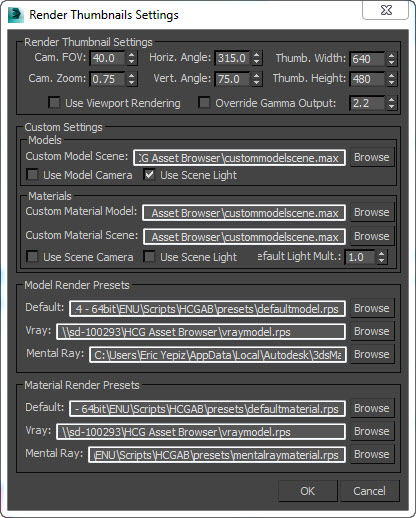
- save updated render presets and .max files on the script folder in order to have the render preview working properly.
alternative
lord_vogel · 2011-12-12
is there an alternative to the HCG Asset Browser or can someone tell me why my Asset Browser 124 dont let me configure the Rendering Prefrences?
Error Message:
"-- Unable to convert: "" to type: BooleanClass"
greeting vogel
Wish!!
 mustafa mamdouh · 2011-10-19
I wish if this script get back to life it's already offered a great help to us
Expecting more ...
Wish!!
mustafa mamdouh · 2011-10-19
I wish if this script get back to life it's already offered a great help to us
Expecting more ...
Where are you?
cecofuli · 2011-10-18
Hello Chico Hermida
nice script, one of the best on scriptspot. But.. where are you :) we need some upgrade and bug-fix ;)
site is down
 jonahhawk · 2011-10-15
it appears this domain is no longer valid. anyone know a mirror for the latest download?
Link below
 tassel · 2011-10-15
As I've said before, see some posts below. Hihi;)
Norton's Warring
othoap · 2011-12-24
I get a Norton's Warring from that link.
Hi Chico
mustafa mamdouh · 2011-10-13
Is there any intends to continue developing this great script?
Thanks
carlos · 2011-10-11
I use this script on max 2010, now i move to max 2012 and almost everything work´s well.
i have problems when i try to render material thumbnails, "Maxscript dotNet event handler Exception"
If someone got the solution it will be great.
tkx
Carlos
 MarkD · 2011-10-04
Any idea where I can get this? It looks like the site is down...
tassel · 2011-10-04
See some posts below ;)
tangelder · 2011-08-05
...
Hello Chico!
 crystal3d · 2011-07-21
it would be great if it did also show "folders+jpgs" as thumbnails like this:

Here is a link...
 Nafetsu · 2011-07-06
Notron Warring
othoap · 2011-12-24
I got a Notron's Warring when I click on this link
Provide documentation please!
RAVEN_NQR · 2011-04-18
Where can I get the documentation for this amazing script?
The link above to Hermida's website is not working. If anyone of you have it, please let me know!
How do I snap object to surface? I have the "use surface" box ticked and I'v tried every combination that I can think of.
Why isn't there any documentation in the help menu!! :)
Please help.
Broken links!
Marioguerson · 2011-03-10
I want to download this!
Does it work on a network with the assets in a server???
Can anybody kindly pass it to me???
THANKS!
god bless!
bug
 SIL · 2011-03-02
When queue render thumbnails - the parameter override gamma output is ignored, but render single thumbnail - is ok.
bug
SIL · 2011-02-28
new Bug: When I have max-file with extension upper case (*.MAX) and JPG-preview, then the Asset Browser PRO not sees JPG-preview. When I rename extension with lower case (*.max) in this case is everything okay.
SIL · 2011-02-03
Yes. Use Model Camera - not work.
toriacht: For temporary solution - reduce the intensity of sunlight in custommodelscene.max
...wishlist:
Can you make deleting model from ItemPanel to Recycle Bin?
toriacht · 2011-01-31
also there is a bug, if render material thumbnails one by one gets you a different result than when you queue all the thumbnails, as render queue ignore the 2.2 gamma
toriacht · 2011-01-31
I have a default scene set up with vray sun and dome light with a vray sky in it.This is our typical exterior lighting setup.
I want to use this lighting to render thumbnails.
My model library is setup without cameras (and I dont want to go into every file and make a vray cam)
So I select use scene lights and ignore the use model camera button in thumbnail preferences.
It renders a thumbnail that uses the scenes vray sun sky setup but it does so with a standard max camera and every thumbnail is blown out white.
I need to be able to say use scenes light and also use scenes camera
1rv · 2011-01-26
Must have for ArchViz!
Thank you so much!
cgstuff · 2010-11-23
Will try this script.
Does this work with pointcache xml files? I have hundreds of mesh with pointcache modifier and need to relink then collect all files.
BUG/Error
cecofuli · 2010-11-21
I've a directory with 512 file (256 thumb and 256 max file) when I try to see the HCG Asset Browser Thumbnail
-- Runtime error: dotNet runtime exception: Out of memory.
Francisco Hermida · 2010-11-15
SIL: "When adding material to VRayPlane I get this message:"
i didn't get this error here, do you have any other detail about this bug?
Thanks for the suggestions, all are being worked :)! (some will be included in a later version since they require a new interface)
cecofuli: "BUG 1 and 2"
Humm thanks for this i will have a look on both.
"thumb.db"
Actually i was researching the best way to work with thumbnails, anyway it will only be included in the new interface that I'm developing.
"Paint multiple models"
This feature is almost developed, couldn't include in the previous update, but I think it will be available in the next one. (Probably i will release a beta first, to test it.)
Thanks for you time to send these suggestions.
Hello Chico Hermida! A new bug is found.
SIL · 2011-01-28
Hello Chico Hermida!
> SIL: "When adding material to VRayPlane I get this message:"
> i didn't get this error here, do you have any other detail about this bug?
Probobly it was my fault with some hotfix for 3dsmax. All ok in version 1.2.4
New BUG:
When checked on option "Compress on Save" in 3dsmax's Preferences:

and try to make Render Thumbnail - I get following message error:
-- Error occurred in renderthumbnail(); filename: C:\Program Files\Autodesk\3ds Max 2010\scripts\HCGAB\hcgabPRO.mse; position: 86083; line: 358
-- Defined in encrypted script
-- called in renderModelThumbnail(); filename: C:\Program Files\Autodesk\3ds Max 2010\scripts\HCGAB\hcgabPRO.mse; position: 43597; line: 188
-- Defined in encrypted script
-- called in fn_fv_CustomContextMenuItemSelect(); filename: C:\Program Files\Autodesk\3ds Max 2010\scripts\HCGAB\hcgabPRO.mse; position: 223547; line: 889
-- Defined in encrypted script
>> MAXScript dotNet event handler Exception: -- Unknown system exception <<
If I try to make Render Thumbnail again...:

Or errors about Garbage Collection...
Finaly - 3dsmax needs to restart (sometimes only from Task Manager) to resume normal operation!
Question:
What does option "Render Filter List"? It is works?
Wishes update :)
Add saving to INI-file greater number preferences of UI, such as "Custom Pivot", "Use Surface", "Size of Treeview and Listview" etc.
cecofuli · 2010-11-14
Hi chico,
it's possible "Paint" multiple file? For example. I've a 3 different flower in HCG Asset Browser PRO. In the HCG Asset Browser PRO I "SHIFT - Click" three different flowers. Perfect, HCG Asset Browser PRO hightlight the three thumb. Now, If I go in the 3ds max viewport, I want to paint with this 3 different object in the same time, with random position and random usage, or, for example 20% for the first flower, 10% second and 70% the last.
Something like Advanced Painter
http://www.scriptspot.com/3ds-max/scripts/advanced-painter
Thanks :)
Little, but important request
cecofuli · 2010-11-14
Hi Chico,
I think it's important the your script can generate something like "Thumbs.db" for Windows. For example, if I've a directory with +100 object, HCG Asset Browser PRO take a lot of time to load each thumb. Every time I open it. So, if I don't add any new max file, the thumbs are always the same. This "speed-up" will be very useful.
thanks
2 Bug!
cecofuli · 2010-11-13
Bug:
1 BUG
(*) I've a file named tree.max and the relative thumb tree.jpg
(*) In the tree.max I've only a proxy object set to "Preview from file (faces)"
(*) When I import a proxy object with HCG Asset Browser PRO, the proxy setup change to "Preview form file". I think this is a bug.
2 BUG
Sometimes I've this error message:
MAXScript dotNet event handles Exception
-- Runtime error: Struct member access requires istances: GroupAndSlose
So, I need to restart 3ds max.
Bugs & wish list
SIL · 2010-11-09
Great script! Thanks that did it for free!
Bugs
When adding material to VRayPlane I get this message:
Suggestions
1. Add feature - search (the system of tags as an extension)
2. Add feature - select what you want to merge - light, cameras, objects, etc
3. Add feature - relink bitmap path for merged models
Francisco Hermida · 2010-10-12
Fajar:
- these two messages are intentional, to alert that these paths aren't valid, about the other error I'm trying to duplicate it here to fix in the next update.
Carlos:
- I will include support only to exclude lights and cameras at the moment, for other objects i believe that is better to clean the model manually.
- About the material it will only save vraydisplacementmod modifier in the next update, others modifiers will be integrated differently in the project.
- Save preset is on the list to be developed, but won't be included in the next update.
othoap:
- Sorry for the long time to reply, since I released the free version, there are a lot of feedback, some new bugs happening also in different environments, so it's taking a little longer to prepare the update, also I started version 2 of this project that probably will be free as well.
At the moment I can only suggest you to run the 3ds max as administrator and if it not works delete the hcgab.ini in your "scripts/HCGAB/" folder.
If you want a more detailed support please contact me using the form in my website, www.hermidacg.com
othoap · 2010-12-01
:
othoap · 2010-12-01
:
carlos · 2010-09-27
Chico is it possible to include on new release:
when u merge one object to your scene group the object.
Select what u want to merge, light, cameras, objects, etc
On materials save all modifiers, not only uvwmap.
Save presets to render thumbnail.
tkx again for ur amazing script.
MichaelB · 2010-09-25
Now as admin it goes. Thanks
runner_cui · 2010-09-22
render thumbnail in max2009 vray1.5sp4, maxscript dotnet event handler excption
--type error:call needs funtion or class,got:undefined
Francisco Hermida · 2010-09-22
MichaelB: Please try to run as administrator to see if it solves the problem, if you continue to have problems please contact me using the contact form in my website http://www.hermidacg.com/contact/
fajar: please can you give more details about the error that you are getting in max 2009, did you try to run as administrator?
fajar · 2010-09-23
this is what I've got every time launching HCG in max 2009...... even after I configure it everything in max 2009 path.....


Error reporting about dotNet error :
run in windows XP sp3 , run as admin, all dotNet installed (1-3.5sp1), max 2009 creativity ext.
fajar · 2010-09-22
well its kind of very buggy in max 2009, I right click it and its error and then max close....
MichaelB · 2010-09-21
I encounter problems on 3DS 2011*64 MAXScript dotNet event handler Exception: --Runtime error:dotNet runtime exception: Parameter is not valid. upon opening the test library.
Any idea?
 Kstudio · 2010-09-21
Maybe you need for latest Dotnet version.
You can find it by this link http://www.microsoft.com/netframework
Francisco Hermida · 2010-09-21
Hi Juang3d,
You can define where your library is located and use existent ones. Just use the menu Customize > Preferences, and click the buttons, models, materials and textures, to add, modify or remove a path.
The default model "Library Example" is located in your 3dsmax\script\hcgab\ folder just to give an idea of what you can setup.
You can use network paths as well to share your library with all the studio, you can have someone organizing models while another one is merging the object to a scene, that is the goal of the script, make libraries organized, fast and easy to access.
juang3d · 2010-09-20
Hi Chico.
I have a question regarding HCG Asset Browser, where are the libraries located? can i configure the path where the script saves the models and the libraries? in fact, can this path be a network path shared with all the studio?
Cheers and thanks for the answer, your script looks good :)
fajar · 2010-09-17
FREE NOW ?!
whats in your mind Chico ? btw thank millions for that.....
hope it goes well with you.
Francisco Hermida · 2010-09-17
Hi Carlos,
Yes now it is free without any limitation, enjoy!!
Just to avoid any confusion, the script will continue to be developed.
carlos · 2010-09-17
hello, its free? so can i use it without limitations?
just to say its a must have script
tkx
mRorstad · 2010-09-07
I found this script very useful, and I am thinking of purchasing it.
One thing I was wondering though, are there limitations in the 15-days trial version which I downloaded and tried out?
I'm asking because I find the option to add multiple models into the browser a bit unreliable, and that concerns me since I need to add a whole lot of models, and don't have the time to add one by one.
EDIT: I found out what the problem was. The filenames can't contain any dots, so changing from chair.white to chair_white solved the problem.
Francisco Hermida · 2010-09-11
Hi mRorstad,
I just released a new version 1.2.3 that has changes to the "Add Models" feature. Now it recognize multiple groups and single objects selected. Please check the website for more information about it, i will update yet the scriptspot page about the changes.
Thank you to point this issue with the dot not working in the name of the model, i will have a look about it to make it work in the next update.
mRorstad · 2010-09-13
Just tried out the new version, it works great!
Thanks!
crystal3d · 2010-07-31
Hello Hermida! i have just tried the "new model" feature of version 1.1, i liked it very much, i have some suggestion, i think it will be perfect.
Suggestions for "NEW MODEL CREATION"
*add a shortcut key to "new model"
*save the model as rar file (it will include all materials assined to that object.) it will change the texture file's names by adding the model name in front.
like
sofa1100_fabric05.jpg
*autonaming:
when it promts for a model name, it will fill the name box by the object's name, it will apear as highlighted and so, just typing the name will clear the auto created name with the new one.
RAR FILE integration suggestion:
the script will show the rar files that have previews just like it does with max files.
when double clicked, it will extract the contents of the rar file to "project folder's " archives folder,
while extracting the textures to that folder, it will append the rar file's name to them.( it should not extract paths)
for example:
corbuiser.rar
it has cory.max and 4 textures (leather 01.jpg, metal_ref.jpeg and so on)
when i double click the "rar" from the script's preview pane, the files inside the rar will be renamed as "corbuiser_corby.max, corbuiser_leather 01.jpg, corbuiser_metal_ref.jpg and so on, and moved to project folder\archives.
please tell me what you think
regards, bora
Francisco Hermida · 2010-08-01
Hi Bora,
*add a shortcut key to "new model":
- Shortcuts will be developed at some point
*save the model as rar file:
- I have it half done, and also something similar to materials.
*autonaming:
I will make sure that i will include it in the next update.
*RAR FILE integration suggestion:
- I like your idea, I want to include something similar in the HCG Asset Browser, but I need to have some time yet to think how this feature can work with some other ideas that i have for this concept. Probably i will need some time using the feature to make it stable enough to include in the final build.
Finally I'm getting in the part of the script that development is fast and easy, so I hope to give frequently news about it.
Regards
crystal3d · 2010-08-01
i forgot to suggest for an adress bar that we can paste folder paths, i like the explorer type navigation instead of predefining model folders.so
i know i suggest alot... but it s worth it , i think
allimran · 2010-07-12
Chico Hermida
Type error : call needs function or class
Francisco Hermida · 2010-07-12
hi allimran:
Can you look in the max listener for any red error messages? (press f11 to open the listener). If you can send the erro msg using my contact here http://www.hermidacg.com/contact/ will be great.
I'm looking about it, and next update 1.2 should have it fixed. Thanks for that.
allimran · 2010-07-12
Chico Hermida Thanks for the Great Script
But when try to paint some thing in max 2010 64x
Got an error reading
"Type error: Call needs function or class,got : udefined"
How to over come this
Francisco Hermida · 2010-07-10
Crystal3D,
Currently I'm working in the update 1.2 fixing some small bugs and polishing the script, this update will come also with a Video showing all the little tricks that you can do with it.
Answering your questions:
+ Yes, is possible to make quality previews with the help of custom models, you just need to change your custom scenes, and tweak render preset, with this you can make any render quality as you want.
* The currently version has old vray presets, if you are using vray it will look strange since old vray presets don't seem to be compatible with the new versions, so i will update these presets in the new update.
+ I will include support to delete unnecessary objects, like cameras and lights, in a checkbox. Mainly it will be a merge property, so if you want to remove it from a model to make a new preview, you just merge the model to the scene, and it will delete camera and lights automatically, than you delete the plane, select the model again, and use the context menu option "Replace content with selection", it will overwrite your model file with the selection without the light camera and ground.
- I can't include this feature since it would break the speed of the script when you render multiple thumbnails, unless that you are thinking about this to solve another issue.
Me:"A confirmation for
crystal3d · 2010-07-12
Me:"A confirmation for overwriting the old preview image, like in acdsee that shows the old preview next to new one."
Hermida: "- I can't include this feature since it would break the speed of the script when you render multiple thumbnails, unless that you are thinking about this to solve another issue."
me:if not,maybe there can be a "check box" for updating only models without previews".
suggestion #1:
as you mentioned the upcoming feature "Replace content with selection", will it also remember that specific model's "camera angle and position, while applying "Replace content with selection"?
if it does, it will eliminate the "wrong-camera-angled-preview" created because of the model's wrong xyz orientation.
suggestion#2: 3ds support
suggestion#3: zip/rar file support
showing the jpg as preview, and dragging the jpg into viewport will actually drag the rar file? there maybe no paint support for rar files i assume.
best regards,
Francisco Hermida · 2010-07-12
Crystal3D:
- Overwrite confirmation for models without previews.
The next update have a way to easily select items that don't have a preview, so you can queue the selection, and also an "only items without thumbnails" checkbox when you try to queue categories and sub categories. Will it solve the problem?
- 3ds support.
I'll have a look about this in the next update, maybe include others file types, need to check it, and also I did a mistake in the textures section that only shows jpg files, but it should show all the other supported files, it will be fixed also.
- Support zip and rar.
Looks like a good way to pack multiple files related to the model, i will study this idea, thanks for that spark.
Best Regards
crystal3d · 2010-07-02
Hello Hermida,
Have some problems with the script but i am still excited about it.
I have used previous versions as demo and removed them sometime ago, now finally, you have made an evaluation copy but it starts as "already expired 15/15"
"call needs function or class" what is this btw?
Francisco Hermida · 2010-07-03
crystal3d
please contact me and i will fix it for you.
http://www.hermidacg.com/contact/
crystal3d · 2010-07-07
just did that, looking forward to your response
crystal3d · 2010-07-09
have not responded me yet...think you are busy.. but i overcome of that problem...
QUESTION:
it is possible to have studio quality previews with the help of custom model scene that uses vray? i created a custom model scene but the results dont look the same... working on it...
FEATURE SUGGESTION:#1
rightclick "modify preview" option.
it lets you remove unneccessary polygons "like ground plane,lights" from model and re render the preview.
FEATURE SUGGESTION:#2
A confirmation for overwriting the old preview image, like in acdsee that shows the old preview next to new one.
GeorgeR · 2010-07-02
With the new version, I can't seem to be able to add network folders. For example, I want to set the Model folder to \\computer\e\folder\. This used to work, but now it doesn't and just points to desktop.
Francisco Hermida · 2010-07-03
duke2:
I tried to replicate this problem here, but it is working without this problem, here i must have network folders, for my personal use, if you can send more details through e-mail would be great in order to fix this problem for you.
I will need your max version, windows version, the exact path that you are trying, if you can test network folders in others assets like materials and textures.
fajar · 2010-06-24
Yea sir the you for enlighten....
gambate kudasai.
carlos · 2010-07-01
nice scrip indeed but here on max2010 x64 with windows7 i cant merge using vrmesh button, cant use shift+click to rotate and nothing works, only the thumb and drag and drop object.
Francisco Hermida · 2010-07-03
Carlos:
Hi, please make sure that you are double clicking the model, and have the correct renderer selected in order to make the proxy (metal ray or vray).
It is working in max 2010 x64 with windows 7, but if you have a specific problem I will need to check.
If you continue to have any problem just e-mail me using this link:
http://www.hermidacg.com/contact/
Francisco Hermida · 2010-06-13
Hi fajar, my conclusion is that will be too difficult, to make it compatible with 3ds max 9, do this kind of script, get a lot of work, the code is huge, and the project has a lot of new things to include like , fix bugs, new features and upgrades old functions. Keep everything compatible at all moments, doing test through all versions of 3ds max might be impossible for a project with only one developer, i hope i can get to a moment that the script is stable and there is no more space to grow, this moment i will polish it and maybe make it compatible.
Since it is a commercial project, i need of course to make sure that it still have lot of possible users using version 9, would be perfect to suit everybody, but we need to make choices, and targeting the right user group may give enough financial return for reinvestment.
fajar · 2010-06-12
also give some compatibility to max 9 will be great too....
simons · 2010-06-09
hi chico,
will there also be a version for max 2008?
thanks and regards
Francisco Hermida · 2010-06-12
To be honest, i will need to test this new version in the 3ds max 2008, i changed so many things that i need to check it again.
mmas · 2010-06-08
Hi! "Currently unavailable for freelance". When you are planning to resume sales? :)
Francisco Hermida · 2010-06-08
Hi haha, i'm just updating files, i will release the new version 1.1 at any moment, a lot of improvements :).
whereareyou · 2010-05-27
Oiii chico, estou usando muito o plugin! gostaria de fazer uma recomendacaum para a proxima versao, eh a posibilidade de filtrar objetos como cameras, luces, vrayplane, etc. para que na hora soh importe o modelo.
valwew!!!
crystal3d · 2010-05-21
the demo is over-limited! i think you should enable preview generation for 3 files so that ppl can see how it behaves on user models and non-library models.
rempage · 2010-04-23
Hi.
In max 2011 x64 I get this error:
"runtime error: group selection: selection empty". It happens during rendering model thumbnail. Also when rendering thumbnail material I get this:
"unknown property: count in undefined"
Any ideas what causes the problem?
 raistlin · 2010-04-16
Hey francesco you finally gone here :) héhé chicco is the king ;) hi chicco :) your plug save my life !
crystal3d · 2010-04-15
Hello ,
i wrote a question on your site , i am excited about your script and if i purchase it , it will be probably continued on future max versions... however i have some uncertainty about the current status of your script.
max 2009 64 bit:
i tired hcg pro 1.0 and free 0.7,
i set path to a folder containing 100+ 3ds and max files however...
"no files" message appear instead of some thumbnails...
correction: yes i can now see , the script does not include sub paths.. i have to set the actual folder , but that means that i will have to set 100's of paths and 100's more for textures,
feature wishes:
*option to add subfolders for texture and models..
*a time limited or somehow limited version to test out the real script as you might be conning ppl with a script that supports 3 meshes.
sorry for my doubt but it is the internet...
thanks again ,
sorry for my basic english ,
crystal3d · 2010-04-15
you can atleast enable thumbnail generation for the 3 models only so that i can check its compability
cecofuli · 2010-04-11
Hi Chico,
I want to ask you if your script read directly a .vrmesh. Because I've a lot of VRayProxy ready, with the corresponding thumb.
Can I create my HCG Asset Browser library with only .vrmesh and the corresponding thumb, rendering by myself?
othoap · 2010-03-18
WOW,
Looks like a dream come true. One question: So I use this to build a scene and send that file to a client. Will they need "HCG Asset Browser PRO" to open and work on the file?
Francisco Hermida · 2010-03-18
no, you won't need HCG Asset Browser PRO installed to open the scene after use it to build one. The script just help you to visualize, organize and apply your models, materials and texture to the scene, removing extra unnecessarily steps for very common daily task for 3d artists.
masey · 2010-01-29
Hi Chico,
This script looks perfect for our requirements. We have a large exhibition library that we currently merge into current stands. I have downloaded your demo and unzipped as suggested, but doesn't seem to install properly. I can create a shortcut in the user interface but when used, I get an error 'Rollout handler exception'??
We are running 3dsMax 2010x64(Vray1.5 SP4) on Windows 7. Any thoughts / guidance welcome. If we can get it working, I would happily purchase for our studio of 5
Regards
Masey
Francisco Hermida · 2010-01-31
Hi Masey,
Can you send me a screenshot of the max listener, when this error occur? Contact me using my website www.hermidacg.com and include your e-mail , I will send another script version to figure out the problem.
Best Regards,
Chico.
whereareyou · 2010-01-14
Oiii chico, muito massa essa nova versao!! ta bem melhor!
abracoo,
Kstudio · 2010-01-11
Nice work, Chico!
Francisco Hermida · 2010-01-11
trick, everytime that I want to make a 2008 compatible version, i get a new problem, i still trying, but there is another paralel project that i'm doing that should resolve this problem.
Francisco Hermida · 2009-11-20
Hi trick, I answered in the e-mail about your questions.
Duke2: I have a new experimental version, I will e-mail you with it if you want to try, and more news are to come, I know that is a long time without a substantial update, most of the changes has been made is in the way the that the script works, to support all the features that i want to include in the future.
trick · 2009-11-20
Chico, you're the best...and hope to see this thing growing.
Will there also be a Max2008 version ? I'm still using it on some ongoing (and going...and going....) projects !! Would be very helpfull. I already put a lot of my libraries in your browser.
GeorgeR · 2009-11-20
Yeah any news?
trick · 2009-11-19
Any news on version 1.0 ?
Will you be able to use this plugin in office AND home ?
Will you be able to transfer it to another computer if neccessary ?
whereareyou · 2009-10-08
Oii chico, uma dica boa eh que de pra ver os thumbnails do arquivo do max no browser quando naum tem imagem, neh?
Francisco Hermida · 2009-10-06
Since I won't release no updates between the last version released and the final version 1.0, I will start to post mini animated gifs showing some of the new features.
Delete by area while painting mesh and reference circle.

Francisco Hermida · 2009-10-05
Duke2:
I'm working on the final release at the moment since the release of the beta version I received a good feedback from the users that used the script, it was important to direct in the write of the final functions and to show the sections that deserve speed improvement, after the final release 1.0 , and the confirmation of a stable version, i will start a new moment of the script, that I will include several functions including the suggested functions from users, so I'm greatfully for your suggestions, and I'm archiving every suggestion in my docs to be implemented in the right moment.
thank you!
whereareyou:
Oi, realmente esse é exatamente um dos pontos que estou melhorando no script, e posso garantir que nos meus testes ja atingi um desempenho muito melhor com o script, lembrando que ele tambem sera muito versatil para aplicacao de vegetacao, coisa que necessita um bom desempenho.
Abraco
whereareyou · 2009-10-04
oiii chico, tudo bem? comprei teu plugin, muito bom! só acho ele um pouco devagar, pode ser?
GeorgeR · 2009-10-02
Could you also add some maxscript access to this? For example, the Library path, the ability to render a thumbnail, etc. I've written a script that exports the currently selected mesh or entire scene (if nothing is selected) to my AB library, with an option for category and name, and it would be good to be able to fire off an "update thumbnail" command with it as well :)
GeorgeR · 2009-10-01
Any news on the xref stuff? :)
GeorgeR · 2009-09-07
Chico could you add the option to merge as xref?
Francisco Hermida · 2009-09-11
It's in my to do list(study a workflow to use xref)! i will think in what can i do.
Thanks!
Francisco Hermida · 2009-08-23
Sorry for the lake of news in the last month, i moved to australia and i had problems to get a internet connection here, now everthing is fine.I continued to develop the script even i was offline, in the next few days i will release a update with new features and bug fixs.
raistlin · 2009-08-13
yes he moved to australia and promise a great come back for us ;)
take your time chico... Making our library is VERY long lol
 Marco Brunetta · 2009-08-13
Last time I heard from Chico, he was moving to another country, updates will probably resume once he's settled in.
GeorgeR · 2009-08-13
The lack of updates to this plugin is VERY disappointing!
raistlin · 2009-07-26
It should be usefull if you can creat a "batch-render" for thumbnails... it's very boring to click and wait one by one... (for exemple it should be possible to do this thing on click on a category and have a choice like "render missings thumbnails" and "render all thumbnails")
and maybe one little thing i'm thinking about, just a little time-render indication on the render, to keep in mind if the object is heavy or not.
an other thing should be usefull (with the vray stuff collector like lele's one) it should be a system which it could transform some vray material into an other like mental ray, brazil and others... (like material converter we can found on this site)
(sorry for this worst english, i do what i can ;) )
thx !
Francisco Hermida · 2009-07-14
hi themaxxer,
i will adjust the script to fallow the gamma and lut> output setting of the max, i think this will resolve the problem and the next version i will include new options to increase the control of the thumbnails.
You can see the price in this link:
http://www.hermidacg.com/?page_id=215
thanks!
themaxxer · 2009-07-14
the script is cool, BUT I work in linear space and all thumbnails are very dark. is it possible to implement a gamma 2.2 button? also the material previews are very dark.
...and how much does the pro version cost? I don't see a price.
thanks, themaxxer
fajar · 2009-07-10
@duke2 : No I dont use that trick !! hehehehehehe.... sorry duke2. I rather using standard camera than vrayCam cause it getting good result as same as vraycam were! and it can apply in general perpective view too!! not like U use vraycam,every time u rotate viewport and render it (no vray cam added), it getting too bright or too dark result! that what I hate from vray cam!! it's not general!! just that!!
GeorgeR · 2009-07-09
I need the physical camera because i have a sun that is 1.0 intensity, which means everything is white if i use the standard camera and all my scenes are setup this way (like a lot of people's) so it's just a way of ensuring the rendered thumbnails show the model like they would in my scene :)
Francisco Hermida · 2009-07-09
duke2: Hi! I will include some new options for the "material preview" and "model preview" that i think will possibility you to do everything.
can you explain better the situation of why you need to use the physical camera? is it for the model preview? i'm asking this just to check if the solution that i have in my mind will resolve all the issues.
GeorgeR · 2009-07-09
Very impressed with the update! Still won't allow me to use the vray physical camera though. Could you add a "use first scene camera" checkbox in render thumbnail settings next to custom model scene? It should still use the other settings like the FOV and angles and auto-positioning of the camera :)
Francisco Hermida · 2009-07-08
Marco: fixed this bug now, download the version 0.721
fajar · 2009-07-08
yaig that's that happy good .....whew ....hahaha...very-very good news to read! thank for hearing!
god bless you!!
thank!
Marco Brunetta · 2009-07-08
Humm I get an error with the latest version:
" >> MAXScript MacroScript Error Exception: -- Runtime error: dotNet runtime exception: Value of '100' is not valid for 'Value'. 'Value' should be between 'Minimum' and 'Maximum'."
MAX 2009 Design.
fajar · 2009-07-07
We will patiently wait!
Francisco Hermida · 2009-07-08
fajar: i already started to do the compatibization of the script to work with 3ds max 9, but i didn't know if will be possible to end this yet... sorry for the bad news.
However i'm working on the free version that will work with the 3ds max 9.
raistlin · 2009-07-06
good news to see that you made a shaders library in ! very usefull ;)
It might be interesting to have a list with shaders renderer (vray/ final render/ mental ray etc)
Because we have a lot... and a lot of shaders and it should be confused to mix all of them.
And also, why not a stuff collector like lele do in his pack to move all of the "picked stuff" from any scene to a common folder for maps, proxy and co (they could also be arranged with singular name like wood, concrete, background, hdri proxy...)
Very usefull i think.
And why not (commercial skill for you) integrate a compatibility with evermotion or dosch and co? we just have to copy and paste their library into a specific folder and that's all... it should be very powerfull and usefull...
good luck for the next and we trust in you !
Francisco Hermida · 2009-07-06
will have a "checkbox" "only show compatible materials" do to what you said but it's only the simple initial solution.
the "stuff collector" could be a future tool for the script i will write this idea here, but now i need to do essential functions yet.
Thank you!
Francisco Hermida · 2009-07-06
preview screenshot from the next update:

Francisco Hermida · 2009-07-05
Track: Thanks!! i want to try your script too, looks very useful, i'm writing a more complex render thumbnail system, will be able to do a lot of new things.
cecofuli: Look for the merge settings, and check the "use merged pivot".
cecofuli · 2009-07-05
Another problem: when I import a model, the script change the pivot position from the orginal model. This is not good 😕!
Kstudio · 2009-07-05
Excellent utility!
When you create a preview for the model would be a good idea to change some settings for renderers and render only a model.
Francisco Hermida · 2009-07-03
raistlin: i'm working in the first update, testing the script in all possible versions of max, doing the compatibility with 3ds max 9, after this update I'll give a list with all compatibles versions. I'll fix some small bugs, and about this shaders library integration, I'm already started to do this and i'm close to end and it's only a part of the whole thing.
I'm studing yet a definitive solution to the license system, when i get something i will post here the details.
Thanks, and keep send suggestion, this is very important to me.
raistlin · 2009-07-03
- does it work fine with max 2010 ?
- The license problem can be temporary solved with an extra license for free before you found a solution to that.
- just a suggestion : could you imagine a shaders library integrate to your solution? It should be usefull to have twice library type in one no? It should work with matlib file and create thumbnail with that and transfer maps into a folder etc.
If this plugins is working 100% with 2010 X64(i'm talking about thumbnails in fact ^^) i'm interest about it.
trick · 2009-07-03
Duke2,
No problem! You don't want to know how irritating it is to NEED 2 locations to work from. And you want to know even less the trouble I have when needing to move licenses to new computers: installing them is one thing, but waiting and arguing about the license transfers is another :(
GeorgeR · 2009-07-03
Sorry, I over-reacted. The whole licensing thing IS annoying but yeah I don't see many alternatives, other than to say, for every 1 license you can register on 2 machines.
Francisco Hermida · 2009-07-02
Duke2:
- yes, when click in the categories button gives a error, i will fix this.
- I'll replace the actual render thumbnail function for another with a lot of new options, you will be able to choice and make your own previews scenes and render settings.
- if i think i can do a checkbox to exclude lights, and another to remove cameras as a simple and fast solution to this problem,but i plan in future updates to include a system to manage extra information about the files that will be able to do things like you said.
-"Ability to exclude files being loaded with certain names", I thought about something that solve this, something like models variations that will be include in one item thumbnail using exactly this type of nomeclature ie: oldchair.max > oldchair_01.max , oldchair_02.max all this files displayed in as one item thumbnail and need to have a way to show the variations too. I'm working on it yet to see if will have a good workflow.
trick · 2009-07-02
Duke2,
- What has price to do with the licensing method ? Should I pay $100 instead of $50 (price per license) for my specific situations ? Buy another 2 network cards just for being able to transfer licenses ?
- I'm willing to pay developers that know how to set up a good licensing method. Didn't you express the exact same concerns about VRayScatter's initial licensing system, in the time the plugin cost $120 ?
- About growing up...Look who's talking! I'm just expressing concerns and I'm glad at least Chico understands these.
- I already use (MooTools) 3D PhotoBrowser which has a Max plugin and you can assign rendered thumbnails to Max-files. I can use it on 2 machines and the license can be de/activated. THE reason I'm interested in this tool is that it is integrated and developed by someone who uses MAX himself. But again: I have my reasons to not accept its licensing system.
GeorgeR · 2009-07-02
Alternatively, allow a script to be used for thumbnails. That way I could use the physical camera, and add anything else like a plane and sunlight, but it doesn't actually affect the scene because its just fired when rendering the thumb.
GeorgeR · 2009-07-02
Well so far this is great. It's so cool to be able to organize all this stuff! A few things:
-Clicking off the categories button gives an error (you shouldn't be able to click it off anyway I guess)
-In preferences, could you add a "use named camera (HCG_Camera)" checkbox? That way, we could have a custom setup camera in the scene called HCG_Camera. This solves cases where we need to use a VRay physical camera, for example.
-Have options for files (right click menu, are saved to a text file with the same name as the scene file), where the most important one for me is "exclude items". You could then have it so that only certain items in the scene are loaded in. So it doesn't bring in your cameras and lights and any other setup items in that scene.
-Ability to exclude files being loaded with certain names, for example with my library items, I have iterations of the file like GreenBush_01.max, but I only want Asset Browser to see the file called GreenBush.max
Francisco Hermida · 2009-07-01
trick: Without this initial license system, i wouldn't release it. So knowing this problem, i will try to think in another solution to your problem.
trick · 2009-07-01
Here we are again: NO office+home/laptop use and when I buy a new computer I somehow have to transfer my integrated network controller !?!?!?!? I'm getting so tired of this...
GeorgeR · 2009-07-02
Oh for God's sake grow up! This won't be some $200 plugin, it will probably be affordable to buy 2 licenses. Think about the developer and put some food on his table.
fajar · 2009-06-30
I already tried it today, I'm 3dsMax 9 user it said
--syntax error need a thing can u fix that for 3dsMax 9 user!